
Android中长度单位和边距
Android表示单位长度的方式通常有三种表示方式。
距离单位☞px:表示屏幕实际的象素。例如,320*480的屏幕在横向有320个象素,在纵向有480个象素
距离单位☞dp:dp = dpi 换算公式:px = dp*(dpi/160) 设置控件大小的通常用dp
距离单位☞sp(与刻度无关的像素): 会随着用户设置的字体的大小而改变 设置控件的文本大小通常用sp
<LinearLayout xmlns:android="http://schemas.android.com/apk/res/android"

    xmlns:tools="http://schemas.android.com/tools"

    android:orientation="vertical"

    android:layout_width="match_parent"

    android:layout_height="match_parent"

    android:paddingBottom="@dimen/activity_vertical_margin"

    android:paddingLeft="@dimen/activity_horizontal_margin"

    android:paddingRight="@dimen/activity_horizontal_margin"

    android:paddingTop="@dimen/activity_vertical_margin"

    tools:context=".MainActivity" >

    <TextView

        android:layout_width="160dp"

        android:layout_height="100dp"

        android:layout_marginTop="300dp"

        android:layout_marginLeft="0dp"

        android:paddingTop="20dp"

        android:textSize="30sp"

        android:background="#FF0000"

        android:text="@string/hello_world" />

</LinearLayout>
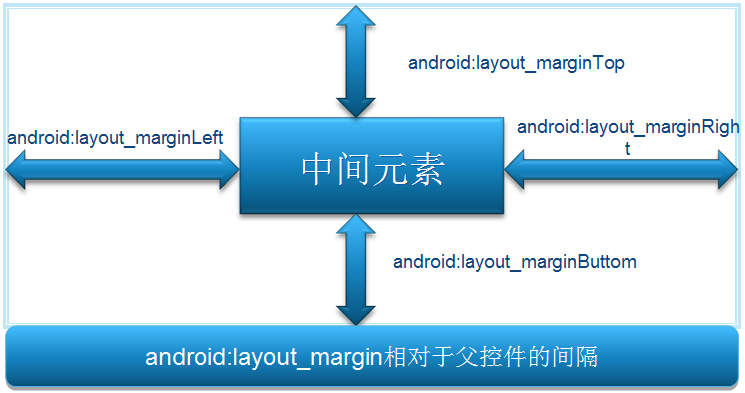
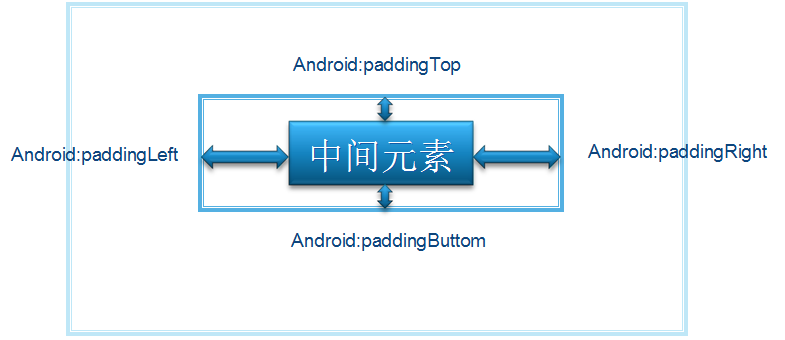
<?xml version="1.0" encoding="utf-8"?>

<LinearLayout xmlns:android="http://schemas.android.com/apk/res/android"

    android:orientation="vertical"

    android:layout_width="fill_parent"

    android:layout_height="fill_parent">

    <Button

        android:id="@+id/button"

        android:layout_width="wrap_content"

        android:layout_marginTop="30dp"

        android:layout_marginLeft="40dp"

        android:layout_marginRight="60dp"

        android:layout_marginBottom="100dp"

        android:layout_height="wrap_content"

        android:text="测试按钮一"></Button>

    <Button

        android:id="@+id/button2"

        android:layout_width="wrap_content"

        android:layout_height="wrap_content"

        android:paddingLeft="20sp"

        android:paddingTop="5sp"

        android:text="测试按钮一"></Button>

    <Button

        android:id="@+id/button3"

        android:layout_width="wrap_content"

        android:layout_gravity="right"

        android:layout_height="wrap_content"

        android:text="测试按钮一"></Button>

</LinearLayout>
Android中长度单位和边距的更多相关文章
- Android 中常见控件的介绍和使用
1 TextView文本框 1.1 TextView类的结构 TextView 是用于显示字符串的组件,对于用户来说就是屏幕中一块用于显示文本的区域.TextView类的层次关系如下: java.la ...
- Android中GridView通过自定义适配器(未优化)实现图文视图排列
Android中GridView组件用来以网格方式排列视图,与矩阵类似,当屏幕上有很多元素(文字.图片或其他元素)需要显示时,可以使用该组件.下面我们通过代码实现如下图例(为了方便截图,将事件处理(土 ...
- Android中View的绘制过程 onMeasure方法简述 附有自定义View例子
Android中View的绘制过程 onMeasure方法简述 附有自定义View例子 Android中View的绘制过程 当Activity获得焦点时,它将被要求绘制自己的布局,Android fr ...
- android中实现view可以滑动的六种方法续篇(二)
承接上一篇,上一篇中讲解了实现滑动的第五种方法,如果你还没读过,可点击下面链接: http://www.cnblogs.com/fuly550871915/p/4985482.html 这篇文章现在来 ...
- Android中的单位及测试相关概念
android中的单位: in 英寸 pt 点距 px 像素 dp(dip) 密度无关的像素单位,自适应device屏幕的比例,通常涉及长宽高时采用 sp 与范围无关的像素单位,通常在设置字体大小时 ...
- 【转】Android中View的绘制过程 onMeasure方法简述 附有自定义View例子
Android中View的绘制过程 当Activity获得焦点时,它将被要求绘制自己的布局,Android framework将会处理绘制过程,Activity只需提供它的布局的根节点. 绘制过程从布 ...
- Android中shape属性详解
一.简单使用 刚开始,就先不讲一堆标签的意义及用法,先简单看看shape标签怎么用. 1.新建shape文件 首先在res/drawable文件夹下,新建一个文件,命名为:shape_radius.x ...
- Android中为图标加上数字--用于未读短信数提醒,待更新应用数提醒等
本文属于原创,转载请著名出处:http://flysnow.iteye.com/blog/906770 写道 在我们开发一些如短消息.应用商店等应用时,会考虑在短消息的图标上加上未读短信的数量,在应用 ...
- android中像素单位dp、px、pt、sp的比较
dp(dip): device independent pixels(设备独立像素). 不同设备有不同的显示效果,这个和设备硬件有关,一般我们为了支持WVGA.HVGA和QVGA 推荐使用这个,不依赖 ...
随机推荐
- python 输出颜色与样式的方法
上次遇到这个问题就想写下来,其实当时我也不怎么会,老师说这个东西不需要理解,只需要死记硬背,写的多了就记住了,所以今天搜集了几篇文章,加上自己的理解,写下了这篇python 输出颜色的样式与方法的文章 ...
- php手撸轻量级开发(二)框架加载
先上图,有图有真相 1. 加载index文件 index文件是整个项目的唯一入口,任何请求进入项目都是走的index,只是带的参数不一样,然后再在index文件里加载其他文件,相当于把其他文件整个复制 ...
- 理解node的模板引擎
1.1.3:分析模板引擎 1.什么是模板引擎 模板引擎是一个将页面模板和要显示的数据结合生成HTML页面的工具 可以这么理解,如果说Express中的路由控制方法是MVC中的控制器的话,那么模板 ...
- .10-浅析webpack源码之graceful-fs模块
在cachedInput.output.watch三大文件系统中,output非常简单,没有必要讲,其余两个模块依赖于input模块,而input主要是引用了graceful-fs的部分API,所以这 ...
- T-SQL :TOP和OFFSET-FETCH筛选 (五)
通过were和having条件可以对数据进行筛选,那么如何通过排序对数据进行筛选呢? 1.TOP筛选 用于限制查询返回行数或者行数的百分比. 例如 我们对订单表筛选最近产生的订单5条 ) orderi ...
- VS2012使用验证控件出现[ASP.NET]WebForms UnobtrusiveValidationMode 需要 'jquery' 的 ScriptResourceMapping。請加入 ScriptResourceMapping 命名的 jquery (區分大小寫)。的解决办法。
方法一:在webconfig中找到 <appSettings><add key="aspnet:UseTaskFriendlySynchronizationContext& ...
- 【Spring】5、利用自定义注解在SpringMVC中实现自定义权限检查
转自:http://www.tuicool.com/articles/6z2uIvU 先描述一下应用场景,基于Spring MVC的WEB程序,需要对每个Action进行权限判断,当前用户有权限则允许 ...
- 【20190129】CSS-定位问题记录
很多情况下我在写div的时候都不会把高度写死,而是用子元素撑开高度的方式,但是如果子元素设置了浮动或者position绝对定位,就相当于把子元素从文档流中拿出来了,这时父元素的高度就不能被子元素撑开了 ...
- 【代码笔记】Web-JavaScript-JavaScript 数据类型
一,效果图. 二,代码. <!DOCTYPE html> <html> <head> <meta charset="utf-8"> ...
- 消除2个按钮之间1px细节引起的冲突
1.代码 <!doctype html> <html lang="en"> <head> <meta charset="UTF- ...