
[原]获取openstack-pike安装包
linux version: CentOS 7.5.1804
#进入仓库配置目录

cd /etc/yum.repo.d/

#批量重命名所有文件

for files in `ls *`; do mv ${files} ${files}.bak; done


#更新仓库文件指引
wget -O /etc/yum.repos.d/CentOS-Base.repo http://mirrors.aliyun.com/repo/Centos-7.repo


#创建新的仓库文件

vim cloud.repo

[cloud]

name=CentOS-7.5. - cloud - mirrors.aliyun.com

failovermethod=priority

baseurl=http://mirrors.aliyun.com/centos/7.5.1804/cloud/$basearch/openstack-pike/

http://mirrors.aliyuncs.com/centos/7.5.1804/cloud/$basearch/openstack-pike/

http://mirrors.cloud.aliyuncs.com/centos/7.5.1804/cloud/$basearch/openstack-pike/

gpgcheck=

gpgkey=http://mirrors.aliyun.com/centos/RPM-GPG-KEY-CentOS-7

------内容说明--------
[标题]
name=名字
failovermethode 有两个选项roundrobin和priority,意思分别是有多个url可供选择时,yum选择的次序,roundrobin是随机选择,
          如果连接失 败则使用下一个,依次循环,priority则根据url的次序从第一个开始。如果不指明,默认是roundrobin。
baseurl=所有rpm包所在的路径可以是网站也可以是本地目录分三种格式ftp:// http:// file://
enabled=0/1这个源是否启用 0不启用1启用
gpgcheck=0/1这个包是否做key校验
gpgkey=file:///etc/pki/rpm-gpg/这个目录下的key文件(如果gpgcheck=0就不需要这一项)
------我是内容说明底线---------

#清空仓库缓存
yum clean all
#强制删除缓存文件索引
rm -rf /var/cache/yum/*
#重新创建新的缓存索引文件
yum makecache

#创建后检查如下图

下载所有rpm包及其相关包:
yumdownloader * --destdir=/tmp/rpms/
下载完成后检查是否下载完成。
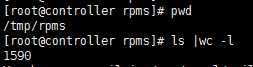
如果不想下载,在有网的情况下可以使用yum在线安装,如果不想在线安装,需要离线安装,可以将下载下来的rpm包打包成为本地源进行使用。
------------------下面是制作离线yum源-------------------
方式一、将下载下的多个rpm包放置在一个临时目录 如/tmp/rpms
[root@controller yum.repos.d]# cat cloud.repo

[cloud]

name=cloud

baseurl=file:///tmp/rpms/

enabled=

gpgcheck=

gpgkey=http://mirrors.aliyun.com/centos/RPM-GPG-KEY-CentOS-7

[root@controller yum.repos.d]# ls

CentOS-Base.repo.bak cloud.repo cloud.repo.bak
#清空仓库缓存
yum clean all
#强制删除缓存文件索引
rm -rf /var/cache/yum/*
#重新创建新的缓存索引文件
yum makecache
上面这个命令可能会出现如下问题:
[root@controller yum.repos.d]# yum makecache

Loaded plugins: fastestmirror, langpacks

Determining fastest mirrors

file:///tmp/rpms/repodata/repomd.xml: [Errno 14] curl#37 - "Couldn't open file /tmp/rpms/repodata/repomd.xml"

Trying other mirror.

 One of the configured repositories failed (cloud),

 and yum doesn't have enough cached data to continue. At this point the only

 safe thing yum can do is fail. There are a few ways to work "fix" this:

     . Contact the upstream for the repository and get them to fix the problem.

     . Reconfigure the baseurl/etc. for the repository, to point to a working

        upstream. This is most often useful if you are using a newer

        distribution release than is supported by the repository (and the

        packages for the previous distribution release still work).

     . Run the command with the repository temporarily disabled

            yum --disablerepo=cloud ...

     . Disable the repository permanently, so yum won't use it by default. Yum

        will then just ignore the repository until you permanently enable it

        again or use --enablerepo for temporary usage:

            yum-config-manager --disable cloud

        or

            subscription-manager repos --disable=cloud

     . Configure the failing repository to be skipped, if it is unavailable.

        Note that yum will try to contact the repo. when it runs most commands,

        so will have to try and fail each time (and thus. yum will be be much

        slower). If it is a very temporary problem though, this is often a nice

        compromise:

            yum-config-manager --save --setopt=cloud.skip_if_unavailable=true

failure: repodata/repomd.xml from cloud: [Errno ] No more mirrors to try.

file:///tmp/rpms/repodata/repomd.xml: [Errno 14] curl#37 - "Couldn't open file /tmp/rpms/repodata/repomd.xml"
问题原因是这个目录下虽然有很多的rpm 包,但是yum工具不会凭空去使用这些rpm包。所以需要使用一个工具createrepo(如果没有默认安装可以下载对应版本安装)
来创建repo索引。
[root@controller yum.repos.d]# createrepo /tmp/rpms/*

Error: Only one directory allowed per run.

Usage: genpkgmetadata.py [options]

You have new mail in /var/spool/mail/root

[root@controller yum.repos.d]# createrepo /tmp/rpms/

Spawning worker 0 with 1590 pkgs

Workers Finished

Saving Primary metadata

Saving file lists metadata

Saving other metadata

Generating sqlite DBs

Sqlite DBs complete
这样就可以使用yum来使用离线仓库了
再试一下:
yum clean all && yum makecache 就可以使用这个离线仓库了(如下)
[root@controller yum.repos.d]# yum clean all && yum makecache

Loaded plugins: fastestmirror, langpacks

Cleaning repos: cloud

Cleaning up everything

Maybe you want: rm -rf /var/cache/yum, to also free up space taken by orphaned data from disabled or removed repos

Cleaning up list of fastest mirrors

Loaded plugins: fastestmirror, langpacks

Determining fastest mirrors

cloud                                                                     | 2.9 kB  ::

(/): cloud/filelists_db                                                 | 1.8 MB  ::

(/): cloud/other_db                                                     |  kB  ::

(/): cloud/primary_db                                                   |  kB  ::

Metadata Cache Created
[原]获取openstack-pike安装包的更多相关文章
- IBM Domino 9 出现 Domino Designer 您正在试图升级多用户安装。请获取正确的安装包以完成升级。 解决方案
如果网上搜索的其他方法解决不了,那么我的这个方法可以试一下. 出现的场景: 先装好了Notes,后准备装Designer. 在装Designer解压包之后,出现下面的错误,不能安装: 您正在试图升级多 ...
- Appium学习笔记1_获取到APK安装包的Package以及Activity属性值
我们设置DesiredCapabilities属性值得时候需要设置"appPackage"和"appActivity",如何获取到这两个值呢? 这两个值不是随便 ...
- 如何获取AppStore软件安装包的路径
本帖最后由 chinald 于 2015-10-16 13:59 编辑 前言:本文介绍在Mac下如何找到AppStore下载的安装包路径,以及如何提取出来供以后使用,希望对大家有所帮助(前提:想要提取 ...
- openstack中安装包与组件
keystone openstack-keystone:验证服务,openstack 中的所有组件的验证以及用户验证,权限,目录等服务. python-openstackclient:命令行,安装以后 ...
- iTunes获取下载的安装包
打开iTunes, 偏好设置,选择高级,即可找到文件路径
- Mac如何找到从AppStore下载的正版Xcode安装包、以及Xcode清理缓存
前言:本文介绍在Mac下如何找到AppStore下载的安装包路径,以及如何提取出来供以后使用,希望对大家有所帮助(前提:想要提取某个安装包,前提是你正在从AppStore安装这个程序.比如你想提取im ...
- Keil MDK5 安装教程(附安装包百度云)
关注微信公众号"龙行单片机",后台回复"安装包"获取最新安装包百度云链接. 1.MDK5.11a 安装 双击 mdk511a.exe,进行安装.这里我们将其安装 ...
- 获取 windows 商店内的 aapx 安装包 并 安装(旁加载)
这是一篇教程,写在 win10 版<量子破碎>发售近期. 主要原因:windows 商城的应用下载实在难以忍受...... #######2016-4-9更新####### 4-6号通过旁 ...
- HOWTO - Basic MSI安装包在安装运行过程中如何获取完整源路径
有朋友问到如何在一个Windows Installer安装包中获取安装包源路径,就是在安装包运行过程中动态获取*.msi所在完整路径. 这个问题分两类,如果我们的安装包只是一个*.msi安装文件,那么 ...
- Installshield获取安装包版本的系统变量是IFX_PRODUCT_VERSION
原文:Installshield获取安装包版本的系统变量是IFX_PRODUCT_VERSION Installshield获取安装包版本的系统变量为IFX_PRODUCT_VERSION 当笔记记下 ...
随机推荐
- linux命令之free篇
作业二: 1.free命令查看内存 [root@localhost 桌面]# free total used free shared buffers cachedMem: 1003432 899760 ...
- H5C303
H5C303 1.CSS3 一些js功能可以通过css3实现. 坚持渐进增强原则. 另一侧:优雅降级hack 3.选择器 1)属性选择器:根据指定名称的属性来查找元素 E是元素 li[style]{ ...
- Java知识回顾 (10) 线程
再次声明,正如(1)中所描述的,本资料来自于runoob,略有修改. 一条线程指的是进程中一个单一顺序的控制流,一个进程中可以并发多个线程,每条线程并行执行不同的任务. Java 给多线程编程提供了内 ...
- java后台服务器启动脚本
最近由于经常在项目上线或者调试中启动服务,由于要设置环境变量这些,所以为了方便写了个启动脚本,希望能够帮助大家,也算是给自己做个小笔记: example_project_start.sh: # /bi ...
- redis启动出错Creating Server TCP listening socket 127.0.0.1:6379: bind: No error(转)
redis启动出错Creating Server TCP listening socket 127.0.0.1:6379: bind: No error windows下安装Redis第一次启动报 ...
- SqlAlchemy “Too many connections”
File "C:\Users\user\AppData\Local\Programs\Python\Python36\lib\site-packages\pymysql\connection ...
- SpringBoot2.0集成FastDFS
SpringBoot2.0集成FastDFS 前两篇整体上介绍了通过 Nginx 和 FastDFS 的整合来实现文件服务器.但是,在实际开发中对图片或文件的操作都是通过应用程序来完成的,因此,本篇将 ...
- html5学习笔记2——新元素
一:H5的改变 <canvas> 新元素 标签 描述 <canvas> 标签定义图形,比如图表和其他图像.该标签基于 JavaScript 的绘图 API 新多媒体元素 标签 ...
- C#使用HttpWebRequest和HttpWebResponse上传文件示例
C#使用HttpWebRequest和HttpWebResponse上传文件示例 1.HttpHelper类: 复制内容到剪贴板程序代码 using System;using System.Colle ...
- failed to create process怎么解决
python 在cmd时,报错:failed to create process怎么解决 在cmd命令前加 : python -m 命令(如:python -m conda update conda)