
POI插入图片至Excel使用固定的长宽
使用POI在Excel里插入图片,如何使插入的图片使用固定的大小?先介绍原有的两种方式:
一种是指定开始和结尾单元格,然后从头画到尾,相当于平铺
还有一种就是仅指定开始的单元格,图片的大小跟这个单元格的长宽有关,可以放大缩小固定的倍数,相当于左对齐
第一种效果如下:
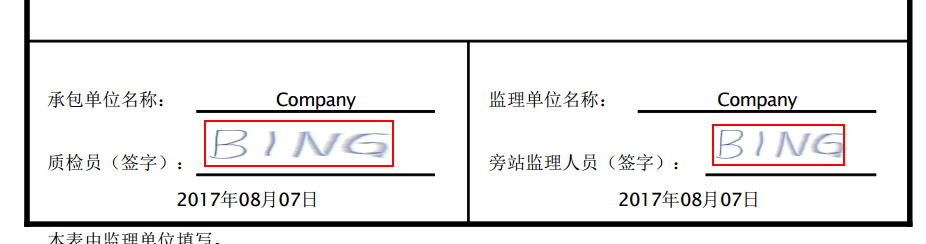
第二种效果如下:

第一种方法的关键代码如下:
 private void pictureToSheet(Sheet finalSheet, Row row, Cell cell, int pictureIdx) {

     Drawing patriarch = finalSheet.createDrawingPatriarch();

     ExcelPositionRange excelPositionRange = ExcelTransferUtils.getMergedRegionPositionRange(finalSheet, row.getRowNum(), cell.getColumnIndex());

     ClientAnchor anchor = patriarch.createAnchor(0, 0, 1023, 255,

             excelPositionRange.getFirstCol(),

             excelPositionRange.getFirstRow(),

             excelPositionRange.getLastCol(),

             excelPositionRange.getLastRow()

     );

     patriarch.createPicture(anchor, pictureIdx);

 }
注:代码中的excelPositionRange,是俺自定义的一个类型。里边只有四个变量和get/set方法,四个变量分别是单元格的开始、结尾单元格的横纵坐标。这个大家可以根据需要来改。
PS:其中1023和255指的是每个单元格被切分的份数,指定的是最后的单元格的最右下角的一个点,其方法的源代码在本文最后的附录里。
第二种方法的关键代码如下:
 private void pictureToSheet(Sheet finalSheet, Row row, Cell cell, int pictureIdx) {

     Drawing patriarch = finalSheet.createDrawingPatriarch();

     ExcelPositionRange excelPositionRange = ExcelTransferUtils.getMergedRegionPositionRange(finalSheet, row.getRowNum(), cell.getColumnIndex());

     CreationHelper helper = finalSheet.getWorkbook().getCreationHelper();

     ClientAnchor anchor = helper.createClientAnchor();

     // 图片插入坐标

     anchor.setCol1(excelPositionRange.getFirstCol());

     anchor.setRow1(excelPositionRange.getFirstRow());

     // 使用固定的长宽比例系数

     double a = 5.9;

     double b = 1;

     // 插入图片

     Picture pict = patriarch.createPicture(anchor, pictureIdx);

     pict.resize(a,b);

 }
进阶方法:
在第二种方法的基础上,可以计算出不同的系数,达到生成图片都是同一个长宽的功能,从而输出固定大小的图片
 private void pictureToSheet(Sheet finalSheet, Row row, Cell cell, int pictureIdx) {

     Drawing patriarch = finalSheet.createDrawingPatriarch();

     ExcelPositionRange excelPositionRange = ExcelTransferUtils.getMergedRegionPositionRange(finalSheet, row.getRowNum(), cell.getColumnIndex());

     CreationHelper helper = finalSheet.getWorkbook().getCreationHelper();

     ClientAnchor anchor = helper.createClientAnchor();

     // 图片插入坐标

     anchor.setCol1(excelPositionRange.getFirstCol());

     anchor.setRow1(excelPositionRange.getFirstRow());

     // 指定我想要的长宽

     double standardWidth = 112;

     double standardHeight = 41;

     // 计算单元格的长宽

     double cellWidth = finalSheet.getColumnWidthInPixels(cell.getColumnIndex());

     double cellHeight = cell.getRow().getHeightInPoints()/72*96;

     // 计算需要的长宽比例的系数

     double a = standardWidth / cellWidth;

     double b = standardHeight / cellHeight;

     // 插入图片

     Picture pict = patriarch.createPicture(anchor, pictureIdx);

     pict.resize(a,b);

 }
PS:这里参考了POI获取单元格长宽的的方法:http://www.cnblogs.com/acm-bingzi/p/poiWidth.html
附录一
一般插入图片的样例代码:
 // 插入 PNG 图片至 Excel

 String fileName = strAppRootPath + "images/" + "bxlogo.png";

 InputStream is = new FileInputStream(fileName);

 byte[] bytes = IOUtils.toByteArray(is);

 int pictureIdx = workbook.addPicture(bytes, Workbook.PICTURE_TYPE_PNG);

 CreationHelper helper = workbook.getCreationHelper();

 Drawing drawing = sheet.createDrawingPatriarch();

 ClientAnchor anchor = helper.createClientAnchor();

 // 图片插入坐标

 anchor.setCol1(0);

 anchor.setRow1(1);

 // 插入图片

 Picture pict = drawing.createPicture(anchor, pictureIdx);

 pict.resize();
附录二
patriarch.createAnchor的源代码跟踪
 /**

  * Creates a new client anchor and sets the top-left and bottom-right

  * coordinates of the anchor.

  *

  * Note: Microsoft Excel seems to sometimes disallow

  * higher y1 than y2 or higher x1 than x2, you might need to

  * reverse them and draw shapes vertically or horizontally flipped!

  *

  * @param dx1  the x coordinate within the first cell.

  * @param dy1  the y coordinate within the first cell.

  * @param dx2  the x coordinate within the second cell.

  * @param dy2  the y coordinate within the second cell.

  * @param col1 the column (0 based) of the first cell.

  * @param row1 the row (0 based) of the first cell.

  * @param col2 the column (0 based) of the second cell.

  * @param row2 the row (0 based) of the second cell.

  */

 public HSSFClientAnchor(int dx1, int dy1, int dx2, int dy2, short col1, int row1, short col2, int row2) {

     super(dx1, dy1, dx2, dy2);

     checkRange(dx1, 0, 1023, "dx1");

     checkRange(dx2, 0, 1023, "dx2");

     checkRange(dy1, 0, 255, "dy1");

     checkRange(dy2, 0, 255, "dy2");

     checkRange(col1, 0, MAX_COL, "col1");

     checkRange(col2, 0, MAX_COL, "col2");

     checkRange(row1, 0, MAX_ROW, "row1");

     checkRange(row2, 0, MAX_ROW, "row2");

     setCol1((short) Math.min(col1, col2));

     setCol2((short) Math.max(col1, col2));

     setRow1(Math.min(row1, row2));

     setRow2(Math.max(row1, row2));

     if (col1 > col2){

         _isHorizontallyFlipped = true;

     }

     if (row1 > row2){

         _isVerticallyFlipped = true;

     }

 }
原创文章,欢迎转载,转载请注明出处!
POI插入图片至Excel使用固定的长宽的更多相关文章
- Python多线程Threading爬取图片,保存本地,openpyxl批量插入图片到Excel表中
之前用过openpyxl库保存数据到Excel文件写入不了,换用xlsxwriter 批量插入图片到Excel表中 1 import os 2 import requests 3 import re ...
- poi将图片导入excel(Java代码)
package com.fh.util;import java.awt.image.BufferedImage; import java.io.ByteArrayOutputStream; imp ...
- EPPlus批量插入图片到Excel
#region 测试EPPlus插入图片 public static void Createsheel2() { WebClien ...
- Poi 写入图片进入excel
public static void cacheWritePicture(BufferedImage bufferImg, Sheet sheet, Workbook wb, int width, i ...
- NPOI插入图片到excel指定单元格
先看效果图 下载NPOI组件(2.0以上支持.xlsx和.xls的excel,2.0以下只支持.xls) NPOI下载官网http://npoi.codeplex.com 下载解压,里面有个dotne ...
- python 向excel 插入图片
这是工作中一个真实的需求. 要做gt excel 表,表中要插入图片. 1.要把图片resize 基本相同的大小. 2.通过一下脚本插入图片到excel #!/usr/bin/env python3 ...
- 【VBA】批量插入图片
解决如下问题: 需要批量导入图片到Excel 图片放在一个文件夹中 图片有严格的顺序关系,即按照:共通名_编号的方式命名. 图片格式统一,即均为同一格式. 有两种方式可以插入图片到Excel中,其一为 ...
- Oracle数据库插入图片和读取图片
package com.basicSql.scroll_page; import java.io.File; import java.io.FileInputStream; import java.i ...
- java POI实现向Excel中插入图片
做Web开发免不了要与Excel打交道.今天老大给我一个任务-导出Excel.开始想的还是蛮简单的,无非就是查找,构建Excel,response下载即可.但是有一点不同,就是要加入图片, ...
随机推荐
- ASP.NET Core中如果Response.HasStarted已经为true,就不能更改Response.Cookies和Response.Headers等属性的值了
最近我在ASP.NET Core中做了一个中间件CustomizedMiddleware,要说该中间件的功能也很简单,其实就是往HttpResponse中添加一个Cookie而已,但是我将添加Cook ...
- electron 开发实时加载
第一个方式 cnpm install electron-reload --save-dev cnpm install electron-prebuilt --save-dev require('ele ...
- [您有新的未分配科技点][BZOJ3545&BZOJ3551]克鲁斯卡尔重构树
这次我们来搞一个很新奇的知识点:克鲁斯卡尔重构树.它也是一种图,是克鲁斯卡尔算法求最小生成树的升级版首先看下面一个问题:BZOJ3545 Peaks. 在Bytemountains有N座山峰,每座山峰 ...
- 【php增删改查实例】第十一节 - 部门管理模块(编辑功能)
9. 编辑部门功能的实现 思路:只允许用户勾选一条数据,点击编辑按钮,会跳出一个和新增数据类似的对话框.然后,用户可以修改部门名称和部门编码.点击保存按钮,提示修改成功. 9.1 前台代码编写 < ...
- Intel x86_64 Architecture Background 2
这里是在学习Intel x86_64体系架构时学习到的一些概念,记录下来以供日后参考.如果有错的地方,欢迎指正! CPU上下文切换(context switch): 这个概念第一次听到对我来说是完全陌 ...
- 老生常谈,函数柯里化(curring)
柯里化这个概念确实晦涩难懂,没有深入思考过的人其实真的很难明白这是一个什么东西.看起来简单.简单到或许只需要一行代码: const curry = fn => (…args) => fn. ...
- 初级Java工程师面试所遇面试题
1.servlet的生命周期 : 一.百度百科 : 1.客户端请求servlet: 2.加载servlet类到内存: 3.实例化并调用init()方法初始化servlet: 4.调用service() ...
- oracle数据库添加新用户
/*分为四步 */ /*第1步:创建临时表空间 */ create temporary tablespace kmyf_temp tempfile 'E:\app\pangxy\product\11. ...
- 【Beta阶段】第十次Scrum Meeting!!!
每日任务内容: 本次会议为第十次Scrum Meeting会议~ 本次会议为团队Beta阶段的最后一次会议!! 队员 今日完成任务 刘乾 #136(完成一半,今晨发布) 团队博客撰写 https:// ...
- Linux内核分析期中总结
目录: “Linux内核分析”实验一报告 “Linux内核分析”实验二报告 “Linux内核分析”实验三报告 Linux实验四报告 “Linux内核分析”第五周报告 "Linux内核分析&q ...