
PowerShell 显示气球提示框 2
https://www.itninja.com/blog/view/reboot-required-toast-notifications-for-windows-machines
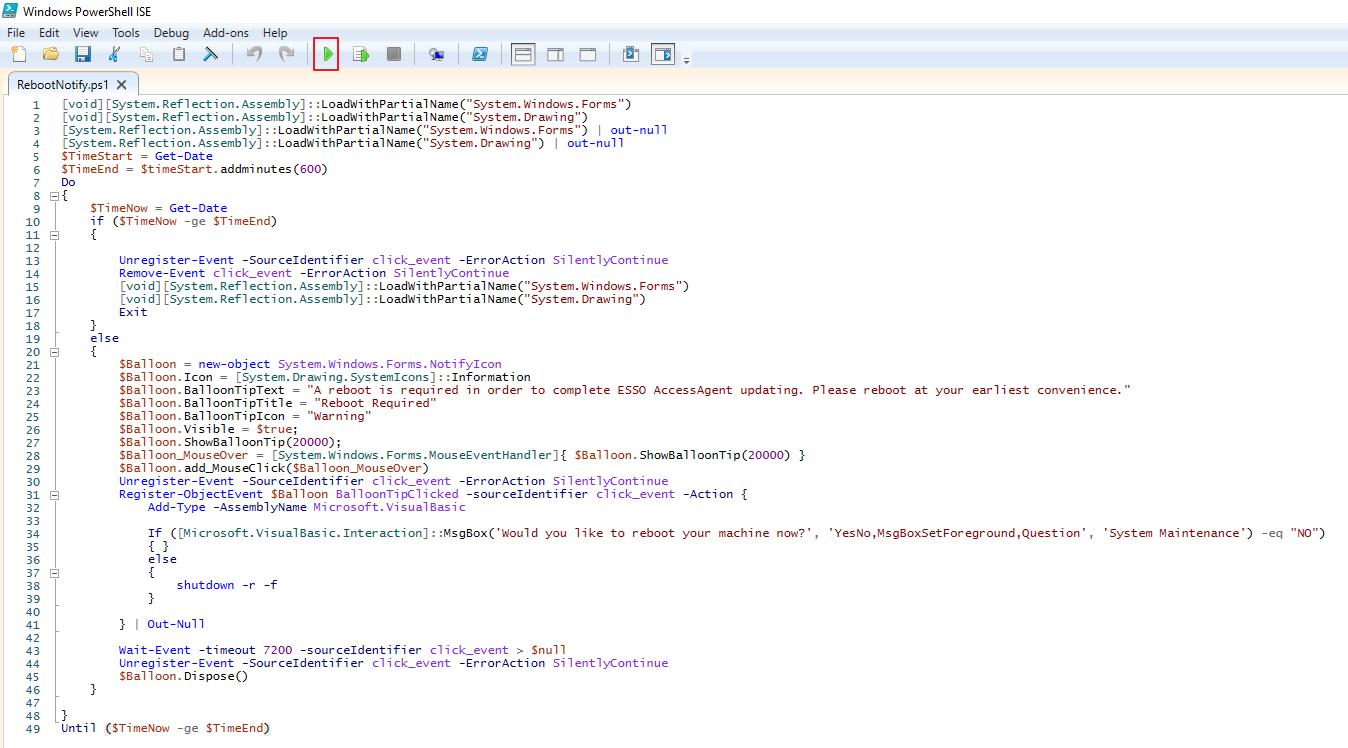
[void][System.Reflection.Assembly]::LoadWithPartialName("System.Windows.Forms")

[void][System.Reflection.Assembly]::LoadWithPartialName("System.Drawing")

[System.Reflection.Assembly]::LoadWithPartialName("System.Windows.Forms") | out-null

[System.Reflection.Assembly]::LoadWithPartialName("System.Drawing") | out-null

$TimeStart = Get-Date

$TimeEnd = $timeStart.addminutes(360)

Do360

{

	$TimeNow = Get-Date

	if ($TimeNow -ge $TimeEnd)

	{

		Unregister-Event -SourceIdentifier click_event -ErrorAction SilentlyContinue

		Remove-Event click_event -ErrorAction SilentlyContinue

		[void][System.Reflection.Assembly]::LoadWithPartialName("System.Windows.Forms")

		[void][System.Reflection.Assembly]::LoadWithPartialName("System.Drawing")

		Exit

	}

	else

	{

		$Balloon = new-object System.Windows.Forms.NotifyIcon

		$Balloon.Icon = [System.Drawing.SystemIcons]::Information

		$Balloon.BalloonTipText = "A reboot is required in order to complete ESSO AccessAgent updating. Please reboot at your earliest convenience."

		$Balloon.BalloonTipTitle = "Reboot Required"

		$Balloon.BalloonTipIcon = "Warning"

		$Balloon.Visible = $true;

		$Balloon.ShowBalloonTip(20000);

		$Balloon_MouseOver = [System.Windows.Forms.MouseEventHandler]{ $Balloon.ShowBalloonTip(20000) }

		$Balloon.add_MouseClick($Balloon_MouseOver)

		Unregister-Event -SourceIdentifier click_event -ErrorAction SilentlyContinue

		Register-ObjectEvent $Balloon BalloonTipClicked -sourceIdentifier click_event -Action {

			Add-Type -AssemblyName Microsoft.VisualBasic

			If ([Microsoft.VisualBasic.Interaction]::MsgBox('Would you like to reboot your machine now?', 'YesNo,MsgBoxSetForeground,Question', 'System Maintenance') -eq "NO")

			{ }

			else

			{

				shutdown -r -f

			}

		} | Out-Null

		Wait-Event -timeout 7200 -sourceIdentifier click_event > $null

		Unregister-Event -SourceIdentifier click_event -ErrorAction SilentlyContinue

		$Balloon.Dispose()

	}

}

Until ($TimeNow -ge $TimeEnd)
it prompts every 2 hours for 6 hours. The highlighted 360 is for the over all length and 7200 is the time (in seconds) between prompts.
执行该脚本的显示效果:单击提示信息时,会显示另外一个提示框,点Yes时,会重启电脑;选择No时,每隔两小时会再次提醒。该提示信息只显示5秒,因为Windows系统设置默认只显示5秒。

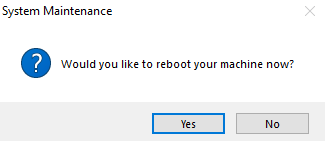
但是关闭PowerShell ISE时,该提示图标就自动退出了。
解决方法:将上面的脚本保存为NotifyReboo.ps1, 然后新建bat脚本test.bat,内容如下:
@ECHO OFF

if "%1"=="hide" goto CmdBegin

start mshta vbscript:createobject("wscript.shell").run("""%~0"" hide",0)(window.close)&&exit

:CmdBegin

SET CurrentPath=%~dp0

powershell.exe -sta -executionpolicy bypass -file  "%CurrentPath%RebootNotify.ps1"

Exit
也就是用test.bat脚本去调用NotifyReboot.ps1,然后在后台运行。
SET CurrentPath=%~dp0 这里是设置当前路径。需要把两个脚本放在同一个目录 下。然后,运行test.bat即可以看到上面的提示效果。
PowerShell 显示气球提示框 2的更多相关文章
- PowerShell 显示气球提示框 1
#加载 Winform 程序集,使用Out-Null抑制输出 [system.Reflection.Assembly]::LoadWithPartialName('System.Windows.For ...
- 微信小程序API交互反馈,wx.showToast显示消息提示框
导读:wx.showToast(OBJECT) 显示消息提示框. OBJECT参数说明: 参数 类型 必填 说明 最低版本 title String 是 提示的内容 icon String 否 图标, ...
- Android学习笔记通过Toast显示消息提示框
显示消息提示框的步骤 这个很简单我就直接上代码了: Button show = (Button)findViewById(R.id.show); show.setOnClickListener(new ...
- 单一按钮显示/隐藏&&提示框效果
<!DOCTYPE html PUBLIC "-//W3C//DTD XHTML 1.0 Transitional//EN" "http://www.w3.org/ ...
- 使提示框居中显示&自定义提示框
ToastActivity.java文件: 1 public class ToastActivity extends AppCompatActivity { 2 private Button mbtn ...
- ASP.NET 使用AJAX让GridView的数据行显示提示框(ToolTip)
介绍ASP.NET AJAX可以使你的web应用程序具有更丰富的功能和更多的用户响应. 本文中,我将演示如何通过ASP.NET AJAX的帮助,给像GridView这样的数据绑定控件的数据行增加pop ...
- echarts —— tooltip 鼠标悬浮显示提示框属性
最近一直在使用echarts,当然也被其中的各种属性整的头大,记录一下其中遇到的问题. tooltip:鼠标悬浮时显示的提示框. 今天想要记录的是[自定义提示框的内容],如下图,鼠标悬浮时提示框内显示 ...
- 微信小程序-提示框
提示框: wx.showToast(OBJECT) 显示消息提示框 OBJECT参数说明: 示例代码: wx.showToast({ title: '成功', icon: 'success', dur ...
- EasyUI-Tooltip(提示框)学习
引子: if($("#BLUETOOTH_a")){ $("#BLUETOOTH_a").tooltip({ position: 'right', conten ...
随机推荐
- mvc 过滤器篇
1,重写类作为特性 2 写一个controller ,让其他controller集成 四种过滤器 1身份验证过滤器 2异常处理过滤器 3行为过滤器 4结果过滤器
- Python中list、字典、字符串的讲解
python 的list讲解 计算机中的数组是从0开始的 list中的下标.角标.索引说的都是一个 数组都是从0开始的. stus=["刘",“王”,“张”] stus2=[] ...
- elf 学习
现在我们使用 readelf 命令来查看 elfDome.out 的文件头 readelf -l elfDemo.out 使用 readelf 来查看程序头: readelf -S elfDemo.o ...
- Wan Android 项目总结
Wan Android 项目总结 项目的由来 这个项目也算是自己学习了一段时间的Android以后的一个总结和学习吧,项目采用了Kotlin语言,Api采用的hongyang大神的WanAndroid ...
- 66. 二叉树的前序遍历.md
描述 给出一棵二叉树,返回其节点值的前序遍历. 您在真实的面试中是否遇到过这个题? 样例 给出一棵二叉树 {1,#,2,3}, 1 \ 2 / 3 返回 [1,2,3]. Binary Tree Pr ...
- 基于socket构造c/s 架构软件
1.socket作用 socket层介于应用层和传输层之间,它起着连接应用层和传输层的功能,同时它能连接应用层和网络层. socket把复杂的tcp/ip协议隐藏在socket接口后面,对用户来说,一 ...
- UIAlertController简单使用
UIAlertView 在iOS2 的时候开始使用,在iOS9 的时候被摒弃 NS_CLASS_DEPRECATED_IOS(2_0, 9_0, "UIAlertView is depr ...
- Java 异常 重写抛出异常限制
1 子类在重写父类抛出异常的方法时,要么不抛出异常,要么抛出与父类方法相同的异常或该异常的子类.如果被重写的父类方法只抛出受检异常,则子类重写的方法可以抛出非受检异常.例如,父类方法抛出了一个受检异常 ...
- redis的主从服务器配置
1. redis的主从配置: (1)把redis的配置文件(reids.conf)拷贝2份 [root@192 redis]# cp redis.conf redis6380.conf [root@1 ...
- 一款好用的轮播插件swiper,适用于移动端和web
swiper的dom布局 <div id="commentsSwiper" class="swiper-container"> <div cl ...