
android开发学习——day8
关于UI学习的总结
EditText的练习
MainActivity.java代码
package test.example.com.ch02_button;

import android.support.v7.app.AppCompatActivity;

import android.os.Bundle;

import android.view.View;

import android.widget.TextView;

public class MainActivity extends AppCompatActivity {

    @Override

    protected void onCreate(Bundle savedInstanceState) {

        super.onCreate(savedInstanceState);

        setContentView(R.layout.activity_main);

    }

    int size=30;//字体大小,初值为30

    public void bigger(View v){

        TextView txv;

        txv= (TextView) findViewById(R.id.txv);//强制类型转换

        txv.setTextSize(++size);

    }

    public void smaller(View v){

        if(size>30){

            TextView txv= (TextView) findViewById(R.id.txv);

            txv.setTextSize(--size);

        }

    }

}
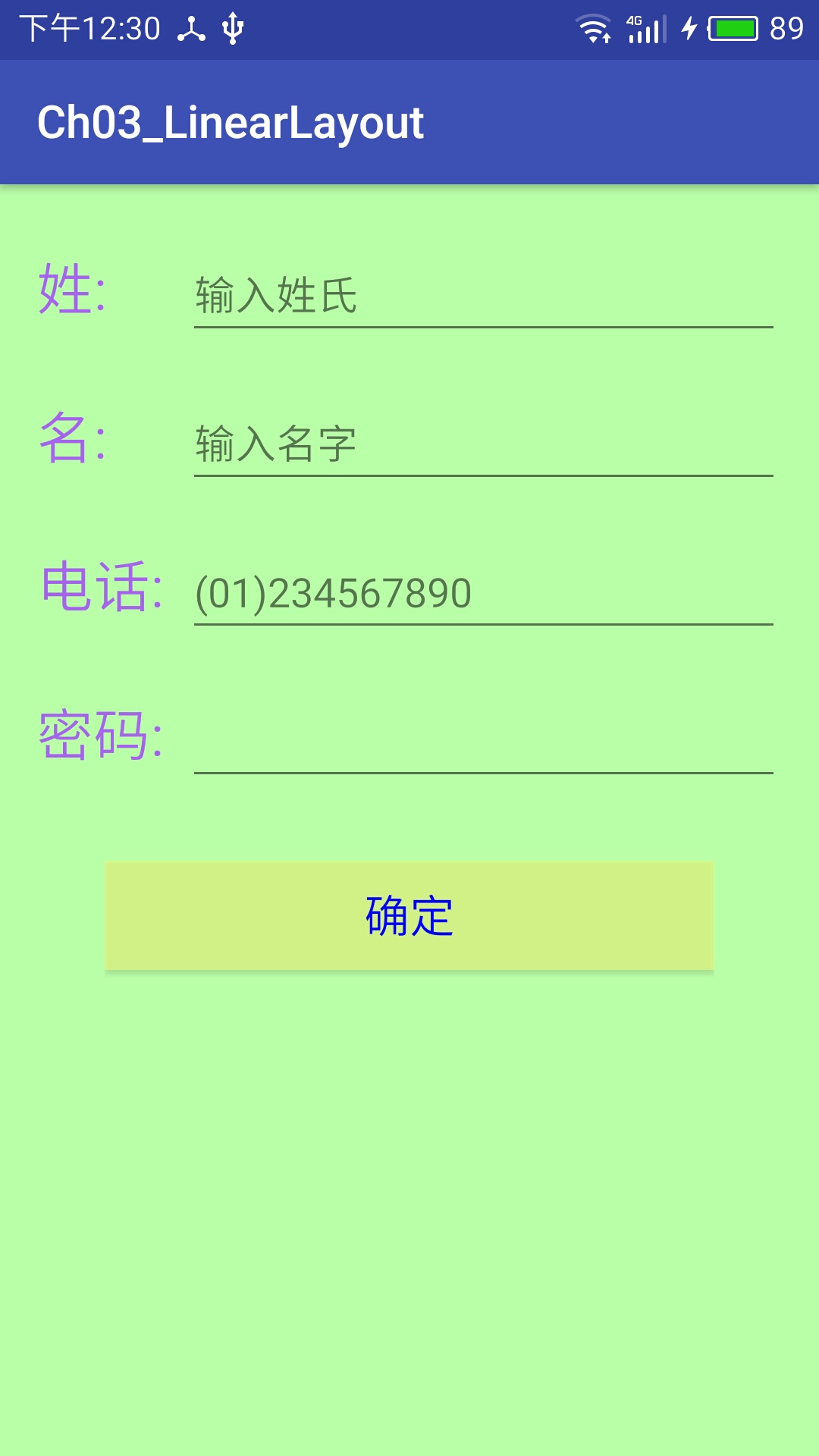
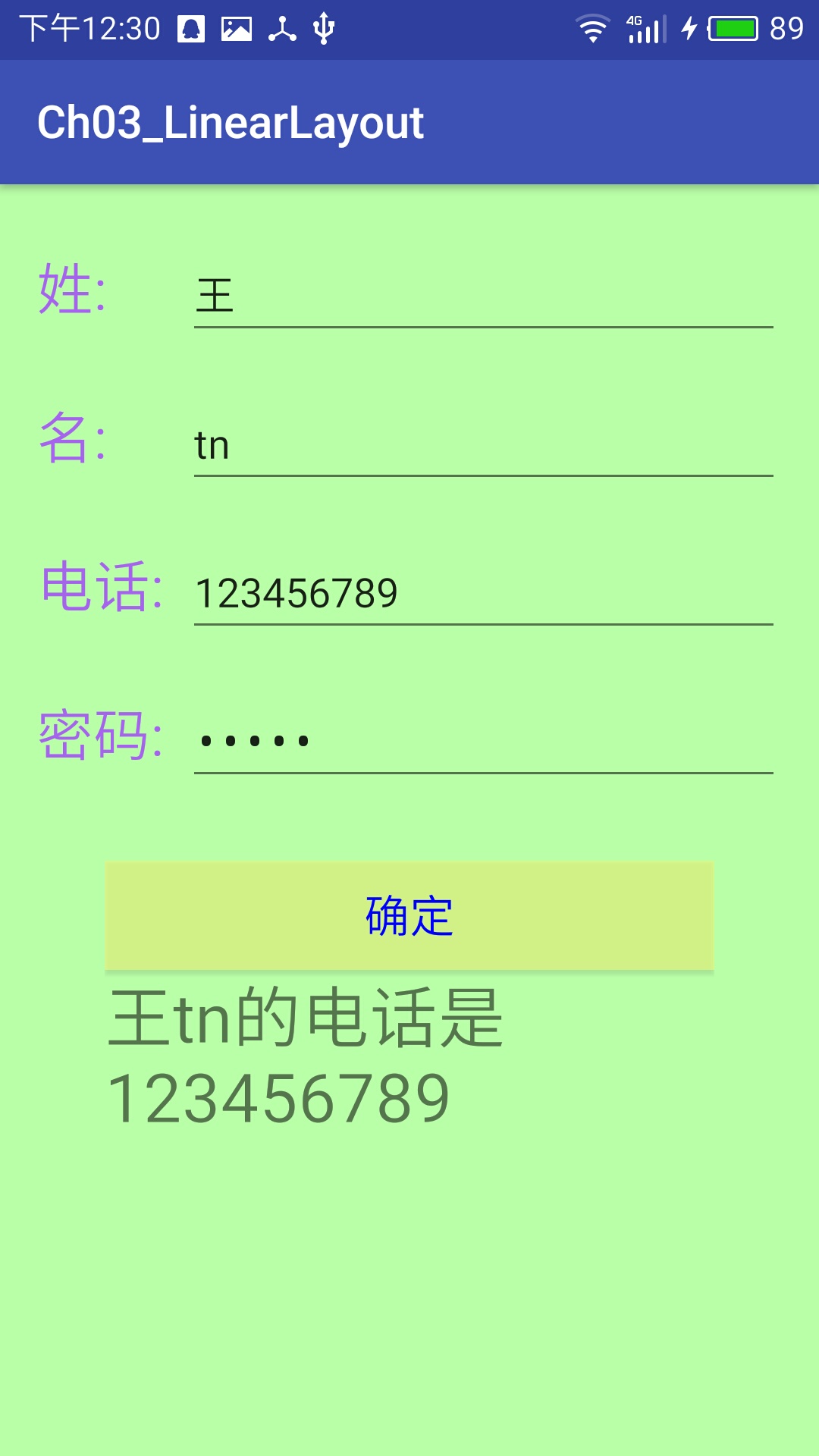
电话簿UI练习
1.利用属性设置布局
2.按比例排布控件
3.改变控件字体颜色以及背景颜色
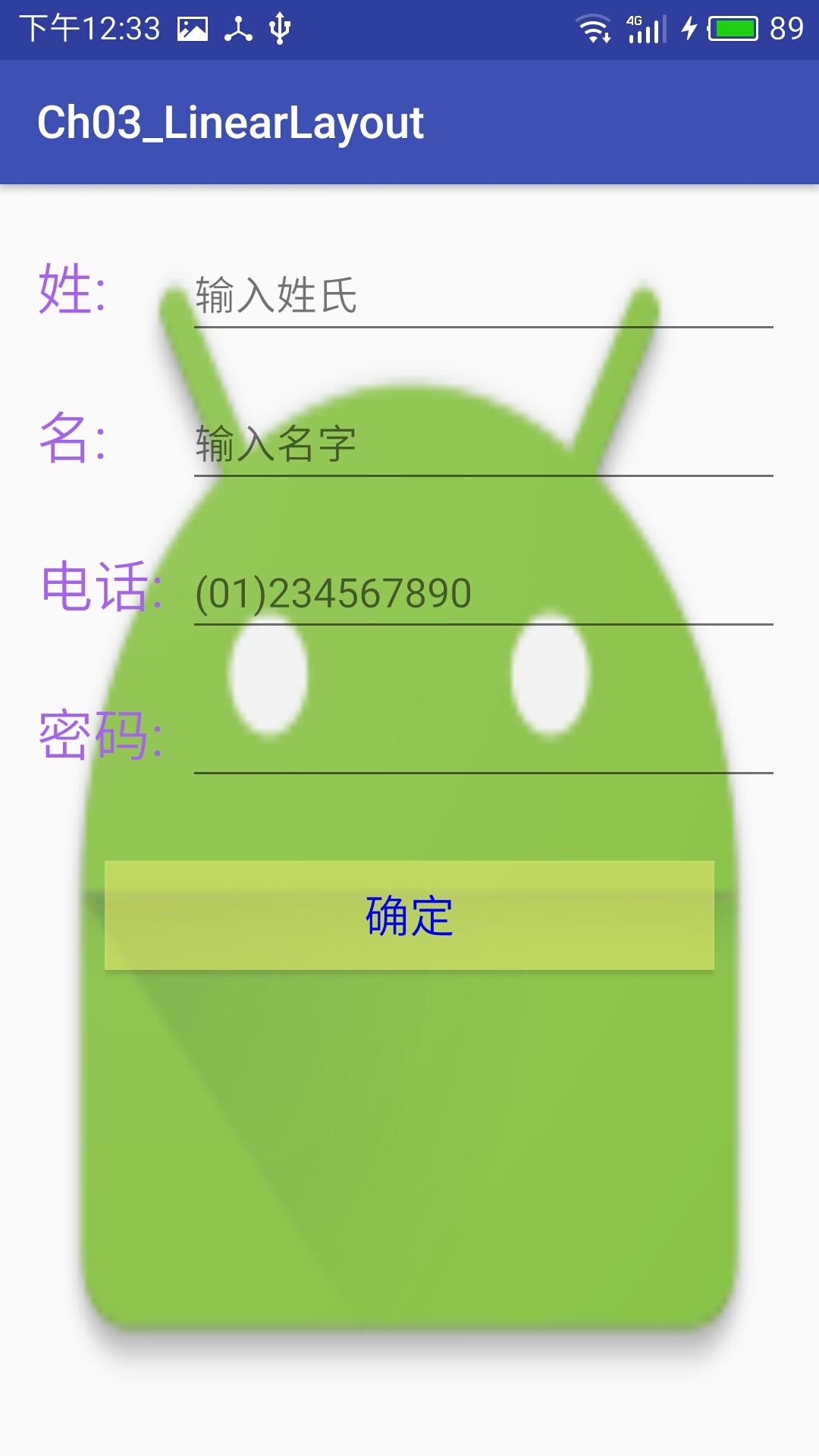
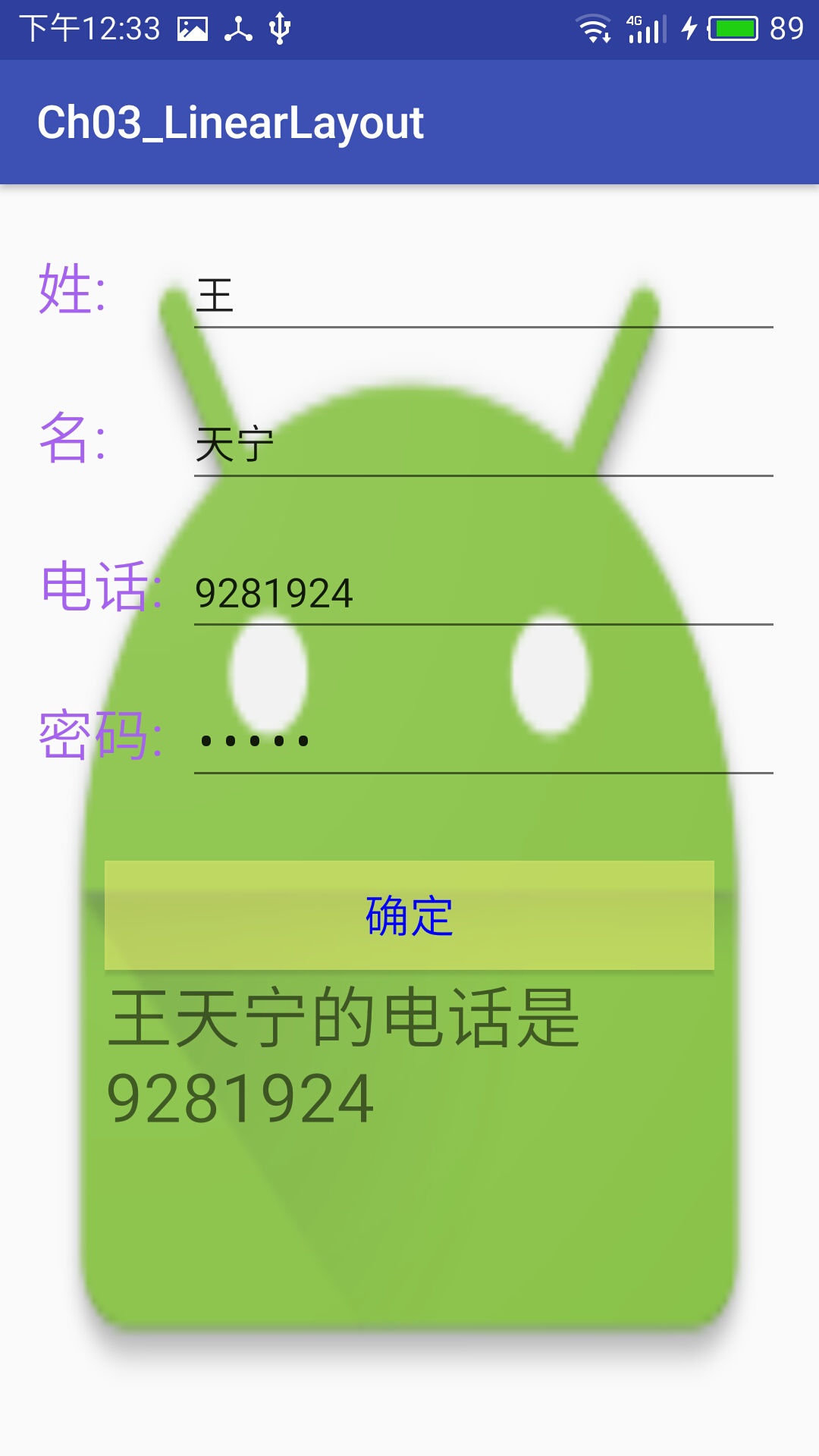
4.插入背景图片
activity_main.xml代码
<?xml version="1.0" encoding="utf-8"?>

<LinearLayout xmlns:android="http://schemas.android.com/apk/res/android"

    xmlns:tools="http://schemas.android.com/tools"

    android:id="@+id/activity_main"

    android:orientation="vertical"

    android:layout_width="match_parent"

    android:layout_height="match_parent"

    android:background="@mipmap/ic_launcher"

    android:paddingBottom="@dimen/activity_vertical_margin"

    android:paddingLeft="@dimen/activity_horizontal_margin"

    android:paddingRight="@dimen/activity_horizontal_margin"

    android:paddingTop="@dimen/activity_vertical_margin"

    tools:context="test.example.com.ch03_linearlayout.MainActivity">

    <LinearLayout

        android:orientation="horizontal"

        android:paddingTop="10dp"

        android:paddingBottom="10dp"

        android:layout_width="match_parent"

        android:layout_height="wrap_content">

        <TextView

            android:layout_width="0dp"

            android:layout_height="wrap_content"

            android:layout_weight="1"

            android:textColor="#ffa763ee"

            android:text="@string/firstname"

            android:textSize="25dp"/>

        <EditText

            android:layout_width="0dp"

            android:layout_height="wrap_content"

            android:inputType="textPersonName"

            android:text=""

            android:ems="10"

            android:id="@+id/editText"

            android:layout_weight="4"

            android:hint="输入姓氏"

            android:ellipsize="end"

            android:singleLine="true" />

    </LinearLayout>

    <LinearLayout

        android:layout_width="match_parent"

        android:layout_height="wrap_content"

        android:paddingTop="10dp"

        android:paddingBottom="10dp"

        android:orientation="horizontal">

        <TextView

            android:layout_width="0dp"

            android:layout_height="wrap_content"

            android:layout_weight="1"

            android:textColor="#ffa763ee"

           android:text="@string/lastname"

            android:textSize="25dp"/>

        <EditText

            android:layout_width="0dp"

            android:layout_height="wrap_content"

            android:inputType="textPersonName"

            android:text=""

            android:ems="10"

            android:id="@+id/editText1"

            android:layout_weight="4"

            android:hint="输入名字"

            android:ellipsize="end"

            android:singleLine="true" />

    </LinearLayout>

    <LinearLayout

        android:layout_width="match_parent"

        android:layout_height="wrap_content"

        android:paddingTop="10dp"

        android:paddingBottom="10dp"

        android:orientation="horizontal">

        <TextView

            android:layout_width="0dp"

            android:layout_height="wrap_content"

            android:layout_weight="1"

            android:textColor="#ffa763ee"

            android:text="@string/tel"

            android:textSize="25dp"/>

        <EditText

            android:layout_width="0dp"

            android:layout_height="wrap_content"

            android:inputType="phone"

            android:text=""

            android:ems="10"

            android:id="@+id/editText2"

            android:layout_weight="4"

            android:ellipsize="end"

            android:singleLine="true"

            android:hint="(01)234567890" />

    </LinearLayout>

    <LinearLayout

        android:layout_width="match_parent"

        android:layout_height="wrap_content"

        android:paddingTop="10dp"

        android:paddingBottom="10dp"

        android:orientation="horizontal">

    <TextView

        android:text="@string/psw"

        android:layout_width="0dp"

        android:layout_height="wrap_content"

        android:layout_weight="1"

        android:textColor="#ffa763ee"

        android:id="@+id/textView"

        android:textSize="25dp"/>

        <EditText

            android:layout_width="0dp"

            android:layout_height="wrap_content"

            android:inputType="textPassword"

            android:ems="10"

            android:id="@+id/editText4"

            android:layout_weight="4"

            android:ellipsize="end"

            android:singleLine="true" />

    </LinearLayout>

<LinearLayout

    android:orientation="vertical"

    android:layout_width="match_parent"

    android:layout_height="wrap_content"

    android:paddingTop="20dp"

    android:paddingBottom="20dp"

    android:paddingRight="30dp"

    android:paddingLeft="30dp">

    <Button

        android:text="确定"

        android:layout_width="match_parent"

        android:layout_height="wrap_content"

        android:textSize="20sp"

        android:textColor="#00F"

        android:background="#80feff79"

        android:id="@+id/button"

        android:onClick="onClick" />

    <TextView

        android:layout_width="match_parent"

        android:layout_height="wrap_content"

        android:textSize="30dp"

        android:id="@+id/textView3" />

</LinearLayout>

</LinearLayout>
MainActivity.java代码
package test.example.com.ch03_linearlayout;

import android.support.v7.app.AppCompatActivity;

import android.os.Bundle;

import android.view.View;

import android.widget.EditText;

import android.widget.TextView;

public class MainActivity extends AppCompatActivity {

    EditText firstname,lastname,tel;

    TextView txv;

    @Override

    protected void onCreate(Bundle savedInstanceState) {

        super.onCreate(savedInstanceState);

        setContentView(R.layout.activity_main);

        firstname=(EditText)findViewById(R.id.editText);

        lastname=(EditText)findViewById(R.id.editText1);

        tel=(EditText)findViewById(R.id.editText2);

        txv=(TextView)findViewById(R.id.textView3);

    }

    public void onClick(View v){

        txv.setText(firstname.getText().toString()+lastname.getText().toString()+"的电话是"+tel.getText());

    }

}
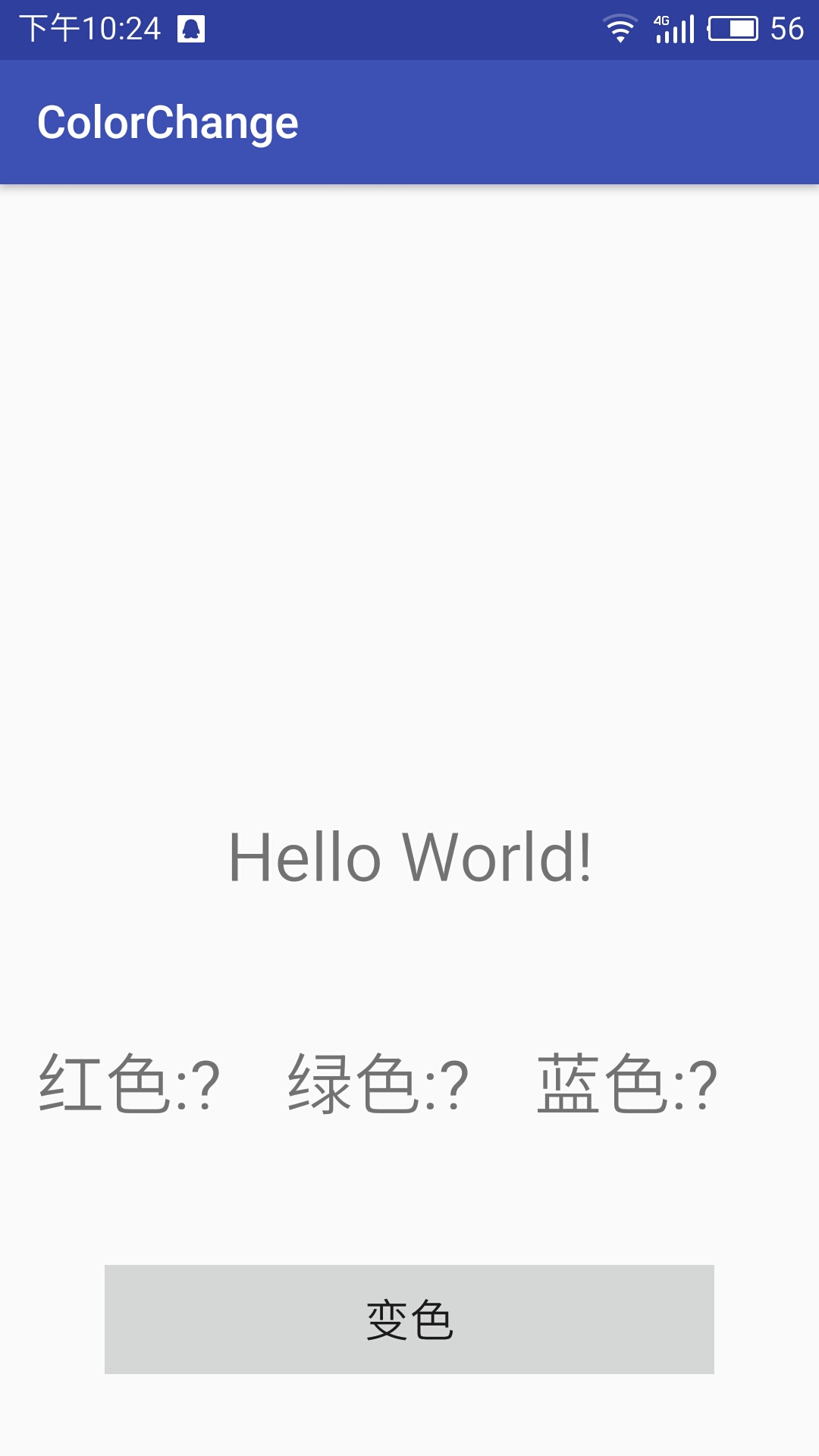
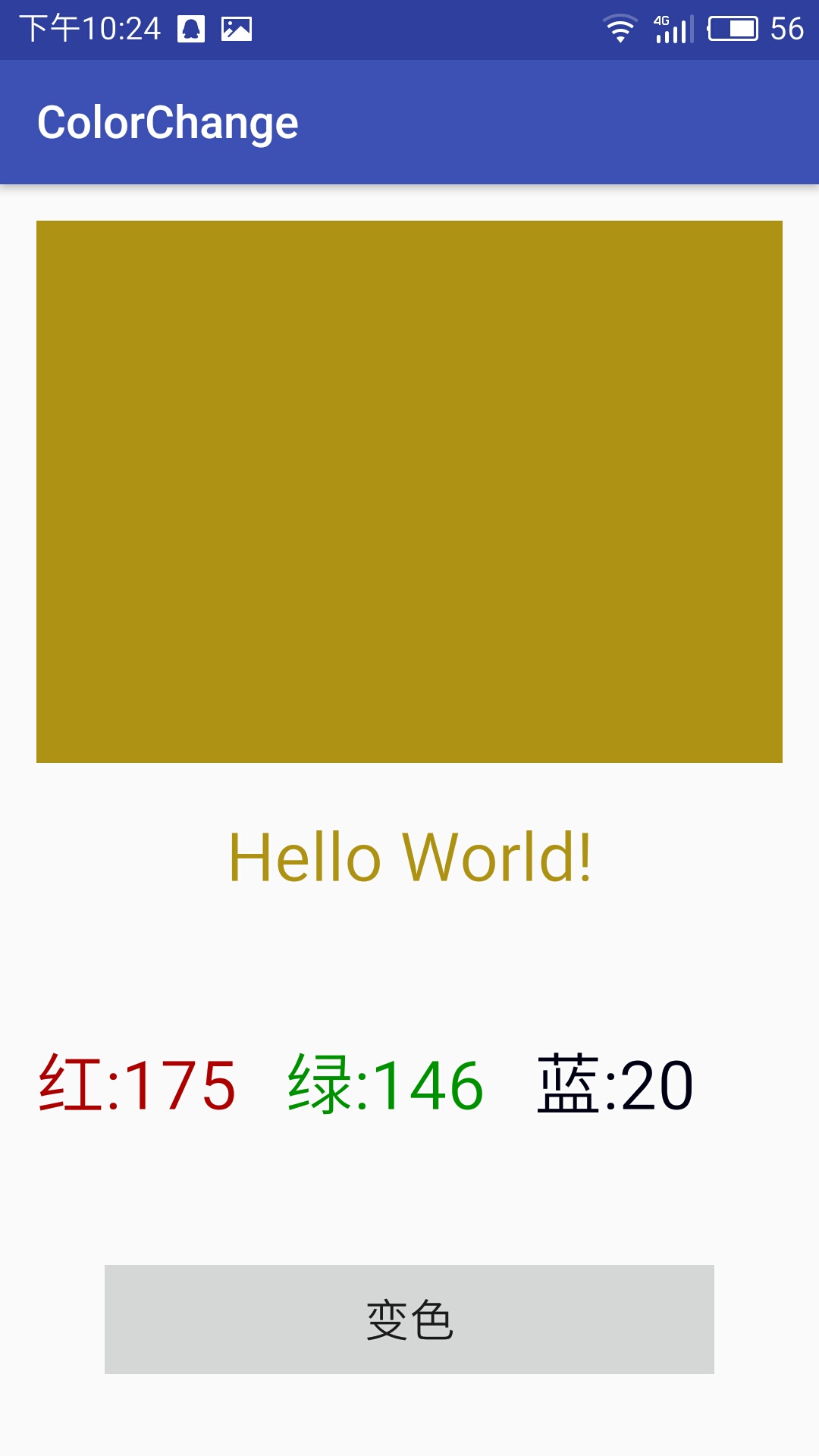
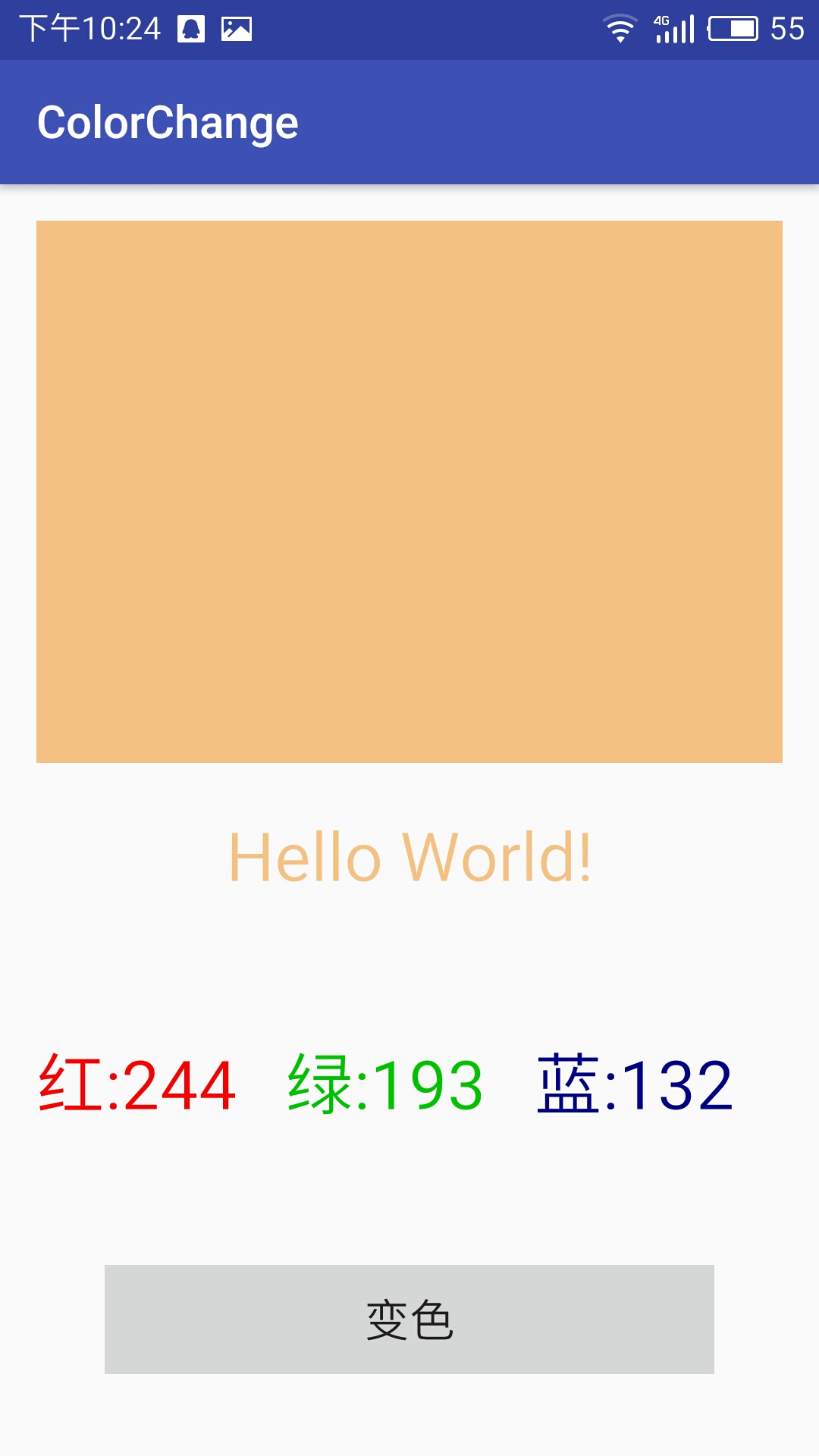
变色程序
activity_main.xml代码
<?xml version="1.0" encoding="utf-8"?>

<LinearLayout xmlns:android="http://schemas.android.com/apk/res/android"

    xmlns:tools="http://schemas.android.com/tools"

    android:id="@+id/activity_main"

    android:layout_width="match_parent"

    android:layout_height="match_parent"

    android:orientation="vertical"

    android:paddingBottom="@dimen/activity_vertical_margin"

    android:paddingLeft="@dimen/activity_horizontal_margin"

    android:paddingRight="@dimen/activity_horizontal_margin"

    android:paddingTop="@dimen/activity_vertical_margin"

    tools:context="test.example.com.chameleon_test.MainActivity">

    <LinearLayout

        android:id="@+id/colorblock"

        android:layout_weight="1"

        android:orientation="horizontal"

        android:layout_width="match_parent"

        android:layout_height="0dp"

        android:paddingTop="20dp"

        android:paddingBottom="20dp">

    </LinearLayout>

    <LinearLayout

        android:id="@+id/hello"

        android:orientation="horizontal"

        android:layout_width="match_parent"

        android:layout_height="wrap_content"

        android:paddingTop="20dp"

        android:paddingBottom="20dp">

<TextView

    android:id="@+id/hhh"

    android:textSize="30dp"

    android:text="Hello World!"

    android:gravity="center"

    android:layout_width="match_parent"

    android:layout_height="wrap_content" />

    </LinearLayout>

    <LinearLayout

        android:orientation="horizontal"

        android:layout_width="match_parent"

        android:layout_height="wrap_content"

        android:paddingTop="40dp"

        android:paddingBottom="20dp">

        <TextView

            android:id="@+id/txvR"

            android:text="@string/red"

            android:textSize="30dp"

            android:layout_width="0dp"

            android:layout_height="wrap_content"

            android:layout_weight="1"/>

        <TextView

            android:id="@+id/txvG"

            android:text="@string/green"

            android:textSize="30dp"

            android:layout_width="0dp"

            android:layout_height="wrap_content"

            android:layout_weight="1"/>

        <TextView

            android:id="@+id/txvB"

            android:text="@string/blue"

            android:textSize="30dp"

            android:layout_width="0dp"

            android:layout_height="wrap_content"

            android:layout_weight="1"/>

    </LinearLayout>

    <LinearLayout

        android:orientation="horizontal"

        android:layout_width="match_parent"

        android:layout_height="wrap_content"

        android:paddingTop="40dp"

        android:paddingBottom="20dp"

        android:paddingRight="30dp"

        android:paddingLeft="30dp">

    <Button

        android:text="@string/change"

        android:textSize="20dp"

        android:layout_width="match_parent"

        android:layout_height="wrap_content"

        android:id="@+id/button"

        android:onClick="changecolor" />

    </LinearLayout>

</LinearLayout>
MainActivity.java代码
package test.example.com.chameleon_test;

import android.graphics.Color;

import android.support.v7.app.AppCompatActivity;

import android.os.Bundle;

import android.view.View;

import android.widget.TextView;

import java.util.Random;

public class MainActivity extends AppCompatActivity {

    TextView red,green,blue,hh;

    View Colorblock;

    @Override

    protected void onCreate(Bundle savedInstanceState) {

        super.onCreate(savedInstanceState);

        setContentView(R.layout.activity_main);

        red=(TextView)findViewById(R.id.txvR);

        green=(TextView)findViewById(R.id.txvG);

        blue=(TextView)findViewById(R.id.txvB);

        hh=(TextView)findViewById(R.id.hhh);

        Colorblock=findViewById(R.id.colorblock);

    }

    public void changecolor(View v){

        Random x=new Random();

        int r=x.nextInt(256);

        red.setText("红:"+r);

        red.setTextColor(Color.rgb(r,0,0));

        int g=x.nextInt(256);

        green.setText("绿:"+g);

        green.setTextColor(Color.rgb(0,g,0));

        int b=x.nextInt(256);

        blue.setText("蓝:"+b);

        blue.setTextColor(Color.rgb(0,0,b));

        Colorblock.setBackgroundColor(Color.rgb(r,g,b));

        hh.setTextColor(Color.rgb(r,g,b));

    }

}
下划线的解决问题
EidtText和textview中内容过长的话自动换行,使用android:ellipsize与android:singleine可以解决,使只有一行。
EditText不支持marquee
用法如下:
在xml中
android:ellipsize = "end" 省略号在结尾
android:ellipsize = "start" 省略号在开头
android:ellipsize = "middle" 省略号在中间
android:ellipsize = "marquee" 跑马灯
android:singleline = "true"
android开发学习——day8的更多相关文章
- Android开发学习之路-RecyclerView滑动删除和拖动排序
Android开发学习之路-RecyclerView使用初探 Android开发学习之路-RecyclerView的Item自定义动画及DefaultItemAnimator源码分析 Android开 ...
- Android开发学习路线图
Android开发学习方法: Android是一个比较庞大的体系,从底层的Linux内核到上层的应用层,各部分的内容跨度也比较大.因此,一个好的学习方法对我们学习Android开发很重要. 在此建议, ...
- android开发学习笔记000
使用书籍:<疯狂android讲义>——李刚著,2011年7月出版 虽然现在已2014,可我挑来跳去,还是以这本书开始我的android之旅吧. “疯狂源自梦想,技术成就辉煌.” 让我这个 ...
- Android开发学习总结(一)——搭建最新版本的Android开发环境
Android开发学习总结(一)——搭建最新版本的Android开发环境(转) 最近由于工作中要负责开发一款Android的App,之前都是做JavaWeb的开发,Android开发虽然有所了解,但是 ...
- Android开发学习之LauncherActivity开发启动的列表
Android开发学习之LauncherActivity开发启动的列表 创建项目:OtherActivity 项目运行结果: 建立主Activity:OtherActivity.java [jav ...
- 最实用的Android开发学习路线分享
Android开发学习路线分享.Android发展主导移动互联发展进程,在热门行业来说,Android开发堪称火爆,但是,虽然Android有着自身种种优势,但对开发者的专业性要求也是极高,这种要求随 ...
- Android开发学习必备的java知识
Android开发学习必备的java知识本讲内容:对象.标识符.关键字.变量.常量.字面值.基本数据类型.整数.浮点数.布尔型.字符型.赋值.注释 Java作为一门语言,必然有他的语法规则.学习编程语 ...
- Android开发学习之路--基于vitamio的视频播放器(二)
终于把该忙的事情都忙得差不多了,接下来又可以开始good good study,day day up了.在Android开发学习之路–基于vitamio的视频播放器(一)中,主要讲了播放器的界面的 ...
- Android开发学习之路--Android Studio cmake编译ffmpeg
最新的android studio2.2引入了cmake可以很好地实现ndk的编写.这里使用最新的方式,对于以前的android下的ndk编译什么的可以参考之前的文章:Android开发学习之路– ...
随机推荐
- java项目测试或者不使用request,如何获取webroot路径
1.使用jdk中的方法,然后根据项目编译后的文件存在的位置,获取到classes目录,然后向上级查询获取String path = EngineTest.class.getResource(" ...
- etcd集群部署与遇到的坑
在k8s集群中使用了etcd作为数据中心,在实际操作中遇到了一些坑.今天记录一下,为了以后更好操作. ETCD参数说明 —data-dir 指定节点的数据存储目录,这些数据包括节点ID,集群ID,集群 ...
- 【PHP面试题】通俗易懂的两个面试必问的排序算法讲解:冒泡排序和快速排序
又到了金三银四找工作的时间,相信很多开发者都在找工作或者准备着找工作了.一般应对面试,我们无可厚非的去刷下面试题.对于PHPer来说,除了要熟悉自己所做的项目,还有懂的基本的算法.下面来分享下PHP面 ...
- Sass入门及知识点整理
Sass 快速入门 | SASS 中文网 文档链接:https://www.sasscss.com/getting-started/ 前言 之前整理了一篇关于Less的,现在就来整理一下关于Sass的 ...
- react 子元素修改父元素值的一个偏方,虽然简单,但是不建议用,
this.state.obj = { name: "小明" } <Zizujian obj={this.state.obj} /> // 子组件这样修改父元素的值 // ...
- 我的java学习之旅--一些基础
(因为我粗略学过C,C++,Python,了解过他们的一些语法,所以为了使得java的入门更为顺畅,便会忽略一些和C语法相类似的地方,着重点明一些java自己的特色之处.也减轻一下自己写文字的负担.) ...
- Mad Libs游戏1
简单的输入输出 输入代码 name1=input('请输入姓名:') name2=input('请输入一个句子:') name3=input('请输入一个地点:') name4=input('请输入一 ...
- Git的SSH-key生成、导入及使用
Git主要使用4种协议传输数据:本地协议,SSH协议,Git协议和HTTP/S协议. SSH协议是最为常用的一种,正式介绍SSH之前,简要说明一下其它协议. 本地协议(file://) 本地协议的优点 ...
- session和cookie相关知识总结
HTTP协议本身是无状态的,这与HTTP协议本来的目的是相符的,客户端只需要简单的向服务器请求下载某些文件,无论是客户端还是服务器都没有必要纪录彼此过去的行为,每一次请求之间都是独立的. 人们很快发现 ...
- centos7升级系统内核
1)升级 方法一: rpm --import https://www.elrepo.org/RPM-GPG-KEY-elrepo.org rpm -Uvh http://www.elrepo.or ...