
[01] JSP的基本认识
1、什么是JSP
public class MyServlet extends HttpServlet {

    @Override

    protected void doGet(HttpServletRequest request, HttpServletResponse response) throws ServletException, IOException {

        response.setContentType("text/html;charset=utf-8");

        PrintWriter out = response.getWriter();

        out.println("<!DOCTYPE HTML PUBLIC \"-//W3C//DTD HTML 4.01 Transitional//EN\">");

        out.println("<HTML>");

        out.println("  <HEAD><TITLE>This is my Servlet</TITLE></HEAD>");

        out.println("  <BODY>");

        out.print("  This is ");

        out.print(this.getClass());

        out.println(", using the GET method");

        out.println("  </BODY>");

        for (int i = 0; i < 10; i++) {

            out.println("<font color='red'>i=" + i + "</font><br>");

        }

        out.println("</HTML>");

        out.flush();

        out.close();

    }

    @Override

    protected void doPost(HttpServletRequest request, HttpServletResponse response) throws ServletException, IOException {

        doGet(request, response);

    }

}public class MyServlet extends HttpServlet {
@Override
protected void doGet(HttpServletRequest request, HttpServletResponse response) throws ServletException, IOException {
response.setContentType("text/html;charset=utf-8");
PrintWriter out = response.getWriter();
out.println("<!DOCTYPE HTML PUBLIC \"-//W3C//DTD HTML 4.01 Transitional//EN\">");
out.println("<HTML>");
out.println(" <HEAD><TITLE>This is my Servlet</TITLE></HEAD>");
out.println(" <BODY>");
out.print(" This is ");
out.print(this.getClass());
out.println(", using the GET method");
out.println(" </BODY>");
for (int i = 0; i < 10; i++) {
out.println("<font color='red'>i=" + i + "</font><br>");
}
out.println("</HTML>");
out.flush();
out.close();
}
@Override
protected void doPost(HttpServletRequest request, HttpServletResponse response) throws ServletException, IOException {
doGet(request, response);
}
}
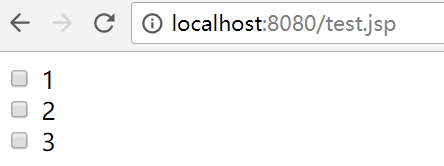
<%@page contentType="text/html;charset=UTF-8" language="java" %>

<html>

<head><title>Simple jsp page</title></head>

<body>

<%

    for (int i = 1; i < 4; i++) {

%>

    <input type="checkbox"> <%=i%> <br>

<%

    }

%>

</body>

</html><%@page contentType="text/html;charset=UTF-8" language="java" %>
<html>
<head><title>Simple jsp page</title></head>
<body>
<%
for (int i = 1; i < 4; i++) {
%>
<input type="checkbox"> <%=i%> <br>
<%
}
%>
</body>
</html>
| <% Java代码 %> | 脚本元素 |
| <%= 输出表达式 %> | 输出表达式 |
2、JSP基本运行过程
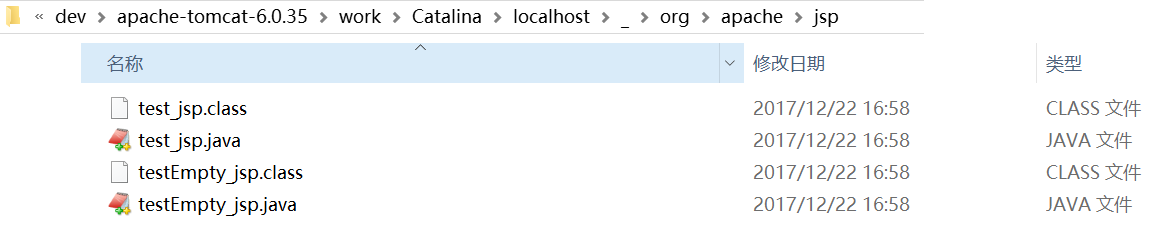
- 翻译:将JSP文件翻译成Java文件(存放在tomcat目录下的 /work/Catalina/localhost/)
- 编译:将Java文件便宜成class文件
- 实例化:由Tomcat创建JSP类的对象
- 提供服务:由Tomcat调用JSP对象的_jspService方法,生成响应,返回给浏览器进行显示
public void _jspService(HttpServletRequest request, HttpServletResponse response)

        throws java.io.IOException, ServletException {

    PageContext pageContext = null;

    HttpSession session = null;

    ServletContext application = null;

    ServletConfig config = null;

    JspWriter out = null;

    Object page = this;

    JspWriter _jspx_out = null;

    PageContext _jspx_page_context = null;

    try {

        response.setContentType("text/html");

        pageContext = _jspxFactory.getPageContext(this, request, response,

                null, true, 8192, true);

        _jspx_page_context = pageContext;

        application = pageContext.getServletContext();

        config = pageContext.getServletConfig();

        session = pageContext.getSession();

        out = pageContext.getOut();

        _jspx_out = out;

    } catch (Throwable t) {

        if (!(t instanceof SkipPageException)) {

            out = _jspx_out;

            if (out != null && out.getBufferSize() != 0)

                try {

                    out.clearBuffer();

                } catch (java.io.IOException e) {

                }

            if (_jspx_page_context != null) _jspx_page_context.handlePageException(t);

        }

    } finally {

        _jspxFactory.releasePageContext(_jspx_page_context);

    }

}public void _jspService(HttpServletRequest request, HttpServletResponse response)
throws java.io.IOException, ServletException {
PageContext pageContext = null;
HttpSession session = null;
ServletContext application = null;
ServletConfig config = null;
JspWriter out = null;
Object page = this;
JspWriter _jspx_out = null;
PageContext _jspx_page_context = null;
try {
response.setContentType("text/html");
pageContext = _jspxFactory.getPageContext(this, request, response,
null, true, 8192, true);
_jspx_page_context = pageContext;
application = pageContext.getServletContext();
config = pageContext.getServletConfig();
session = pageContext.getSession();
out = pageContext.getOut();
_jspx_out = out;
} catch (Throwable t) {
if (!(t instanceof SkipPageException)) {
out = _jspx_out;
if (out != null && out.getBufferSize() != 0)
try {
out.clearBuffer();
} catch (java.io.IOException e) {
}
if (_jspx_page_context != null) _jspx_page_context.handlePageException(t);
}
} finally {
_jspxFactory.releasePageContext(_jspx_page_context);
}
}
<%@page contentType="text/html;charset=UTF-8" language="java" %>

<html>

<head><title>Simple jsp page</title></head>

<body>

<%

    for (int i = 1; i < 4; i++) {

%>

    <input type="checkbox"> <%=i%> <br>

<%

    }

%>

</body>

</html><%@page contentType="text/html;charset=UTF-8" language="java" %>
<html>
<head><title>Simple jsp page</title></head>
<body>
<%
for (int i = 1; i < 4; i++) {
%>
<input type="checkbox"> <%=i%> <br>
<%
}
%>
</body>
</html>
public void _jspService(HttpServletRequest request, HttpServletResponse response)

        throws java.io.IOException, ServletException {

    PageContext pageContext = null;

    HttpSession session = null;

    ServletContext application = null;

    ServletConfig config = null;

    JspWriter out = null;

    Object page = this;

    JspWriter _jspx_out = null;

    PageContext _jspx_page_context = null;

    try {

        response.setContentType("text/html;charset=UTF-8");

        pageContext = _jspxFactory.getPageContext(this, request, response,

                null, true, 8192, true);

        _jspx_page_context = pageContext;

        application = pageContext.getServletContext();

        config = pageContext.getServletConfig();

        session = pageContext.getSession();

        out = pageContext.getOut();

        _jspx_out = out;

        out.write("\r\n");

        out.write("<html>\r\n");

        out.write("<head><title>Simple jsp page</title></head>\r\n");

        out.write("<body>\r\n");

        for (int i = 1; i < 4; i++) {

            out.write("\r\n");

            out.write("    <input type=\"checkbox\"> ");

            out.print(i);

            out.write(" <br>\r\n");

        }

        out.write("\r\n");

        out.write("</body>\r\n");

        out.write("</html>");

    } catch (Throwable t) {

        if (!(t instanceof SkipPageException)) {

            out = _jspx_out;

            if (out != null && out.getBufferSize() != 0)

                try {

                    out.clearBuffer();

                } catch (java.io.IOException e) {

                }

            if (_jspx_page_context != null) _jspx_page_context.handlePageException(t);

        }

    } finally {

        _jspxFactory.releasePageContext(_jspx_page_context);

    }

}public void _jspService(HttpServletRequest request, HttpServletResponse response)
throws java.io.IOException, ServletException {
PageContext pageContext = null;
HttpSession session = null;
ServletContext application = null;
ServletConfig config = null;
JspWriter out = null;
Object page = this;
JspWriter _jspx_out = null;
PageContext _jspx_page_context = null;
try {
response.setContentType("text/html;charset=UTF-8");
pageContext = _jspxFactory.getPageContext(this, request, response,
null, true, 8192, true);
_jspx_page_context = pageContext;
application = pageContext.getServletContext();
config = pageContext.getServletConfig();
session = pageContext.getSession();
out = pageContext.getOut();
_jspx_out = out;
out.write("\r\n");
out.write("<html>\r\n");
out.write("<head><title>Simple jsp page</title></head>\r\n");
out.write("<body>\r\n");
for (int i = 1; i < 4; i++) {
out.write("\r\n");
out.write(" <input type=\"checkbox\"> ");
out.print(i);
out.write(" <br>\r\n");
}
out.write("\r\n");
out.write("</body>\r\n");
out.write("</html>");
} catch (Throwable t) {
if (!(t instanceof SkipPageException)) {
out = _jspx_out;
if (out != null && out.getBufferSize() != 0)
try {
out.clearBuffer();
} catch (java.io.IOException e) {
}
if (_jspx_page_context != null) _jspx_page_context.handlePageException(t);
}
} finally {
_jspxFactory.releasePageContext(_jspx_page_context);
}
}
<%@ page contentType="text/html;charset=UTF-8" language="java" %>

<html>

<head><title>Simple jsp page</title></head>

<body>

<%

    for (int i = 1; i < 4; i++) {

%>

    <input type="checkbox"> <%=i%> <br>

<%

    }

%>

<%!

    double giveMeNumber() {

        return Math.random();

    }

%>

This is a random number between 0.0 and 1.0 : <%=giveMeNumber()%>

</body>

</html><%@ page contentType="text/html;charset=UTF-8" language="java" %>
<html>
<head><title>Simple jsp page</title></head>
<body>
<%
for (int i = 1; i < 4; i++) {
%>
<input type="checkbox"> <%=i%> <br>
<%
}
%>
<%!
double giveMeNumber() {
return Math.random();
}
%>
This is a random number between 0.0 and 1.0 : <%=giveMeNumber()%>
</body>
</html>
public final class test_jsp extends org.apache.jasper.runtime.HttpJspBase

    implements org.apache.jasper.runtime.JspSourceDependent {

    double giveMeNumber() {

        return Math.random();

    }

  private static final JspFactory _jspxFactory = JspFactory.getDefaultFactory();

  private static java.util.List _jspx_dependants;

  private javax.el.ExpressionFactory _el_expressionfactory;

  private org.apache.AnnotationProcessor _jsp_annotationprocessor;

  public Object getDependants() {

    return _jspx_dependants;

  }

  public void _jspInit() {

    _el_expressionfactory = _jspxFactory.getJspApplicationContext(getServletConfig().getServletContext()).getExpressionFactory();

    _jsp_annotationprocessor = (org.apache.AnnotationProcessor) getServletConfig().getServletContext().getAttribute(org.apache.AnnotationProcessor.class.getName());

  }

  public void _jspDestroy() {

  }

  public void _jspService(HttpServletRequest request, HttpServletResponse response)

        throws java.io.IOException, ServletException {

    PageContext pageContext = null;

    HttpSession session = null;

    ServletContext application = null;

    ServletConfig config = null;

    JspWriter out = null;

    Object page = this;

    JspWriter _jspx_out = null;

    PageContext _jspx_page_context = null;

    try {

      response.setContentType("text/html;charset=UTF-8");

      pageContext = _jspxFactory.getPageContext(this, request, response,

      			null, true, 8192, true);

      _jspx_page_context = pageContext;

      application = pageContext.getServletContext();

      config = pageContext.getServletConfig();

      session = pageContext.getSession();

      out = pageContext.getOut();

      _jspx_out = out;

      out.write("\r\n");

      out.write("<html>\r\n");

      out.write("<head><title>Simple jsp page</title></head>\r\n");

      out.write("<body>\r\n");

    for (int i = 1; i < 4; i++) {

      out.write("\r\n");

      out.write("    <input type=\"checkbox\"> ");

      out.print(i);

      out.write(" <br>\r\n");

    }

      out.write("\r\n");

      out.write("\r\n");

      out.write("\r\n");

      out.write("\r\n");

      out.write("This is a random number between 0.0 and 1.0 : ");

      out.print(giveMeNumber());

      out.write("\r\n");

      out.write("</body>\r\n");

      out.write("</html>");

    } catch (Throwable t) {

      if (!(t instanceof SkipPageException)){

        out = _jspx_out;

        if (out != null && out.getBufferSize() != 0)

          try { out.clearBuffer(); } catch (java.io.IOException e) {}

        if (_jspx_page_context != null) _jspx_page_context.handlePageException(t);

      }

    } finally {

      _jspxFactory.releasePageContext(_jspx_page_context);

    }

  }

}public final class test_jsp extends org.apache.jasper.runtime.HttpJspBase
implements org.apache.jasper.runtime.JspSourceDependent {
double giveMeNumber() {
return Math.random();
}
private static final JspFactory _jspxFactory = JspFactory.getDefaultFactory();
private static java.util.List _jspx_dependants;
private javax.el.ExpressionFactory _el_expressionfactory;
private org.apache.AnnotationProcessor _jsp_annotationprocessor;
public Object getDependants() {
return _jspx_dependants;
}
public void _jspInit() {
_el_expressionfactory = _jspxFactory.getJspApplicationContext(getServletConfig().getServletContext()).getExpressionFactory();
_jsp_annotationprocessor = (org.apache.AnnotationProcessor) getServletConfig().getServletContext().getAttribute(org.apache.AnnotationProcessor.class.getName());
}
public void _jspDestroy() {
}
public void _jspService(HttpServletRequest request, HttpServletResponse response)
throws java.io.IOException, ServletException {
PageContext pageContext = null;
HttpSession session = null;
ServletContext application = null;
ServletConfig config = null;
JspWriter out = null;
Object page = this;
JspWriter _jspx_out = null;
PageContext _jspx_page_context = null;
try {
response.setContentType("text/html;charset=UTF-8");
pageContext = _jspxFactory.getPageContext(this, request, response,
null, true, 8192, true);
_jspx_page_context = pageContext;
application = pageContext.getServletContext();
config = pageContext.getServletConfig();
session = pageContext.getSession();
out = pageContext.getOut();
_jspx_out = out;
out.write("\r\n");
out.write("<html>\r\n");
out.write("<head><title>Simple jsp page</title></head>\r\n");
out.write("<body>\r\n");
for (int i = 1; i < 4; i++) {
out.write("\r\n");
out.write(" <input type=\"checkbox\"> ");
out.print(i);
out.write(" <br>\r\n");
}
out.write("\r\n");
out.write("\r\n");
out.write("\r\n");
out.write("\r\n");
out.write("This is a random number between 0.0 and 1.0 : ");
out.print(giveMeNumber());
out.write("\r\n");
out.write("</body>\r\n");
out.write("</html>");
} catch (Throwable t) {
if (!(t instanceof SkipPageException)){
out = _jspx_out;
if (out != null && out.getBufferSize() != 0)
try { out.clearBuffer(); } catch (java.io.IOException e) {}
if (_jspx_page_context != null) _jspx_page_context.handlePageException(t);
}
} finally {
_jspxFactory.releasePageContext(_jspx_page_context);
}
}
}
3、JSP基本认知的总结
- JSP文件本质是一个Java类,这个类遵守Servlet的规范,所以也可以说JSP就是一个Servlet
- JSP文件对应的Java类由容器翻译生成
- JSP文件中的所有内容,会翻译到Java类中,其中不同的JSP表达式翻译到类中的位置不同
- 我们写的大部分JSP代码,无非就是Java类_jspService方法中方法体的一部分(<%! Java代码 %>形式实际上用得很少)
| 语法 | 说明 | 备注 |
| <% Java代码 %> | 脚本元素 | 翻译在 _jspService() 中 |
| <%= 输出表达式 %> | 输出表达式 |
翻译在 _jspService() 中 |
| <%! Java代码 %> | 定义表达式 | 翻译在类中,定义类中的全局变量和方法 |
| 语法 | 说明 | 备注 |
| <!-- ... --> | HTML注释 | 客户端可以查看网页源码看到 |
| <% //... %> <% /* ... */ %> |
Java注释 | 网页上无法查看,会出现在翻译后的Java类中 |
| <%-- ... --%> | JSP注释 | 不翻译到Java类中,仅在JSP源文件中可见 |
[01] JSP的基本认识的更多相关文章
- 01.JSP基础语法
本章主要讲解Java Web与JSP的入门内容,适合有JSP或Java Web基础的读者学习. 1.Web应用与web.xml文件 (1)Java Web应用程序的结构 Java We ...
- jsp内置对象浅谈
jsp内置对象浅谈 | 浏览:1184 | 更新:2013-12-11 16:01 JSP内置对象:我们在使用JSP进行页面编程时可以直接使用而不需自己创建的一些Web容器已为用户创建好的JSP内置对 ...
- jsp内置对象和el表达式
九个内置对象 *out jsp的输出流,用来向客户端响应 *page 当前jsp页面, 它的引用数据类型是Object,即真身中有如下代码 Object page=this; *config 它对应真 ...
- 【转】jsp 表单form传值
写的很好,看到了忍不住不转啊,希望可以分享一下~~ 转载自http://blog.csdn.net/anmei2010/article/details/4140216 页面间链接和数据传递的三种方式 ...
- JavaWeb 后端 <五> 之 JSP 学习笔记
一.JSP简介 1.也是SUN公司推出的开发动态web资源的技术,属于JavaEE技术之一.由于原理上是Servlet, 所以JSP/Servlet在一起. 二.HTML.Servlet和JSP 1. ...
- JavaBean和jsp的开发模型
1.实体类 package com.zdsofe.javaBean.work; public class Student { public String name; public String sex ...
- Rhythmk 一步一步学 JAVA(6): JSP 语法学习笔记
1.修改JSP页面模版: 找到MyEclips安装目录,搜索“Jsp.vtl”,找到该文件修改编码,以及一些不需要用到的代码. 2.查找项目生成的Servlet文件路径: 查看当前项目父级目录搜索 . ...
- JavaEE JSP 学习笔记
一.JSP简介 1.也是SUN公司推出的开发动态web资源的技术,属于JavaEE技术之一.由于原理上是Servlet, 所以JSP/Servlet在一起. 二.HTML.Servlet和JSP 1. ...
- JSP的动态导入
<body> <!-- 动态引入 他们引入的相互独立的代码段 所以可以运行 代码段之间存在重复的变量 --> this is a test dy include 01 < ...
随机推荐
- 华为交换机MSTP+VRRP配置实例说明文档
华为交换机MSTP+VRRP配置实例说明文档 拓扑图 IP地址规划表 设备名称 设备接口 对端设备 对端接口 VLAN VLAN /接口地址 备注 SW0 GE0/0/23 SW2 GE0/0/23 ...
- .Net Core(二)EFCore
EFCore与之前的EF基本类似,区别在于配置的时候有一些差异:也取消了DB First和Model First,仅保留广泛使用的Code First模式:也不再支持LazyLoad.这里就感受一下 ...
- engineercms支持文档协作和文档流程,基于flow
我们用于管理文件的系统,比如网盘云盘等,并不具备流程功能,所谓流程,本质是修改文档状态,比如,从初始状态,不同权限的人登录,查看这个文件,具有修改这个文档状态的权限,比如将初始状态修改为已审查状态. ...
- Android View体系(五)从源码解析View的事件分发机制
1.处理点击事件的方法 View的层级 我们知道View的结构是树形的结构,View可以放在ViewGroup中,这个ViewGroup也可以放到另一个ViewGroup中,这样层层的嵌套就组成了Vi ...
- (网页)备注在HTML页面的放置的小技巧(title属性)
其实很简单,就是title这个属性:(字符多余的剪切,title显示完整的字符) 下面是代码: <ul> <li title="江南style.江南style.江南styl ...
- 数据库的IO and 数据库优化问题
一.IO介绍 IO有四种类型:连续读,随机读,随机写和连续写,连续读写的IO size通常比较大(128KB-1MB),主要衡量吞吐量,而随机读写的IO size比较小(小于8KB),主要衡量IOPS ...
- JMeter—配置元件(七)
参考<全栈性能测试修炼宝典JMeter实战>第六章 JMeter 元件详解中第二节配置元件JMeter配置元件可以用来初始化默认值和变量,以便后续采样器使用.将在其作用域的初始化阶段处理. ...
- Cockpit subscriptions on CentOS 7 - This system is not registered with an entitlement server. You can use subscription-manager to register.
下午安装 cockpit 时,使用 yum 工具的时候哦,出现如下信息: This system is not registered with an entitlement server. You c ...
- 解决pycharm下代码报错的问题
file-----settings------project:Pythonstudy------project structure-----选择要导入的文件并点击OK
- OutputStreamWriter与InputStreamReader(转换流)
import java.io.BufferedReader; import java.io.BufferedWriter; import java.io.IOException; import jav ...