
Spark DataSet 、DataFrame 一些使用示例
以前使用过DS和DF,最近使用Spark ML跑实验,再次用到简单复习一下。
//案例数据

1,2,3

4,5,6

7,8,9

10,11,12

13,14,15

1,2,3

4,5,6

7,8,9

10,11,12

13,14,15

1,2,3

4,5,6

7,8,9

10,11,12

13,14,15
1:DS与DF关系?
type DataFrame = Dataset[Row]
2:加载txt数据
  val rdd = sc.textFile("data")

  val df = rdd.toDF()
这种直接生成DF,df数据结构为(查询语句:df.select("*").show(5)):
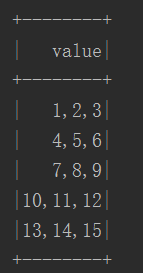
只有一列,属性为value。
3: df.printSchema()

4:case class 可以直接就转成DS
// Note: Case classes in Scala 2.10 can support only up to 22 fields. To work around this limit,

// you can use custom classes that implement the Product interface

case class Person(name: String, age: Long)

// Encoders are created for case classes

val caseClassDS = Seq(Person("Andy", 32)).toDS()
5:直接解析主流格式文件
val path = "examples/src/main/resources/people.json"

val peopleDS = spark.read.json(path).as[Person]
6:RDD转成DataSet两种方法
数据格式:
xiaoming,18,iPhone

mali,22,xiaomi

jack,26,smartisan

mary,16,meizu

kali,45,huawei
(a):使用反射推断模式
  val persons = rdd.map {

    x =>

      val fs = x.split(",")

      Person(fs(0), fs(1).toInt, fs(2))

  }

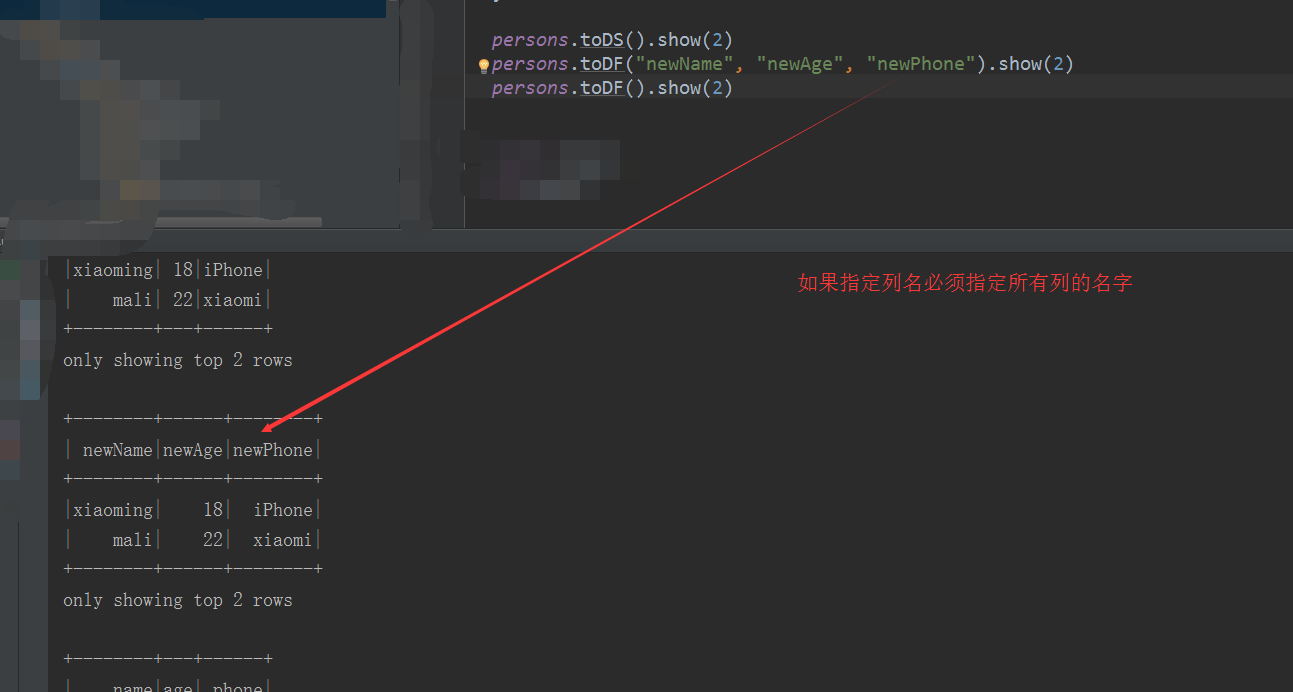
  persons.toDS().show(2)

  persons.toDF("newName", "newAge", "newPhone").show(2)

  persons.toDF().show(2)
(b):编程方式指定模式
步骤:

import org.apache.spark.sql.types._

  //1:创建RDD

  val rddString = sc.textFile("C:\\Users\\Daxin\\Documents\\GitHub\\OptimizedRF\\sql_data")

  //2:创建schema

  val schemaString = "name age phone"

  val fields = schemaString.split(" ").map {

    filedName => StructField(filedName, StringType, nullable = true)

  }

  val schema = StructType(fields)

  //3:数据转成Row

  val rowRdd = rddString.map(_.split(",")).map(attributes => Row(attributes(0), attributes(1), attributes(2)))

  //创建DF

  val personDF = spark.createDataFrame(rowRdd, schema)

  personDF.show(5)
7:注册视图
  //全局表,生命周期多个session可以共享并且创建该视图的sparksession停止该视图也不会过期

  personDF.createGlobalTempView("GlobalTempView_Person")

  //临时表,存在的话覆盖。生命周期和sparksession相同

  personDF.createOrReplaceTempView("TempView_Person")

  //personDF.createTempView("TempView_Person") //如果视图已经存在则异常

  //  Global temporary view is tied to a system preserved database `global_temp`

  //全局视图存储在global_temp数据库中,如果不加数据库前缀异常,提示找不到视图

  spark.sql("select * from global_temp.GlobalTempView_Person").show(2)

  //临时表不需要添加数据库

  spark.sql("select * from TempView_Person").show(2)

8:UDF 定义:
Untyped User-Defined Aggregate Functions
package com.daxin.sq.df

import org.apache.spark.sql.expressions.MutableAggregationBuffer

import org.apache.spark.sql.expressions.UserDefinedAggregateFunction

import org.apache.spark.sql.types._

import org.apache.spark.sql.Row

/**

  * Created by Daxin on 2017/11/18.

  * url:http://spark.apache.org/docs/latest/sql-programming-guide.html#untyped-user-defined-aggregate-functions

  */

//Untyped User-Defined Aggregate Functions

object MyAverage extends UserDefinedAggregateFunction {

  // Data types of input arguments of this aggregate function

  override def inputSchema: StructType = StructType(StructField("inputColumn", IntegerType) :: Nil) //2

  // Updates the given aggregation buffer `buffer` with new input data from `input`

  //TODO  第一个缓冲区是sum,第二个缓冲区是元素个数

  override def update(buffer: MutableAggregationBuffer, input: Row): Unit = {

    if (!input.isNullAt(0)) {

      buffer(0) = buffer.getInt(0) + input.getInt(0) // input.getInt(0)是中inputSchema定义的第0个元素

      buffer(1) = buffer.getInt(1) + 1

      println()

    }

  }

  // Data types of values in the aggregation buffer

  //TODO  定义缓冲区的模型(也就是数据结构)

  override def bufferSchema: StructType = StructType(StructField("sum", IntegerType) :: StructField("count", IntegerType) :: Nil)

  // Merges two aggregation buffers and stores the updated buffer values back to `buffer1`

  //TODO MutableAggregationBuffer 是Row子类

  override def merge(buffer1: MutableAggregationBuffer, buffer2: Row): Unit = {

    //TODO 合并分区,将结果更新到buffer1

    buffer1(0) = buffer1.getInt(0) + buffer2.getInt(0)

    buffer1(1) = buffer1.getInt(1) + buffer2.getInt(1)

    println()

  }

  // Initializes the given aggregation buffer. The buffer itself is a `Row` that in addition to

  // standard methods like retrieving a value at an index (e.g., get(), getBoolean()), provides

  // the opportunity to update its values. Note that arrays and maps inside the buffer are still

  // immutable.

  override def initialize(buffer: MutableAggregationBuffer): Unit = {

    buffer(0) = 0

    buffer(1) = 0

  }

  // Whether this function always returns the same output on the identical input

  override def deterministic: Boolean = true

  // Calculates the final result

  override def evaluate(buffer: Row): Int = buffer.getInt(0) / buffer.getInt(1)

  // The data type of the returned value,返回值类型

  override def dataType: DataType = IntegerType //

}
测试代码:
  spark.udf.register("myAverage", MyAverage)

  val result = spark.sql("SELECT myAverage(age)  FROM TempView_Person")

  result.show()
8:关于机器学习中的DataFrame的schema定:
一列名字为 label,另一列名字为 features。一般可以使用case class完成转换
case class UDLabelpOint(label: Double, features: org.apache.spark.ml.linalg.Vector)
Spark DataSet 、DataFrame 一些使用示例的更多相关文章
- Spark Dataset DataFrame 操作
Spark Dataset DataFrame 操作 相关博文参考 sparksql中dataframe的用法 一.Spark2 Dataset DataFrame空值null,NaN判断和处理 1. ...
- Spark Dataset DataFrame空值null,NaN判断和处理
Spark Dataset DataFrame空值null,NaN判断和处理 import org.apache.spark.sql.SparkSession import org.apache.sp ...
- Spark提高篇——RDD/DataSet/DataFrame(二)
该部分分为两篇,分别介绍RDD与Dataset/DataFrame: 一.RDD 二.DataSet/DataFrame 该篇主要介绍DataSet与DataFrame. 一.生成DataFrame ...
- spark第七篇:Spark SQL, DataFrame and Dataset Guide
预览 Spark SQL是用来处理结构化数据的Spark模块.有几种与Spark SQL进行交互的方式,包括SQL和Dataset API. 本指南中的所有例子都可以在spark-shell,pysp ...
- Spark提高篇——RDD/DataSet/DataFrame(一)
该部分分为两篇,分别介绍RDD与Dataset/DataFrame: 一.RDD 二.DataSet/DataFrame 先来看下官网对RDD.DataSet.DataFrame的解释: 1.RDD ...
- Spark获取DataFrame中列的几种姿势--col,$,column,apply
1.doc上的解释(https://spark.apache.org/docs/2.1.0/api/java/org/apache/spark/sql/Column.html) df("c ...
- RDD/Dataset/DataFrame互转
1.RDD -> Dataset val ds = rdd.toDS() 2.RDD -> DataFrame val df = spark.read.json(rdd) 3.Datase ...
- 【spark】dataframe常见操作
spark dataframe派生于RDD类,但是提供了非常强大的数据操作功能.当然主要对类SQL的支持. 在实际工作中会遇到这样的情况,主要是会进行两个数据集的筛选.合并,重新入库. 首先加载数据集 ...
- Spark:将DataFrame写入Mysql
Spark将DataFrame进行一些列处理后,需要将之写入mysql,下面是实现过程 1.mysql的信息 mysql的信息我保存在了外部的配置文件,这样方便后续的配置添加. //配置文件示例: [ ...
- Spark:DataFrame批量导入Hbase的两种方式(HFile、Hive)
Spark处理后的结果数据resultDataFrame可以有多种存储介质,比较常见是存储为文件.关系型数据库,非关系行数据库. 各种方式有各自的特点,对于海量数据而言,如果想要达到实时查询的目的,使 ...
随机推荐
- netty源码解解析(4.0)-5 线程模型-EventExecutorGroup框架
上一章讲了EventExecutorGroup的整体结构和原理,这一章我们来探究一下它的具体实现. EventExecutorGroup和EventExecutor接口 io.netty.util.c ...
- Struts2之ValueStack、ActionContext
今天在看Action获取Resquest.Response时,发现了一个词:值栈.于是今天一天都在看,了解了值栈不仅能知道Action怎么获取request.response等这些,还会了解OGNL语 ...
- SQL 数据库加字段声明
ALTER TABLE dbo.C_TrainPlan ADD MailCost DATETIME EXECUTE sp_addextendedproperty N'MS_Description', ...
- 清除电脑垃圾.bat
echo.title delete cachecolor 0aecho.echo please enter any key start.....@echo offecho execuing delet ...
- Android开发——使用自带图标
Android其实也是自带有许多常用的图标,我们直接使用即可 在源代码*.Java中可以进入如下方式引用: myMenuItem.setIcon(android.R.drawable.ic_menu_ ...
- 判断api请求方式
$curl_request = $_SERVER['REQUEST_METHOD']; //获取请求方式 if($curl_request == 'POST'){ echo post; }else i ...
- canvas-star6-drawMoon.html
<!DOCTYPE html> <html lang="en"> <head> <meta charset="UTF-8&quo ...
- 2018-02-27 "Literate Programming"一书摘记之一
书到后才发现是Knuth的论文集, 第一篇就在网上: Computer programming as an art (1974). 其中"Taste and Style"(品味和风 ...
- 【工具相关】Web-HTML特殊字符对照表
特殊符号 命名实体 十进制编码 特殊符号 命名实体 十进制编码 特殊符号 命名实体 十进制编码 Α Α Α Β Β Β Γ Γ Γ Δ Δ Δ Ε Ε Ε Ζ Ζ Ζ Η Η Η Θ Θ Θ Ι Ι ...
- 机器学习是万能的吗?AI落地有哪些先决条件?
机器学习是万能的吗?AI落地有哪些先决条件? https://mp.weixin.qq.com/s/9rNY2YA3BMpoY8NQ_rVIjQ 1.引言 入门机器学习或从事其相关工作前,不知道你思考 ...