
[转]mybatis-generator 代码自动生成工具(maven方式)
由于MyBatis属于一种半自动的ORM框架,所以主要的工作将是书写Mapping映射文件,但是由于手写映射文件很容易出错,mybatis-gennerator插件帮我们自动生成mybatis所需要的dao、bean、mapper xml文件。
这里主要通过eclipse工具,来讲解实现;
1、建表语句
CREATE TABLE `user` (

  `id` int(11) NOT NULL AUTO_INCREMENT,

  `name` varchar(100) DEFAULT NULL,

  PRIMARY KEY (`id`)

) ENGINE=InnoDB AUTO_INCREMENT=3 DEFAULT CHARSET=utf8;
2、新建测试工程
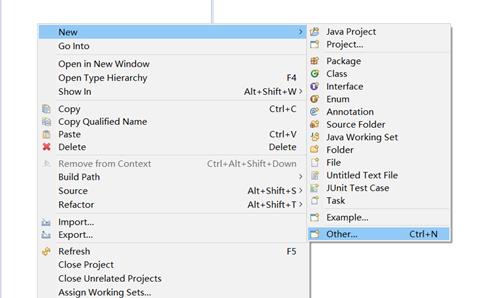
选择maven工程
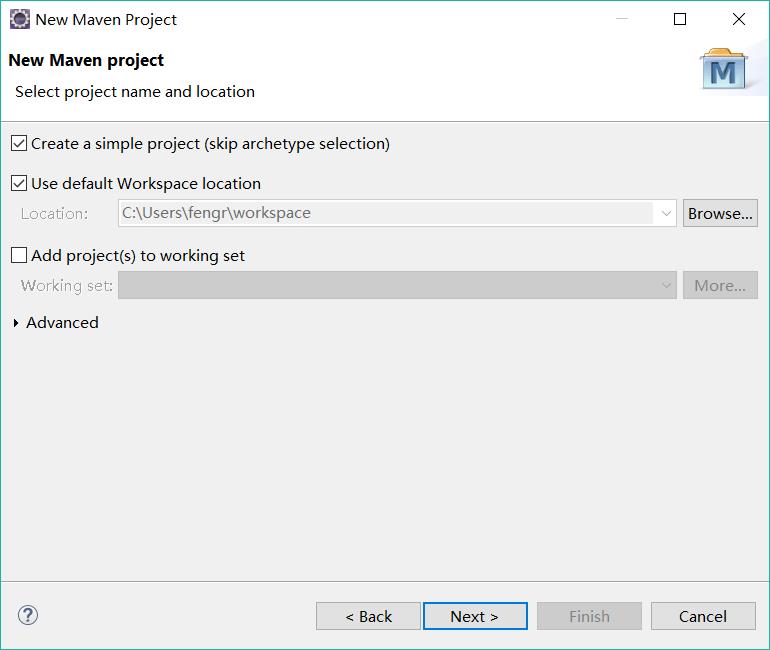
选择create a simple project就行
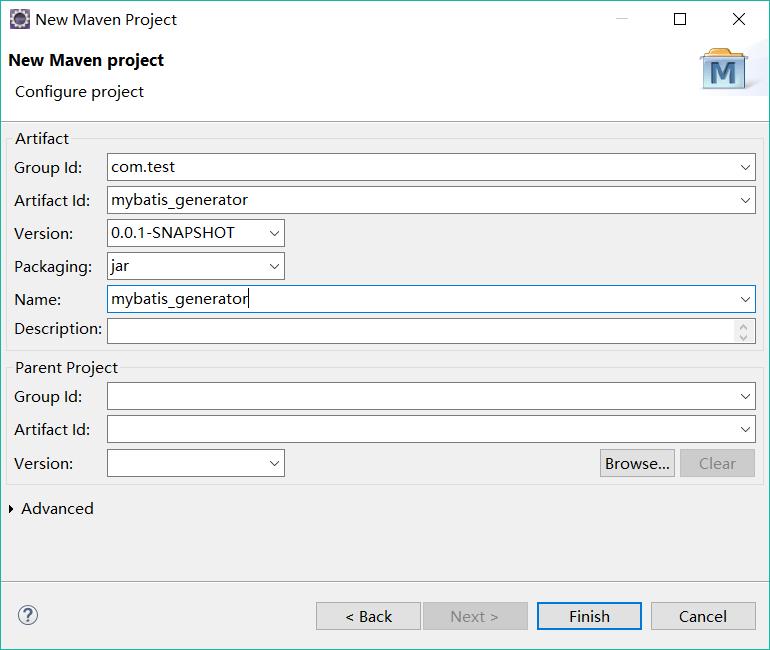
点击finish,测试项目就建完了
3、在maven配置文件pom.xml中添加依赖

<project xmlns="http://maven.apache.org/POM/4.0.0" xmlns:xsi="http://www.w3.org/2001/XMLSchema-instance" xsi:schemaLocation="http://maven.apache.org/POM/4.0.0 http://maven.apache.org/xsd/maven-4.0.0.xsd">

  <modelVersion>4.0.0</modelVersion>

  <groupId>com.test</groupId>

  <artifactId>mybatis_generator</artifactId>

  <version>0.0.1-SNAPSHOT</version>

  <name>mybatis_generator</name>

  <properties>

        <project.build.sourceEncoding>UTF-8</project.build.sourceEncoding>

    </properties>

    <dependencies>

        <dependency>

            <groupId>mysql</groupId>

            <artifactId>mysql-connector-java</artifactId>

            <version>5.1.35</version>

        </dependency>

        <dependency>

            <groupId>org.mybatis.generator</groupId>

            <artifactId>mybatis-generator-core</artifactId>

            <version>1.3.2</version>

        </dependency>

    </dependencies>

    <build>

        <pluginManagement>

            <plugins>

                <plugin>

                    <groupId>org.apache.maven.plugins</groupId>

                    <artifactId>maven-compiler-plugin</artifactId>

                    <configuration>

                        <source>1.7</source>

                        <target>1.7</target>

                    </configuration>

                    <version>3.3</version>

                </plugin>

                <plugin>

                    <groupId>org.mybatis.generator</groupId>

                    <artifactId>mybatis-generator-maven-plugin</artifactId>

                    <version>1.3.2</version>

                    <dependencies>

                        <dependency>

                            <groupId>mysql</groupId>

                            <artifactId>mysql-connector-java</artifactId>

                            <version>5.1.35</version>

                        </dependency>

                    </dependencies>

                    <configuration>
                         <!--配置文件的路径-->

                         <configurationFile>${basedir}/src/main/resources/generatorConfig.xml</configurationFile>

                        <overwrite>true</overwrite>

                    </configuration>

                </plugin>

            </plugins>

        </pluginManagement>

    </build>

</project>
4、在resources下,创建一个generatorConfig.xml配置文件
<?xml version="1.0" encoding="UTF-8"?>

<!DOCTYPE generatorConfiguration

  PUBLIC "-//mybatis.org//DTD MyBatis Generator Configuration 1.0//EN"

  "http://mybatis.org/dtd/mybatis-generator-config_1_0.dtd">

<generatorConfiguration>

    <context id="test" targetRuntime="MyBatis3">

        <plugin type="org.mybatis.generator.plugins.EqualsHashCodePlugin"></plugin>

        <plugin type="org.mybatis.generator.plugins.SerializablePlugin"></plugin>

         <plugin type="org.mybatis.generator.plugins.ToStringPlugin"></plugin>

        <commentGenerator>

            <!-- 这个元素用来去除指定生成的注释中是否包含生成的日期 false:表示保护 -->

            <!-- 如果生成日期,会造成即使修改一个字段,整个实体类所有属性都会发生变化,不利于版本控制,所以设置为true -->

            <property name="suppressDate" value="true" />

            <!-- 是否去除自动生成的注释 true:是 : false:否 -->

            <property name="suppressAllComments" value="false" />

        </commentGenerator>

        <!--数据库链接URL,用户名、密码 -->

        <jdbcConnection driverClass="com.mysql.jdbc.Driver"

            connectionURL="jdbc:mysql://localhost/mytest" userId="root" password="123456">

            </jdbcConnection>

        <javaTypeResolver>

            <!-- This property is used to specify whether MyBatis Generator should

                force the use of java.math.BigDecimal for DECIMAL and NUMERIC fields, -->

            <property name="forceBigDecimals" value="false" />

        </javaTypeResolver>

        <!-- 生成模型的包名和位置 -->

        <javaModelGenerator targetPackage="com.test.pojo"

            targetProject="target">

            <property name="enableSubPackages" value="true" />

            <property name="trimStrings" value="true" />

        </javaModelGenerator>

        <!-- 生成映射文件的包名和位置 -->

        <sqlMapGenerator targetPackage="com.test.mapping"

            targetProject="target">

            <property name="enableSubPackages" value="true" />

        </sqlMapGenerator>

        <!-- 生成DAO的包名和位置 -->

        <javaClientGenerator type="XMLMAPPER"

            targetPackage="com.test.dao" implementationPackage="com.test.dao.impl"  targetProject="target">

            <property name="enableSubPackages" value="true" />

        </javaClientGenerator>

        <!-- 要生成哪些表 -->

        <table tableName="user" domainObjectName="user"

            enableCountByExample="false" enableUpdateByExample="false"

            enableDeleteByExample="false" enableSelectByExample="false"

            selectByExampleQueryId="false"></table>

    </context>

</generatorConfiguration>
5、下载maven依赖包,update project

这个要稍微等一下,需要时间~~~
6、执行mybatis-generator:generate命令,生成文件(注意命令不要拼写错哟)


在控制台 显示 build success,说明已经成功了:

7、在项目上F5刷新,target目录下呢就会出现对应的文件
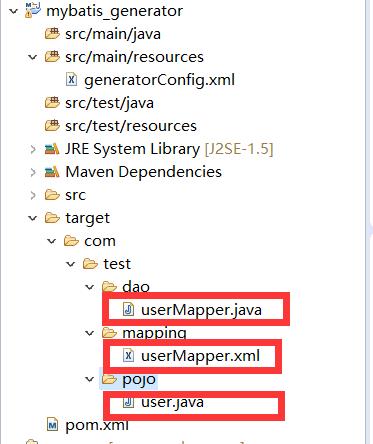
这是想要的文件自动生成了。
github项目地址:https://github.com/JsonShare/mybatis_generator.git
[转]mybatis-generator 代码自动生成工具(maven方式)的更多相关文章
- MyBatis Generator代码自动生成工具的使用
MyBatis Generator MyBatis Generator有三种使用方式,分别是maven插件形式.命令行形式以及eclipse插件形式.我在这里使用的是命令行的形式(主要是命令行形式比较 ...
- Mybatis Generator代码自动生成(实体类、dao层、映射文件)
写了一段时间增删改查有点厌烦,自己找了下网上的例子鼓捣了下自动生成. 首先得有一个配置文件: generatorConfig.xml <?xml version="1.0" ...
- MyEclipse下安装MyBatis Generator代码反向生成工具
一.离线方式: 在http://mybatis.googlecode.com/svn/sub-projects/generator/trunk/eclipse/UpdateSite/下载 featur ...
- 用mybatis的代码自动生成工具,炒鸡好用,推荐一下别人的操作
http://www.cnblogs.com/smileberry/p/4145872.html
- Eclipse 使用mybatis generator插件自动生成代码
Eclipse 使用mybatis generator插件自动生成代码 标签: mybatis 2016-12-07 15:10 5247人阅读 评论(0) 收藏 举报 .embody{ paddin ...
- 基于eclipse的mybatis映射代码自动生成的插件
基于eclipse的mybatis映射代码自动生成的插件 分类: JAVA 数据库 工具相关2012-04-29 00:15 2157人阅读 评论(9) 收藏 举报 eclipsegeneratori ...
- 基于eclipse的mybatis映射代码自动生成的插件http://blog.csdn.net/fu9958/article/details/7521681
基于eclipse的mybatis映射代码自动生成的插件 分类: JAVA 数据库 工具相关2012-04-29 00:15 2157人阅读 评论(9) 收藏 举报 eclipsegeneratori ...
- 基于数据库的代码自动生成工具,生成JavaBean、生成数据库文档、生成前后端代码等(v6.0.0版)
TableGo v6.0.0 版震撼发布,此次版本更新如下: 1.UI界面大改版,组件大调整,提升界面功能的可扩展性. 2.新增BeautyEye主题,界面更加清新美观,也可以通过配置切换到原生Jav ...
- 代码自动生成工具MyGeneration之一(程序员必备工具)
代码自动生成工具MyGeneration之一(程序员必备工具) 转 分类: C#2008-08-06 18:12 16064人阅读 评论(12) 收藏 举报 工具数据库相关数据库stringbrows ...
- Asp.net mvc 5 CRUD代码自动生成工具- vs.net 2013 Saffolding功能扩展
Asp.net mvc 5 CRUD代码自动生成工具 -Visual Studio.net2013 Saffolding功能扩展 上次做过一个<Asp.net webform scaffoldi ...
随机推荐
- Dubbox服务的消费方配置
在src/main/resources下创建applicationContext-web.xml <?xml version="1.0" encoding="UTF ...
- koa 的 Context
context上下文对象: 该对象类似原生http中的 req + res - 该对象的req,res属性也存在,就是原生没有包装过的req,res - 简单说: context 对象就是从请求到响应 ...
- 设置ll命令
ll 是 ls -l的别名,之所以 ll出现错误是因为没有定义别名. 如果要实现ll 命令,可以做如下操作: 1.编辑 ~./bashrc 添加 ls -l 的别名为 ll即可. vi /root/. ...
- 搭建appium自动化测试环境
注意:请使用不用的手机测试,appium会把微信app重新安装,记录都会清除 一.安装Java JDK JDK下载地址:https://www.oracle.com/technetwork/java/ ...
- (转)Linux下使用system()函数一定要谨慎
转:http://my.oschina.net/renhc/blog/53580 曾经的曾经,被system()函数折磨过,之所以这样,是因为对system()函数了解不够深入.只是简单的知道用这个函 ...
- 敏捷在《PMBOK指南》知识领域中的应用
<PMOBOK指南>知识领域 敏捷工作过程中的应用 第四章 项目整合管理 迭代和敏捷方法能够促进团队成员以相关领域专家的身份参与整合管理.团队成员自行决定计划及其组件的整合方式.在适应型环 ...
- 资源-.Net-ASP.NET:ASP.NET资源列表
ylbtech-资源-.Net-ASP.NET:ASP.NET资源列表 ASP.NETFree. Cross-platform. Open source.A framework for buildin ...
- python使用threading获取线程函数返回值的实现方法
python使用threading获取线程函数返回值的实现方法 这篇文章主要介绍了python使用threading获取线程函数返回值的实现方法,需要的朋友可以参考下 threading用于提供线程相 ...
- RabbitMQ使用(一)
1. 安装与使用 1. 激活 RabbitMQ's Management Plugin (前面跟绝对路径) "D:\娱乐\rabbitmq_server-3.6.5\sbin\rabbitm ...
- URAL 1748 The Most Complex Number
题目链接:https://vjudge.net/problem/11177 题目大意: 求小于等于 n 的最大反素数. 分析: n <= 10^18,而前20个素数的乘积早超过10^18,因此可 ...