
Spring_使用(JDBC)
Spring_对JDBC的支持
使用JdbcTemplate更新数据库
导入jar包
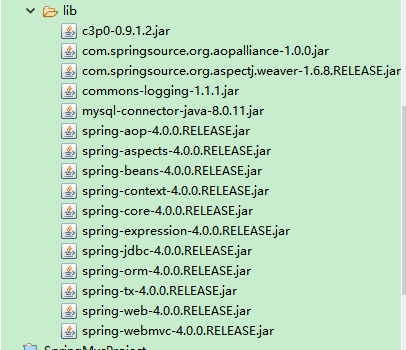
创建applicationcontext.xml
<?xml version="1.0" encoding="UTF-8"?>

<beans xmlns="http://www.springframework.org/schema/beans"

    xmlns:xsi="http://www.w3.org/2001/XMLSchema-instance"

    xmlns:context="http://www.springframework.org/schema/context"

    xsi:schemaLocation="http://www.springframework.org/schema/beans http://www.springframework.org/schema/beans/spring-beans.xsd

        http://www.springframework.org/schema/context http://www.springframework.org/schema/context/spring-context-4.0.xsd">

 <!-- 导入资源文件 -->

   <context:property-placeholder location="classpath:db.properties"></context:property-placeholder>

   <!-- 配置C3p0数据源 -->

   <bean id="dataSource" class="com.mchange.v2.c3p0.ComboPooledDataSource">

     <property name="user" value="${jdbc.user}"></property>

     <property name="password" value="${jdbc.password}"></property>

     <property name="jdbcUrl" value="${jdbc.jdbcUrl}"></property>

     <property name="driverClass" value="${jdbc.driverClass}"></property>

     <property name="initialPoolSize" value="${jdbc.initPoolSize}"></property>

     <property name="maxPoolSize" value="${jdbc.maxPoolSize}"></property>

   </bean>

   <!-- 配置Spring的jdbcTemplate -->

   <bean id="jdbcTemplate"

   class="org.springframework.jdbc.core.JdbcTemplate">

       <property name="dataSource" ref="dataSource"></property>

   </bean>

</beans>
创建db.properties文件
jdbc.user=root

jdbc.password=password

jdbc.driverClass=com.mysql.jdbc.Driver

jdbc.jdbcUrl=jdbc:mysql://localhost:3306/spring4?serverTimezone=GMT%2B8

jdbc.initPoolSize=5

jdbc.maxPoolSize=10
创建测试类
package com.tanlei.pojo.jdbc;

import static org.junit.jupiter.api.Assertions.*;

import java.sql.SQLException;

import java.util.ArrayList;

import java.util.List;

import javax.sql.DataSource;

import org.junit.jupiter.api.Test;

import org.springframework.context.ApplicationContext;

import org.springframework.context.support.ClassPathXmlApplicationContext;

import org.springframework.jdbc.core.BeanPropertyRowMapper;

import org.springframework.jdbc.core.JdbcTemplate;

import org.springframework.jdbc.core.RowMapper;

import junit.framework.TestListener;

public class JDBCTest {
 private ApplicationContext ctx=null;

    private  JdbcTemplate jdbcTemplate;

    {

        ctx=new ClassPathXmlApplicationContext("applicationcontext.xml");

        jdbcTemplate=(JdbcTemplate) ctx.getBean("jdbcTemplate");

    }
/**

     *

     *tanlei

     *2018年12月26日

     *执行INSERT UPDATE DELETE

     */

    //单独修改一条语句

    //update

    @Test

    public void testUpdate() {

        String sql="update  employee  set EMP_NAME=?  where EMP_ID=?";

        jdbcTemplate.update(sql,"tanlei",769);

    }

    //批量增加数据,修改,删除

    //batchUpdate

    @Test

    public  void testAlladd() {

        String sql="insert into  DEPARTMENT(DEPT_ID,DEPT_NAME,DEPT_NO) values (?,?,?)";

        List<Object[]> batchArgs=new ArrayList<>();

        batchArgs.add(new Object[] {1,"AA","D1"});

        batchArgs.add(new Object[] {2,"BB","D2"});

        jdbcTemplate.batchUpdate(sql, batchArgs);

    }

    //从数据库获取一条记录,实际上得到一个对象

    //queryForObject   使用sql中的列的 别名完成列名和属性名的映射

    //jdbcTemplate是一个jdbc的小工具,不是orm框架

    @Test

    public void testemployee() {

        String sql="select EMP_ID as id,EMP_NAME as empname,EMP_NO as empno,JOB as job  from  employee  where EMP_ID=?";

        RowMapper<Employee> rowMapper=new BeanPropertyRowMapper<>(Employee.class);

        Employee employee=jdbcTemplate.queryForObject(sql, rowMapper,769);

        System.out.println(employee);

    }

    //查到实体类的集合

    @Test

    public void TestList() {

        String sql="select EMP_ID as id,EMP_NAME as empname,EMP_NO as empno,JOB as job  from  employee  where EMP_ID>?";

        RowMapper<Employee> rowMapper=new BeanPropertyRowMapper<>(Employee.class);

        List<Employee> employees=jdbcTemplate.query(sql, rowMapper,769);

        System.out.println(employees);

    }

    //获取某一个属性值,或做统计查询

    @Test

    public void testListForObject() {

        String sql="select count(EMP_ID) as id  from  employee  ";

        long count=jdbcTemplate.queryForObject(sql, Long.class);

        System.out.println(count);

    }
@Test

    public void testDataSource() throws SQLException {

        DataSource dataSource=ctx.getBean(DataSource.class);

        System.out.println(dataSource.getConnection());

    }
}
1.查询单行数据
1.1 自定义RowMapper
public class RowMapper implements org.springframework.jdbc.core.RowMapper {

    @Override

    public Object mapRow(ResultSet resultSet, int i) throws SQLException {

        Customer customer=new Customer();

        customer.setCustid(resultSet.getInt("cus_id"));

        customer.setName(resultSet.getString("name"));

        customer.setAge(resultSet.getInt("age"));

        return null;

    }

}
它传递给 queryForObject()方法,返回的结果将调用自定义 mapRow()方法的值匹配到属性
public Customer findByCustomerId(int custId){

    String sql = "SELECT * FROM CUSTOMER WHERE CUST_ID = ?";

    Customer customer = (Customer)getJdbcTemplate().queryForObject(

            sql, new Object[] { custId }, new CustomerRowMapper());

    return customer;

}
1.2 BeanPropertyRowMapper
在Spring2.5中,带有一个方便 RowMapper 实现所谓“BeanPropertyRowMapper”,它可以通过匹配行的名字的列值映射到一个属性。只要确保这两个属性和列具有相同的名称,如属性“CUSTID'将匹配到列名为:”CUSTID'或下划线“CUST_ID”。
public Customer findByCustomerId2(int custId){

    String sql = "SELECT * FROM CUSTOMER WHERE CUST_ID = ?";

    Customer customer = (Customer)getJdbcTemplate().queryForObject(

            sql, new Object[] { custId },

            new BeanPropertyRowMapper(Customer.class));

    return customer;

}
2,查询多行
2.1手动映射它
public List<Customer> findAll(){

    String sql = "SELECT * FROM CUSTOMER";

    List<Customer> customers = new ArrayList<Customer>();

    List<Map> rows = getJdbcTemplate().queryForList(sql);

    for (Map row : rows) {

        Customer customer = new Customer();

        customer.setCustId((Long)(row.get("CUST_ID")));

        customer.setName((String)row.get("NAME"));

        customer.setAge((Integer)row.get("AGE"));

        customers.add(customer);

    }

    return customers;

}
2.2 BeanPropertyRowMapper
public List<Customer> findAll(){

    String sql = "SELECT * FROM CUSTOMER";

    List<Customer> customers  = getJdbcTemplate().query(sql,

            new BeanPropertyRowMapper(Customer.class));

    return customers;

}
继承JdbcDaoSupport(不推荐使用,而推进直接使用
jdbcTemplate
)
Spring_使用(JDBC)的更多相关文章
- Spring_总结_04_高级配置(一)_Profile
一.前言 本文承接上一节:Spring_总结_03_装配Bean(四)之导入与混合配置 这一节,来总结一下profile. 我们在开发软件时,通常会进行跨环境部署.而在跨环境部署时,经常会遇到某些环境 ...
- Java数据库连接技术——JDBC
大家好,今天我们学习了Java如何连接数据库.之前学过.net语言的数据库操作,感觉就是一通百通,大同小异. JDBC是Java数据库连接技术的简称,提供连接各种常用数据库的能力. JDBC API ...
- 玩转spring boot——结合AngularJs和JDBC
参考官方例子:http://spring.io/guides/gs/relational-data-access/ 一.项目准备 在建立mysql数据库后新建表“t_order” ; -- ----- ...
- [原创]java使用JDBC向MySQL数据库批次插入10W条数据测试效率
使用JDBC连接MySQL数据库进行数据插入的时候,特别是大批量数据连续插入(100000),如何提高效率呢?在JDBC编程接口中Statement 有两个方法特别值得注意:通过使用addBatch( ...
- JDBC MySQL 多表关联查询查询
public static void main(String[] args) throws Exception{ Class.forName("com.mysql.jdbc.Driver&q ...
- JDBC增加删除修改
一.配置程序--让我们程序能找到数据库的驱动jar包 1.把.jar文件复制到项目中去,整合的时候方便. 2.在eclipse项目右击"构建路径"--"配置构建路径&qu ...
- JDBC简介
jdbc连接数据库的四个对象 DriverManager 驱动类 DriverManager.registerDriver(new com.mysql.jdbc.Driver());不建议使用 ...
- JDBC Tutorials: Commit or Rollback transaction in finally block
http://skeletoncoder.blogspot.com/2006/10/jdbc-tutorials-commit-or-rollback.html JDBC Tutorials: Com ...
- FineReport如何用JDBC连接阿里云ADS数据库
在使用FineReport连接阿里云的ADS(AnalyticDB)数据库,很多时候在测试连接时就失败了.此时,该如何连接ADS数据库呢? 我们只需要手动将连接ads数据库需要使用到的jar放置到%F ...
随机推荐
- 廖雪峰Java9正则表达式-2正则表达式进阶-6搜索和替换
1.使用正则表达式分割字符串: String[] string.split(String regex); "a b c".split("\\s");->[ ...
- VS C++/ClI调用C++ 外部Dll无法查看变量值
C#项目调用C++/ClI项目,C++/ClI项目又引用了外部C++ dll时 C++/CLI代码中在调试时无法查看native 变量的值 解决方法:C#项目右键属性-->Debug--> ...
- 44个 Javascript 变态题解析 (下)
承接上篇 44个 Javascript 变态题解析 (上) 第23题 [1 < 2 < 3, 3 < 2 < 1] 这个题也还可以. 这个题会让人误以为是 2 > 1 & ...
- Linq处理list数据
获取数据列表. //获取数据列表,Model是类 IList<Model> list = dao.getmx(Model, pageInfo);//DataTable数据DataTable ...
- 启动easy-mock
1.启动mongodb 启动mongodb服务器: /usr/local/mongodb/bin/mongod -config /usr/local/mongodb/data/mongodb.co ...
- vue如何发请求
1.vue 支持开发者引入 jquery 使用 $.ajax() 1 2 3 4 5 6 7 8 9 10 11 12 13 14 15 16 17 1.首先,在 package.json 中添加 j ...
- bzoj 1266 [AHOI2006] 上学路线
传送门 传说中的经典容斥+卢卡斯定理+中国剩余定理 题解传送门 //Achen #include<algorithm> #include<iostream> #include& ...
- centos apache安装oracle扩展
参考网址: http://blog.csdn.net/a82168506/article/details/11763989 步骤如下: 下载安装包,下载地址.(我下载的11.1版本) http://w ...
- 直接在安装了redis的Linux机器上操作redis数据存储类型--对Sorted-Sets操作
一.概述: Sorted-Sets和Sets类型极为相似,它们都是字符串的集合,都不允许重复的成员出现在一个Set中.它们之间的主要差别是Sorted-Sets中的每一个成员都会有一个分数(score ...
- Appium_Python_Client介绍
一.Appium_Python_Client介绍 Appium的实用方法都藏在Client的源码里,对于driver和webelement实例,均有对应的元素查找方法(webelement查找的是下面 ...