
JavaScript--结合CSS变形、缩放能拖拽的登录框
上例图:
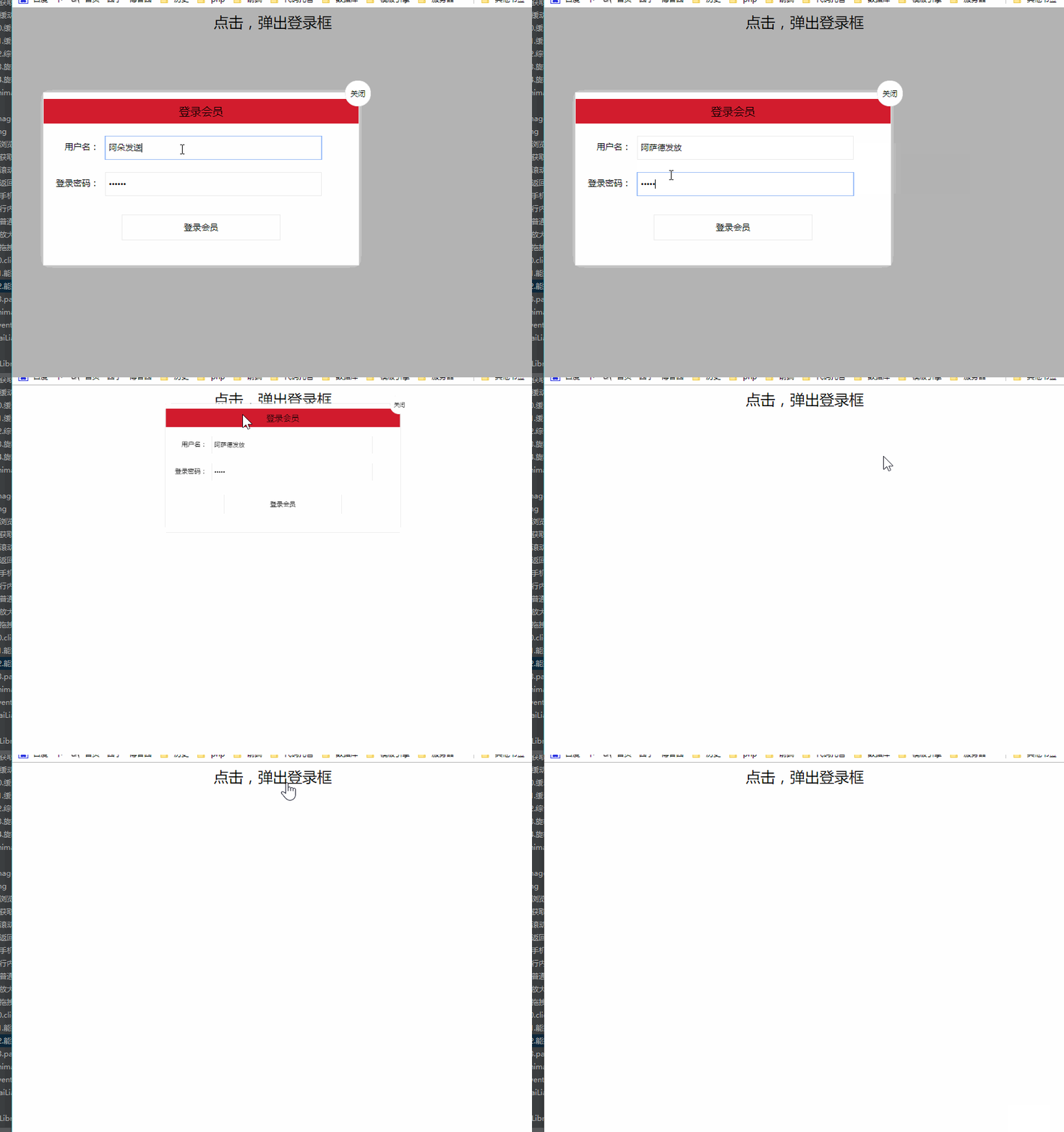
代码块:
 <!DOCTYPE html>

 <html>

 <head lang="en">

     <meta charset="UTF-8">

     <title></title>

     <style>

         .login-header {

             width: 100%;

             text-align: center;

             height: 30px;

             font-size: 24px;

             line-height: 30px;

         }

         ul, li, ol, dl, dt, dd, div, p, span, h1, h2, h3, h4, h5, h6, a {

             padding: 0px;

             margin: 0px;

         }

         .login {

             width: 512px;

             position: absolute;

             border: #ebebeb solid 1px;

             height: 280px;

             left: 50%;

             right: 50%;

             background: #ffffff;

             box-shadow: 0px 0px 20px #ddd;

             z-index: 9999;

             margin-left: -250px;

             margin-top: 140px;

             transform: translateY(-500px) scale(0);

             transition: transform .4s  cubic-bezier(0.98, 0.09, 0.4, 1.3);

         }

         .login-title {

             width: 100%;

             margin: 10px 0px 0px 0px;

             text-align: center;

             line-height: 40px;

             height: 40px;

             font-size: 18px;

             position: relative;

             cursor: move;

             -moz-user-select:none;/*火狐*/

             -webkit-user-select:none;/*webkit浏览器*/

             -ms-user-select:none;/*IE10*/

             -khtml-user-select:none;/*早期浏览器*/

             user-select:none;

             background: #d21c2e;

         }

         .login-input-content {

             margin-top: 20px;

         }

         .login-button {

             width: 50%;

             margin: 30px auto 0px auto;

             line-height: 40px;

             font-size: 14px;

             border: #ebebeb 1px solid;

             text-align: center;

         }

         .login-bg {

             width: 100%;

             height: 100%;

             position: fixed;

             top: 0px;

             left: 0px;

             background: #000000;

             filter: alpha(opacity=30);

             -moz-opacity: 0.3;

             -khtml-opacity: 0.3;

             opacity: 0.3;

             display: none;

         }

         a {

             text-decoration: none;

             color: #000000;

         }

         .login-button a {

             display: block;

         }

         .login-input input.list-input {

             float: left;

             line-height: 35px;

             height: 35px;

             width: 350px;

             border: #ebebeb 1px solid;

             text-indent: 5px;

         }

         .login-input {

             overflow: hidden;

             margin: 0px 0px 20px 0px;

         }

         .login-input label {

             float: left;

             width: 90px;

             padding-right: 10px;

             text-align: right;

             line-height: 35px;

             height: 35px;

             font-size: 14px;

         }

         .login-title span {

             position: absolute;

             font-size: 12px;

             right: -20px;

             top: -30px;

             background: #ffffff;

             border: #ebebeb solid 1px;

             width: 40px;

             height: 40px;

             border-radius: 20px;

         }

         body.show-login .login{

             display:block;

             transform: translateY(0) scale(1);

         }

         body.show-login .login-bg {

             display: block;

         }

         .login.on {

             margin-left: 0;

             margin-top: 0;

         }

     </style>

 </head>

 <body>

 <div class="login-header"><a id="link" href="javascript:void(0);">点击,弹出登录框</a></div>

 <div id="login" class="login" >

     <div id="title" class="login-title">登录会员

         <span id="closeBtn"><a  href="javascript:void(0);" class="close-login">关闭</a></span></div>

     <div class="login-input-content">

         <div class="login-input">

             <label>用户名:</label>

             <input type="text" placeholder="请输入用户名" name="info[username]" id="username" class="list-input">

         </div>

         <div class="login-input">

             <label>登录密码:</label>

             <input type="password" placeholder="请输入登录密码" name="info[password]" id="password" class="list-input">

         </div>

     </div>

     <div id="loginBtn" class="login-button"><a href="javascript:void(0);" id="login-button-submit">登录会员</a></div>

 </div>

 <div id="bg" class="login-bg" ></div>

 <script>

     /**

      * 获取元素样式函数

      * @param element 要获取的样式的对象

      * return 目标css样式对象

      * */

     function getStyle(element) {

         if(window.getComputedStyle) {

             return  window.getComputedStyle(element,null);

         }else if(element.currentStyle){

             return element.currentStyle;

         }

     }

     /**

      * 鼠标按下

      *      标记可以被拖动

      * 鼠标移动

      *      让盒子跟着鼠标移动

      * 鼠标弹起

      *      标记不能被拖动

      */

     var link = document.getElementById('link');

     var closeBtn = document.getElementById('closeBtn');

     var bg = document.getElementById('bg');

     var title = document.getElementById('title');

     var login = document.getElementById('login');

     link.onclick = function () {

         document.body.className = 'show-login';

 //        login.style.left = window.innerWidth/ 2;

 //        login.style.top = window.innerHeight / 2;

     }

     closeBtn.onclick = function () {

         document.body.className = '';

     }

     bg.onclick = function () {

         document.body.className = '';

     }

     // 开关思想

     var flag = false;

     document.onmouseup = function () {

         flag = false;

     }

     title.onmousedown = function () {

         flag = true;

     }

     var boxWidth = parseInt(getStyle(login).width);

     var boxHeight = parseInt(getStyle(login).height);

     document.onmousemove = function (event) {

         if(flag) {

             login.className = "login on";

             var pageX = event.pageX - boxWidth/2 ;

             var pageY = event.pageY - 30;

             if(pageX < 50) {

                 pageX = 50;

             }

             if(pageY < 50) {

                 pageY = 50;

             }

             if(pageX > window.innerWidth - boxWidth) {

                 pageX = window.innerWidth - boxWidth;

             }

             if(pageY > window.innerHeight - boxHeight) {

                 pageY = window.innerHeight - boxHeight;

             }

             login.style.left = pageX + "px";

             login.style.top = pageY + "px";

         }

     }

 </script>

 </body>

 </html>
JavaScript--结合CSS变形、缩放能拖拽的登录框的更多相关文章
- 超强的纯 CSS 鼠标点击拖拽效果
背景 鼠标拖拽元素移动,算是一个稍微有点点复杂的交互. 而在本文,我们就将打破常规,向大家介绍一种超强的仅仅使用纯 CSS 就能够实现的鼠标点击拖拽效果. 在之前的这篇文章中 -- 不可思议的纯 CS ...
- C#实现GDI+基本图的缩放、拖拽、移动
C#实现GDI+基本图的缩放.拖拽.移动示例代码如下: using System;using System.Collections.Generic;using System.ComponentMode ...
- 缩放系列(三):一个可以手势缩放、拖拽、旋转的layout
弄了一个下午,终于搞出来了,PowerfulLayout 下面是一个功能强大的改造的例子: 可以实现以下需求: 1.两个手指进行缩放布局 2.所有子控件也随着缩放, 3.子控件该有的功能不能丢失(像b ...
- Android 自定义ImageView支持缩放,拖拽,方便复用
今天刚发了一篇关于ImageView的缩放和拖拽的博客,然后我想了下,将他自定义下,方便我们来复用这个imageView,效果我就不多说了,http://blog.csdn.net/xiaanming ...
- C# 之文件拖拽和pixturBox缩放与拖拽
文件拖拽: 效果:将一个文件拖拽到窗体的某个控件时,将该控件的路径显示在该控件上,只要拿到了路径自然可以读取文件中的内容了. 将一个控件的属性AllowDrop设置为true,然后添加DragDrop ...
- AJ学IOS(36)UI之手势事件旋转_缩放_拖拽
AJ分享,必须精品 效果 完成一个图片的捏合缩放,拖拽,旋转动作. 设计思路 拖拽: 首先是最简单的拖拽 //拖拽 -(void)panTest { UIPanGestureRecognizer *p ...
- flutter实现可缩放可拖拽双击放大的图片功能
flutter实现可缩放可拖拽双击放大的图片功能 可缩放可拖拽的功能,可实现图片或者其他widget的缩放已经拖拽并支持双击放大的功能 我们知道官方提供了双击缩放,但是不支持拖拽的功能,我们要实现向百 ...
- C#pictureBox滚轮缩放与拖拽
[转载]C#pictureBox滚轮缩放与拖拽 [转载]C#中图像平移.缩放的实现技巧 [转载]c# 通过鼠标拖动.放大图片,GDI绘图通过鼠标拖动.放大
- 纯JS.CSS编写的可拖拽并左右分栏的插件(复制代码就能用)
<!DOCTYPE html><html><head><meta charset="utf-8"><meta http-equ ...
随机推荐
- 全栈之路-杂篇-前端Http请求封装优化
在项目开发过程中,代码的封装是很有必要的,我觉得这是程序员进阶的一个重要的技能,不会封装代码,你的代码看起来乱的一批,基本上不能维护,像一次性塑料袋一样,用完一次就失去了价值,这同时也会无缘无故的增加 ...
- 长按触发(PC端和移动端)
$.fn.longPress = function(fn) { var timeout = undefined; var $this = this; for(var i = 0;i<$this. ...
- Vue简单评星效果与单张图片上传
<form class="" id="pj-frm"> <div class="assess-header"> &l ...
- HTML5 drag拖动事件
参考链接:https://segmentfault.com/a/1190000013606983 例子: <!DOCTYPE HTML> <html> <head> ...
- 166 链表倒数第n个结点
原题网址:https://www.lintcode.com/problem/nth-to-last-node-in-list/description 描述 找到单链表倒数第n个节点,保证链表中节点的最 ...
- Python学习笔记(五)函数和代码复用
函数能提高应用的模块性,和代码的重复利用率.在很多高级语言中,都可以使用函数实现多种功能.在之前的学习中,相信你已经知道Python提供了许多内建函数,比如print().同样,你也可以自己创建函数, ...
- 用windows命令解压chm文件
Windows里有这样一个工具:hh.exe.hh.exe最重要的功能就是用来关联CHM文件,当你运行一个chm文件的时候,系统就是用这个工具来打开的. 其实它还有另外一个功能——解压CHM文件在CM ...
- Django部署,Django+uWSGI+nginx+Centos部署
说明:系统是在windows上开发的,使用django1.11.4+python3.6.3开发,需要部署在centos6.4服务器上. 第一步:在Centos6.4上安装Python3.6.2 安装请 ...
- Go之路之go语言结构
Go Hello World 实例 package main //定义了包名,必须在源文件中非注释的第一行指名这个文件属于哪个包,每个Go应用程序都包含一个名为main的包 import " ...
- 实例详解TOP命令
Linux中的top命令显示系统上正在运行的进程.它是系统管理员最重要的工具之一.被广泛用于监视服务器的负载.在本篇中,我们会探索top命令的细节.top命令是一个交互命令.在运行top的时候还可以运 ...