
JavaScript--结合CSS变形、缩放能拖拽的登录框
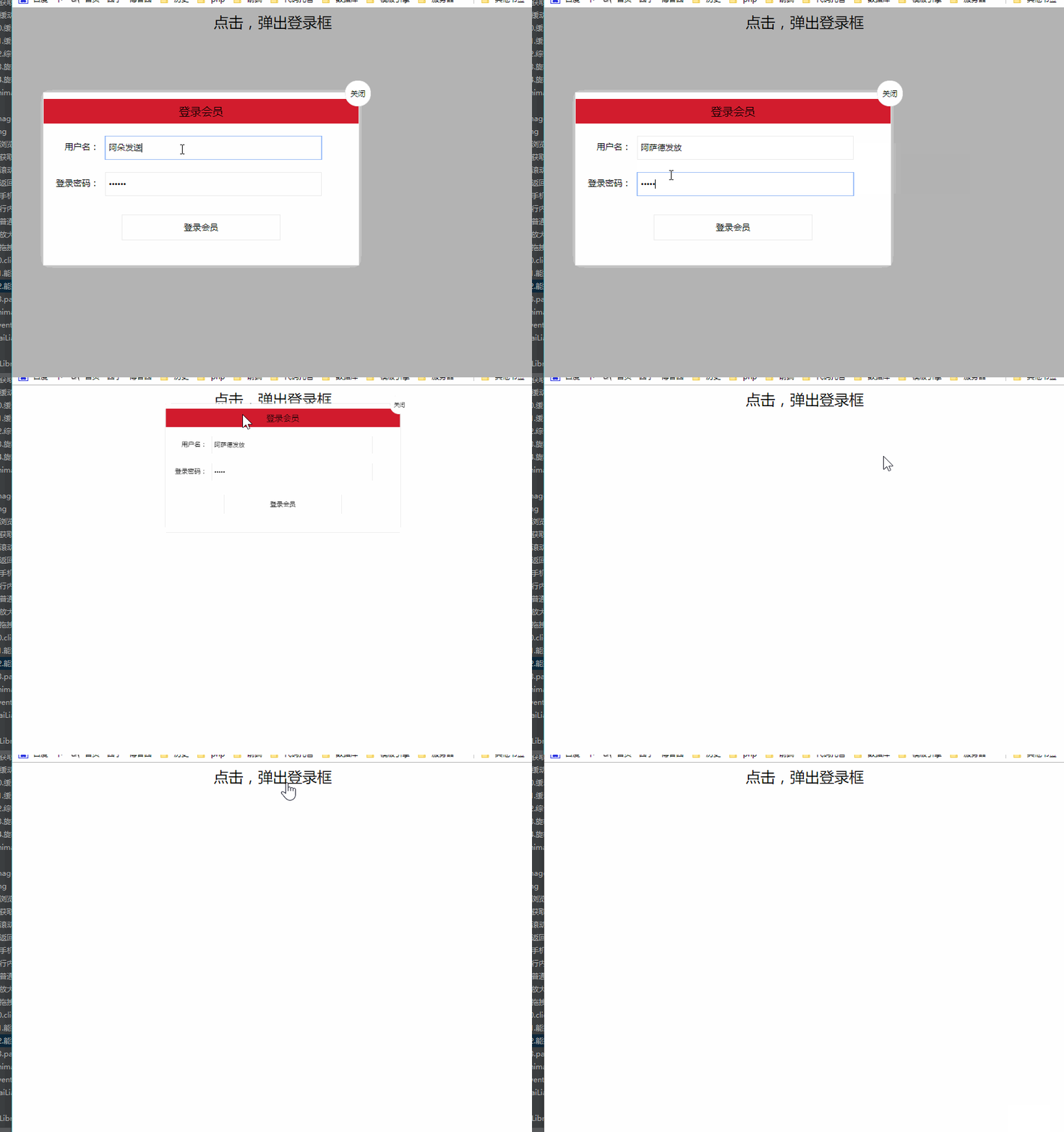
上例图:
代码块:
 <!DOCTYPE html>

 <html>

 <head lang="en">

     <meta charset="UTF-8">

     <title></title>

     <style>

         .login-header {

             width: 100%;

             text-align: center;

             height: 30px;

             font-size: 24px;

             line-height: 30px;

         }

         ul, li, ol, dl, dt, dd, div, p, span, h1, h2, h3, h4, h5, h6, a {

             padding: 0px;

             margin: 0px;

         }

         .login {

             width: 512px;

             position: absolute;

             border: #ebebeb solid 1px;

             height: 280px;

             left: 50%;

             right: 50%;

             background: #ffffff;

             box-shadow: 0px 0px 20px #ddd;

             z-index: 9999;

             margin-left: -250px;

             margin-top: 140px;

             transform: translateY(-500px) scale(0);

             transition: transform .4s  cubic-bezier(0.98, 0.09, 0.4, 1.3);

         }

         .login-title {

             width: 100%;

             margin: 10px 0px 0px 0px;

             text-align: center;

             line-height: 40px;

             height: 40px;

             font-size: 18px;

             position: relative;

             cursor: move;

             -moz-user-select:none;/*火狐*/

             -webkit-user-select:none;/*webkit浏览器*/

             -ms-user-select:none;/*IE10*/

             -khtml-user-select:none;/*早期浏览器*/

             user-select:none;

             background: #d21c2e;

         }

         .login-input-content {

             margin-top: 20px;

         }

         .login-button {

             width: 50%;

             margin: 30px auto 0px auto;

             line-height: 40px;

             font-size: 14px;

             border: #ebebeb 1px solid;

             text-align: center;

         }

         .login-bg {

             width: 100%;

             height: 100%;

             position: fixed;

             top: 0px;

             left: 0px;

             background: #000000;

             filter: alpha(opacity=30);

             -moz-opacity: 0.3;

             -khtml-opacity: 0.3;

             opacity: 0.3;

             display: none;

         }

         a {

             text-decoration: none;

             color: #000000;

         }

         .login-button a {

             display: block;

         }

         .login-input input.list-input {

             float: left;

             line-height: 35px;

             height: 35px;

             width: 350px;

             border: #ebebeb 1px solid;

             text-indent: 5px;

         }

         .login-input {

             overflow: hidden;

             margin: 0px 0px 20px 0px;

         }

         .login-input label {

             float: left;

             width: 90px;

             padding-right: 10px;

             text-align: right;

             line-height: 35px;

             height: 35px;

             font-size: 14px;

         }

         .login-title span {

             position: absolute;

             font-size: 12px;

             right: -20px;

             top: -30px;

             background: #ffffff;

             border: #ebebeb solid 1px;

             width: 40px;

             height: 40px;

             border-radius: 20px;

         }

         body.show-login .login{

             display:block;

             transform: translateY(0) scale(1);

         }

         body.show-login .login-bg {

             display: block;

         }

         .login.on {

             margin-left: 0;

             margin-top: 0;

         }

     </style>

 </head>

 <body>

 <div class="login-header"><a id="link" href="javascript:void(0);">点击,弹出登录框</a></div>

 <div id="login" class="login" >

     <div id="title" class="login-title">登录会员

         <span id="closeBtn"><a  href="javascript:void(0);" class="close-login">关闭</a></span></div>

     <div class="login-input-content">

         <div class="login-input">

             <label>用户名:</label>

             <input type="text" placeholder="请输入用户名" name="info[username]" id="username" class="list-input">

         </div>

         <div class="login-input">

             <label>登录密码:</label>

             <input type="password" placeholder="请输入登录密码" name="info[password]" id="password" class="list-input">

         </div>

     </div>

     <div id="loginBtn" class="login-button"><a href="javascript:void(0);" id="login-button-submit">登录会员</a></div>

 </div>

 <div id="bg" class="login-bg" ></div>

 <script>

     /**

      * 获取元素样式函数

      * @param element 要获取的样式的对象

      * return 目标css样式对象

      * */

     function getStyle(element) {

         if(window.getComputedStyle) {

             return  window.getComputedStyle(element,null);

         }else if(element.currentStyle){

             return element.currentStyle;

         }

     }

     /**

      * 鼠标按下

      *      标记可以被拖动

      * 鼠标移动

      *      让盒子跟着鼠标移动

      * 鼠标弹起

      *      标记不能被拖动

      */

     var link = document.getElementById('link');

     var closeBtn = document.getElementById('closeBtn');

     var bg = document.getElementById('bg');

     var title = document.getElementById('title');

     var login = document.getElementById('login');

     link.onclick = function () {

         document.body.className = 'show-login';

 //        login.style.left = window.innerWidth/ 2;

 //        login.style.top = window.innerHeight / 2;

     }

     closeBtn.onclick = function () {

         document.body.className = '';

     }

     bg.onclick = function () {

         document.body.className = '';

     }

     // 开关思想

     var flag = false;

     document.onmouseup = function () {

         flag = false;

     }

     title.onmousedown = function () {

         flag = true;

     }

     var boxWidth = parseInt(getStyle(login).width);

     var boxHeight = parseInt(getStyle(login).height);

     document.onmousemove = function (event) {

         if(flag) {

             login.className = "login on";

             var pageX = event.pageX - boxWidth/2 ;

             var pageY = event.pageY - 30;

             if(pageX < 50) {

                 pageX = 50;

             }

             if(pageY < 50) {

                 pageY = 50;

             }

             if(pageX > window.innerWidth - boxWidth) {

                 pageX = window.innerWidth - boxWidth;

             }

             if(pageY > window.innerHeight - boxHeight) {

                 pageY = window.innerHeight - boxHeight;

             }

             login.style.left = pageX + "px";

             login.style.top = pageY + "px";

         }

     }

 </script>

 </body>

 </html>
JavaScript--结合CSS变形、缩放能拖拽的登录框的更多相关文章
- 超强的纯 CSS 鼠标点击拖拽效果
背景 鼠标拖拽元素移动,算是一个稍微有点点复杂的交互. 而在本文,我们就将打破常规,向大家介绍一种超强的仅仅使用纯 CSS 就能够实现的鼠标点击拖拽效果. 在之前的这篇文章中 -- 不可思议的纯 CS ...
- C#实现GDI+基本图的缩放、拖拽、移动
C#实现GDI+基本图的缩放.拖拽.移动示例代码如下: using System;using System.Collections.Generic;using System.ComponentMode ...
- 缩放系列(三):一个可以手势缩放、拖拽、旋转的layout
弄了一个下午,终于搞出来了,PowerfulLayout 下面是一个功能强大的改造的例子: 可以实现以下需求: 1.两个手指进行缩放布局 2.所有子控件也随着缩放, 3.子控件该有的功能不能丢失(像b ...
- Android 自定义ImageView支持缩放,拖拽,方便复用
今天刚发了一篇关于ImageView的缩放和拖拽的博客,然后我想了下,将他自定义下,方便我们来复用这个imageView,效果我就不多说了,http://blog.csdn.net/xiaanming ...
- C# 之文件拖拽和pixturBox缩放与拖拽
文件拖拽: 效果:将一个文件拖拽到窗体的某个控件时,将该控件的路径显示在该控件上,只要拿到了路径自然可以读取文件中的内容了. 将一个控件的属性AllowDrop设置为true,然后添加DragDrop ...
- AJ学IOS(36)UI之手势事件旋转_缩放_拖拽
AJ分享,必须精品 效果 完成一个图片的捏合缩放,拖拽,旋转动作. 设计思路 拖拽: 首先是最简单的拖拽 //拖拽 -(void)panTest { UIPanGestureRecognizer *p ...
- flutter实现可缩放可拖拽双击放大的图片功能
flutter实现可缩放可拖拽双击放大的图片功能 可缩放可拖拽的功能,可实现图片或者其他widget的缩放已经拖拽并支持双击放大的功能 我们知道官方提供了双击缩放,但是不支持拖拽的功能,我们要实现向百 ...
- C#pictureBox滚轮缩放与拖拽
[转载]C#pictureBox滚轮缩放与拖拽 [转载]C#中图像平移.缩放的实现技巧 [转载]c# 通过鼠标拖动.放大图片,GDI绘图通过鼠标拖动.放大
- 纯JS.CSS编写的可拖拽并左右分栏的插件(复制代码就能用)
<!DOCTYPE html><html><head><meta charset="utf-8"><meta http-equ ...
随机推荐
- Android 开发 防止按键连续点击
前言 按键防止连续点击是任何一个项目都要考虑的功能.下面我们将介绍几种防止按键连续点击的方法 用工具类实现 /** *@content:按键延时工具类,用于防止按键连点 *@time:2019-5-1 ...
- mysql InnoDB: Assertion failure in thread xxxx in file ut0mem.cc line 105
mysql InnoDB: Assertion failure in thread xxxx in file ut0mem.cc line 105 错误信息 InnoDB: Assertion fai ...
- Python读写文件学习笔记
一. 基础 1.创建文件夹 import os os.makedirs('I:\\pythonWorkPace') # 创建文件夹 2. 获取文件夹里面文件列表 import os # os.make ...
- 程序员总数3W+,阿里巴巴首次公开2018代码数据报告
- js获取url链接中的域名部分
用js提取出url中的域名(domain)部分,用split()函数就可以了. 因为一个正确的url必定是由http://或者是https://.domain.路径/参数组成,所以可以用split以/ ...
- UVa 12034 Race 递推?
一开始是想排列组合做的,排列组合感觉确实可以推出公式,但是复杂度嘛.. dp[i][j]表示有i只马,j个名次的方法数,显然j<=i,然后递推公式就很好写了,一只马新加进来要么与任意一个名次的马 ...
- HNOI 2019 多边形
HNOI 2019 多边形 题意 小 R 与小 W 在玩游戏. 他们有一个边数为\(n\)的凸多边形,其顶点沿逆时针方向标号依次为\(1,2,3...n\).最开始凸多边形中有\(n\)条线段,即多边 ...
- Leetcode561.Array Partition I数组拆分1
给定长度为 2n 的数组, 你的任务是将这些数分成 n 对, 例如 (a1, b1), (a2, b2), ..., (an, bn) ,使得从1 到 n 的 min(ai, bi) 总和最大. 示例 ...
- ssh 连接vps
默认端口22 ssh root@194.10.10.10 特定端口xxx 上面命令后面加上 "-p xxx" 就可以了
- UOJ#422. 【集训队作业2018】小Z的礼物
#422. [集训队作业2018]小Z的礼物 min-max容斥 转化为每个集合最早被染色的期望时间 如果有x个选择可以染色,那么期望时间就是((n-1)*m+(m-1)*n))/x 但是x会变,中途 ...