
kubernetes istio之gateway
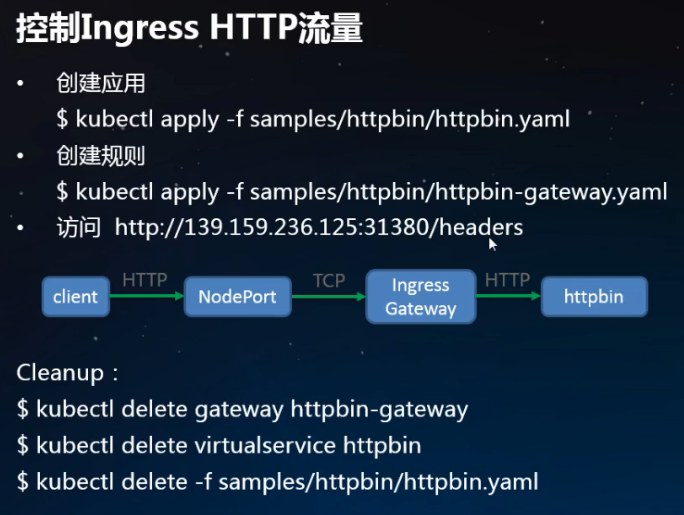
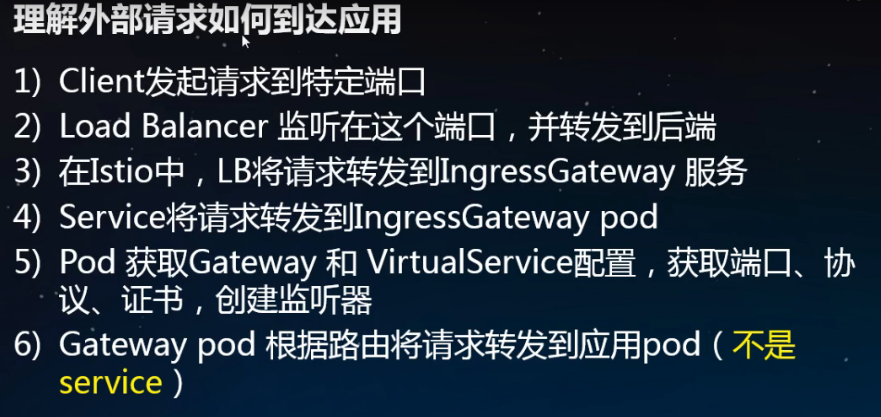
[root@master istio-1.1.]# kubectl apply -f samples/httpbin/httpbin.yaml

service/httpbin created

deployment.extensions/httpbin created

[root@master istio-1.1.]#

[root@master istio-1.1.]# kubectl get svc

NAME           TYPE           CLUSTER-IP       EXTERNAL-IP   PORT(S)        AGE

details        ClusterIP      10.106.209.133   <none>        /TCP       23h

httpbin        ClusterIP      10.104.20.107    <none>        /TCP       9s

kubernetes     ClusterIP      10.96.0.1        <none>        /TCP        14d

productpage    ClusterIP      10.96.27.39      <none>        /TCP       23h

ratings        ClusterIP      10.109.45.236    <none>        /TCP       23h

reviews        ClusterIP      10.102.249.50    <none>        /TCP       23h

[root@master istio-1.1.]# kubectl get pod -o wide

NAME                             READY   STATUS    RESTARTS   AGE     IP             NODE     NOMINATED NODE   READINESS GATES

details-v1-79c6548b59-d8448      /     Running             23h     10.244.3.186   node02   <none>           <none>

httpbin-5446f4d9b4-jtnzw         /     Running             3m38s   10.244.1.207   node01   <none>           <none>

ratings-v1-7665579b75-jjvv7      /     Running             23h     10.244.1.203   node01   <none>           <none>

reviews-v1-67446f7d9b-hrhbj      /     Running             23h     10.244.1.204   node01   <none>           <none>

reviews-v2-6bc7b4f678-vhjwh      /     Running             23h     10.244.1.206   node01   <none>           <none>

reviews-v3-59b5b6948-sxxhj       /     Running             23h     10.244.1.205   node01   <none>           <none>

[root@master istio-1.1.]# curl 10.104.20.107:/headers

{

  "headers": {

    "Accept": "*/*",

    "Host": "10.104.20.107:8000",

    "User-Agent": "curl/7.29.0"

  }

}

//只有集群内部可以访问,外部不行

//创建网关,让集群外部也可以访问

[root@master istio-1.1.]# kubectl apply -f samples/httpbin/httpbin-gateway.yaml

gateway.networking.istio.io/httpbin-gateway created

virtualservice.networking.istio.io/httpbin created

[root@master istio-1.1.]# kubectl get gateway

NAME               AGE

bookinfo-gateway   23h

httpbin-gateway    3m15s

[root@master istio-1.1.]# kubectl get virtualservice

NAME       GATEWAYS             HOSTS       AGE

bookinfo   [bookinfo-gateway]   [*]         23h

httpbin    [httpbin-gateway]    [*]         5m22s

reviews                         [reviews]   18h
生成证书

https://istio.io/docs/tasks/traffic-management/secure-ingress/#generate-clinet-and-server-certificates-and-keys

[root@master istio-1.1.]# wget https://github.com/nicholasjackson/mtls-go-example/archive/master.zip

[root@master istio-1.1.]# unzip master.zip

Archive:  master.zip

85f7453487e47c018961ca11f3526fd3e5d888d9

   creating: mtls-go-example-master/

  inflating: mtls-go-example-master/LICENSE

  inflating: mtls-go-example-master/README.md

  inflating: mtls-go-example-master/generate.sh

  inflating: mtls-go-example-master/intermediate_openssl.cnf

  inflating: mtls-go-example-master/main.go

  inflating: mtls-go-example-master/openssl.cnf

[root@master istio-1.1.]# ls

bin  install  istio.VERSION  LICENSE  master.zip  mtls-go-example-master  README.md  samples  tools

[root@master istio-1.1.]# cd mtls-go-example-master/

[root@master mtls-go-example-master]# ls

generate.sh  intermediate_openssl.cnf  LICENSE  main.go  openssl.cnf  README.md

[root@master mtls-go-example-master]# ./generate.sh httpbin.example.com

//出现提示时,选择y所有问题。该命令将产生四个目录:1_root, 2_intermediate,3_application,和4_client包含您在下面的程序使用客户端和服务器证书。

[root@master mtls-go-example-master]# ls

1_root  2_intermediate  3_application  4_client  generate.sh  intermediate_openssl.cnf  LICENSE  main.go  openssl.cnf  README.md

//将证书移动到名为的目录中httpbin.example.com

[root@master mtls-go-example-master]# mkdir ../httpbin.example.com && mv 1_root 2_intermediate 3_application 4_client ../httpbin.example.com

[root@master mtls-go-example-master]# ls ../

bin  httpbin.example.com  install  istio.VERSION  LICENSE  master.zip  mtls-go-example-master  README.md  samples  tools
创建证书
[root@master istio-1.1.]# kubectl create -n istio-system secret tls istio-ingressgateway-certs --key httpbin.example.com/3_application/private/httpbin.example.com.key.pem --cert httpbin.example.com/3_application/certs/httpbin.example.com.cert.pem

secret/istio-ingressgateway-certs created

//验证tls.crt并tls.key已安装在入口网关pod中:

[root@master istio-1.1.]# kubectl exec -it -n istio-system $(kubectl -n istio-system get pods -l istio=ingressgateway -o jsonpath='{.items[0].metadata.name}') -- ls -al /etc/istio/ingressgateway-certs

total

drwxrwxrwt  root root   May  : .

drwxr-xr-x  root root  May  : ..

drwxr-xr-x  root root    May  : ..2019_05_25_09_34_54.

lrwxrwxrwx  root root    May  : ..data -> ..2019_05_25_09_34_54.

lrwxrwxrwx  root root    May  : tls.crt -> ..data/tls.crt

lrwxrwxrwx  root root    May  : tls.key -> ..data/tls.key

//删掉之前创建的httpbin-gateway

[root@master istio-1.1.]# kubectl delete -f samples/httpbin/httpbin-gateway.yaml

gateway.networking.istio.io "httpbin-gateway" deleted

virtualservice.networking.istio.io "httpbin" deleted

//创建新的

[root@master istio-1.1.]# vim samples/httpbin/httpbin-gateway-https.yaml

apiVersion: networking.istio.io/v1alpha3

kind: Gateway

metadata:

  name: httpbin-gateway

spec:

  selector:

    istio: ingressgateway # use istio default ingress gateway

  servers:

  - port:

      number:

      name: https

      protocol: HTTPS

    tls:

      mode: SIMPLE

      serverCertificate: /etc/istio/ingressgateway-certs/tls.crt

      privateKey: /etc/istio/ingressgateway-certs/tls.key

    hosts:

    - "httpbin.example.com"

---

apiVersion: networking.istio.io/v1alpha3

kind: VirtualService

metadata:

  name: httpbin

spec:

  hosts:

  - "httpbin.example.com"

  gateways:

  - httpbin-gateway

  http:

  - match:

    - uri:

        prefix: /status

    - uri:

        prefix: /delay

    route:

    - destination:

        port:

          number:

        host: httpbin
[root@master istio-1.1.]# kubectl apply -f samples/httpbin/httpbin-gateway-https.yaml

gateway.networking.istio.io/httpbin-gateway created

virtualservice.networking.istio.io/httpbin created

[root@master istio-1.1.]# kubectl get gateway

NAME               AGE

bookinfo-gateway   24h

httpbin-gateway    58s

[root@master istio-1.1.]# kubectl get virtualservice

NAME       GATEWAYS             HOSTS                   AGE

bookinfo   [bookinfo-gateway]   [*]                     24h

httpbin    [httpbin-gateway]    [httpbin.example.com]   70s

reviews                         [reviews]               20h

[root@master istio-1.1.]# curl -v -HHost:httpbin.example.com --resolve httpbin.example.com::10.0.1.133 --cacert httpbin.example.com/2_intermediate/certs/ca-chain.cert.pem https://httpbin.example.com:31390/status/418

* Added httpbin.example.com::10.0.1.133 to DNS cache

* About to connect() to httpbin.example.com port  (#)

*   Trying 10.0.1.133...

* Connected to httpbin.example.com (10.0.1.133) port  (#)

* Initializing NSS with certpath: sql:/etc/pki/nssdb

*   CAfile: httpbin.example.com/2_intermediate/certs/ca-chain.cert.pem

  CApath: none

* SSL connection using TLS_ECDHE_RSA_WITH_AES_128_GCM_SHA256

* Server certificate:

*     subject: CN=httpbin.example.com,O=Dis,L=Springfield,ST=Denial,C=US

*     start date: May  ::  GMT

*     expire date: Jun  ::  GMT

*     common name: httpbin.example.com

*     issuer: CN=httpbin.example.com,O=Dis,ST=Denial,C=US

> GET /status/ HTTP/1.1

> User-Agent: curl/7.29.

> Accept: */*

> Host:httpbin.example.com

>

< HTTP/1.1 418 Unknown

< server: istio-envoy

< date: Sat, 25 May 2019 10:12:24 GMT

< x-more-info: http://tools.ietf.org/html/rfc2324

< access-control-allow-origin: *

< access-control-allow-credentials: true

< content-length: 135

< x-envoy-upstream-service-time: 2

<

    -=[ teapot ]=-

       _...._

     .'  _ _ `.

    | ."` ^ `". _,

    \_;`"---"`|//

      |       ;/

      \_     _/

        `"""`

* Connection #0 to host httpbin.example.com left intact

[root@master istio-1.1.5]#
kubernetes istio之gateway的更多相关文章
- 15分钟在笔记本上搭建 Kubernetes + Istio开发环境
11月13~15日,KubeCon 上海大会召开,云原生是这个秋天最火热的技术.很多同学来问如何上手 Kubernetes和Istio 服务网格开发.本文将帮助你利用Docker CE桌面版,15分钟 ...
- kubernetes + istio进行流量管理
实验目的: 本文介绍如何通过istio实现域名访问k8s部署的nginx服务 前提: 已经安装了kubernetes的服务器 了解 kubernetes 基本命令如何使用 (kubectl creat ...
- kubernetes istio的快速安装和使用例子
安装 [root@master ~]# wget https://github.com/istio/istio/releases/download/1.1.5/istio-1.1.5-linux.ta ...
- Kubernetes+Istio
Kubernetes+Istio 微服务.SpringCloud.k8s.Istio杂谈 一.微服务与SOA “微服务”是一个名词,没有这个名词之前也有“微服务”,一个朗朗上口的名词能让大家产 ...
- ambassador kubernetes native api gateway
github 上的介绍: Ambassador is an open source Kubernetes-native API Gateway built on Envoy, designed for ...
- kubernetes istio之流量管理
1.部署 Bookinfo 应用 要在 Istio 中运行这一应用,无需对应用自身做出任何改变.我们只要简单的在 Istio 环境中对服务进行配置和运行,具体一点说就是把 Envoy sidecar ...
- Kubernetes+Docker+Istio 容器云实践
随着社会的进步与技术的发展,人们对资源的高效利用有了更为迫切的需求.近年来,互联网.移动互联网的高速发展与成熟,大应用的微服务化也引起了企业的热情关注,而基于Kubernetes+Docker的容器云 ...
- Istio Routing 实践掌握virtualservice/gateway/destinationrule/AB版本发布/金丝雀发布
原文 在学习像 Istio 这样的新技术时,看一下示例应用程序总是一个好主意. Istio repo 有一些示例应用程序,但它们似乎有各种不足. 文档中的 BookInfo 是一个很好的示例. 但是, ...
- Istio Gateway网关
Istio Ingress Gateway Istio 服务网格中的网关 使用网关为网格来管理入站和出站流量,可以让用户指定要进入或离开网格的流量. 使用网关为网格来管理入站和出站流量,可以让用户指定 ...
随机推荐
- Raft——可理解的分布式一致性算法
Raft Understandable Distributed Consensus http://thesecretlivesofdata.com/raft/ 一个直观的动画,便于理解raft算法. ...
- 从零开始搭建系统2.2——ELK安装及配置
ELK 最新版本对JDK的最低要求是1.8,安装java_1.8版本 一.Elasticsearch 1.创建目录 2.下载安装包 wget https://artifacts.elastic.co/ ...
- -bash: docker-compose: command not found、linux 安装 docker-compose
方式1:https://blog.csdn.net/qq_32447321/article/details/76512137 方式2: curl -L https://get.daocloud.io/ ...
- windows10,nodejs安装步骤
系统: windows10 1.下载: https://nodejs.org/en/ 2.下载最新版本,根据你的系统选择32位或者64位: 3.建议选择源码源码安装,不选择编译后的安装 如: 4.进行 ...
- HTTP状态码及请求头
状态码 状态码告知从服务器端返回的请求结果 一般可分为5个大类 1XX Informational(信息性状态码) 2XX Success(成功状态码) 3XX Redirection(重定向状态码) ...
- delphi 获取本机IP地址和MAC地址 (转)
unit NetFunc; interface uses SysUtils, Windows, dialogs, winsock, Classes, ComObj, WinInet, Variants ...
- 代码格式化工具---prettier配置
我自己的常用 prettier 配置如下: // .prettierrc 文件 // 这里修改的都是与默认值不同的,没有修改到的就是启用默认值 // .prettierrc 文件是使用 json 格式 ...
- Delphi中关于菜单的几个技巧
-- 1将菜单项移到菜单栏的最右边 在一些应用程序中,常把一些特殊的菜单项放在菜单栏的最右边(如WPS2000 中的"定制界面"菜单,一些应用程序的帮助菜单),这些菜单项放在菜单栏 ...
- 数据结构C++版-树
一.概念 树是节点的有限集合. 二叉树: 二.补充知识点 1.<二叉树编码实战二>课程笔记: 递归的基本概念:程序调用自身的编程技巧称为递归,是函数自己调用自己. 迭代:利用变量的原值推算 ...
- elasticsearch配置文件
配置Elasticsearch的集群名称,默认是elasticsearch,Elasticsearch会自动发现在同一网段下的Elasticsearch 节点,如果在同一网段下有多个集群,就可以用这个 ...