
spring cloud oauth2搭建认证中心与资源中心
一 认证中心搭建
添加依赖,如果使用spring cloud的话,不管哪个服务都只需要这一个封装好的依赖即可
<dependency>

            <groupId>org.springframework.cloud</groupId>

            <artifactId>spring-cloud-starter-oauth2</artifactId>

        </dependency>
配置spring security
/**

 * security配置类

 */

@Configuration

@EnableWebSecurity //开启web保护

@EnableGlobalMethodSecurity(prePostEnabled = true) // 开启方法注解权限配置

public class WebSecurityConfig extends WebSecurityConfigurerAdapter {

    @Qualifier("userDetailsServiceImpl")

    @Autowired

    private UserDetailsService userDetailsService;

    //配置用户签名服务,赋予用户权限等

    @Override

    protected void configure(AuthenticationManagerBuilder auth) throws Exception {

        auth.userDetailsService(userDetailsService)//指定userDetailsService实现类去对应方法认

                .passwordEncoder(passwordEncoder()); //指定密码加密器

    }

    @Bean

    public PasswordEncoder passwordEncoder() {

        return new BCryptPasswordEncoder();

    }

    //配置拦截保护请求,什么请求放行,什么请求需要验证

    @Override

    protected void configure(HttpSecurity http) throws Exception {

        http.authorizeRequests()

                //配置所有请求开启认证

                .anyRequest().permitAll()

                .and().httpBasic(); //启用http基础验证

    }

    // 配置token验证管理的Bean

    @Override

    @Bean

    public AuthenticationManager authenticationManagerBean() throws Exception {

        return super.authenticationManagerBean();

    }

}
配置OAuth2认证中心
/**

 *  OAuth2授权服务器

 */

@EnableAuthorizationServer //声明OAuth2认证中心

@Configuration

public class AuthorizationServerConfig extends AuthorizationServerConfigurerAdapter {

    @Autowired

    @Qualifier("authenticationManagerBean")

    private AuthenticationManager authenticationManager;

    @Autowired

    private DataSource dataSource;

    @Autowired

    private UserDetailsService userDetailsService;

    @Autowired

    private PasswordEncoder passwordEncoder;

    /**

     * 这个方法主要是用于校验注册的第三方客户端的信息,可以存储在数据库中,默认方式是存储在内存中,如下所示,注释掉的代码即为内存中存储的方式

     */

    @Override

    public void configure(ClientDetailsServiceConfigurer clients) throws Exception{

               clients.inMemory()

               .withClient("hou") // 客户端id,必须有

                .secret(passwordEncoder.encode("123456")) // 客户端密码

                       .scopes("server")

               .authorizedGrantTypes("authorization_code", "password", "refresh_token") //验证类型

                .redirectUris("http://www.baidu.com");

               /*redirectUris 关于这个配置项,是在 OAuth2协议中,认证成功后的回调地址,此值同样可以配置多个*/

         //数据库配置,需要建表

//        clients.withClientDetails(clientDetailsService());

//        clients.jdbc(dataSource);

    }

    // 声明 ClientDetails实现

    private ClientDetailsService clientDetailsService() {

        return new JdbcClientDetailsService(dataSource);

    }

    /**

     * 控制token端点信息

     */

    @Override

    public void configure(AuthorizationServerEndpointsConfigurer endpoints) throws Exception {

        endpoints.authenticationManager(authenticationManager)

                .tokenStore(tokenStore())

                .userDetailsService(userDetailsService);

    }

    //获取token存储类型

    @Bean

    public TokenStore tokenStore() {

        //return new JdbcTokenStore(dataSource); //存储mysql中

        return new InMemoryTokenStore();   //存储内存中

        //new RedisTokenStore(connectionFactory);  //存储redis中

    }

    //配置获取token策略和检查策略

    @Override

    public void configure(AuthorizationServerSecurityConfigurer oauthServer) throws Exception {

        oauthServer.tokenKeyAccess("permitAll()") //获取token请求不进行拦截

                .checkTokenAccess("isAuthenticated()")  //验证通过返回token信息

                .allowFormAuthenticationForClients();   // 允许 客户端使用client_id和client_secret获取token

    }

}
二 测试获取Token
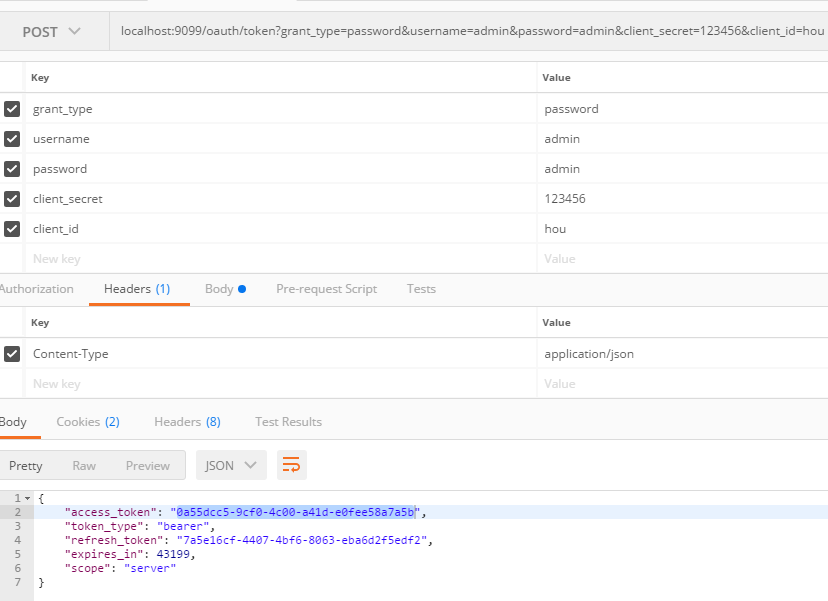
默认获取token接口图中2所示,这里要说明一点,参数key千万不能有空格,尤其是client_这两个
三 需要保护的资源服务配置
yml配置客户端信息以及认中心地址
security:

  oauth2:

    resource:

      tokenInfoUri: http://localhost:9099/oauth/check_token

      preferTokenInfo: true

    client:

      client-id: hou

      client-secret: 123456

      grant-type: password

      scope: server

      access-token-uri: http://localhost:9099/oauth/token
配置认证中心地址即可
/**

 * 资源中心配置

 */

@Configuration

@EnableResourceServer  // 声明资源服务,即可开启token验证保护

@EnableGlobalMethodSecurity(prePostEnabled = true) // 开启方法权限注解

public class ResourceServerConfig extends ResourceServerConfigurerAdapter {

    @Override

    public void configure(HttpSecurity http) throws Exception {

        http.authorizeRequests()

                //配置所有请求不需要认证,在方法用注解定制权限

                .anyRequest().permitAll();

    }

}
编写权限控制
@RestController

@RequestMapping("test")

public class TestController {

    //不需要权限

    @GetMapping("/hou")

    public String test01(){

        return "返回测试数据hou";

    }

    @PreAuthorize("hasAnyAuthority('ROLE_USER')") //需要权限

    @GetMapping("/zheng")

    public String test02(){

        return "返回测试数据zheng";

    }

}
四 测试权限
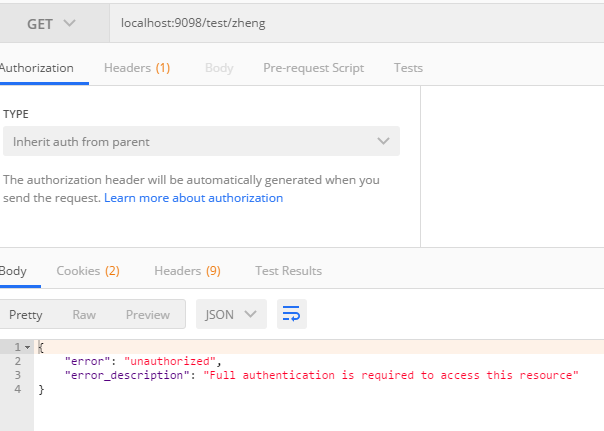
不使用token
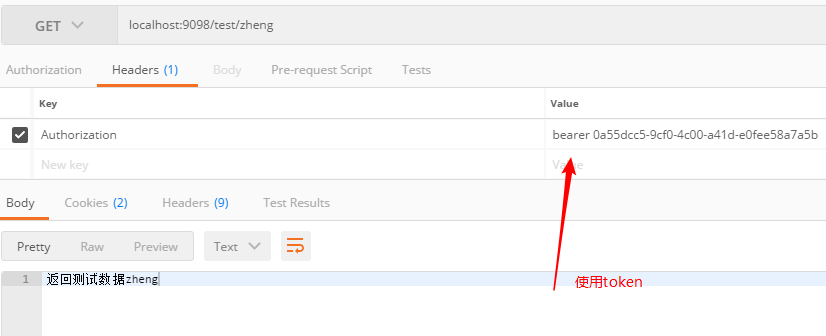
使用token
spring cloud oauth2搭建认证中心与资源中心的更多相关文章
- spring cloud 专题一 (spring cloud 入门搭建 之 Eureka注册中心搭建)
一.前言 本文为spring cloud 微服务框架专题的第一篇,主要讲解如何快速搭建spring cloud微服务及Eureka 注册中心 以及常用开发方式等. 本文理论不多,主要是傻瓜式的环境搭建 ...
- spring security oauth2 搭建认证中心demo
oauth2 介绍 oauth2 协议应该是开发者们耳熟能详的协议了,这里就不做过多的介绍了,具体介绍如何在spring security中搭建oauth2的认证服务.Spring-Securit ...
- vue+uni-app商城实战 | 第一篇:【有来小店】微信小程序快速开发接入Spring Cloud OAuth2认证中心完成授权登录
一. 前言 本篇通过实战来讲述如何使用uni-app快速进行商城微信小程序的开发以及小程序如何接入后台Spring Cloud微服务. 有来商城 youlai-mall 项目是一套全栈商城系统,技术栈 ...
- SpringCloud实战之初级入门(三)— spring cloud config搭建git配置中心
目录 1.环境介绍 2.配置中心 2.1 创建工程 2.2 修改配置文件 2.3 在github中加入配置文件 2.3 修改启动文件 3. 访问配置中心 1.环境介绍 上一篇文章中,我们介绍了如何利用 ...
- Spring Cloud config之一:分布式配置中心入门介绍
Spring Cloud Config为服务端和客户端提供了分布式系统的外部化配置支持.配置服务器为各应用的所有环境提供了一个中心化的外部配置.它实现了对服务端和客户端对Spring Environm ...
- spring security oauth2搭建resource-server demo及token改造成JWT令牌
我们在上文讲了如何在spring security的环境中搭建基于oauth2协议的认证中心demo:https://www.cnblogs.com/process-h/p/15688971.html ...
- Spring Cloud OAuth2.0 微服务中配置 Jwt Token 签名/验证
关于 Jwt Token 的签名与安全性前面已经做了几篇介绍,在 IdentityServer4 中定义了 Jwt Token 与 Reference Token 两种验证方式(https://www ...
- Spring Cloud(七):配置中心(Git 版与动态刷新)【Finchley 版】
Spring Cloud(七):配置中心(Git 版与动态刷新)[Finchley 版] 发表于 2018-04-19 | 更新于 2018-04-24 | Spring Cloud Confi ...
- Spring Cloud第十一篇 | 分布式配置中心高可用
本文是Spring Cloud专栏的第十一篇文章,了解前十篇文章内容有助于更好的理解本文: Spring Cloud第一篇 | Spring Cloud前言及其常用组件介绍概览 Spring Cl ...
随机推荐
- acwing 102 -利用二分枚举区间平均值
我真的是服了,看了一晚上发现居然,,,,, 上图吧,话说有人评论没... 对于结果来说,不一定要枚举有序数列,感觉这是一种猜结果的方法,只不过特别精确,令人发指 #include<cstdio& ...
- The sixth day of Crawler learning
爬取我爱竞赛网的大量数据 首先获取每一种比赛信息的分类链接 def get_type_url(url): web_data = requests.get(web_url) soup = B ...
- lnmp安装部署-mysql5.6+centos6.8+php7.1+nginx1.9
1.准备工作: 1)把所有的软件安装在/Data/apps/,源码包放在/Data/tgz/,数据放在/Data/data,日志文件放在/Data/logs,项目放在/Data/webapps, mk ...
- 如何选择API测试工具
没有最好,只有最合适. 如今,越来越多的公司正在向DevOps的方向左转,以实现持续集成和持续部署开发.这意味着我们的反馈需要比以往更快,以便确定我们的应用程序是否准备好交付.这就是API测试如此重要 ...
- spark(1.1) mllib 源码分析(三)-决策树
本文主要以mllib 1.1版本为基础,分析决策树的基本原理与源码 一.基本原理 二.源码分析 1.决策树构造 指定决策树训练数据集与策略(Strategy)通过train函数就能得到决策树模型Dec ...
- SpringBoot 2.1.6 启动原理解析(一)
小白第一次写博客,如果有不足之处烦请各位大佬指正. 用了好久的SpringBoot了,一直不清楚它内部的一些启动原理,如何加载yml文件.如何初始化bean的,今天就记录一下,新建了一个springb ...
- Session是怎么实现的?存储在哪里?
为什么有session? 首先大家知道,http协议是无状态的,即你连续访问某个网页100次和访问1次对服务器来说是没有区别对待的,因为它记不住你. 那么,在一些场合,确实需要服务器记住当前用户怎么办 ...
- Numpy常用方法及应用总汇
目录 Numpy 1.基本操作 1.1数组转换 1.2数组生成 1.3文件读取 1.4查看操作 2.数据类型 2.1指定数据类型: 2.2查看数据类型 2.3数据类型转换 3.数组运算 3.1数组间运 ...
- The command '/bin/sh -c unzip -o php-7.2.23-src.zip' returned a non-zero code: 1
Dockerfile 内容 #centos7 nginx php redis inotify FROM centos:7 MAINTAINER INFOBIRD RUN yum -y update & ...
- Java set接口之HashSet集合原理讲解
Set接口 java.util.set接口继承自Collection接口,它与Collection接口中的方法基本一致, 并没有对 Collection接口进行功能上的扩充,只是比collection ...