
本地jar包上传docker容器
先安装docker的注册服务器:
[root@VM_0_7_centos ~]# docker run -d -p : --restart=always --name registry2 registry:
开启docker远程api:
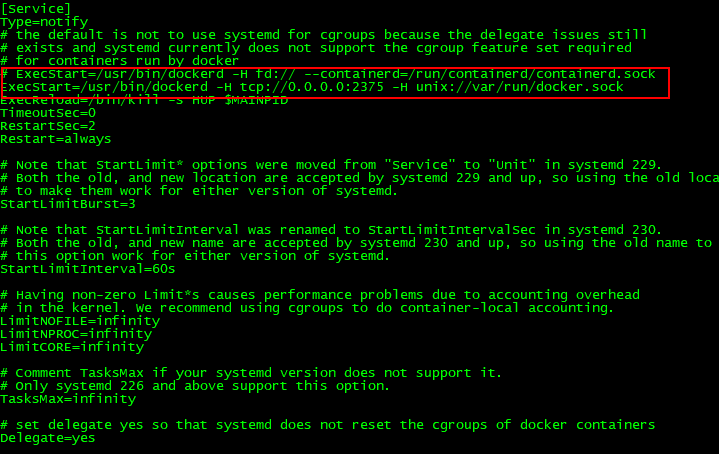
[root@VM_0_7_centos ~]# vi /usr/lib/systemd/system/docker.service
原来文件描述符fd方式改为tcp,指定端口2375:
让docker支持http上传镜像文件(我们本地的jar包):
[root@VM_0_7_centos ~]# echo '{ "insecure-registries":["110.111.119.10:5000"] }' > /etc/docker/daemon.json
注意:这里的110.111.119.10是你docker所在服务器的ip。
重启docker:
[root@VM_0_7_centos ~]# systemctl daemon-reload && systemctl restart docker
本地jar包的pom文件引入docker插件:
    <build>

        <plugins>

            <plugin>

                <groupId>org.springframework.boot</groupId>

                <artifactId>spring-boot-maven-plugin</artifactId>

            </plugin>

            <plugin>

                <groupId>com.spotify</groupId>

                <artifactId>docker-maven-plugin</artifactId>

                <version>1.1.</version>

                <executions>

                    <execution>

                        <id>build-image</id>

                        <phase>package</phase>

                        <goals>

                            <goal>build</goal>

                        </goals>

                    </execution>

                </executions>

                <configuration>

                    <imageName>wlf/${project.artifactId}:${project.version}</imageName>

                    <dockerHost>http://110.111.119.10:2375</dockerHost>

                    <baseImage>java:</baseImage>

                    <entryPoint>["java", "-jar", "-Dspring.profiles.active=prod","/${project.build.finalName}.jar"]

                    </entryPoint>

                    <resources>

                        <resource>

                            <targetPath>/</targetPath>

                            <directory>${project.build.directory}</directory>

                            <include>${project.build.finalName}.jar</include>

                        </resource>

                    </resources>

                </configuration>

            </plugin>

        </plugins>

    </build>
注意:dockerHost的ip就是docker所在服务器的ip,端口号是2375。直接跑maven:
[INFO] Building wlf-test 1.0-SNAPSHOT

[INFO] ------------------------------------------------------------------------

[INFO]

[INFO] --- maven-resources-plugin:3.1.:resources (default-resources) @ wlf-test ---

[INFO] Using 'UTF-8' encoding to copy filtered resources.

[INFO] Copying  resources

[INFO] Copying  resource

[INFO]

[INFO] --- maven-compiler-plugin:3.8.:compile (default-compile) @ wlf-test ---

[INFO] Nothing to compile - all classes are up to date

[INFO]

[INFO] --- maven-resources-plugin:3.1.:testResources (default-testResources) @ wlf-test ---

[INFO] Using 'UTF-8' encoding to copy filtered resources.

[INFO] skip non existing resourceDirectory E:\workspace\wlf\wlf-test\src\test\resources

[INFO]

[INFO] --- maven-compiler-plugin:3.8.:testCompile (default-testCompile) @ wlf-test ---

[INFO] Nothing to compile - all classes are up to date

[INFO]

[INFO] --- maven-surefire-plugin:2.22.:test (default-test) @ wlf-test ---

[INFO] Tests are skipped.

[INFO]

[INFO] --- maven-jar-plugin:3.1.:jar (default-jar) @ wlf-test ---

[INFO] Building jar: E:\workspace\wlf\wlf-test\target\wlf-test-1.0-SNAPSHOT.jar

[INFO]

[INFO] --- spring-boot-maven-plugin:2.1..RELEASE:repackage (repackage) @ wlf-test ---

[INFO] Replacing main artifact with repackaged archive

[INFO]

[INFO] --- docker-maven-plugin:1.1.:build (build-image) @ wlf-test ---

[INFO] Using authentication suppliers: [ConfigFileRegistryAuthSupplier]

[INFO] Copying E:\workspace\wlf\wlf-test\target\wlf-test-1.0-SNAPSHOT.jar -> E:\workspace\wlf\wlf-test\target\docker\wlf-test-1.0-SNAPSHOT.jar

[INFO] Building image wlf/wlf-test:1.0-SNAPSHOT

Step / : FROM java:

 ---> d23bdf5b1b1b

Step / : ADD /wlf-test-1.0-SNAPSHOT.jar //

 ---> 1c5c2b47b5fb

Step / : ENTRYPOINT ["java", "-jar", "-Dspring.profiles.active=prod","/wlf-test-1.0-SNAPSHOT.jar"]

 ---> Running in 3a0ae2be2945

Removing intermediate container 3a0ae2be2945

 ---> 372d06d19472

ProgressMessage{id=null, status=null, stream=null, error=null, progress=null, progressDetail=null}

Successfully built 372d06d19472

Successfully tagged wlf/wlf-test:1.0-SNAPSHOT
本地jar包上传docker容器的更多相关文章
- Maven中安装本地Jar包到仓库中或将本地jar包上传
摘要 maven install 本地jar 命令格式 mvn install:install-file -DgroupId=<group_name> -DartifactId=<a ...
- 使用mvn deploy命令将本地jar包上传到maven私服
记录一下,以后少走弯路 前提:已经搭建好nexus maven私服,地址192.168.110.240:9091 在maven的setting.xml中找到<mirrors></mi ...
- 用eclipse怎样将本地的项目打成jar包上传到maven仓库
使用maven的项目中,有时需要把本地的项目打成jar包上传到mevan仓库. 操作如下: 前提:pom文件中配置好远程库的地址,否则会报错 1.将maven 中的settings文件配置好用户名和密 ...
- nexus搭建maven私服及私服jar包上传和下载
nexus搭建maven私服及私服jar包上传和下载 标签: nexus管理maven库snapshot 2017-06-28 13:02 844人阅读 评论(0) 收藏 举报 分类: Maven(1 ...
- maven jar包上传到服务器
maven jar包上传到服务器时出现pom文件没有上传上去,致使该jar包再被使用的时候没有依赖,jar包调用出错 解决办法,将pom文件一起deploy上去 mvn deploy:deploy-f ...
- Apache Flink任意Jar包上传导致远程代码执行漏洞复现
0x00 简介 Apache Flink是由Apache软件基金会开发的开源流处理框架,其核心是用Java和Scala编写的分布式流数据流引擎.Flink以数据并行和流水线方式执行任意流数据程序,Fl ...
- IDEA如何将写好的java类(UDF函数)打成jar包上传linux
一.编写一个UDF函数,实现将字符串大写转小写 import org.apache.hadoop.hive.ql.exec.UDF; import org.apache.hadoop.io.Text; ...
- 构建自己的jar包上传至Mvaen中央仓库和版本更新
构建自己的jar包上传至Mvaen中央仓库和版本更新 一直羡慕别人制造轮子,开源项目,供别人使用:我也想这样,可以自己才疏学浅,本次就将自己写小工具上传到Maven的中央仓库. 一步一步详细教程演示如 ...
- Apache Flink Dashboard未授权访问导致任意Jar包上传漏洞
漏洞危害 攻击者无需Flink Dashboard认证,通过上传恶意jar包 csdn-[漏洞复现]Apache Flink任意Jar包上传导致远程代码执行 freebuf-Apache Flink ...
随机推荐
- python中分页使用
分页代码pagination.py如文件: from django.utils.safestring import mark_safe from django.http.request import ...
- 构建之法——beta版本
一.开头☀️ 这个作业属于哪个课程 课程链接 这个作业要求在哪里 要求链接 团队名称 Running Man 这个作业的目标 完成团队的Beta版本项目 二.时间任务安排☀️ 时间安排: 冲刺总时间为 ...
- spring cloud (三) 路由 zuul
1 pom.xml <?xml version="1.0" encoding="UTF-8"?> <project xmlns="h ...
- Linux的rwx
- BZOJ2523/LOJ2646 聪明的学生
BZOJ2523/LOJ2646 聪明的学生 第一道CTSC的题. 因为是思维题,所以思路就不写了.直接看代码吧. #include<bits/stdc++.h> #define M 30 ...
- Struts2漏洞导致的反弹shell——青藤云安全使用的是agent进程采集器进行检测
安全老司机 | Struts2漏洞爆发后,与黑客的一次正面交锋 from:https://zhuanlan.zhihu.com/p/66122521 备注: 青藤云安全:——用的是进程信息采集器 通 ...
- ThinkPHP的路由规则和URL生成,结合django的URL理解
这个知识点,我觉得蛮重要的. 不作任何路由定义的TP,URL格式和controller之间,相当于强绑定. 路由配置,让URL和controller的关系可以自定义. URL生成,让controlle ...
- 在inux中安装redis的时候,会出现下面的这个异常
是因为没有安装c++的编译器 安装c++的编译器: yum -y install gcc-c++ 然后再使用命令执行make就可以了 ,如果你遇到这个错误以后,一定要先将redis的解压包删掉以后,再 ...
- Python练习题——用列表的方法输出杨辉三角
def main(): num = int(input('请输入行数: ')) yh = [[]] * num #创建num行空列表 for row in range(len(yh)): #遍历每一行 ...
- Sql操作时间
--. 当前系统日期.时间 -- ::27.277 --.时间操作 dateadd 在向指定日期加上一段时间的基础上,返回新的 datetime 值 dateadd(datepart,number,d ...