
wpf模仿QQ表情
效果图:
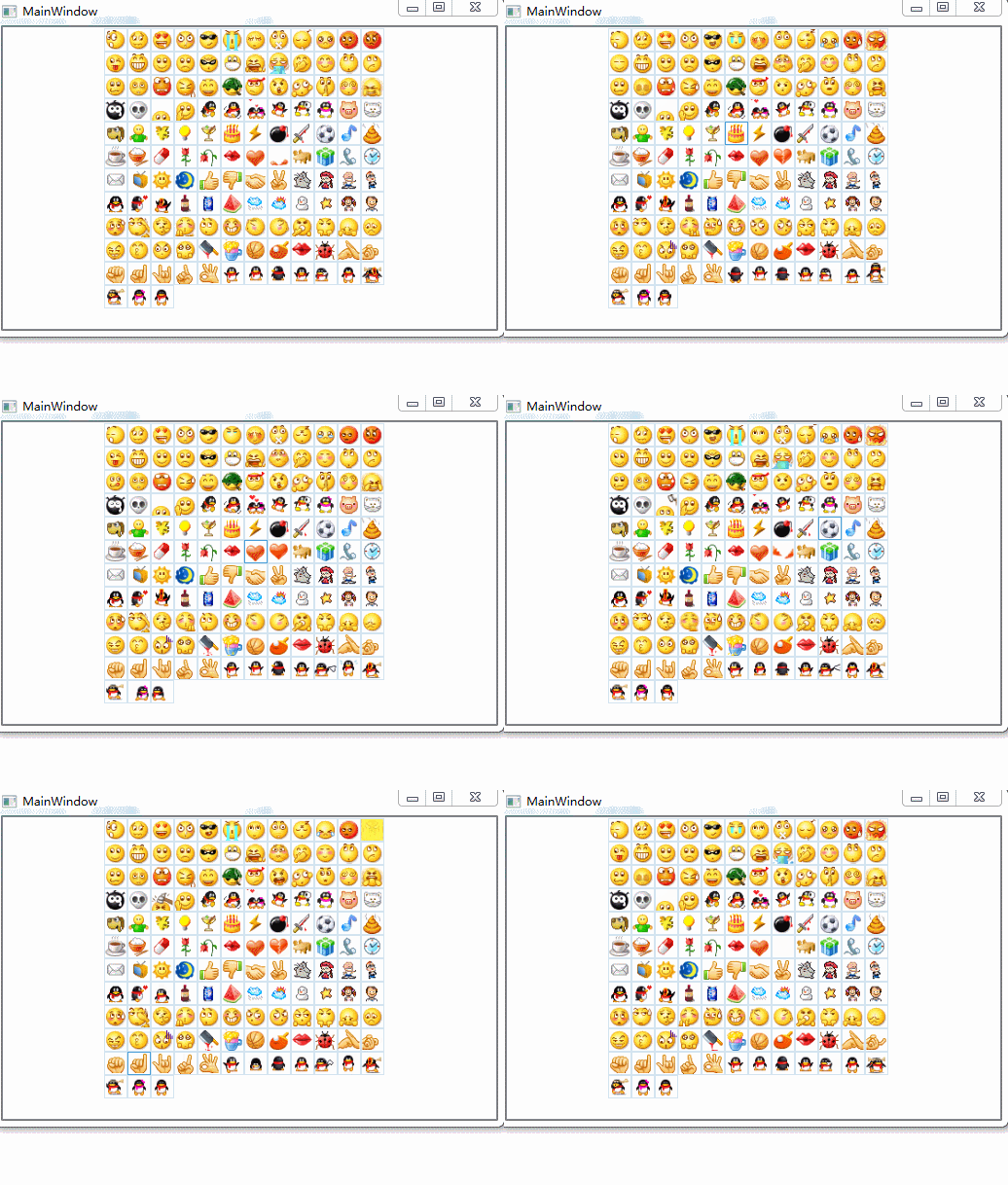
style:
<Style x:Key="LBXITEM_VERTICAL" TargetType="ListBoxItem">
            <Setter Property="Template">
                <Setter.Value>
                    <ControlTemplate TargetType="ListBoxItem">
                        <Border x:Name=">
                            <local:GifImage x:Name="
                                            BorderBrush="#D3E4F0" Source="{Binding gifImg}"
                                            Stretch="Uniform"/>
                        </Border>
                        <ControlTemplate.Triggers>
                            <Trigger Property="IsMouseOver" Value="True">
                                <Setter Property="BorderBrush" TargetName="gif" Value="#4CA0D9"/>
                            </Trigger>
                            <Trigger Property="IsSelected" Value="True">
                                <Setter Property="BorderBrush" TargetName="gif" Value="#4CA0D9"/>
                            </Trigger>
                        </ControlTemplate.Triggers>
                    </ControlTemplate>
                </Setter.Value>
            </Setter>
        </Style>

        <Style x:Key="LBX_VERTICAL" TargetType="ListBox">
            <Setter Property="ItemContainerStyle" Value="{DynamicResource LBXITEM_VERTICAL}"/>
            <Setter Property="ItemsPanel">
                <Setter.Value>
                    <ItemsPanelTemplate>
                        <WrapPanel Orientation=">
                        </WrapPanel>
                    </ItemsPanelTemplate>
                </Setter.Value>
            </Setter>
        </Style>
local:GifImage 在WPF中动态显示gif http://www.cnblogs.com/zhouyinhui/archive/2007/12/23/1011555.html
xaml:
  <ListBox x:Name="listboGif" Style="{StaticResource LBX_VERTICAL}">
        </ListBox>
xaml.CS:
Loaded:
string xmlPath = "../../Face/emoticons.xml";
            XmlDocument xmlDoc = new XmlDocument();
            xmlDoc.Load(xmlPath);//xmlPath为xml文件路径
            XmlNode xmlNode = xmlDoc.SelectSingleNode("/Emoticons");
            XmlNodeList oList = xmlNode.ChildNodes;
            //XmlNode xmlNode1 = xmlDoc.SelectSingleNode("/Emoticons/Emoticon");
            XmlNode oCurrentNode;
            List<gifModel> list = new List<gifModel>();
            gifModel gif;
            ; i < oList.Count; i++)
            {
                gif = new gifModel();
                oCurrentNode = oList[i];
                , oCurrentNode.BaseURI.LastIndexOf("e"));
                gif.gifImg =str+oCurrentNode.InnerText;
                list.Add(gif);
            }
            listboGif.ItemsSource = list;
emoticons.xml:
<?xml version="1.0"?>
<Emoticons>
<Emoticon id="0" tip="微笑">0.gif</Emoticon>
<Emoticon id="1" tip="撇嘴">1.gif</Emoticon>
<Emoticon id="2" tip="色">2.gif</Emoticon>
<Emoticon id="3" tip="发呆">3.gif</Emoticon>
<Emoticon id="4" tip="得意">4.gif</Emoticon>
<Emoticon id="5" tip="流泪">5.gif</Emoticon>
<Emoticon id="6" tip="害羞">6.gif</Emoticon>
<Emoticon id="7" tip="闭嘴">7.gif</Emoticon>
<Emoticon id="8" tip="睡">8.gif</Emoticon>
<Emoticon id="9" tip="大哭">9.gif</Emoticon>
<Emoticon id="10" tip="尴尬">10.gif</Emoticon>
<Emoticon id="11" tip="发怒">11.gif</Emoticon>
<Emoticon id="12" tip="调皮">12.gif</Emoticon>
<Emoticon id="13" tip="呲牙">13.gif</Emoticon>
<Emoticon id="14" tip="惊讶">14.gif</Emoticon>
<Emoticon id="15" tip="难过">15.gif</Emoticon>
<Emoticon id="16" tip="酷">16.gif</Emoticon>
<Emoticon id="17" tip="冷汗">17.gif</Emoticon>
<Emoticon id="18" tip="抓狂">18.gif</Emoticon>
<Emoticon id="19" tip="吐">19.gif</Emoticon>
<Emoticon id="20" tip="偷笑">20.gif</Emoticon>
<Emoticon id="21" tip="可爱">21.gif</Emoticon>
<Emoticon id="22" tip="白眼">22.gif</Emoticon>
<Emoticon id="23" tip="傲慢">23.gif</Emoticon>
<Emoticon id="24" tip="饥饿">24.gif</Emoticon>
<Emoticon id="25" tip="困">25.gif</Emoticon>
<Emoticon id="26" tip="惊恐">26.gif</Emoticon>
<Emoticon id="27" tip="流汗">27.gif</Emoticon>
<Emoticon id="28" tip="憨笑">28.gif</Emoticon>
<Emoticon id="29" tip="大兵">29.gif</Emoticon>
<Emoticon id="30" tip="奋斗">30.gif</Emoticon>
<Emoticon id="31" tip="咒骂">31.gif</Emoticon>
<Emoticon id="32" tip="疑问">32.gif</Emoticon>
<Emoticon id="33" tip="嘘...">33.gif</Emoticon>
<Emoticon id="34" tip="晕">34.gif</Emoticon>
<Emoticon id="35" tip="折磨">35.gif</Emoticon>
<Emoticon id="36" tip="衰">36.gif</Emoticon>
<Emoticon id="37" tip="骷髅">37.gif</Emoticon>
<Emoticon id="38" tip="敲打">38.gif</Emoticon>
<Emoticon id="39" tip="再见">39.gif</Emoticon>
<Emoticon id="40" tip="擦汗">40.gif</Emoticon>
<Emoticon id="41" tip="抠鼻">41.gif</Emoticon>
<Emoticon id="42" tip="鼓掌">42.gif</Emoticon>
<Emoticon id="43" tip="糗大了">43.gif</Emoticon>
<Emoticon id="44" tip="坏笑">44.gif</Emoticon>
<Emoticon id="45" tip="左哼哼">45.gif</Emoticon>
<Emoticon id="46" tip="右哼哼">46.gif</Emoticon>
<Emoticon id="47" tip="哈欠">47.gif</Emoticon>
<Emoticon id="48" tip="鄙视">48.gif</Emoticon>
<Emoticon id="49" tip="委屈">49.gif</Emoticon>
<Emoticon id="50" tip="快哭了">50.gif</Emoticon>
<Emoticon id="51" tip="阴险">51.gif</Emoticon>
<Emoticon id="52" tip="亲亲">52.gif</Emoticon>
<Emoticon id="53" tip="吓">53.gif</Emoticon>
<Emoticon id="54" tip="可怜">54.gif</Emoticon>
<Emoticon id="55" tip="菜刀">55.gif</Emoticon>
<Emoticon id="56" tip="西瓜">56.gif</Emoticon>
<Emoticon id="57" tip="啤酒">57.gif</Emoticon>
<Emoticon id="58" tip="篮球">58.gif</Emoticon>
<Emoticon id="59" tip="乒乓">59.gif</Emoticon>
<Emoticon id="60" tip="咖啡">60.gif</Emoticon>
<Emoticon id="61" tip="饭">61.gif</Emoticon>
<Emoticon id="62" tip="猪头">62.gif</Emoticon>
<Emoticon id="63" tip="玫瑰">63.gif</Emoticon>
<Emoticon id="64" tip="凋谢">64.gif</Emoticon>
<Emoticon id="65" tip="示爱">65.gif</Emoticon>
<Emoticon id="66" tip="爱心">66.gif</Emoticon>
<Emoticon id="67" tip="心碎">67.gif</Emoticon>
<Emoticon id="68" tip="蛋糕">68.gif</Emoticon>
<Emoticon id="69" tip="闪电">69.gif</Emoticon>
<Emoticon id="70" tip="炸弹">70.gif</Emoticon>
<Emoticon id="71" tip="刀">71.gif</Emoticon>
<Emoticon id="72" tip="足球">72.gif</Emoticon>
<Emoticon id="73" tip="瓢虫">73.gif</Emoticon>
<Emoticon id="74" tip="便便">74.gif</Emoticon>
<Emoticon id="75" tip="月亮">75.gif</Emoticon>
<Emoticon id="76" tip="太阳">76.gif</Emoticon>
<Emoticon id="77" tip="礼物">77.gif</Emoticon>
<Emoticon id="78" tip="拥抱">78.gif</Emoticon>
<Emoticon id="79" tip="强">79.gif</Emoticon>
<Emoticon id="80" tip="弱">80.gif</Emoticon>
<Emoticon id="81" tip="握手">81.gif</Emoticon>
<Emoticon id="82" tip="胜利">82.gif</Emoticon>
<Emoticon id="83" tip="抱拳">83.gif</Emoticon>
<Emoticon id="84" tip="勾引">84.gif</Emoticon>
<Emoticon id="85" tip="拳头">85.gif</Emoticon>
<Emoticon id="86" tip="差劲">86.gif</Emoticon>
<Emoticon id="87" tip="爱你">87.gif</Emoticon>
<Emoticon id="88" tip="NO">88.gif</Emoticon>
<Emoticon id="89" tip="OK">89.gif</Emoticon>
<Emoticon id="90" tip="爱情">90.gif</Emoticon>
<Emoticon id="91" tip="飞吻">91.gif</Emoticon>
<Emoticon id="92" tip="跳跳">92.gif</Emoticon>
<Emoticon id="93" tip="发抖">93.gif</Emoticon>
<Emoticon id="94" tip="怄火">94.gif</Emoticon>
<Emoticon id="95" tip="转圈">95.gif</Emoticon>
<Emoticon id="96" tip="磕头">96.gif</Emoticon>
<Emoticon id="97" tip="回头">97.gif</Emoticon>
<Emoticon id="98" tip="跳绳" >98.gif</Emoticon>
<Emoticon id="99" tip="挥手">99.gif</Emoticon>
<Emoticon id="100" tip="激动">100.gif</Emoticon>
<Emoticon id="101" tip="街舞">101.gif</Emoticon>
<Emoticon id="102" tip="献吻">102.gif</Emoticon>
<Emoticon id="103" tip="左太极">103.gif</Emoticon>
<Emoticon id="104" tip="右太极">104.gif</Emoticon>
<Emoticon id="105" tip="非典">105.gif</Emoticon>
<Emoticon id="106" tip="闪人">106.gif</Emoticon>
<Emoticon id="107" tip="找">107.gif</Emoticon>
<Emoticon id="108" tip="美眉">108.gif</Emoticon>
<Emoticon id="109" tip="猫咪">109.gif</Emoticon>
<Emoticon id="110" tip="小狗">110.gif</Emoticon>
<Emoticon id="111" tip="钱">111.gif</Emoticon>
<Emoticon id="112" tip="灯泡">112.gif</Emoticon>
<Emoticon id="113" tip="酒杯">113.gif</Emoticon>
<Emoticon id="114" tip="音乐">114.gif</Emoticon>
<Emoticon id="115" tip="药丸">115.gif</Emoticon>
<Emoticon id="116" tip="吻">116.gif</Emoticon>
<Emoticon id="117" tip="会议">117.gif</Emoticon>
<Emoticon id="118" tip="电话">118.gif</Emoticon>
<Emoticon id="119" tip="时间">119.gif</Emoticon>
<Emoticon id="120" tip="邮件">120.gif</Emoticon>
<Emoticon id="121" tip="电视">121.gif</Emoticon>
<Emoticon id="122" tip="多多">122.gif</Emoticon>
<Emoticon id="123" tip="美女">123.gif</Emoticon>
<Emoticon id="124" tip="汉良">124.gif</Emoticon>
<Emoticon id="125" tip="毛毛">125.gif</Emoticon>
<Emoticon id="126" tip="Q仔">126.gif</Emoticon>
<Emoticon id="127" tip="白酒">127.gif</Emoticon>
<Emoticon id="128" tip="汽水">128.gif</Emoticon>
<Emoticon id="129" tip="下雨">129.gif</Emoticon>
<Emoticon id="130" tip="多云">130.gif</Emoticon>
<Emoticon id="131" tip="雪人">131.gif</Emoticon>
<Emoticon id="132" tip="星星">132.gif</Emoticon>
<Emoticon id="133" tip="女">133.gif</Emoticon>
<Emoticon id="134" tip="男">134.gif</Emoticon>
</Emoticons>
gifModel:
 internal class gifModel
        {
            public string gifImg { get; set; }
        }
wpf模仿QQ表情的更多相关文章
- WPF模仿QQ登录按钮
原文:WPF模仿QQ登录按钮 如下图,第一张是未点击时按钮样式,第二张是鼠标划过时按钮样式. 样式代码: <Style TargetType="{x:Type Button}" ...
- WPF 微信 MVVM 【续】发送部分QQ表情
今天主要记录的就是发送QQ表情, WPF 微信 MVVM里写了,后期为了发送QQ表情,需要把TextBox替换为RichTextBox,接下来就说说替换的过程. 一.支持Binding的RichTex ...
- WPF仿QQ聊天框表情文字混排实现
原文:WPF仿QQ聊天框表情文字混排实现 二话不说.先上图 图中分别有文件.文本+表情.纯文本的展示,对于同一个list不同的展示形式,很明显,应该用多个DataTemplate,那么也就需要Data ...
- wpf仿qq边缘自动停靠,支持多屏
wpf完全模仿qq边缘自动隐藏功能,采用鼠标钩子获取鼠标当前状态,在通过当前鼠标的位置和点击状态来计算是否需要隐藏. 以下是实现的具体方法: 一.鼠标钩子实时获取当前鼠标的位置和点击状态 /// &l ...
- QQ表情的发送与接收
我想大家对QQ表情一定不会陌生,一个个小头像极大丰富了聊天的乐趣,使得聊天不再是简单的文字叙述,还能够配上喜.怒.哀.乐等表达人物心情的小图片.本文重点要介绍的内容就是如何在微信公众平台使用QQ表情, ...
- QQ表情动图,增加写博客的乐趣
QQ表情动图,增加写博客的乐趣 body{margin:0px;}
- 活跃天数计算用户等级模仿QQ的升级方式
QQ等级的算法:设当前等级为N,达到当前等级最少需要的活跃天数为D,当前活跃天数为Dc,升级剩余天数为Dr,则: 从而推出: 好了,引述完成,懒得写字了,贴出代码: 复制内容到剪贴板 代码: < ...
- 模仿QQ空间 网页设计
目的:1.通过模仿QQ空间,全自主写代码,熟悉网页设计的流程 2.熟练的掌握HTML.CSS.JS的应用 3.将在此过程中遇到的问题及其解决方法记录在此,以便取用. 开始: 一.登陆界面(index. ...
- 消除QQ表情小游戏
<!doctype html> <html> <head> <meta charset="utf-8"> <title> ...
随机推荐
- 剑指Offer面试题:31.两个链表的第一个公共节点
一.题目:两个链表的第一个公共节点 题目:输入两个链表,找出它们的第一个公共结点. 链表结点定义如下,这里使用C#语言描述: public class Node { public int key; p ...
- WPF +MVVM(Caliburn.Micro)项目框架
最近做了一个软件,这个软件不是网站,但是与HTML,AJAX等技术密切相关,也不是只有单纯的数据库增删改查,还涉及到线程协调,比较复杂的文本处理…… 这样的软件,用OA,ERP的框架显然是不合适的,因 ...
- 三国魂破解1——resmask.swf
这个是资源文件的映射. 根据index.swf的加载流程,直到初始化会加载: 破解方式: var l:URLLoader = new URLLoader(); l.dataFormat = URLLo ...
- ASP.NET MVC 5 - 控制器
MVC代表: 模型-视图-控制器 .MVC是一个架构良好并且易于测试和易于维护的开发模式.基于MVC模式的应用程序包含: · Models: 表示该应用程序的数据并使用验证逻辑来强制实施业务规则的数据 ...
- 《Entity Framework 6 Recipes》中文翻译系列 (21) -----第四章 ASP.NET MVC中使用实体框架之在页面中创建查询和使用ASP.NET URL路由过虑
翻译的初衷以及为什么选择<Entity Framework 6 Recipes>来学习,请看本系列开篇 4.2. 构建一个搜索查询 搜索数据是几乎所有应用的一个基本功能.它一般是动态的,因 ...
- ASP.NET Web.config
分析: .NET Web 应用程序的配置信息(如最常用的设置ASP.Net Web 应用程序的身份验证方式),它可以出现在应用程序的每一个目录中.当你通过VB.NET新 建 一个Web应用程序后,默认 ...
- Ajax_02之XHR发起异步请求
1.Ajax: AJAX:Asynchronous Javascript And Xml,异步的JS和XML: 同步请求:地址栏输入URL.链接跳转.表单提交-- 异步请求:使用Ajax发起,底层使用 ...
- Leetcode-463 Island Perimeter
#463. Island Perimeter You are given a map in form of a two-dimensional integer grid where 1 represe ...
- 如何在多线程leader-follower模式下正确的使用boost::asio。
#include <assert.h> #include <signal.h> #include <unistd.h> #include <iostream& ...
- JS原生基础终结篇 (帅哥)
闭包 基础 面向对象基础 1.1 闭包 在程序语言中,所谓闭包,是指语法域位于某个特定的区域,具有持续参照(读写)位于该区域内自身范围之外的执行域上的非持久型变量值能力的段落.这些外部执行域的非 ...