
warning insecure world writable dir ruby mode 040777,gem insstal sass error failed to build gem native extension
//1.删除原gem源

gem sources --remove https://rubygems.org/

//2.添加国内镜像

gem source -a https://gems.ruby-china.com

//3.打印是否替换成功

gem sources -l

//4.更换成功后打印如下

*** CURRENT SOURCES ***

 https://gems.ruby-china.com
sudo gem install sass

Building native extensions. This could take a while...

ERROR:  Error installing sass:

    ERROR: Failed to build gem native extension.

    current directory: /var/lib/gems/2.5./gems/ffi-1.11./ext/ffi_c

/usr/bin/ruby2. -r ./siteconf20190522--9c6o4.rb extconf.rb

mkmf.rb can't find header files for ruby at /usr/lib/ruby/include/ruby.h

extconf failed, exit code

Gem files will remain installed in /var/lib/gems/2.5./gems/ffi-1.11. for inspection.

Results logged to /var/lib/gems/2.5./extensions/x86_64-linux/2.5./ffi-1.11./gem_make.out

这个烂方法不能用
sudo chmod 777 /Library/Ruby/Gems
sudo chmod go-w /usr/local/bin
来安装一个homebrew
https://docs.brew.sh/Homebrew-on-Linux
sh -c "$(curl -fsSL https://raw.githubusercontent.com/Linuxbrew/install/master/install.sh)"
继续按照官方说的做,基本上都是环境的问题。
test -d ~/.linuxbrew && eval $(~/.linuxbrew/bin/brew shellenv)

test -d /home/linuxbrew/.linuxbrew && eval $(/home/linuxbrew/.linuxbrew/bin/brew shellenv)

test -r ~/.bash_profile && echo "eval \$($(brew --prefix)/bin/brew shellenv)" >>~/.bash_profile

echo "eval \$($(brew --prefix)/bin/brew shellenv)" >>~/.profile
安装完毕测试一下
brew install hello
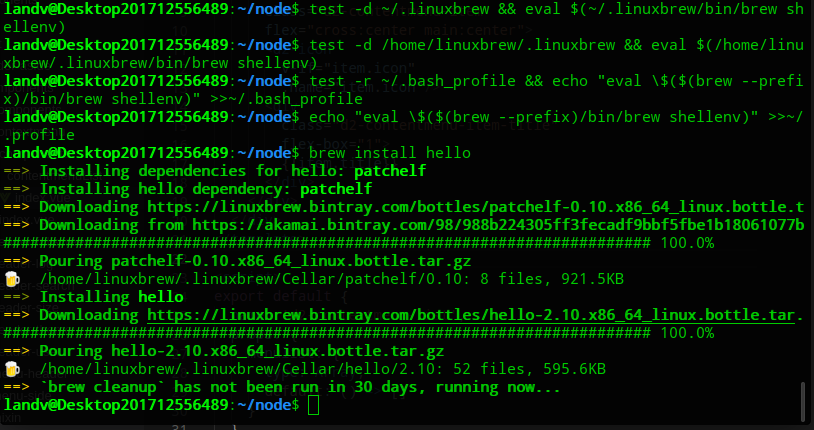
安装了完整版居然好了。。。。好吧
sudo apt-get install ruby-full
如果没好,那就继续
brew install ruby
不知道homebrew的不要问我,因为我也不知道是什么鬼。应该和忍者影分身一种鬼东西。
安装完毕看一下版本号

继续安装sass(我叫他洒洒水)
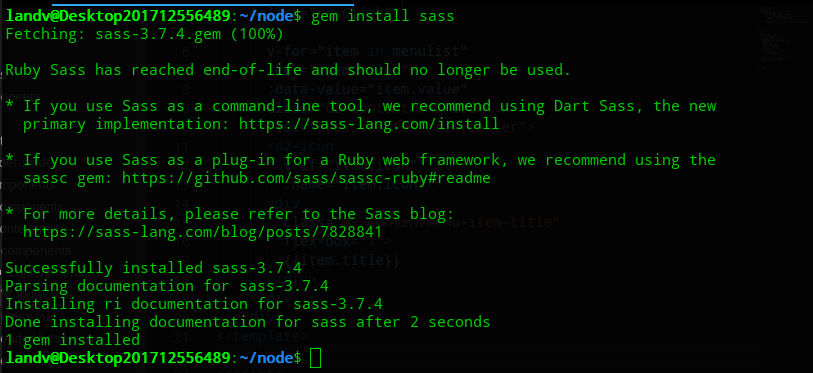
安装成功,查看一下是否安装成功
landv@Desktop201712556489:~/node$ sass -v

bash: sass: 未找到命令

landv@Desktop201712556489:~/node$
悲惨呀,又是环境问题,明明已经安装成功了
换一条路
npm install -g sass
一样的问题,找不到命令
FUCK~~~~
难道只有Deepin是酱紫~~~
好吧曲线救国,直接吧npm下载到的node-sass加入环境变量
综上所述,那就是卸载ruby再进行安装配置,如果还不行那就再卸载一边。
ERROR:  While executing gem ... (Errno::EACCES)

Permission denied @ rb_sysopen - /Library/Ruby/Gems/2.3./gems/fuzzy_match-2.1./.gitignore
报这个错误就执行
sudo gem install cocoapods-core
然后再安装sass
记住千万不要用deepin自带的ruby
重要的事情不怕多说
sudo apt-get install ruby-full
Linux用流了,要比Windows配置快。
Deepin Linux 绝逼是环境的问题,虽然它不背锅吧。
https://www.cnblogs.com/landv/p/10867433.html(深度Linux /etc/profile 环境变量生效问题)
warning insecure world writable dir ruby mode 040777,gem insstal sass error failed to build gem native extension的更多相关文章
- /var/lib/gems/2.5.0/gems/seccomp-tools-1.3.0/lib/seccomp-tools/dumper.rb:125: warning: Insecure world writable dir /home/python/.local in PATH, mode 040777 解决方案
/var/lib/gems/2.5.0/gems/seccomp-tools-1.3.0/lib/seccomp-tools/dumper.rb:125: warning: Insecure worl ...
- Insecure world writable dir /usr/local in PATH, mode 040777
/System/Library/Frameworks/Ruby.framework/Versions/2.0/usr/lib/ruby/2.0.0/universal-darwin14/rbconfi ...
- iOS:解决pod的Insecure world writable dir问题
当我们运行pod setup的命令的时候,有时候会碰到这个警告: /Library/Ruby/Gems/2.0.0/gems/cocoapods-0.33.1/lib/cocoapods/execut ...
- Ruby 踩坑 “Failed to build gem native extension”
ruby新手,总是会出现这样那样的问题,这里先记录下,希望能解决你得问题. 首先是安装ruby 环境,楼主愚钝,在公司和自己的电脑上来来回回整了好几天,每次安装 gem 包的时候总是报错,错误信息大致 ...
- ruby中输入命令行编译sass(ruby小白)
Ruby(或cmd中)输入命令行编译sass步骤如下: (1)举例而言:首先在F盘下建立一个总文件夹,比如test文件夹:其次在该文件夹下建立html,images,js,sass等文件夹. (2)在 ...
- ruby配合gem使用sass
Ruby环境安装 1.Ruby安装包下载地址:http://rubyinstaller.org/downloads/下载对应系统版本的安装包: 2.双击rubyinstaller-2.2.3-x64. ...
- 1月10日 ruby基础教程,查漏补缺; 2月22日 Exception补充
https://ruby-doc.org/core-2.5.0/Exception.html 1月20日练习完1,2章. 第一章 初探 ‘’单引号不执行转义符. \t 制表符.\n 换行符. p me ...
- ruby 编译安装,gem国内源ruby.taobao.org
centos6.6final 一.安装依赖包(使用默认CENTOS更新源): # yum install openssl* openssl-devel zlib-devel gcc gcc-c++ m ...
- Ruby基础类型,动态特性,代码块
#Ruby内置基础数据类型 NilClass,TureClass,FalseClass,Time,Date,String,Range,Struct,Array,Hash #Numerice 1.分为I ...
随机推荐
- linq 动态排序 order by
项目查询数据库使用的是linq 语法,可是后期需要用到不同字段的排序.各种纠结! 在网上找了各种资料 后面才找到两种方法 using System; using System.Collections. ...
- 【ABAP】第一章-基础
1. ABAP语法基础 1.1 基本数据类型 C.N.D.T.I.F.P.X.string.Xstring P:默认为8字节,最大允许16字节.最大整数位:16*2 = 32 - 1 = 31 -14 ...
- Oracle数据库连接超时
关于Oracle数据库的连接失败问题,有N种情况都会导致,这次遇到的是一般开发或者运维人员难以发现的 场景: 有一台机A能够正常连接数据库并正常运行,机器B连接失败 32位WebService程序基于 ...
- opencv 源码分析 CUDA可分离滤波器设计 ( 发现OpenCV的cuda真TM慢 )
1. 主函数 void SeparableLinearFilter::apply(InputArray _src, OutputArray _dst, Stream& _stream) { G ...
- Java xml出现错误 javax.xml.transform.TransformerException: java.lang.NullPointerException
转自:https://www.jb51.net/article/98644.htm Java xml出现错误 javax.xml.transform.TransformerException: jav ...
- angularcli 第一篇(新建、组件、模块)
1.新建并启动项目: 1.安装: npminstall -g @angular/cli 2.新建: ng new mytest 3.进入项目:cd mytest 4.启动: ng serve 5.打开 ...
- edgex0.7.1_1.0.1的X86编译和交叉编译
一. X86编译 1. 安装zeromq库 根据setup script安装: wget https://github.com/zeromq/libzmq/releases/download/v4.2 ...
- SVN提交错误及使用技巧
错误1: Some of selected resources were not added to version control. Some of selected resources were n ...
- 使用Cloudera Manager搭建Impala环境
使用Cloudera Manager搭建Impala服务 作者:尹正杰 版权声明:原创作品,谢绝转载!否则将追究法律责任. 一.使用CM安装Imapala 1>.进入CM的服务安装向导 2> ...
- CDH构建大数据平台-使用自建的镜像地址安装Cloudera Manager
CDH构建大数据平台-使用自建的镜像地址安装Cloudera Manager 作者:尹正杰 版权声明:原创作品,谢绝转载!否则将追究法律责任. 一.搭建CM私有仓库 详情请参考我的笔记: http ...