
Spark累加器(Accumulator)
一、累加器简介
在Spark中如果想在Task计算的时候统计某些事件的数量,使用filter/reduce也可以,但是使用累加器是一种更方便的方式,累加器一个比较经典的应用场景是用来在Spark Streaming应用中记录某些事件的数量。
使用累加器时需要注意只有Driver能够取到累加器的值,Task端进行的是累加操作。
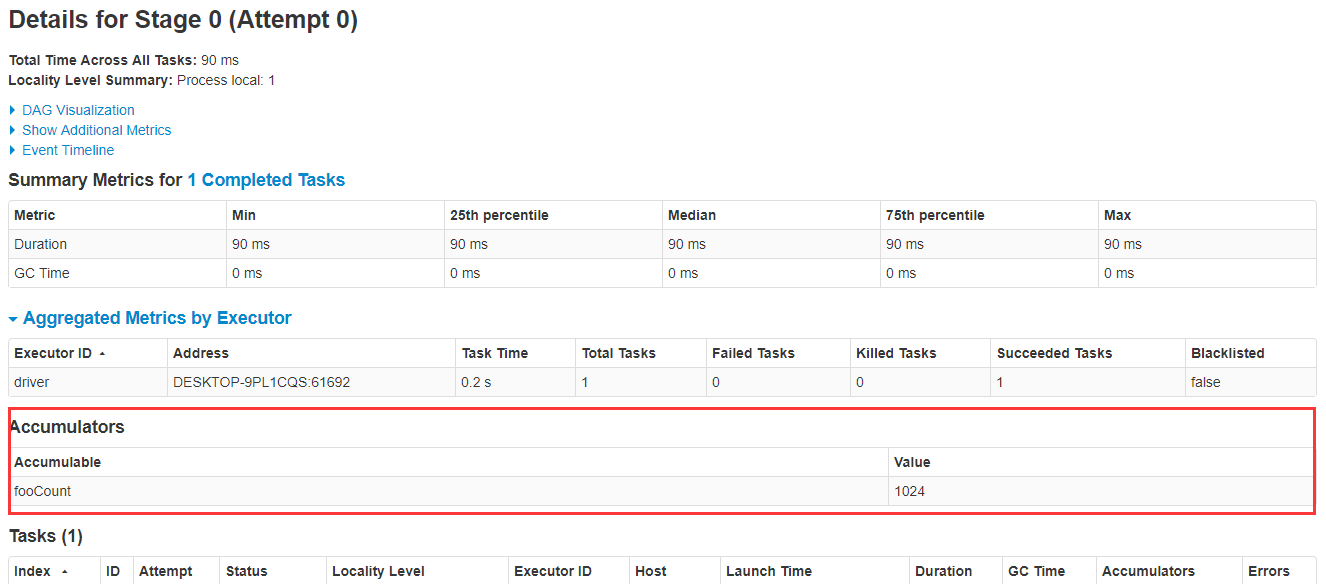
创建的Accumulator变量的值能够在Spark Web UI上看到,在创建时应该尽量为其命名,下面探讨如何在Spark Web UI上查看累加器的值。
示例代码:
package cc11001100.spark.sharedVariables.accumulators;

import org.apache.spark.api.java.function.ForeachFunction;

import org.apache.spark.sql.Encoders;

import org.apache.spark.sql.SparkSession;

import org.apache.spark.util.LongAccumulator;

import java.util.Collections;

import java.util.concurrent.TimeUnit;

/**

 * @author CC11001100

 */

public class SparkWebUIShowAccumulatorDemo {

    public static void main(String[] args) {

        SparkSession spark = SparkSession.builder().master("local[*]").getOrCreate();

        LongAccumulator fooCount = spark.sparkContext().longAccumulator("fooCount");

        spark.createDataset(Collections.singletonList(), Encoders.INT())

                .foreach((ForeachFunction<Integer>) fooCount::add);

        try {

            TimeUnit.DAYS.sleep( * );

        } catch (InterruptedException e) {

            e.printStackTrace();

        }

    }

}
启动的时候注意观察控制台上输出的Spark Web UI的地址:

打开此链接,点进去Jobs-->Stage,可以看到fooCount累加器的值已经被累加到了1024:
二、Accumulator的简单使用
Spark内置了三种类型的Accumulator,分别是LongAccumulator用来累加整数型,DoubleAccumulator用来累加浮点型,CollectionAccumulator用来累加集合元素。
package cc11001100.spark.sharedVariables.accumulators;

import org.apache.spark.SparkContext;

import org.apache.spark.api.java.function.MapFunction;

import org.apache.spark.sql.Dataset;

import org.apache.spark.sql.Encoders;

import org.apache.spark.sql.SparkSession;

import org.apache.spark.util.CollectionAccumulator;

import org.apache.spark.util.DoubleAccumulator;

import org.apache.spark.util.LongAccumulator;

import java.util.Arrays;

/**

 * 累加器的基本使用

 *

 * @author CC11001100

 */

public class AccumulatorsSimpleUseDemo {

    public static void main(String[] args) {

        SparkSession spark = SparkSession.builder().master("local[*]").getOrCreate();

        SparkContext sc = spark.sparkContext();

        // 内置的累加器有三种,LongAccumulator、DoubleAccumulator、CollectionAccumulator

        // LongAccumulator: 数值型累加

        LongAccumulator longAccumulator = sc.longAccumulator("long-account");

        // DoubleAccumulator: 小数型累加

        DoubleAccumulator doubleAccumulator = sc.doubleAccumulator("double-account");

        // CollectionAccumulator:集合累加

        CollectionAccumulator<Integer> collectionAccumulator = sc.collectionAccumulator("double-account");

        Dataset<Integer> num1 = spark.createDataset(Arrays.asList(, , ), Encoders.INT());

        Dataset<Integer> num2 = num1.map((MapFunction<Integer, Integer>) x -> {

            longAccumulator.add(x);

            doubleAccumulator.add(x);

            collectionAccumulator.add(x);

            return x;

        }, Encoders.INT()).cache();

        num2.count();

        System.out.println("longAccumulator: " + longAccumulator.value());

        System.out.println("doubleAccumulator: " + doubleAccumulator.value());

        // 注意,集合中元素的顺序是无法保证的,多运行几次发现每次元素的顺序都可能会变化

        System.out.println("collectionAccumulator: " + collectionAccumulator.value());

    }

}
三、自定义Accumulator
当内置的Accumulator无法满足要求时,可以继承AccumulatorV2实现自定义的累加器。
实现自定义累加器的步骤:
1. 继承AccumulatorV2,实现相关方法
2. 创建自定义Accumulator的实例,然后在SparkContext上注册它
假设要累加的数非常大,内置的LongAccumulator已经无法满足需求,下面是一个简单的例子用来累加BigInteger:
package cc11001100.spark.sharedVariables.accumulators;

import org.apache.spark.SparkContext;

import org.apache.spark.api.java.function.MapFunction;

import org.apache.spark.sql.Dataset;

import org.apache.spark.sql.Encoders;

import org.apache.spark.sql.SparkSession;

import org.apache.spark.util.AccumulatorV2;

import java.math.BigInteger;

import java.util.Arrays;

import java.util.List;

/**

 * 自定义累加器

 *

 * @author CC11001100

 */

public class CustomAccumulatorDemo {

    // 需要注意的是累加操作不能依赖顺序,比如类似于StringAccumulator这种则会得到错误的结果

    public static class BigIntegerAccumulator extends AccumulatorV2<BigInteger, BigInteger> {

        private BigInteger num = BigInteger.ZERO;

        public BigIntegerAccumulator() {

        }

        public BigIntegerAccumulator(BigInteger num) {

            this.num = new BigInteger(num.toString());

        }

        @Override

        public boolean isZero() {

            return num.compareTo(BigInteger.ZERO) == ;

        }

        @Override

        public AccumulatorV2<BigInteger, BigInteger> copy() {

            return new BigIntegerAccumulator(num);

        }

        @Override

        public void reset() {

            num = BigInteger.ZERO;

        }

        @Override

        public void add(BigInteger num) {

            this.num = this.num.add(num);

        }

        @Override

        public void merge(AccumulatorV2<BigInteger, BigInteger> other) {

            num = num.add(other.value());

        }

        @Override

        public BigInteger value() {

            return num;

        }

    }

    public static void main(String[] args) {

        SparkSession spark = SparkSession.builder().master("local[*]").getOrCreate();

        SparkContext sc = spark.sparkContext();

        // 直接new自定义的累加器

        BigIntegerAccumulator bigIntegerAccumulator = new BigIntegerAccumulator();

        // 然后在SparkContext上注册一下

        sc.register(bigIntegerAccumulator, "bigIntegerAccumulator");

        List<BigInteger> numList = Arrays.asList(new BigInteger(""), new BigInteger(""), new BigInteger(""));

        Dataset<BigInteger> num = spark.createDataset(numList, Encoders.kryo(BigInteger.class));

        Dataset<BigInteger> num2 = num.map((MapFunction<BigInteger, BigInteger>) x -> {

            bigIntegerAccumulator.add(x);

            return x;

        }, Encoders.kryo(BigInteger.class));

        num2.count();

        System.out.println("bigIntegerAccumulator: " + bigIntegerAccumulator.value());

    }

}
思考:内置的累加器LongAccumulator、DoubleAccumulator、CollectionAccumulator和我上面的自定义BigIntegerAccumulator,它们都有一个共同的特点,就是最终的结果不受累加数据顺序的影响(对于CollectionAccumulator来说,可以简单的将结果集看做是一个无序Set),看到网上有博主举例子StringAccumulator,这个就是一个错误的例子,就相当于开了一百个线程,每个线程随机sleep若干毫秒然后往StringBuffer中追加字符,最后追加出来的字符串是无法被预测的。总结一下就是累加器的最终结果应该不受累加顺序的影响,否则就要重新审视一下这个累加器的设计是否合理。
四、使用Accumulator的陷阱
来讨论一下使用累加器的一些陷阱,累加器的累加是在Task中进行的,而这些Task就是我们在Dataset上调用的一些算子操作,这些算子操作有Transform的,也有Action的,来探讨一下不同类型的算子对Accumulator有什么影响。
package cc11001100.spark.sharedVariables.accumulators;

import org.apache.spark.SparkContext;

import org.apache.spark.api.java.function.MapFunction;

import org.apache.spark.sql.Dataset;

import org.apache.spark.sql.Encoders;

import org.apache.spark.sql.SparkSession;

import org.apache.spark.util.LongAccumulator;

import java.util.Arrays;

/**

 * 累加器使用的陷阱

 *

 * @author CC11001100

 */

public class AccumulatorTrapDemo {

    public static void main(String[] args) {

        SparkSession spark = SparkSession.builder().master("local[*]").getOrCreate();

        SparkContext sc = spark.sparkContext();

        LongAccumulator longAccumulator = sc.longAccumulator("long-account");

        // ------------------------------- 在transform算子中的错误使用 -------------------------------------------

        Dataset<Integer> num1 = spark.createDataset(Arrays.asList(, , ), Encoders.INT());

        Dataset<Integer> nums2 = num1.map((MapFunction<Integer, Integer>) x -> {

            longAccumulator.add();

            return x;

        }, Encoders.INT());

        // 因为没有Action操作,nums.map并没有被执行,因此此时广播变量的值还是0

        System.out.println("num2 1: " + longAccumulator.value()); // 0

        // 调用一次action操作,num.map得到执行,广播变量被改变

        nums2.count();

        System.out.println("num2 2: " + longAccumulator.value());  // 3

        // 又调用了一次Action操作,广播变量所在的map又被执行了一次,所以累加器又被累加了一遍,就悲剧了

        nums2.count();

        System.out.println("num2 3: " + longAccumulator.value()); // 6

        // ------------------------------- 在transform算子中的正确使用 -------------------------------------------

        // 累加器不应该被重复使用,或者在合适的时候进行cache断开与之前Dataset的血缘关系,因为cache了就不必重复计算了

        longAccumulator.setValue();

        Dataset<Integer> nums3 = num1.map((MapFunction<Integer, Integer>) x -> {

            longAccumulator.add();

            return x;

        }, Encoders.INT()).cache(); // 注意这个地方进行了cache

        // 因为没有Action操作,nums.map并没有被执行,因此此时广播变量的值还是0

        System.out.println("num3 1: " + longAccumulator.value()); // 0

        // 调用一次action操作,广播变量被改变

        nums3.count();

        System.out.println("num3 2: " + longAccumulator.value());  // 3

        // 又调用了一次Action操作,因为前一次调用count时num3已经被cache,num2.map不会被再执行一遍,所以这里的值还是3

        nums3.count();

        System.out.println("num3 3: " + longAccumulator.value()); // 3

        // ------------------------------- 在action算子中的使用 -------------------------------------------

        longAccumulator.setValue();

        num1.foreach(x -> {

            longAccumulator.add();

        });

        // 因为是Action操作,会被立即执行所以打印的结果是符合预期的

        System.out.println("num4: " + longAccumulator.value()); //

    }

}
五、Accumulator使用的奇淫技巧
累加器并不是只能用来实现加法,也可以用来实现减法,直接把要累加的数值改成负数就可以了:
package cc11001100.spark.sharedVariables.accumulators;

import org.apache.spark.sql.Dataset;

import org.apache.spark.sql.Encoders;

import org.apache.spark.sql.SparkSession;

import org.apache.spark.util.LongAccumulator;

import java.util.Arrays;

/**

 * 使用累加器实现减法

 *

 * @author CC11001100

 */

public class AccumulatorSubtraction {

    public static void main(String[] args) {

        SparkSession spark = SparkSession.builder().master("local[*]").getOrCreate();

        Dataset<Integer> nums = spark.createDataset(Arrays.asList(, , , , , , , ), Encoders.INT());

        LongAccumulator longAccumulator = spark.sparkContext().longAccumulator("AccumulatorSubtraction");

        nums.foreach(x -> {

            if (x %  == ) {

                longAccumulator.add(-);

            } else {

                longAccumulator.add();

            }

        });

        System.out.println("longAccumulator: " + longAccumulator.value()); //

    }

}
Spark累加器(Accumulator)的更多相关文章
- Spark累加器(Accumulator)陷阱及解决办法
累加器(accumulator)是Spark中提供的一种分布式的变量机制,其原理类似于mapreduce,即分布式的改变,然后聚合这些改变.累加器的一个常见用途是在调试时对作业执行过程中的事件进行计数 ...
- Spark 累加器
由于spark是分布式的计算,所以使得每个task间不存在共享的变量,而为了实现共享变量spark实现了两种类型 - 累加器与广播变量, 对于其概念与理解可以参考:共享变量(广播变量和累加器).可能需 ...
- Spark累加器
spark累计器 因为task的执行是在多个Executor中执行,所以会出现计算总量的时候,每个Executor只会计算部分数据,不能全局计算. 累计器是可以实现在全局中进行累加计数. 注意: 累加 ...
- spark累加器、广播变量
一言以蔽之: 累加器就是只写变量 通常就是做事件统计用的 因为rdd是在不同的excutor去执行的 你在不同excutor中累加的结果 没办法汇总到一起 这个时候就需要累加器来帮忙完成 广播变量是只 ...
- 入门大数据---Spark累加器与广播变量
一.简介 在 Spark 中,提供了两种类型的共享变量:累加器 (accumulator) 与广播变量 (broadcast variable): 累加器:用来对信息进行聚合,主要用于累计计数等场景: ...
- Spark中自定义累加器Accumulator
1. 自定义累加器 自定义累加器需要继承AccumulatorParam,实现addInPlace和zero方法. 例1:实现Long类型的累加器 object LongAccumulatorPara ...
- pyspark中使用累加器Accumulator统计指标
评价分类模型的性能时需要用到以下四个指标 最开始使用以下代码计算,发现代码需要跑近一个小时,而且这一个小时都花在这四行代码上 # evaluate model TP = labelAndPreds.f ...
- spark的accumulator值保存在哪里?
答案:保存在driver端.因此需要对收集的信息的规模要加以控制,不宜过大.避免 driver端的outofmemory问题!!!
- Spark(八)【广播变量和累加器】
目录 一. 广播变量 使用 二. 累加器 使用 使用场景 自定义累加器 在spark程序中,当一个传递给Spark操作(例如map和reduce)的函数在远程节点上面运行时,Spark操作实际上操作的 ...
随机推荐
- Coins in a Line III
Description There are n coins in a line, and value of i-th coin is values[i]. Two players take turns ...
- Longest Continuous Increasing Subsequence II
Description Given an integer matrix. Find the longest increasing continuous subsequence in this matr ...
- 获取上一个页面的data
let pages = getCurrentPages();// 获取页面栈 let current = pages[pages.length - 1]; // 当前页面 let url = curr ...
- 2019.11.29 Mysql的数据操作
为名为name的表增加数据(插入所有字段) insert into name values(1,‘张三’,‘男’,20); 为名为name的表增加数据(插入部分字段) insert into name ...
- codevs1580单词游戏
题目描述中说: 单词为at,k=8则新单词为ib 推移规则是:如果k为正数则下推,否则上推,当推移超越边界时回到另一端继续推移. 但在我做题时发现: 这个描述与数据所要求的是完全相反的!!!! 样例1 ...
- 深入基础(二)练习题,REPL交互解析器
NPM 关于npm命令其实不算很多很多,起码比dos命令少不少呢废话少说npm命令大全and各个命令用处持续更新中..来自园子内另外一位大神~:http://www.cnblogs.com/P ...
- 【一起来烧脑】一步学会CSS3体系
[外链图片转存失败(img-yfi1VPyy-1563434266398)(https://upload-images.jianshu.io/upload_images/11158618-fc8784 ...
- php unset
说明:unset ( mixed $var [, mixed $... ] ) : void unset() 销毁指定的变量. unset() 在函数中的行为会依赖于想要销毁的变量的类型而有所不同. ...
- 根据数据文件自定义边界条件timeVaryingUniformFixedValue【转载】
转载自:http://blog.sina.com.cn/s/blog_e256415d0101nf9j.html 在OpenFOAM中,可以创建数据文件,自定义边界条件. 下面的例子读取outletP ...
- Assignment2:因果图法的介绍与示例分析
一. 黑盒测试:是一种常用的软件测试方法,它将被测软件看作一个打不开的黑盒,主要根据功能需求设计测试用例,进行测试.几种常用的黑盒测试方法和黑盒测试工具有,等价类划分法.边界值分析法.因果图法.决策表 ...