
【CentOS7】之执行yum命令报错
备份文件:
# CentOS-Base.repo

#

# The mirror system uses the connecting IP address of the client and the

# update status of each mirror to pick mirrors that are updated to and

# geographically close to the client.  You should use this for CentOS updates

# unless you are manually picking other mirrors.

#

# If the mirrorlist= does not work for you, as a fall back you can try the

# remarked out baseurl= line instead.

#

#

[base]

name=CentOS-$releasever - Base

mirrorlist=http://mirrorlist.centos.org/?release=$releasever&arch=$basearch&repo=os

#baseurl=http://mirror.centos.org/centos/$releasever/os/$basearch/

gpgcheck=1

gpgkey=file:///etc/pki/rpm-gpg/RPM-GPG-KEY-CentOS-7

#released updates

[updates]

name=CentOS-$releasever - Updates

mirrorlist=http://mirrorlist.centos.org/?release=$releasever&arch=$basearch&repo=updates

#baseurl=http://mirror.centos.org/centos/$releasever/updates/$basearch/

gpgcheck=1

gpgkey=file:///etc/pki/rpm-gpg/RPM-GPG-KEY-CentOS-7

#additional packages that may be useful

[extras]

name=CentOS-$releasever - Extras

mirrorlist=http://mirrorlist.centos.org/?release=$releasever&arch=$basearch&repo=extras

#baseurl=http://mirror.centos.org/centos/$releasever/extras/$basearch/

gpgcheck=1

gpgkey=file:///etc/pki/rpm-gpg/RPM-GPG-KEY-CentOS-7

#additional packages that extend functionality of existing packages

[centosplus]

name=CentOS-$releasever - Plus

mirrorlist=http://mirrorlist.centos.org/?release=$releasever&arch=$basearch&repo=centosplus

#baseurl=http://mirror.centos.org/centos/$releasever/centosplus/$basearch/

gpgcheck=1

enabled=0

gpgkey=file:///etc/pki/rpm-gpg/RPM-GPG-KEY-CentOS-7
进入yum.repos.d目录下
cd /etc/yum.repos.d/
替换CentOS-Base.repo文件内容。
# 执行下面命令报错

yum clean all

yum makecache

Could not retrieve mirrorlist http://mirrorlist.centos.org/?release=7&arch=x86_64&repo=os error was
14: curl#6 - "Could not resolve host: mirrorlist.centos.org; 未知的错误"
参考文章:
https://blog.csdn.net/qq_32448349/article/details/97751497
# 进入网络配置

cd  /etc/sysconfig/network-scripts/

# 查看自己本机的网卡,在终端中执行命令:

nmcli d


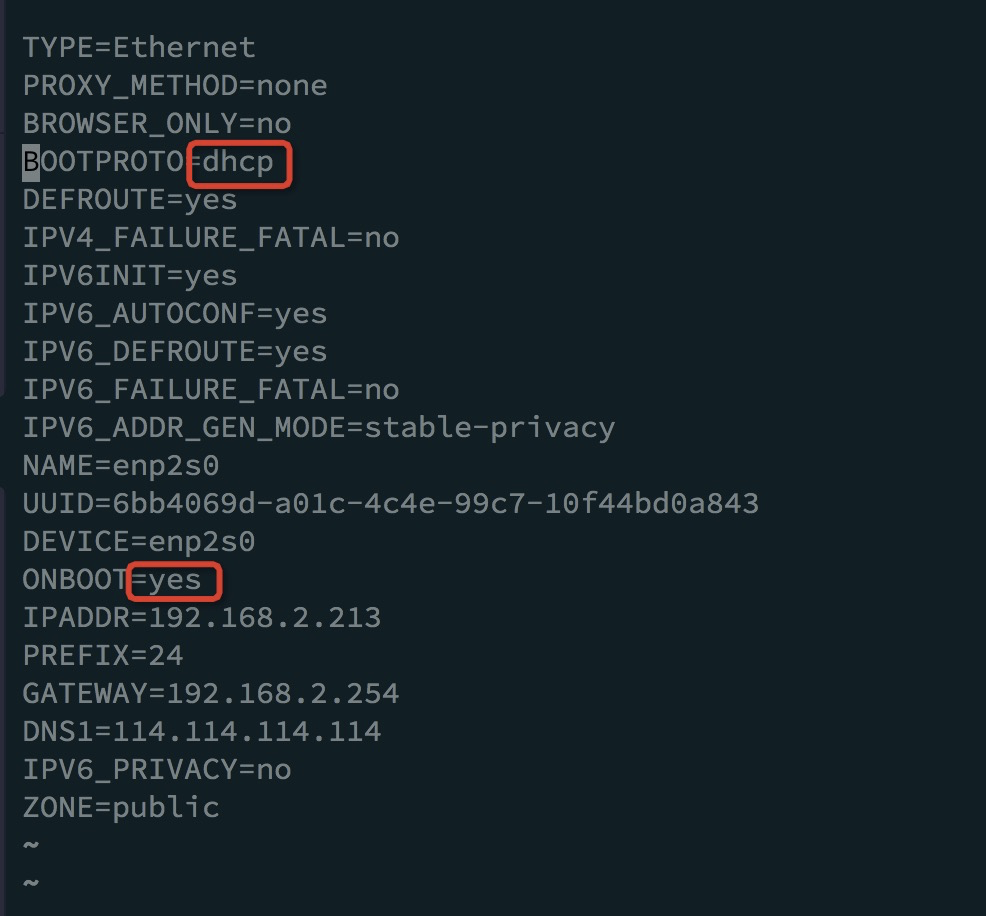
修改ifcfg-enp2s0的配置:
# 再重启

systemctl restart network
但是再运行yum还是报错:
curl#6 - "Could not resolve host: apt.sw.be; 未知的错误"
参开解决办法:https://blog.csdn.net/feiz3020/article/details/79812798?utm_source=blogxgwz9

安装好了!!
【CentOS7】之执行yum命令报错的更多相关文章
- 执行yum命令报错"Unable to connect to Registration Management Service"
问题描述 linux上执行yum相关命令时,报无法连接到注册管理服务的错误,具体报错信息如下 [root@aijihe-core-zy-2-3 ~]# yum install gcc Loaded p ...
- Linux执行YUM命令报错解决方案
Loaded plugins: rhnplugin, security This system is not registered with RHN. RHN support will be disa ...
- 树莓派(Raspberry Pi 3) centos7使用yum命令报错File "/usr/bin/yum", line 30 except KeyboardInterrupt, e:
使用yum命令报错 File "/usr/bin/yum", line 30 except KeyboardInterrupt, e: ^SyntaxError: invalid ...
- Python3安装Celery模块后执行Celery命令报错
1 Python3安装Celery模块后执行Celery命令报错 pip3 install celery # 安装正常,但是执行celery 命令的时候提示没有_ssl模块什么的 手动在Python解 ...
- 使用yum命令报错
树莓派(Raspberry Pi 3) centos7使用yum命令报错File "/usr/bin/yum", line 30 except KeyboardInterrupt, ...
- Centos下使用yum命令报错 except KeyboardInterrupt, e: SyntaxError: invalid syntax
使用yum命令报错 File "/usr/bin/yum", line 30 except KeyboardInterrupt, e: ^ SyntaxError: invalid ...
- yum命令报错File "/usr/bin/yum", line 30 except KeyboardInterrupt, e:
使用yum命令报错File "/usr/bin/yum", line 30 except KeyboardInterrupt, e: 问题出现原因:yum包管理是使用python2 ...
- CentOS yum命令报错 Error: File /var/cache/yum/i386/6/epel/metalink.xml does not exist
最近在虚拟机上执行yum命令一直报错:Could not parse metalink https://mirrors.fedoraproject.org/metalink?repo=epel-7&a ...
- yum命令报错 yum update File "/usr/bin/yum", line 30 except KeyboardInterrupt, e: --CentOS7.5
1.问题: 使用yum命令如:yum update 报SyntaxError invalid syntax 2.原因分析 yum的解释器是Python,CentOS自带的yum采用(自带的)pytho ...
- 关于使用AWS上的RHEL-8.x/Redhat系统使用自己单独购买的Redhat官网license导致的yum命令报错处理
我们在aws上使用市场提供的RHEL-8.x系统后,license相关的都是由aws官网一起提供了 最近笔者将aws上一台作过系统加固的RHEL-8.x导出到自己本地DC环境,也注册了Redhat官网 ...
随机推荐
- LAMP-CentOS7搭建Web服务器
搭建LAMP Web服务器 在家中翻到了以前用的老电脑,在思索一番后,决定把这台电脑改造成一台Web服务器,作为我自己搭建博客的测试机器. 一.Linux服务器 LAMP中的L指的是Linux服务器, ...
- CF1860C 题解
显然是一个博弈论题,考虑 dp. 定义状态 \(dp_i\) 表示先手走到 \(i\) 之后是否有必胜策略,不难发现以下几点: 若走到 \(i\) 之后无路可走,那么就必败. 若走到 \(i\) 之后 ...
- debian12 安装ch343驱动
前言 最近心血来潮,装了一台debian12玩,安装完毕arduino后发现没有ch343驱动,倒是在 ls /lib/modules/6.1.0-13-amd64/kernel/drivers/us ...
- Simple WPF: WPF自定义一个可以定义步长的SpinBox
最新内容优先发布于个人博客:小虎技术分享站,随后逐步搬运到博客园. 通过WPF的按钮.文本输入框实现了一个简单的SpinBox数字输入用户组件并可以通过数据绑定数值和步长.本文中介绍了通过Xaml代码 ...
- Linux-makefile命令后面的-j4 -j8是什么意思?
其实是指在编译指定的文件时用多少个线程进行编程的意思~ 相关命令示例如下: make zImage -j8 make modules -j8 --------------------------- m ...
- 学习笔记--Java方法基础
Java方法基础 那么什么是方法呢? public class MethodTest01{ public static void main(String[] args){ // 需求1:编写程序计算 ...
- Jmeter让线程循环变量值不重复
我们定义用户参数时为了保证某个参数值不重复会设置为随机变量 1.使用[用户定义的变量]组件,传入随机值如"HELLO${__Random(100,200,)}_${__counter(FAL ...
- .Net内存管理释放的两种方式
在.Net中,资源回收主要是指内存管理和非托管资源的释放.分别提供了两种主要的方式进行处理: 垃圾回收(GC) 确认性资源释放(DRD) 官网相关文档的链接:https://learn.microso ...
- 在计算框架MindSpore中手动保存参数变量(Parameter 变量)—— from mindspore.train.serialization import save_checkpoint
本文参考内容: https://www.mindspore.cn/doc/programming_guide/zh-CN/r1.2/advanced_usage_of_checkpoint.html? ...
- 网络文件系统nfs服务端配置客户端权限时的demo例子
参考: https://www.cnblogs.com/devilmaycry812839668/p/15127755.html 由上面的参考资料我们可以知道在nfs服务端进行配置时对于客户端的权限设 ...