
【Autoware】Autoware安装教程
此篇主要是从自己的csdn copy 在博客园上备份一下哈~
前提:大家需要换源【软件源和pip源】;git clone的时候走博主给的Gitee的链接吧 不然得等个十万年...
如果想看最终是啥样的可以直接点运行autoware书签查看Gif图,此次安装还没有给CUDA降级所以是without CUDA,这个系列后面应该还会继续写 因为要做一个拿autoware搭建的小车
参考:
1.Autoware官方Github
2.官方源码编译教程
3.官方运行BAG教程
大家记得点开左/右侧目录看哈!!记得看目录哈!
更新日记:
2022/12/16:看到这个于 2021-01-08 14:42:49 发布 的 当时真的是给自己记录的帖子 帮助了那么多人 也算是没有白写 hhhh,这次主要是重构了一下内容 把官方不见的wiki链接贴上,顺便贴一下对大家下载更友好的网盘方式
0. 系统依赖
换源,不然速度真的很慢哦!
pip升级
pip install -i https://pypi.tuna.tsinghua.edu.cn/simple pip -U
换源pip
pip config set global.index-url https://pypi.tuna.tsinghua.edu.cn/simple
ROS源
基本在安装ROS的时候应该就改好了,这就不复述了
软件源
打开Software&Updates
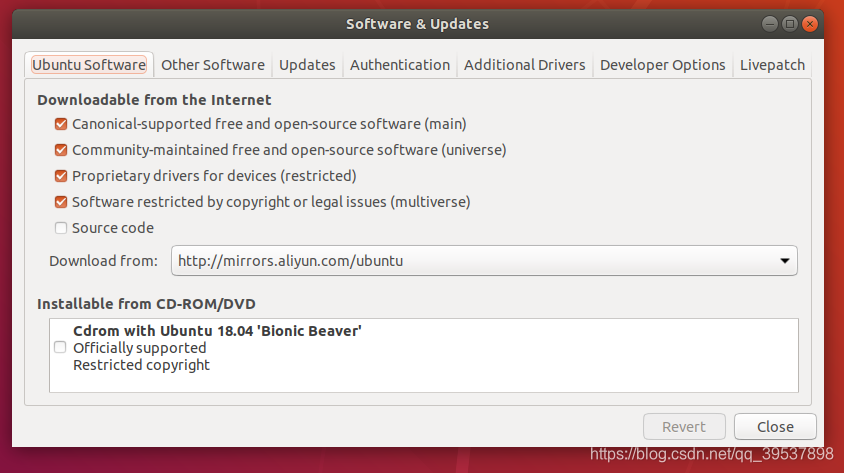
更新软件源
sudo apt update
更新python-ros的一些东西(catkin_make rosdep有关ros装依赖的可以类比Python的requirement.txt)
sudo apt install -y python-catkin-pkg python-rosdep ros-$ROS_DISTRO-catkin
python的依赖
sudo apt install -y python3-pip python3-colcon-common-extensions python3-setuptools python3-vcstool
pip3的设置工具安装
pip3 install -U setuptools
1. CUDA (Additional system) 如果不用CUDA直接跳转第二部分拉取2.
注意!!!ATTENTION!!!!
显卡显存在4G以下的可以直接跳过这个部分了,如果想开Carla显卡显存至少6G,GPU就out of memory了
Autoware对CUDA的要求是:10.0 从2022年看来 这个版本着实有点低了
安装整合到另一篇文章内了 Ubuntu下的NVIDIA显卡【安装与卸载、CUDA安装】
2. 拉取repos
创建工作区 workspace
mkdir -p autoware.ai/src

cd autoware.ai
官方的
创建autoware.ai.repos的文件,拉取官方的repos链接 真的很慢很慢哈
wget -O autoware.ai.repos "https://raw.githubusercontent.com/Autoware-AI/autoware.ai/master/autoware.ai.repos"
repositories:

  autoware/common:

    type: git

    url: https://github.com/Autoware-AI/common.git

    version: master

  autoware/core_perception:

    type: git

    url: https://github.com/Autoware-AI/core_perception.git

    version: master

  autoware/core_planning:

    type: git

    url: https://github.com/Autoware-AI/core_planning.git

    version: master

  autoware/documentation:

    type: git

    url: https://github.com/Autoware-AI/documentation.git

    version: master

  autoware/messages:

    type: git

    url: https://github.com/Autoware-AI/messages.git

    version: master

  autoware/simulation:

    type: git

    url: https://github.com/Autoware-AI/simulation.git

    version: master

  autoware/utilities:

    type: git

    url: https://github.com/Autoware-AI/utilities.git

    version: master

  autoware/visualization:

    type: git

    url: https://github.com/Autoware-AI/visualization.git

    version: master

  drivers/awf_drivers:

    type: git

    url: https://github.com/Autoware-AI/drivers.git

    version: master

  citysim:

    type: git

    url: https://github.com/CPFL/osrf_citysim.git

    version: master

  car_demo:

    type: git

    url: https://github.com/CPFL/car_demo.git

    version: master

  drivers/ds4:

    type: git

    url: https://github.com/tier4/ds4.git

    version: master
拉到了gitee上
就是在创建好的autoware.ai.repos上直接全选覆盖掉
repositories:

  autoware/common:

    type: git

    url: https://gitee.com/kin_zhang/common.git

    version: master

  autoware/core_perception:

    type: git

    url: https://gitee.com/kin_zhang/core_perception.git

    version: master

  autoware/core_planning:

    type: git

    url: https://gitee.com/kin_zhang/core_planning.git

    version: master

  autoware/documentation:

    type: git

    url: https://gitee.com/kin_zhang/documentation.git

    version: master

  autoware/messages:

    type: git

    url: https://gitee.com/kin_zhang/messages.git

    version: master

  autoware/simulation:

    type: git

    url: https://gitee.com/kin_zhang/simulation.git

    version: master

  autoware/utilities:

    type: git

    url: https://gitee.com/n__n/utilities.git

    version: master

  autoware/visualization:

    type: git

    url: https://gitee.com/kin_zhang/visualization.git

    version: master

  drivers/awf_drivers:

    type: git

    url: https://gitee.com/kin_zhang/drivers.git

    version: master

  citysim:

    type: git

    url: https://gitee.com/kin_zhang/osrf_citysim.git

    version: master

  car_demo:

    type: git

    url: https://gitee.com/kin_zhang/car_demo.git

    version: master

  drivers/ds4:

    type: git

    url: https://gitee.com/kin_zhang/ds4.git

    version: master
3. 下载
如果在内地记得 先都换成gitee上的链接 再运行这这步 会快很多
vcs import src < autoware.ai.repos
4. rosdep的依赖
这一个我安装ROS的时候dep那步一直拉不过来所以一直没... rosdep的功能
如果有dep的功能的话,请直接运行:并忽略下面的安装依赖部分(并且十分建议rosdep这么做)
rosdep install -y --from-paths src --ignore-src --rosdistro $ROS_DISTRO
那就麻烦点,一个编译一个错误的安装?
ROS方面的
主机上直接安装的ROS-full-desktop,傻一点的方法碰到一个错误就安装一个漏掉的包这是所有的:运行这一堆的就是全部了
sudo apt-get install ros-melodic-jsk-recognition-msgs ros-melodic-jsk-rviz-plugins ros-melodic-lanelet2* ros-melodic-nmea* ros-melodic-grid-map* ros-melodic-automotive-* ros-melodic-velodyne* ros-melodic-gps-common ros-melodic-qpoases-vendor
下面是一个个的介绍:这里是一个个的介绍哦【运行了上面这条指令不需要再逐个运行这个了】
sudo apt-get install ros-melodic-jsk-recognition-msgs ros-melodic-jsk-rviz-plugins ros-melodic-lanelet2* ros-melodic-nmea* ros-melodic-grid-map* ros-melodic-automotive-* ros-melodic-velodyne*
sudo apt-get install ros-melodic-gps-common
sudo apt-get install ros-melodic-qpoases-vendor
错误及警告的示例
错误及警告的示例,其实远远不止这么点
#错误1

Finished <<< sick_lms5xx [20.4s]

Starting >>> system_monitor

Finished <<< imm_ukf_pda_track [31.5s]

Starting >>> twist2odom

--- stderr: system_monitor

CMake Error: The following variables are used in this project, but they are set to NOTFOUND.

Please set them or make sure they are set and tested correctly in the CMake files:

LIBNL3_INCLUDE_DIRS

#错误2

--- stderr: system_monitor

CMake Error: The following variables are used in this project, but they are set to NOTFOUND.

Please set them or make sure they are set and tested correctly in the CMake files:

NLGENL3

    linked by target "net_monitor" in directory /home/udi/autoware.ai/src/autoware/utilities/system_monitor

    linked by target "test_net_monitor" in directory /home/udi/autoware.ai/src/autoware/utilities/system_monitor

#警告

[6.285s] WARNING:colcon.colcon_cmake.task.cmake.build:Could not run installation step for package 'ndt_gpu' because it has no 'install' target
系统方面的
sudo apt install libnl-3-*

sudo apt install libnl-genl-3-*
关于依赖的后话
我后面又在我的PC双系统上按着自己的教程走了一遍发现(同样没有dep)有些我没有写全,所以大家还是开一下小飞机 把dep过一下,让rosdep自己去搞定依赖,
还有有一个问题:velodyne的驱动中的一个系统的包升级了不存在旧包,当时的解决方法是删了新包,安了旧包的版本,但是不建议这样操作,因为很容易导致系统依赖出问题,之所以我当时这么做:是因为发送删新包的时候没有其他东西同时删除,也就说没有其他的影响(比如我安装plotjuggler就要删除一个系统包 基本附加删除删了整个ROS... 也就是不要这么干的原因)
//home/user/anaconda3/lib/libfontconfig.so.1: undefined reference to `FT_Done_MM_Var'
参考:
ubuntu18 anaconda3/lib/libfontconfig.so.1: undefined reference to `FT_Done_MM_Var‘ collect2: error:
cd /usr/lib/x86_64-linux-gnu

ll |grep libfontconfig.so.1

cd ~/anaconda3/lib

ll | grep libfontconfig.so.1

方法就是把1.10.1复制到anaconda文件夹下,删除原有链接并创建新链接
cp /usr/lib/x86_64-linux-gnu/libfontconfig.so.1.10.1 ~/anaconda3/lib/libfontconfig.so.1.10.1

ls ~/anaconda3/lib/libfontconfig.so*
5. 编译 Compile the workspace
建议走CPU【也就是without CUDA support】比较简单,如果想用GPU运行一些节点的话,测试过的是需要3G以上的显存才行,CUDA版本是10.0
【两个方式二选一!!!】 不是都要做哈!!!选其一!!!比如不用GPU就选without的哈!!【也就是without CUDA support】
With CUDA support
编译Autoware
1.14版本的或者直接master拉下来的,在其中一个地方有点问题没有define,记得改一下这个。在cnn_segmentation.h中没有define__APP_NAME__
gedit ~/autoware.ai/src/autoware/core_preception//lidar_apollo_cnn_seg_detect_include/cnn_segmentation.h
#define __APP_NAME__ "lidar_apollo_cnn_seg_detect"

//加入这行进去就行 不然会报错
caffe详情见:请记得跳转GPU版本,这句命令一定要建立在安装好了CUDA和caffe的!
$ AUTOWARE_COMPILE_WITH_CUDA=1 colcon build --cmake-args -DCMAKE_BUILD_TYPE=Release
Without CUDA Support【两个方式二选一!!!执行了上面的就跳过这段】
Without CUDA Support 【我没装CUDA那步 所以使用的是这条命令】
$ colcon build --cmake-args -DCMAKE_BUILD_TYPE=Release
编译完成后:
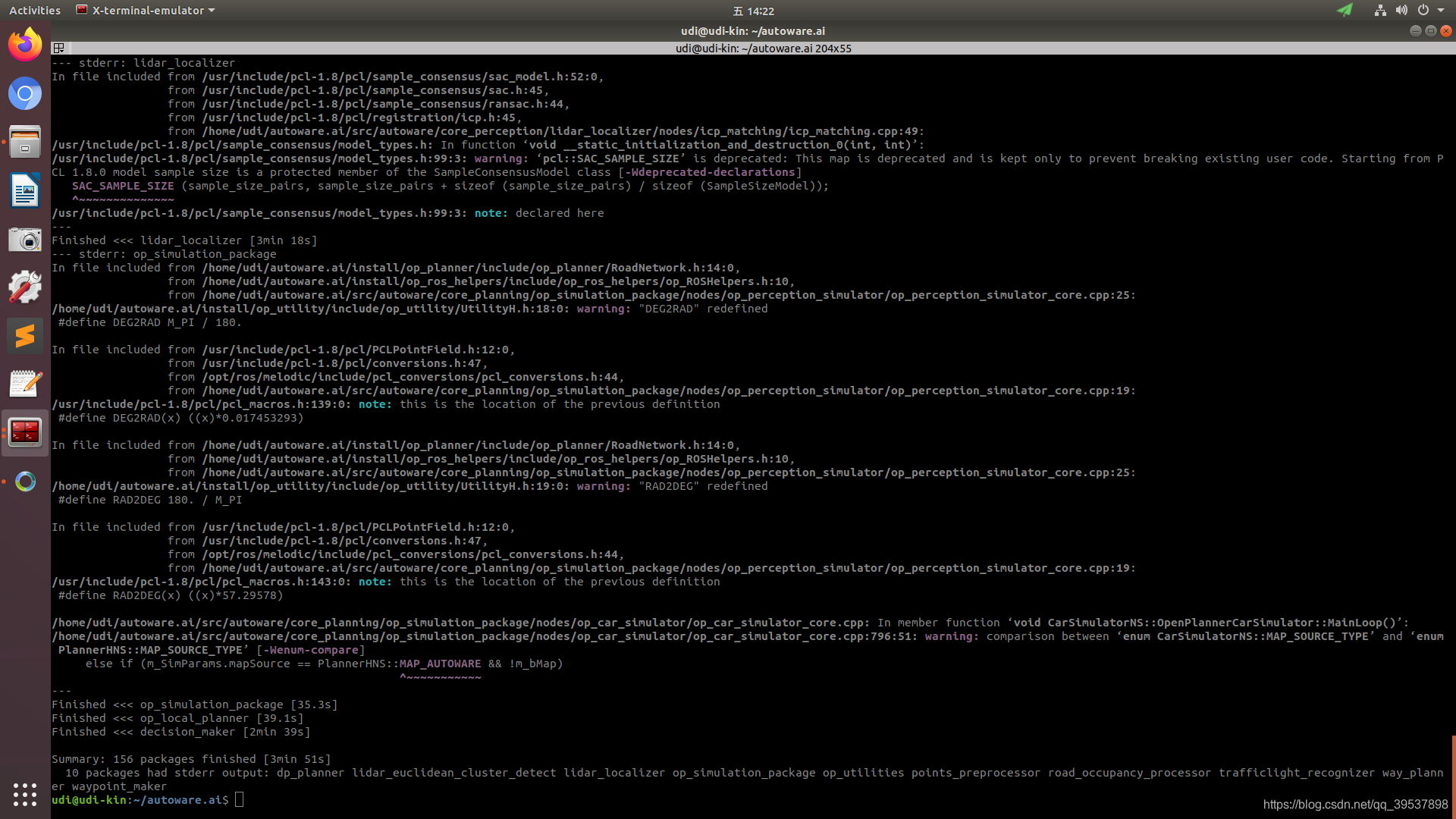
单独编译某个包
colcon build --cmake-args -DCMAKE_BUILD_TYPE=Release --packages-select detected_objects_visualizer
6. 下载Bag包并运行
下载BAG包
这个过期了:官方的下载地址 但是很慢很慢很慢
2022/12/14这是我找到的官方gitlab上还有存留下来的:官方下载地址 但是在内地很慢很慢很慢
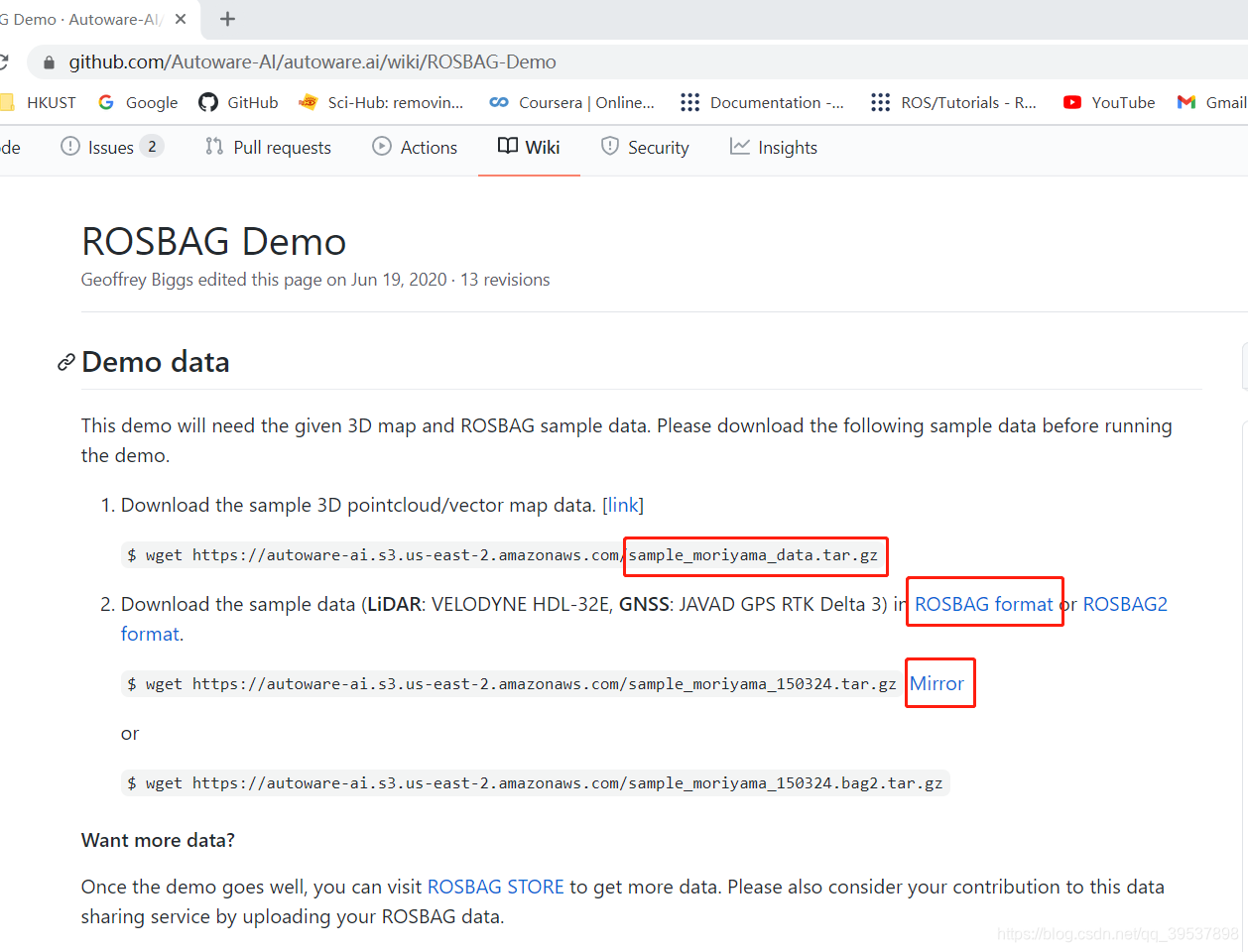
百度云下载地址 但是不是会员也很慢 password: kinz,阿里云盘无法分享 所以就无了
这里是把下载下来的BAG包复制到.autoware的文件夹下:
mkdir .autoware

cd .autoware

cp ~/Downloads/sample_moriyama_* .
这一步是把BAG解压出来:
tar zxfv sample_moriyama_150324.tar.gz
moriyama的数据解压出来:
tar zxfv sample_moriyama_data.tar.gz
图形化界面下是这样的:
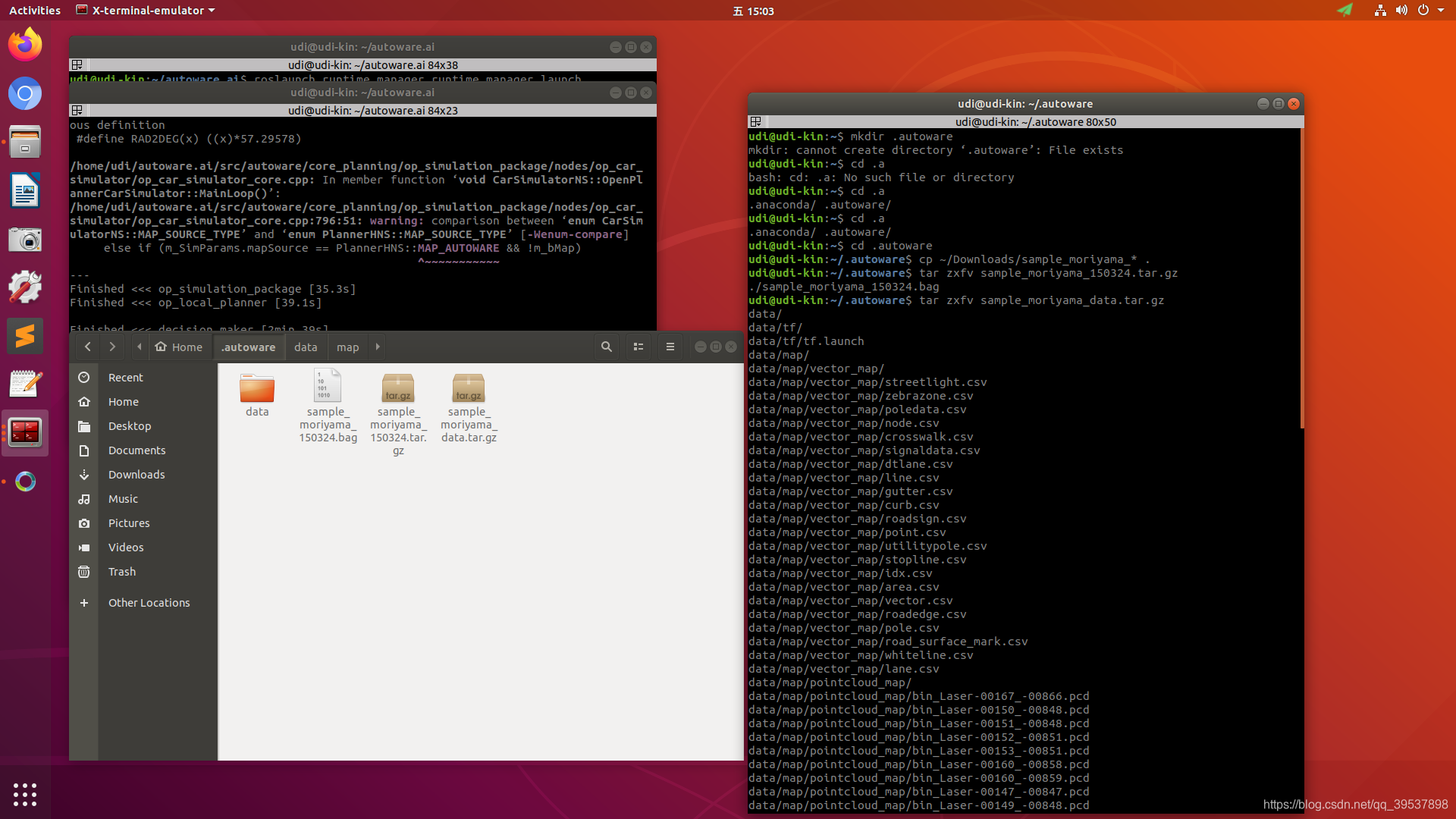
运行autoware
cd autoware.ai

source install/setup.bash

roslaunch runtime_manager runtime_manager.launch
运行的截图界面如下:
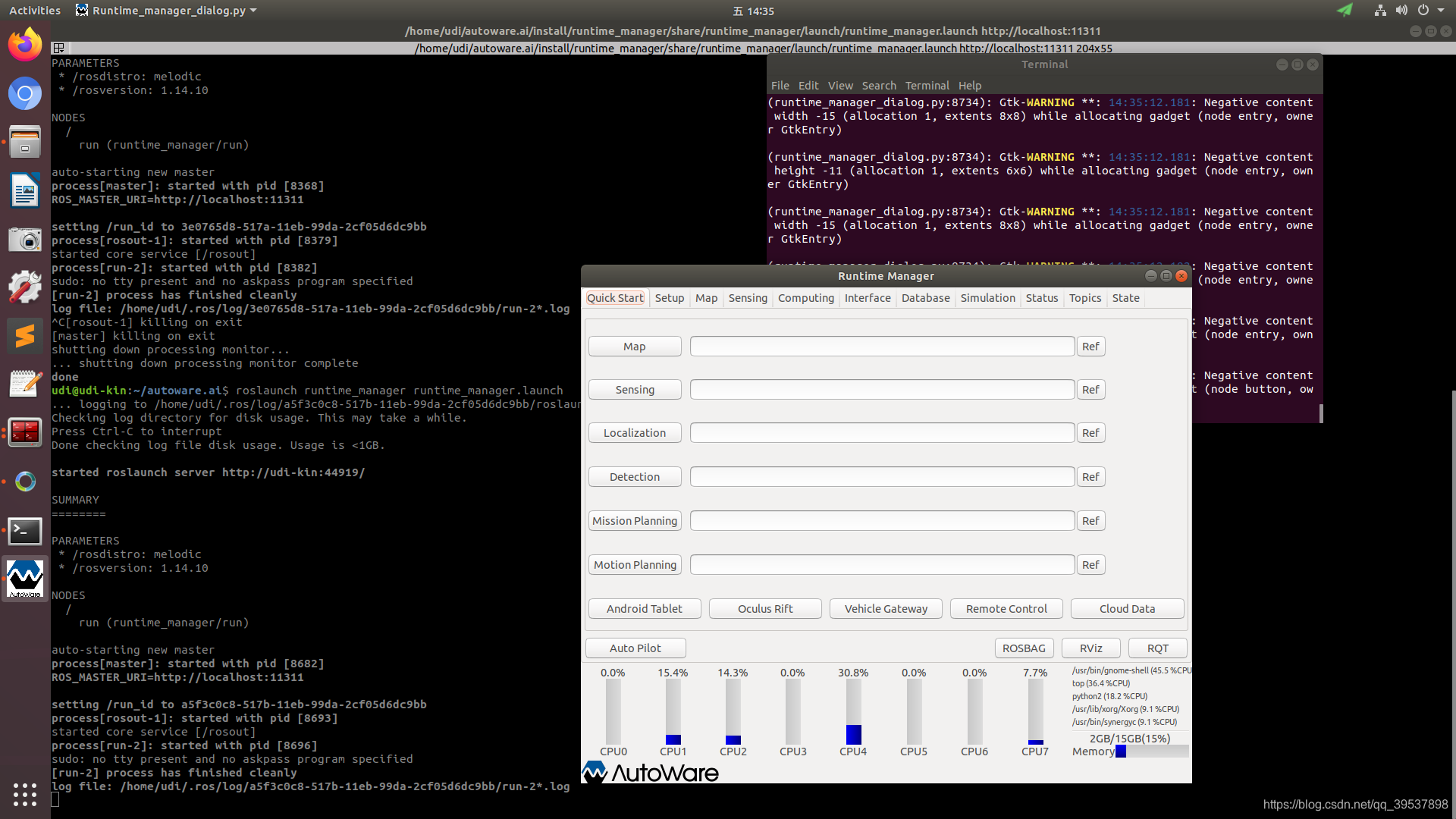
剩下复制官方的哈~
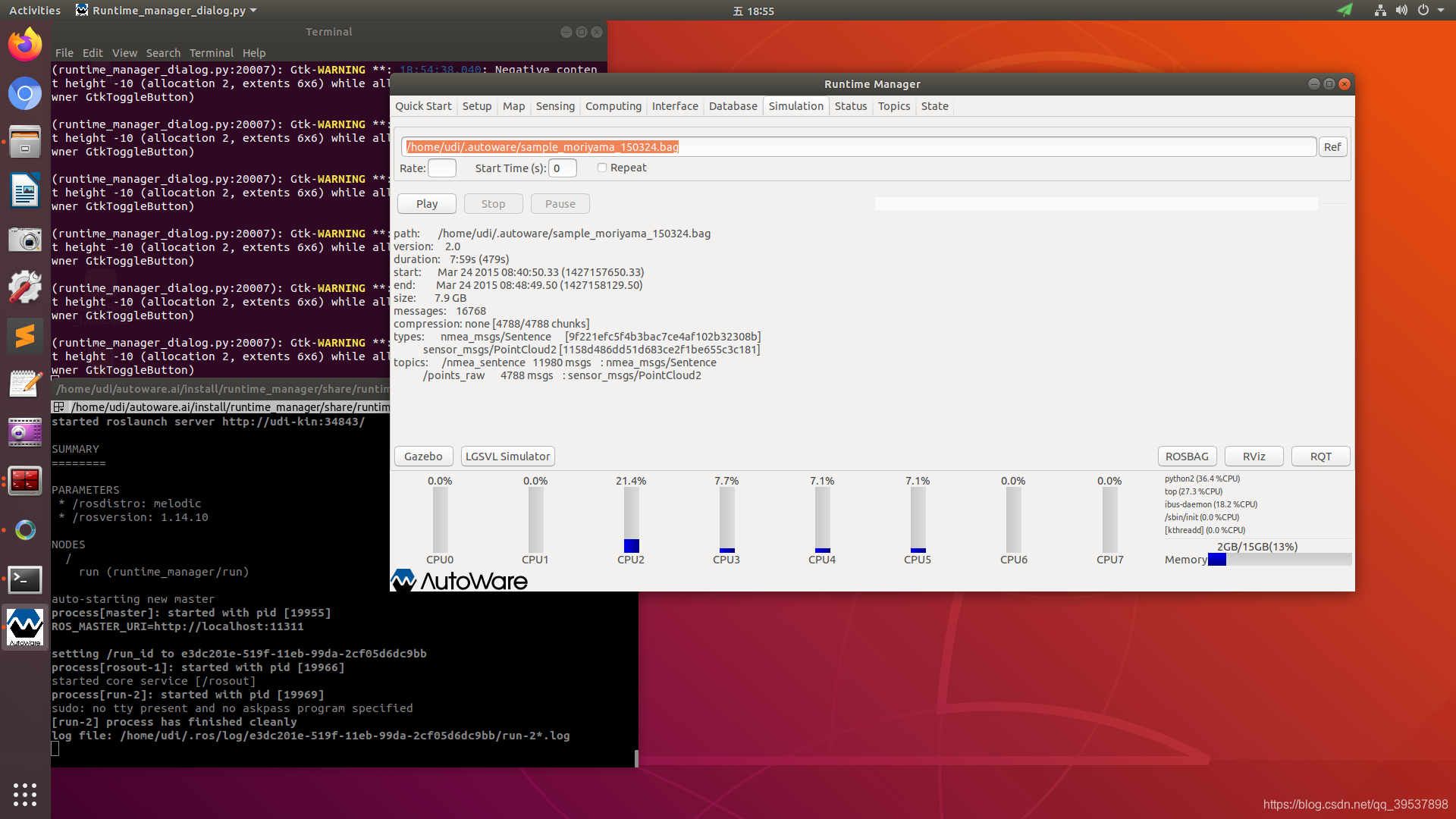
- 导入BAG:Go to the Simulation tab of Autoware Runtime Manager (ARM), and load the sample ROSBAG data, which is located in ~/.autoware. Show Hidden Files needs to be checked for the .autoware folder to be displayed.
- 设置开始时间并运行:Set the start time to 140, then click Play and Pause just after it has started playing.
- 启动rviz:Launch RViz through the RViz button in the bottom-right corner of the ARM and load the default.rviz config provided with Autoware. To do this got to File -> Open Config and navigate to
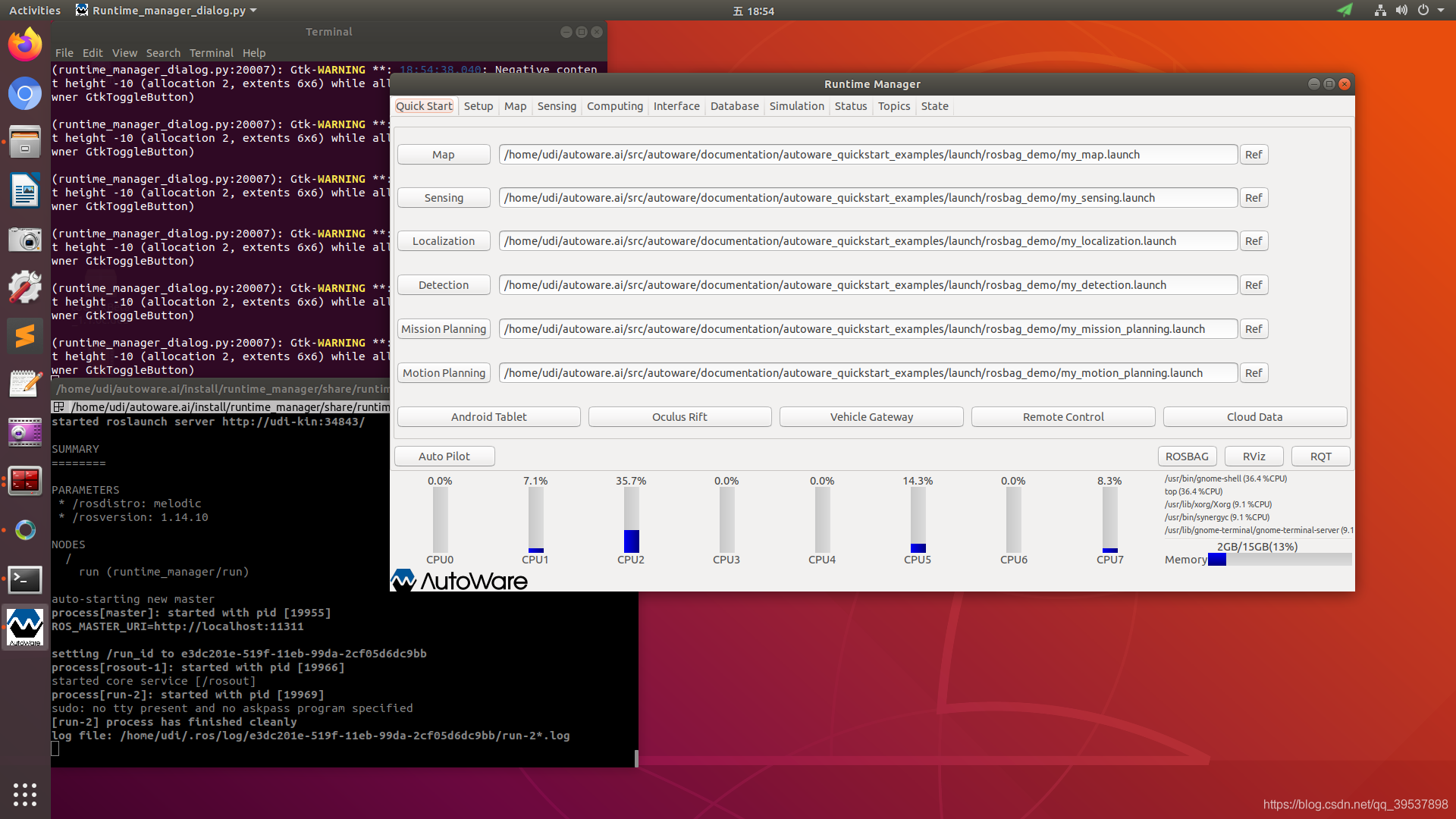
autoware.ai/src/autoware/documentation/autoware_quickstart_examples/launch/rosbag_demo/default.rviz. - Go to the Quick Start tab of ARM, and load the preinstalled roslaunch scripts one by one. The scripts are located in autoware.ai/src/autoware/documentation/autoware_quickstart_examples/launch/rosbag_demo/. The scripts need to be enabled by clicking on the left button as shown in the image for the Map.
- Un-pausing the simulation after starting the Map will show the pointcloud map in Rviz.
Simulation的界面:
Quick Start的界面:
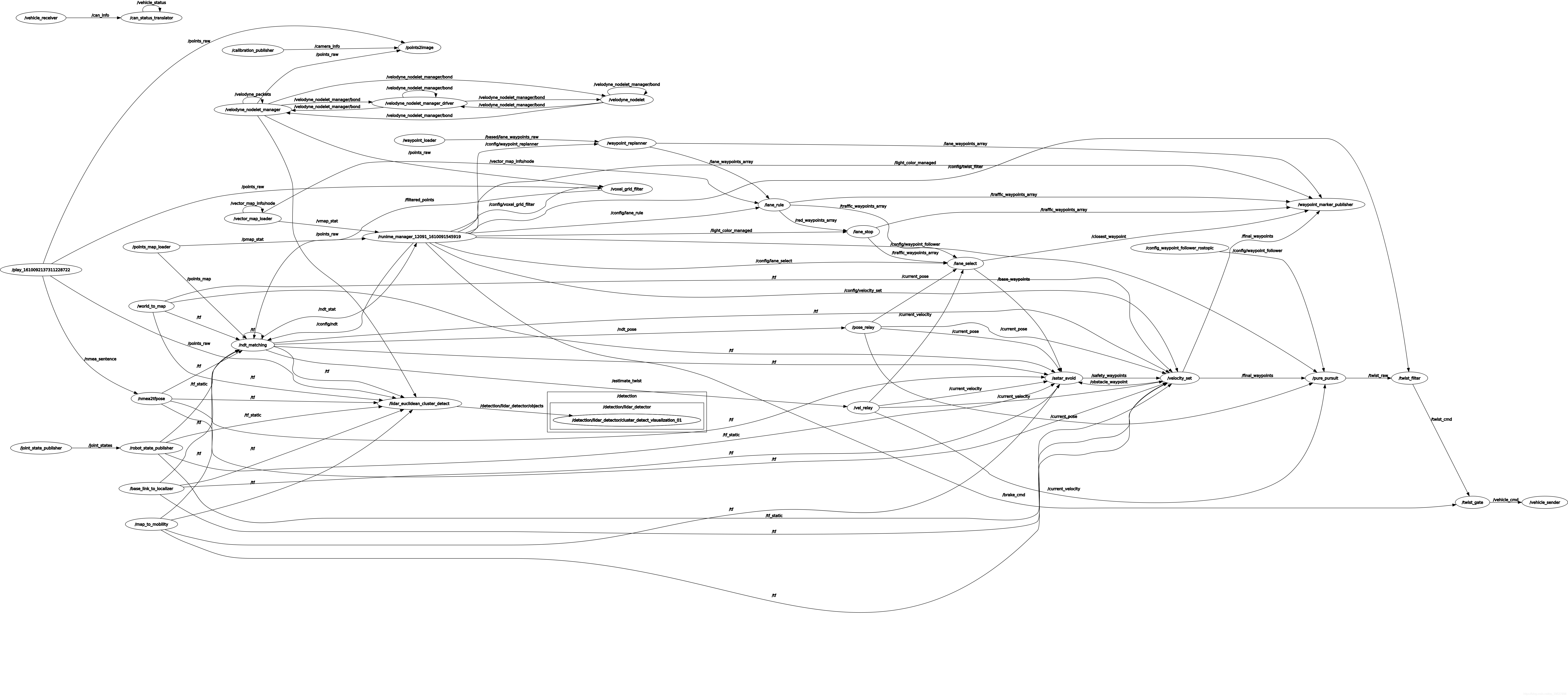
运行所有的launch后的示意图:

运行时的graph图:
一些需要注意的问题
ndt_mapping 无法建图 [GO TO Autoware: ndt_mapping doesn't compute transformation matrix]
2022年:或者这个就别用了,我直接抽取了一个simple_ndt_mapping,内核是一样的 只是变得更适配了 hhh 比较简单就能上手,脱离Autoware,但是!生成出来的map可以直接load autoware的GUI里 这一点都是一样的哈
这个问题出现在0.1.14里,如果换成1.13就可以了,具体原因还在compare找一下,Autoware: ndt_mapping doesn't compute transformation matrix
直接在1.14里的解法是:在原ndt_mapping.cpp的1016-1046之间换成这个:
  double tf_x, tf_y, tf_z, tf_roll, tf_pitch, tf_yaw;

  // 3. Try getting base_link -> lidar TF from tf_* params

  if (!received_tf)

  {

    if (nh.getParam("tf_x", tf_x) &&

        nh.getParam("tf_y", tf_y) &&

        nh.getParam("tf_z", tf_z) &&

        nh.getParam("tf_roll", tf_roll) &&

        nh.getParam("tf_pitch", tf_pitch) &&

        nh.getParam("tf_yaw", tf_yaw))

    {

      tf::Vector3 trans(tf_x, tf_y, tf_z);

      tf::Quaternion quat;

      quat.setRPY(tf_roll, tf_pitch, tf_yaw);

      tf_baselink2primarylidar.setOrigin(trans);

      tf_baselink2primarylidar.setRotation(quat);

      received_tf = true;

    }

    else

    {

      ROS_WARN("Query base_link to primary lidar frame through tf_* params failed");

    }

  }

  if (received_tf)

  {

    ROS_INFO("base_link to primary lidar transform queried successfully");

    tf_baselink2primarylidar.getOrigin();

    tf_x = tf_baselink2primarylidar.getOrigin().getX();

    tf_y = tf_baselink2primarylidar.getOrigin().getY();

    tf_z = tf_baselink2primarylidar.getOrigin().getZ();

    Eigen::Translation3f tl_btol(tf_x, tf_y, tf_z);// tl: translation

    tf::Matrix3x3(tf_baselink2primarylidar.getRotation()).getRPY( tf_roll, tf_pitch,tf_yaw);

    Eigen::AngleAxisf rot_x_btol(tf_roll, Eigen::Vector3f::UnitX());  // rot: rotation

    Eigen::AngleAxisf rot_y_btol(tf_pitch, Eigen::Vector3f::UnitY());

    Eigen::AngleAxisf rot_z_btol(tf_yaw, Eigen::Vector3f::UnitZ());

    tf_btol = (tl_btol * rot_z_btol * rot_y_btol * rot_x_btol).matrix();

    tf_ltob = tf_btol.inverse();

  }
主要原因是他没有更新tf_ltob这个需要在计算变换矩阵里用到的矩阵,然后我们做的就是看了看1.13 对比了,发现更新没有在1.14里所以emmm 就是这样
最后的bag包的建图局部效果:

关于后续
更多关于autoware.ai的学习请关注后续文章的发出,主要是移植路上遇到的问题、学习笔记、看代码笔记更多一些的~ 噢 当然也包含操作视频 想想应该搞完会拍一个系列到b站 毕竟真的是约到后面越难记清开这么多节点 \lol
2022年:其实吧 之前留的言 也算是实现了几个flag 确实搞了几个视频,写了更多一点的博客,回想当时第一次用autoware.ai的稚嫩,hhh 对很多东西都不太清楚 包括ubuntu本身 ros 算法 C++,现在看来自己一年成长的这么快也是算欣慰啦;很幸运第一次的入门是与autoware.ai,真的是一个很好很好的学习资料(除了网速拖累了我们的学习进度
希望此贴仅仅是开启 让你们步入使用,但是学习远不止于此,一起加油
记住这个博文是我2021年写的 很多东西确实会过时的哦,学有余力的大佬们可以抽取自己需要的部分,再分享给大家 更简易的使用!
最后Autoware 万岁!
赠人点赞 手有余香 ;正向回馈 才能更好开放记录 hhh
【Autoware】Autoware安装教程的更多相关文章
- Linux+apache+mono+asp.net安装教程
Linux+apache+mono+asp.net安装教程(CentOS上测试的) 一.准备工作: 1.安装linux系统(CentOS,这个就不多讲了) 2.下载所需软件 http-2.4.4.ta ...
- Greenplum 源码安装教程 —— 以 CentOS 平台为例
Greenplum 源码安装教程 作者:Arthur_Qin 禾众 Greenplum 主体以及orca ( 新一代优化器 ) 的代码以可以从 Github 上下载.如果不打算查看代码,想下载编译好的 ...
- git 安装教程
昆,简单说下安装教程1,安装Git2,安装TortoiseGit3,打开第一步安装的git工具GIT BASH
- Docker和Docker-compose安装教程以及docker-elk,docker-storm安装教程
此安装教程仅供我自己安装配置时查看,其他的人不可以偷看!!! 安装Docker 1. Update package information, ensure that APT works with th ...
- RHEL 6.3 详细安装教程
以前刚接触linux时,什么都不懂,为了学习,在电脑上安装双系统(原系统为Win7),吃过不少苦头,在网上搜教程,很多都是语焉不详,导致安装过程中战战兢兢.最近朋友面试运维,面试官有考他对linux安 ...
- Android Studio的下载和安装教程(从ADT到AS)
之前一直使用的是Android development tools(简称ADT),后来说是google对ADT不再提供支持,然后一直在考虑是否把自己电脑换成Android Studio(简称AS),从 ...
- mysql快速导出数据库ER图和数据字典(附navicat11安装教程及资源)
♣ mysql使用navicat11快速导出数据库ER图 ♣ mysql使用navicat11快速导出数据库数据字典 ♣ navicat11 for mysql (这里是mysql5.7.12)专业版 ...
- Smokeping安装教程
Smokeping安装教程 #Smokeping2.6.8安装教程 #2016.3.6 改编v1.0 #Linux运维技术交流 347163978 环境 CentOS release 6.4 (F ...
- (二)ADS1.2的安装教程以及使用 调试 (不会 AXD 调试工具)
安装教程: 参考百度 http://jingyan.baidu.com/article/cdddd41c7db85253cb00e1ae.html 具体使用看: 杨铸的那本书(嵌入式底层软件驱动开发) ...
- hadoop 安装教程 转载
hadoop2.2安装教程:http://www.aboutyun.com/thread-7684-1-1.html hadoop2.X使用手册1:通过web端口查看主节点.slave1节点及集群运行 ...
随机推荐
- SpringMVC学习五(resultful风格/异常处理/注解)
resultful风格 异常处理 1.Restfule风格 Restfule风格是一种软件架构风格,而不是标准,只是提供了一种设计原则和约束条件.主要适用于客户端和服务器端交互的软件.是基于http协 ...
- R3_Elasticsearch Index Setting
索引的配置项按是否可以更改分为static属性与动态配置,所谓的静态配置即索引创建后不能修改.目录如下:生产环境中某索引结构(7.X后有变化) 索引静态配置 1.分片与压缩 index.number_ ...
- surging版本有哪些?
surging 一直在升级开发各个版本,以下是各个版本的费用,有需要可以联系或者可以聘请我为架构师,技术顾问,后期会升级多语言版本,推广至海外. 基于surging 的物联网技术架构 平台版本:
- Python中强大的通用ORM框架:SQLAlchemy
Python中强大的通用ORM框架:SQLAlchemy https://zhuanlan.zhihu.com/p/444930067
- shell 去掉逗号_shell替换和去掉换行符
用shell处理文件的时候我们常常需要去掉或者加上换行符,name问题就来了怎么才能快速的替换呢? 我们有这样一个文件[root@hxy working]# cat 1 GD200A16C013493 ...
- cesium问题-关于不同时间模型亮度不一致问题
项目中遇到发布的bim模型在当天不同时间的模型亮度发生变化,尤其是晚上的时候会出现模型很暗.尴了个尬,一度怀疑是自己眼睛有问题,连续几天出现同样的情况,想到可能是时间问题导致的模型亮度不同,于是测试了 ...
- Python OpenCV #1 - OpenCV介绍
一.OpenCV介绍 1.1 OpenCV-Python教程简介 OpenCV由 Gary Bradsky 于1999年在英特尔创立,第一个版本于2000年发布. Vadim Pisarevsky 加 ...
- ASP.NET Core环境Web Audio API+SingalR+微软语音服务实现web实时语音识别
处于项目需要,我研究了一下web端的语音识别实现.目前市场上语音服务已经非常成熟了,国内的科大讯飞或是国外的微软在这块都可以提供足够优质的服务,对于我们工程应用来说只需要花钱调用接口就行了,难点在于整 ...
- claude3国内API接口对接
众所周知,由于地理位置原因,Claude3不对国内开放,而国内的镜像网站使用又贵的离谱! 因此,团队萌生了一个想法:为什么不创建一个一站式的平台,让用户能够通过单一的接口与多个模型交流呢?这样,用户就 ...
- MyBatis完成CRUD 详细细节内容
1. MyBatis完成CRUD 详细细节内容 @ 目录 1. MyBatis完成CRUD 详细细节内容 每博一文案 2. MyBatis工具类SqlSessionUtil的封装 3. 准备工作 3. ...