
Spring Cloud灰度部署
1、背景(灰度部署)
在我们系统发布生产环境时,有时为了确保新的服务逻辑没有问题,会让一小部分特定的用户来使用新的版本(比如客户端的内测版本),而其余的用户使用旧的版本,那么这个在Spring Cloud中该如何来实现呢?
负载均衡组件使用:Spring Cloud LoadBalancer
2、需求
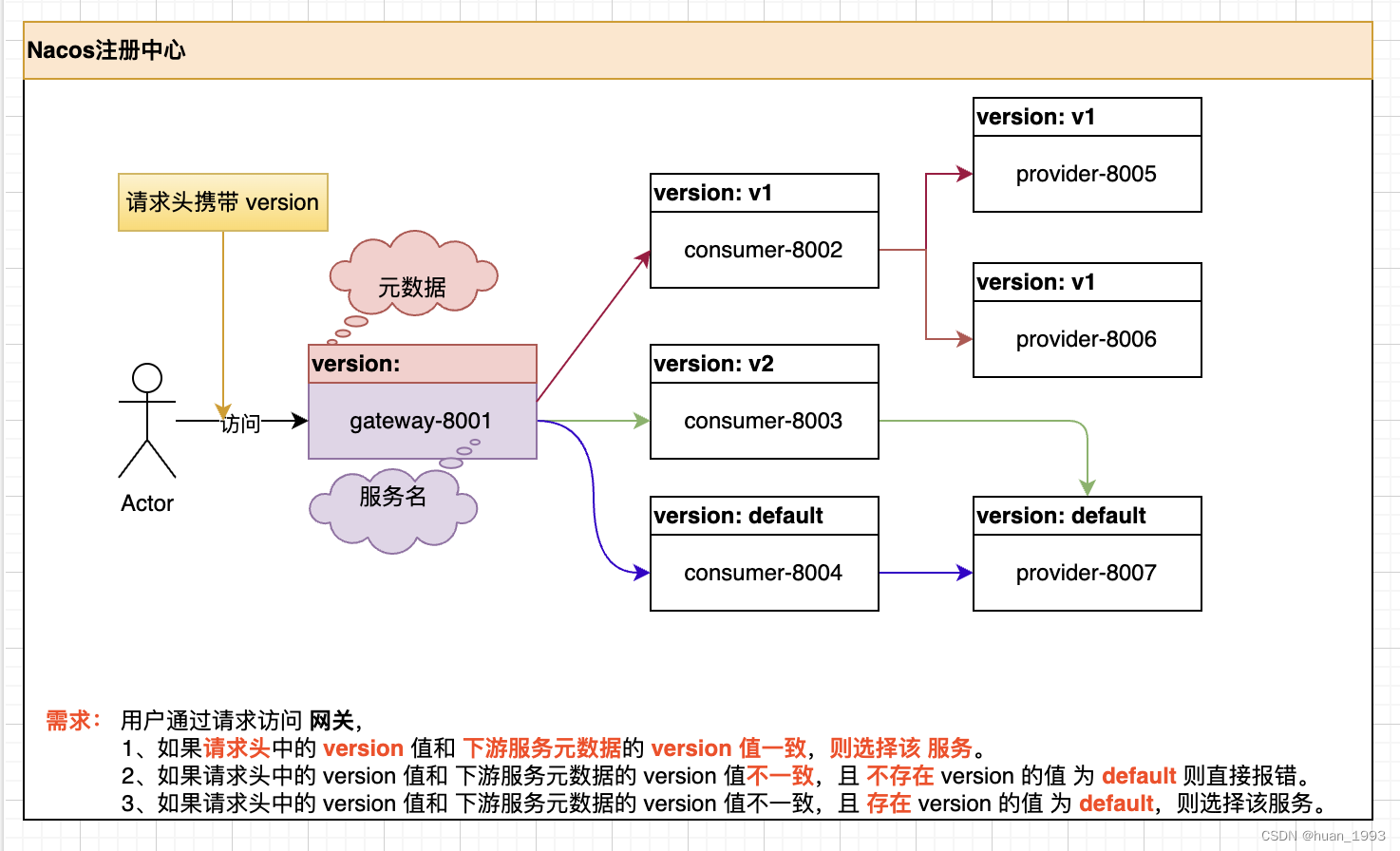
3、实现思路

通过翻阅Spring Cloud的官方文档,我们知道,大概可以通过2种方式来达到我们的目的。
- 实现
ReactiveLoadBalancer接口,重写负载均衡算法。 - 实现
ServiceInstanceListSupplier接口,重写get方法,返回自定义的服务列表。
ServiceInstanceListSupplier: 可以实现如下功能,比如我们的 user-service在注册中心上存在5个,此处我可以只返回3个。
4、Spring Cloud中是否有我上方类似需求的例子
查阅Spring Cloud官方文档,发现org.springframework.cloud.loadbalancer.core.HintBasedServiceInstanceListSupplier 类可以实现类似的功能。
那可能有人会说,既然Spring Cloud已经提供了这个功能,为什么你还要重写一个? 此处只是为了一个记录,因为工作中的需求可能各种各样,万一后期有类似的需求,此处记录了,后期知道怎么实现。
5、核心代码实现
5.1 灰度核心代码
5.1.1 灰度服务实例选择器实现
package com.huan.loadbalancer;

import lombok.extern.slf4j.Slf4j;

import org.springframework.cloud.client.ServiceInstance;

import org.springframework.cloud.client.loadbalancer.Request;

import org.springframework.cloud.client.loadbalancer.RequestDataContext;

import org.springframework.cloud.loadbalancer.core.DelegatingServiceInstanceListSupplier;

import org.springframework.cloud.loadbalancer.core.ServiceInstanceListSupplier;

import org.springframework.http.HttpHeaders;

import reactor.core.publisher.Flux;

import java.util.List;

import java.util.Objects;

import java.util.stream.Collectors;

/**

 * 自定义 根据服务名 获取服务实例 列表

 * <p>

 * 需求: 用户通过请求访问 网关<br />

 * 1、如果请求头中的 version 值和 下游服务元数据的 version 值一致,则选择该 服务。<br />

 * 2、如果请求头中的 version 值和 下游服务元数据的 version 值不一致,且 不存在 version 的值 为 default 则直接报错。<br />

 * 3、如果请求头中的 version 值和 下游服务元数据的 version 值不一致,且 存在 version 的值 为 default,则选择该服务。<br />

 * <p>

 * 参考: {@link org.springframework.cloud.loadbalancer.core.HintBasedServiceInstanceListSupplier} 实现

 *

 * @author huan.fu

 * @date 2023/6/19 - 21:14

 */

@Slf4j

public class VersionServiceInstanceListSupplier extends DelegatingServiceInstanceListSupplier {

    /**

     * 请求头的名字, 通过这个 version 字段和 服务中的元数据来version字段进行比较,

     * 得到最终的实例数据

     */

    private static final String VERSION_HEADER_NAME = "version";

    public VersionServiceInstanceListSupplier(ServiceInstanceListSupplier delegate) {

        super(delegate);

    }

    @Override

    public Flux<List<ServiceInstance>> get() {

        return delegate.get();

    }

    @Override

    public Flux<List<ServiceInstance>> get(Request request) {

        return delegate.get(request).map(instances -> filteredByVersion(instances, getVersion(request.getContext())));

    }

    private String getVersion(Object requestContext) {

        if (requestContext == null) {

            return null;

        }

        String version = null;

        if (requestContext instanceof RequestDataContext) {

            version = getVersionFromHeader((RequestDataContext) requestContext);

        }

        log.info("获取到需要请求服务[{}]的version:[{}]", getServiceId(), version);

        return version;

    }

    /**

     * 从请求中获取version

     */

    private String getVersionFromHeader(RequestDataContext context) {

        if (context.getClientRequest() != null) {

            HttpHeaders headers = context.getClientRequest().getHeaders();

            if (headers != null) {

                return headers.getFirst(VERSION_HEADER_NAME);

            }

        }

        return null;

    }

    private List<ServiceInstance> filteredByVersion(List<ServiceInstance> instances, String version) {

        // 1、获取 请求头中的 version 和 ServiceInstance 中 元数据中 version 一致的服务

        List<ServiceInstance> selectServiceInstances = instances.stream()

                .filter(instance -> instance.getMetadata().get(VERSION_HEADER_NAME) != null

                        && Objects.equals(version, instance.getMetadata().get(VERSION_HEADER_NAME)))

                .collect(Collectors.toList());

        if (!selectServiceInstances.isEmpty()) {

            log.info("返回请求服务:[{}]为version:[{}]的有:[{}]个", getServiceId(), version, selectServiceInstances.size());

            return selectServiceInstances;

        }

        // 2、返回 version=default 的实例

        selectServiceInstances = instances.stream()

                .filter(instance -> Objects.equals(instance.getMetadata().get(VERSION_HEADER_NAME), "default"))

                .collect(Collectors.toList());

        log.info("返回请求服务:[{}]为version:[{}]的有:[{}]个", getServiceId(), "default", selectServiceInstances.size());

        return selectServiceInstances;

    }

}
5.1.2 灰度feign请求头传递拦截器
package com.huan.loadbalancer;

import feign.RequestInterceptor;

import feign.RequestTemplate;

import lombok.extern.slf4j.Slf4j;

import org.springframework.stereotype.Component;

import org.springframework.web.context.request.RequestContextHolder;

import org.springframework.web.context.request.ServletRequestAttributes;

/**

 * 将version请求头通过feign传递到下游

 *

 * @author huan.fu

 * @date 2023/6/20 - 08:27

 */

@Component

@Slf4j

public class VersionRequestInterceptor implements RequestInterceptor {

    @Override

    public void apply(RequestTemplate requestTemplate) {

        String version = ((ServletRequestAttributes) RequestContextHolder.getRequestAttributes()).getRequest()

                .getHeader("version");

        log.info("feign 中传递的 version 请求头的值为:[{}]", version);

        requestTemplate

                .header("version", version);

    }

}
注意: 此处全局配置了,配置了一个feign的全局拦截器,进行请求头version的传递。
5.1.3 灰度服务实例选择器配置
package com.huan.loadbalancer;

import lombok.extern.slf4j.Slf4j;

import org.springframework.boot.autoconfigure.condition.ConditionalOnBean;

import org.springframework.boot.autoconfigure.condition.ConditionalOnClass;

import org.springframework.cloud.client.discovery.DiscoveryClient;

import org.springframework.cloud.client.discovery.ReactiveDiscoveryClient;

import org.springframework.cloud.loadbalancer.annotation.LoadBalancerClients;

import org.springframework.cloud.loadbalancer.core.ServiceInstanceListSupplier;

import org.springframework.context.ConfigurableApplicationContext;

import org.springframework.context.annotation.Bean;

import org.springframework.context.annotation.Configuration;

/**

 * 此处选择全局配置

 *

 * @author huan.fu

 * @date 2023/6/19 - 22:16

 */

@Configuration

@Slf4j

@LoadBalancerClients(defaultConfiguration = VersionServiceInstanceListSupplierConfiguration.class)

public class VersionServiceInstanceListSupplierConfiguration {

    @Bean

    @ConditionalOnClass(name = "org.springframework.web.servlet.DispatcherServlet")

    public VersionServiceInstanceListSupplier versionServiceInstanceListSupplierV1(

            ConfigurableApplicationContext context) {

        log.error("===========> versionServiceInstanceListSupplierV1");

        ServiceInstanceListSupplier delegate = ServiceInstanceListSupplier.builder()

                .withBlockingDiscoveryClient()

                .withCaching()

                .build(context);

        return new VersionServiceInstanceListSupplier(delegate);

    }

    @Bean

    @ConditionalOnClass(name = "org.springframework.web.reactive.DispatcherHandler")

    public VersionServiceInstanceListSupplier versionServiceInstanceListSupplierV2(

            ConfigurableApplicationContext context) {

        log.error("===========> versionServiceInstanceListSupplierV2");

        ServiceInstanceListSupplier delegate = ServiceInstanceListSupplier.builder()

                .withDiscoveryClient()

                .withCaching()

                .build(context);

        return new VersionServiceInstanceListSupplier(delegate);

    }

}
此处偷懒全局配置了
@Configuration @Slf4j @LoadBalancerClients(defaultConfiguration = VersionServiceInstanceListSupplierConfiguration.class)
5.2 网关核心代码
5.2.1 网关配置文件
spring:

  application:

    name: lobalancer-gateway-8001

  cloud:

    nacos:

      discovery:

        # 配置 nacos 的服务地址

        server-addr: localhost:8848

        group: DEFAULT_GROUP

      config:

        server-addr: localhost:8848

    gateway:

      discovery:

        locator:

          enabled: true

server:

  port: 8001

logging:

  level:

    root: info
5.3 服务提供者核心代码
5.3.1 向外提供一个方法
package com.huan.loadbalancer.controller;

import com.alibaba.cloud.nacos.NacosDiscoveryProperties;

import org.springframework.web.bind.annotation.GetMapping;

import org.springframework.web.bind.annotation.RestController;

import javax.annotation.Resource;

/**

 * 提供者控制器

 *

 * @author huan.fu

 * @date 2023/3/6 - 21:58

 */

@RestController

public class ProviderController {

    @Resource

    private NacosDiscoveryProperties nacosDiscoveryProperties;

    /**

     * 获取服务信息

     *

     * @return ip:port

     */

    @GetMapping("serverInfo")

    public String serverInfo() {

        return nacosDiscoveryProperties.getIp() + ":" + nacosDiscoveryProperties.getPort();

    }

}
5.3.2 提供者端口8005配置信息
spring:

  application:

    name: provider

  cloud:

    nacos:

      discovery:

        # 配置 nacos 的服务地址

        server-addr: localhost:8848

        # 配置元数据

        metadata:

          version: v1

      config:

        server-addr: localhost:8848

server:

  port: 8005
注意 metadata中version的值
5.3.2 提供者端口8006配置信息
spring:

  application:

    name: provider

  cloud:

    nacos:

      discovery:

        # 配置 nacos 的服务地址

        server-addr: localhost:8848

        # 配置元数据

        metadata:

          version: v1

      config:

        server-addr: localhost:8848

server:

  port: 8006
注意 metadata中version的值
5.3.3 提供者端口8007配置信息
spring:

  application:

    name: provider

  cloud:

    nacos:

      discovery:

        # 配置 nacos 的服务地址

        server-addr: localhost:8848

        # 配置元数据

        metadata:

          version: default

      config:

        server-addr: localhost:8848

server:

  port: 8007
注意 metadata中version的值
5.4 服务消费者代码
5.4.1 通过 feign 调用提供者方法
/**

 * @author huan.fu

 * @date 2023/6/19 - 22:21

 */

@FeignClient(value = "provider")

public interface FeignProvider {

    /**

     * 获取服务信息

     *

     * @return ip:port

     */

    @GetMapping("serverInfo")

    String fetchServerInfo();

}
5.4.2 向外提供一个方法
package com.huan.loadbalancer.controller;

import com.alibaba.cloud.nacos.NacosDiscoveryProperties;

import com.huan.loadbalancer.feign.FeignProvider;

import org.springframework.web.bind.annotation.GetMapping;

import org.springframework.web.bind.annotation.RestController;

import javax.annotation.Resource;

import java.util.HashMap;

import java.util.Map;

/**

 * 消费者控制器

 *

 * @author huan.fu

 * @date 2023/6/19 - 22:21

 */

@RestController

public class ConsumerController {

    @Resource

    private FeignProvider feignProvider;

    @Resource

    private NacosDiscoveryProperties nacosDiscoveryProperties;

    @GetMapping("fetchProviderServerInfo")

    public Map<String, String> fetchProviderServerInfo() {

        Map<String, String> ret = new HashMap<>(4);

        ret.put("consumer信息", nacosDiscoveryProperties.getIp() + ":" + nacosDiscoveryProperties.getPort());

        ret.put("provider信息", feignProvider.fetchServerInfo());

        return ret;

    }

}
消费者端口 8002 配置信息
spring:

  application:

    name: consumer

  cloud:

    nacos:

      discovery:

        # 配置 nacos 的服务地址

        server-addr: localhost:8848

        register-enabled: true

        service: nacos-feign-consumer

        group: DEFAULT_GROUP

        metadata:

          version: v1

      config:

        server-addr: localhost:8848

server:

  port: 8002
注意 metadata中version的值
消费者端口 8003 配置信息
spring:

  application:

    name: consumer

  cloud:

    nacos:

      discovery:

        # 配置 nacos 的服务地址

        server-addr: localhost:8848

        register-enabled: true

        service: nacos-feign-consumer

        group: DEFAULT_GROUP

        metadata:

          version: v2

      config:

        server-addr: localhost:8848

server:

  port: 8003
注意 metadata中version的值
消费者端口 8004 配置信息
spring:

  application:

    name: consumer

  cloud:

    nacos:

      discovery:

        # 配置 nacos 的服务地址

        server-addr: localhost:8848

        register-enabled: true

        service: nacos-feign-consumer

        group: DEFAULT_GROUP

        metadata:

          version: default

      config:

        server-addr: localhost:8848

server:

  port: 8003
注意 metadata中version的值
6、测试
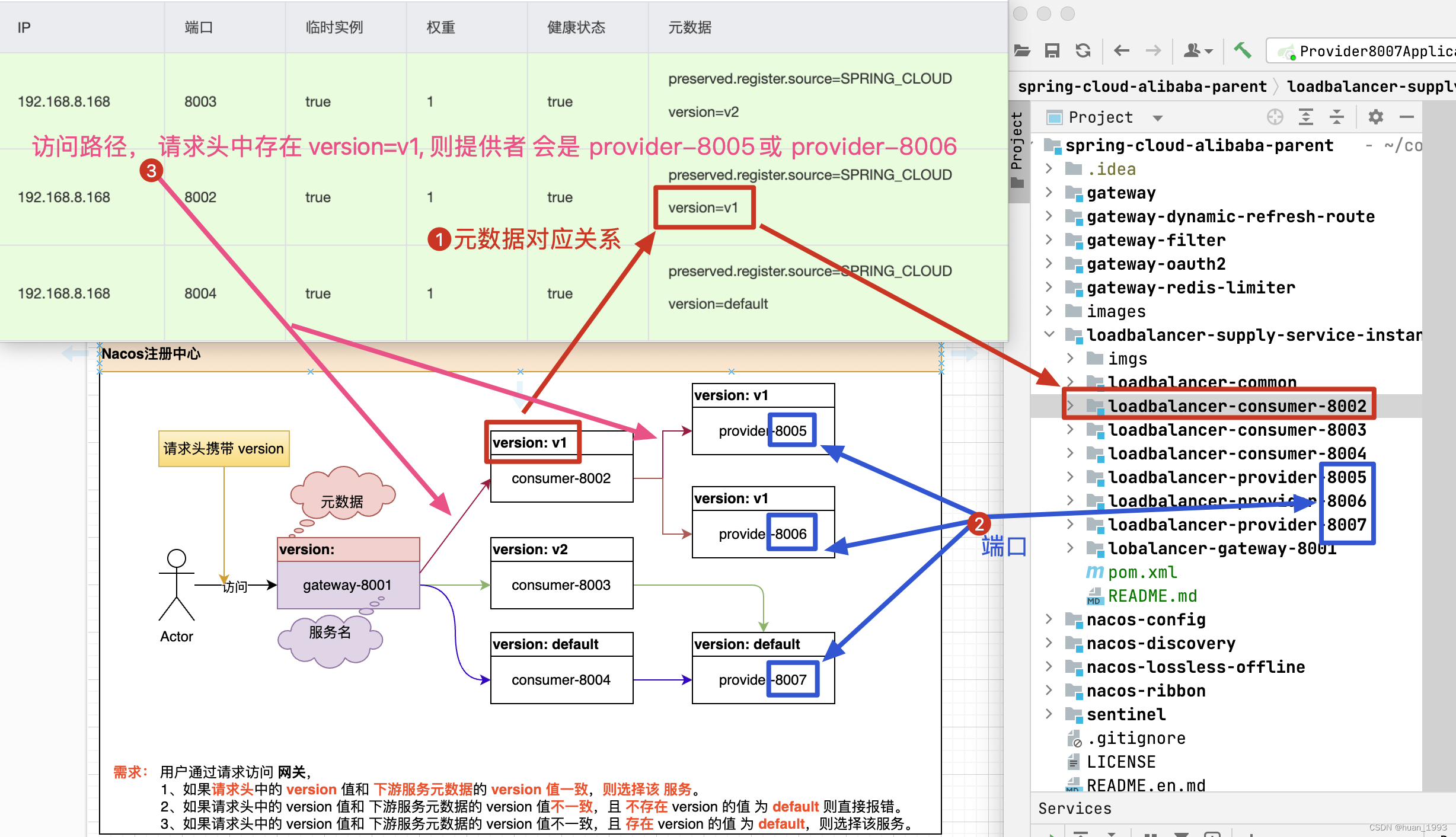
6.1 请求头中携带 version=v1
从上图中可以看到,当version=v1时,服务消费者为consumer-8002, 提供者为provider-8005和provider-8006
➜  ~ curl --location --request GET 'http://localhost:8001/nacos-feign-consumer/fetchProviderServerInfo' \

--header 'version: v1'

{"consumer信息":"192.168.8.168:8002","provider信息":"192.168.8.168:8005"}%

➜  ~ curl --location --request GET 'http://localhost:8001/nacos-feign-consumer/fetchProviderServerInfo' \

--header 'version: v1'

{"consumer信息":"192.168.8.168:8002","provider信息":"192.168.8.168:8006"}%

➜  ~ curl --location --request GET 'http://localhost:8001/nacos-feign-consumer/fetchProviderServerInfo' \

--header 'version: v1'

{"consumer信息":"192.168.8.168:8002","provider信息":"192.168.8.168:8005"}%

➜  ~ curl --location --request GET 'http://localhost:8001/nacos-feign-consumer/fetchProviderServerInfo' \

--header 'version: v1'

{"consumer信息":"192.168.8.168:8002","provider信息":"192.168.8.168:8006"}%

➜  ~
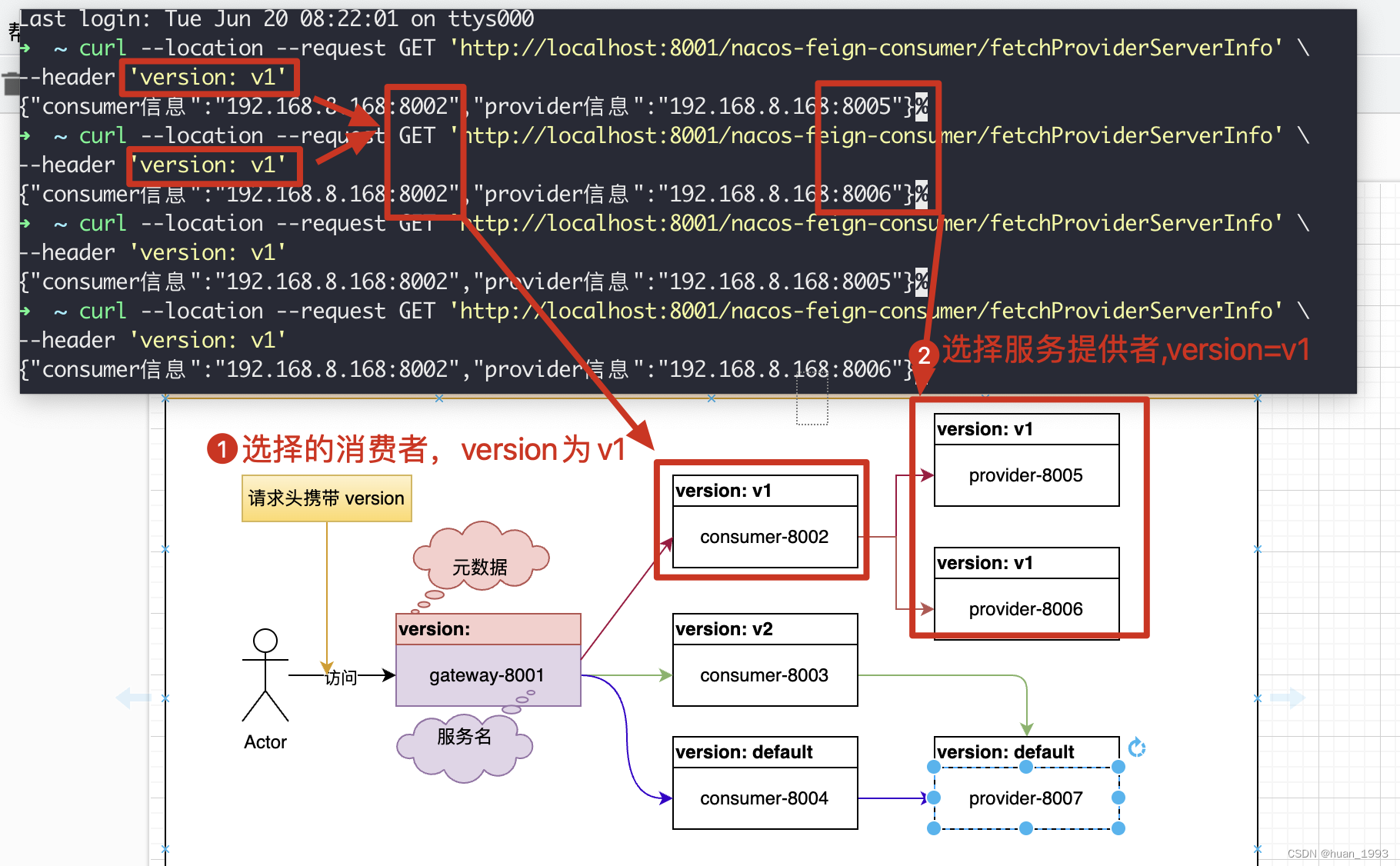
可以看到,消费者返回的端口是8002,提供者返回的端口是8005|8006是符合预期的。
6.2 不传递version
从上图中可以看到,当不携带时,服务消费者为consumer-8004, 提供者为provider-8007和
➜  ~ curl --location --request GET 'http://localhost:8001/nacos-feign-consumer/fetchProviderServerInfo'

{"consumer信息":"192.168.8.168:8004","provider信息":"192.168.8.168:8007"}%

➜  ~ curl --location --request GET 'http://localhost:8001/nacos-feign-consumer/fetchProviderServerInfo'

{"consumer信息":"192.168.8.168:8004","provider信息":"192.168.8.168:8007"}%

➜  ~ curl --location --request GET 'http://localhost:8001/nacos-feign-consumer/fetchProviderServerInfo'

{"consumer信息":"192.168.8.168:8004","provider信息":"192.168.8.168:8007"}%

➜  ~
可以看到,消费者返回的端口是8004,提供者返回的端口是8007是符合预期的。
7、完整代码
8、参考文档
1、https://docs.spring.io/spring-cloud-commons/docs/current/reference/html/#spring-cloud-loadbalancer
Spring Cloud灰度部署的更多相关文章
- Spring Cloud灰度发布之Nepxion Discovery
<蓝绿部署.红黑部署.AB测试.灰度发布.金丝雀发布.滚动发布的概念与区别> 最近公司项目在做架构升级,升级为 Spring Cloud,我们希望能够做到服务的灰度发布,根据访问量逐渐切换 ...
- 【架构】Kubernetes和Spring Cloud哪个部署微服务更好?
Spring Cloud 和Kubernetes都自称自己是部署和运行微服务的最好环境,但是它们在本质上和解决不同问题上是有很大差异的.在本文中,我们将看到每个平台如何帮助交付基于微服务的架构(MSA ...
- 微服务开发平台 Spring Cloud Blade 部署实践
本文介绍使用 Rainbond 快速部署 Spring Cloud Blade 微服务平台.Spring Cloud Blade 是一个由商业级项目升级优化而来的微服务架构,采用Spring Boot ...
- 一句话概括下spring框架及spring cloud框架主要组件
作为java的屌丝,基本上跟上spring屌丝的步伐,也就跟上了主流技术.spring 顶级项目:Spring IO platform:用于系统部署,是可集成的,构建现代化应用的版本平台,具体来说当你 ...
- Spring顶级项目以及Spring cloud组件
作为java的屌丝,基本上跟上spring屌丝的步伐,也就跟上了主流技术. spring 顶级项目: Spring IO platform:用于系统部署,是可集成的,构建现代化应用的版本平台,具体来说 ...
- 【译文】用Spring Cloud和Docker搭建微服务平台
by Kenny Bastani Sunday, July 12, 2015 转自:http://www.kennybastani.com/2015/07/spring-cloud-docker-mi ...
- Spring cloud定义学习
今天讲到的最重要的内容: Spring cloud是什么? Spring cloud项目 spring cloud版本 什么事springcloud? spring cloud 为开发人员提供 ...
- 简述 Spring Cloud 是什么2
一.概念定义 Spring Cloud是一个微服务框架,相比Dubbo等RPC框架, Spring Cloud提供的全套的分布式系统解决方案. Spring Cloud对微服务基础框架Ne ...
- spring 和spring cloud 组成
spring 顶级项目:Spring IO platform:用于系统部署,是可集成的,构建现代化应用的版本平台,具体来说当你使用maven dependency引入spring jar包时它就在工作 ...
- Spring Boot + Spring Cloud 实现权限管理系统 后端篇(一):Kitty 系统介绍
在线演示 演示地址:http://139.196.87.48:9002/kitty 用户名:admin 密码:admin 温馨提示: 有在演示环境删除数据的童鞋们,如果可以的话,麻烦动动小指,右键头像 ...
随机推荐
- [工具/IDE]IDEA常用效率插件
0 代码规范性检查 Alibaba Java Coding Guidelines 1 maven Maven Helper / Maven Wrapper support 2 mybatis Free ...
- [网络/Linux]网络嗅探工具——nmap
1 nmap 简介 Nmap 即 Network Mapper,最早是Linux下的网络扫描和嗅探工具包. nmap是网络扫描和主机检测的工具,用nmap进行信息收集和检测漏洞,功能有: 检测存活主机 ...
- arc076f F - Exhausted?
ARC076 F - Exhausted? [题目大意] \(有m个座位,分别位于坐标为1,2,3,...,m的地方:n个客人,第i位客人只坐位于[0,li]∪[ri,m]的座位.每个座位只能坐一个人 ...
- scikit-learn 中 Boston Housing 数据集问题解决方案
scikit-learn 中 Boston Housing 数据集问题解决方案 在部分旧教程或教材中是 sklearn,现在[2023]已经变更为 scikit-learn 作用:开源机器学习库,支持 ...
- ChatGPT API接口编程基础与使用技巧
总结/朱季谦 趁着这周末空闲时间,在研读完OpenAi官网文档的基础上,及时总结了这篇<ChatGPT API接口编程基础与使用技巧>. 本文大部分内容是围绕编程方面,包括ChatGPT模 ...
- Solon2 常用注解之 @ProxyComponent 用法说明
在 Solon 提倡"克制"的原则下,托管组件分为: 普通组件 代理组件(即 @ProxyComponent 注解的类).代理的细节可以看下<动态代理的本质> . 之所 ...
- ts、typescript、enum、枚举、ts 获取枚举对应的类型、获取 enum 的 key 和 value
ts.typescript.enum.枚举.ts 获取枚举对应的类型 // 假设我一个枚举 enum ENUM_TYPE { ALL = 'all', SOME = 'some', LITTLE = ...
- C# 编译异常CS0433
编译后遇到nuget版本冲突: error CS0433: 类型"ShellFile"同时存在于"Microsoft.WindowsAPICodePack.Shell, ...
- js验证统一社会信用代码
js验证统一社会信用代码 //验证信用代码 function CheckSocialCreditCode(Code) { var patrn = /^[0-9A-Z]+$/; //18位校验及大写校验 ...
- 2023-03-05:ffmpeg推送本地视频至lal流媒体服务器(以RTMP为例),请用go语言编写。
2023-03-05:ffmpeg推送本地视频至lal流媒体服务器(以RTMP为例),请用go语言编写. 答案2023-03-05: 使用 github.com/moonfdd/ffmpeg-go 库 ...