
一步步学习EF Core(1.DBFirst)
很久没写博客了,因为真的很忙,终于空下来,打算学习一下EF Core顺便写个系列, 今天我们就来看看第一篇DBFirst.
本文环境:VS2017 Win7 .NET Core1.1 EF Core1.1.2
这里我们不讨论是用DBFirst好,还是CodeFirst高端..各有各自的用处和适用场景..
我们单纯的只是来使用这个DBFirst..
既然是DBFirst,那么在用DBFirst之前..首先你要有一个数据库(嗯,废话)
其次,如果你是Windows7系统 那么需要升级你的Windows PowerShell到3.0+的版本
然后你需要安装相关的工具包,从NuGet下载即可如下图:
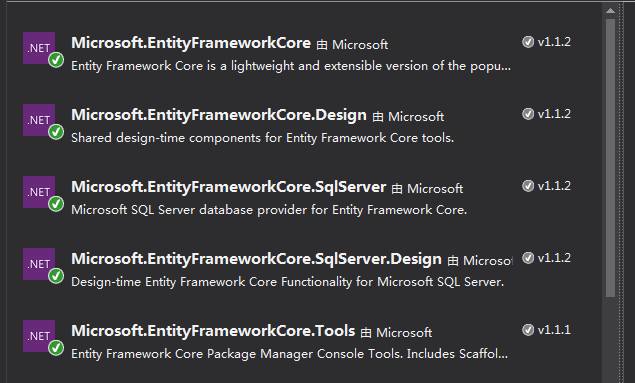
为了方便你们复制..我列一下:
Microsoft.EntityFrameworkCore
Microsoft.EntityFrameworkCore.SqlServer
Microsoft.EntityFrameworkCore.Tools
Microsoft.EntityFrameworkCore.Design
Microsoft.EntityFrameworkCore.SqlServer.Design
然后,我们在VS的工具选项中,选择NuGet包管理器,选择程序包管理控制台
输入命令行:
Scaffold-DbContext "这里输入你的数据库连接字符串" Microsoft.EntityFrameworkCore.SqlServer
就会生成一个Modles文件夹如图: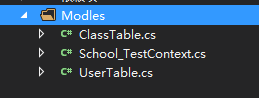
这里面就是你的上下文对象和相关的实体类了.
我们进到上下文对象,会发现自己的连接字符串是固化在这里面的,如图:

我们当然不能这么做,所以,请删除掉他.
下一步,我们使用Asp.net Core 来测试测试看能不能访问.
创建Core项目的流程,我就不说了
然后给你的Core项目用NuGet添加引用:Microsoft.EntityFrameworkCore.SqlServer和Microsoft.EntityFrameworkCore
在配置文件里添加数据库连接字符串:
  "ConnectionStrings": {

    "SchoolConnection": "Data Source=.;Initial Catalog=School_Test;User ID=**;Password=***;MultipleActiveResultSets=true"

  }
然后我们在Startup中注入我们的上下文对象:
在ConfigureServices()方法中注入,代码如下:
        public void ConfigureServices(IServiceCollection services)

        {

            // Add framework services.

            //注入SignalR.(与本文无关,请无视)

            services.AddSignalR(options =>

            {

                options.Hubs.EnableDetailedErrors = true;

            });

           //注入上下文对象

            services.AddDbContext<School_TestContext>(options =>

            options.UseSqlServer(Configuration.GetConnectionString("SchoolConnection")));

            services.AddMvc();

        }
我们创建控制器,代码如下:
    public class TestController : Controller

    {

        //构造函数注入上下文

        private readonly School_TestContext _context;

        public TestController(School_TestContext Context)

        {

            _context = Context;

        }

        public IActionResult ListView()

        {

            return View(_context.UserTable.ToList());

        }

    }
创建相应的视图如下:
@model IEnumerable<EFCoreModel.Modles.UserTable>

 @{

        ViewData["Title"] = "ListView";

        Layout = "~/Views/Shared/_Layout.cshtml";

}

    <h2>ListView</h2>

<p>

    <a asp-action="Create">Create New</a>

</p>

<table class="table">

    <thead>

        <tr>

            <th>

                用户名

            </th>

            <th>

                密码

            </th>

            <th>

               ID

            </th>

            <th>

               班级名

            </th>

            <th></th>

        </tr>

    </thead>

    <tbody>

        @foreach (var item in Model)

        {

            <tr>

                <td>

                    @Html.DisplayFor(modelItem => item.UserName)

                </td>

                <td>

                    @Html.DisplayFor(modelItem => item.PassWord)

                </td>

                <td>

                    @Html.DisplayFor(modelItem => item.Id)

                </td>

                <td>

                    @Html.DisplayFor(modelItem => item.Class.ClassName)

                </td>

                <td>

                    <a asp-action="Edit" asp-route-id="@item.Id">Edit</a> |

                    <a asp-action="Details" asp-route-id="@item.Id">Details</a> |

                    <a asp-action="Delete" asp-route-id="@item.Id">Delete</a>

                </td>

            </tr>

        }

    </tbody>

</table>
运行代码,会报错.如下错误:
No database provider has been configured for this DbContext. A provider can be configured by overriding the DbContext.OnConfiguring method or by using AddDbContext on the application service provider. If AddDbContext is used, then also ensure that your DbContext type accepts a DbContextOptions<TContext> object in its constructor and passes it to the base constructor for DbContext.
这是因为我们通过DBFirst生成的上下文并不能直接拿来注入使用.我们需要改造一下,给上下文添加构造函数,如下:
        public School_TestContext(DbContextOptions options) :base(options)

        {

        }
然后在运行我们的代码.得到结果如下:
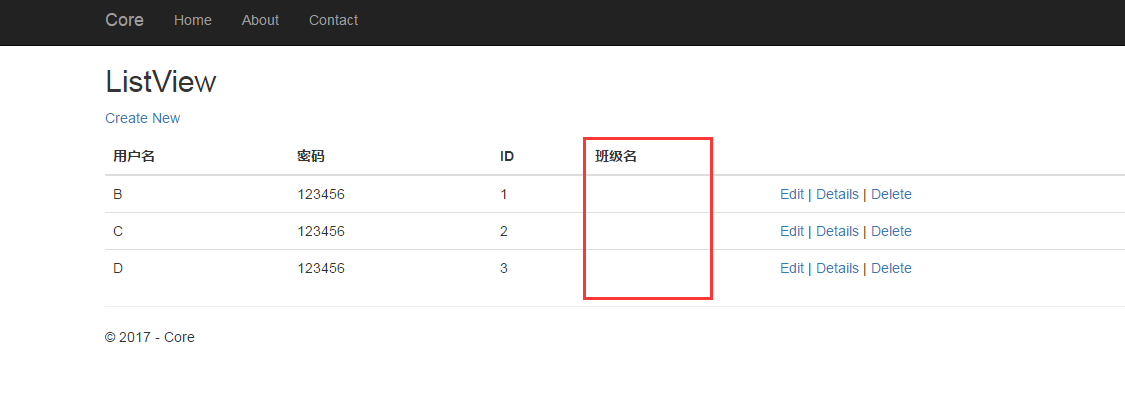
我们发现红框位置的作为关联表的班级名,并没有显示~,这个留待我们后面讲解.
一步步学习EF Core(1.DBFirst)的更多相关文章
- 一步步学习EF Core(3.EF Core2.0路线图)
前言 这几天一直在研究EF Core的官方文档,暂时没有发现什么比较新的和EF6.x差距比较大的东西. 不过我倒是发现了EF Core的路线图更新了,下面我们就来看看 今天我们来看看最新的EF Cor ...
- 一步步学习EF Core(2.事务与日志)
前言 上节我们留了一个问题,为什么EF Core中,我们加载班级,数据并不会出来 其实答案很简单,~ 因为在EF Core1.1.2 中我们在EF6.0+中用到的的延迟加载功能并没有被加入,不过在EF ...
- [转]一步步学习EF Core(2.事务与日志)
本文转自:http://www.cnblogs.com/GuZhenYin/p/6862505.html 上节我们留了一个问题,为什么EF Core中,我们加载班级,数据并不会出来 其实答案很简单,~ ...
- EF Core学习Code First
下面通过实例来学习EF Core Code First,也就是通过EF Core迁移来完成从模型生成数据库. 本实例使用EntityFrameworkCore SQLite 数据库进行介绍,大家也可以 ...
- [翻译 EF Core in Action 2.3] 理解EF Core数据库查询
Entity Framework Core in Action Entityframework Core in action是 Jon P smith 所著的关于Entityframework Cor ...
- [翻译 EF Core in Action 2.2] 创建应用程序的数据库上下文
Entity Framework Core in Action Entityframework Core in action是 Jon P smith 所著的关于Entityframework Cor ...
- EF Core in Action 中文翻译 第一部分导航
Entityframework Core in action Entityframework Core in action是 Jon P smith 所著的关于Entityframework Core ...
- [翻译 EF Core in Action 2.1] 设置一个图书销售网站的场景
Entity Framework Core in Action Entityframework Core in action是 Jon P smith 所著的关于Entityframework Cor ...
- [翻译 EF Core in Action 2.0] 查询数据库
Entity Framework Core in Action Entityframework Core in action是 Jon P smith 所著的关于Entityframework Cor ...
随机推荐
- webSocket学习与应用
非原创,版权归原作者所有http://www.cnblogs.com/shizhouyu/p/4975409.html 1.什么是WebSocket WebSocket 是一种自然的全双工.双向.单套 ...
- Swing入门
厌倦了在控制台使用键盘输入并显示结果的过程?是的,在你现在这台电脑上,已经很少有程序使用这种交互方式.本实验将带你初步进入图形用户界面(GUI)的世界,让你学会如何编写屏幕上那些具有特定大小和位置的窗 ...
- SearchBar简单展示
import UIKit class SearchViewController: UIViewController,UISearchBarDelegate { let SCREEN_WIDTH = U ...
- ksum问题
2sum: Given an array of integers, return indices of the two numbers such that they add up to a speci ...
- [笔记]GBDT理论知识总结
一. GBDT的经典paper:<Greedy Function Approximation:A Gradient Boosting Machine> Abstract Function ...
- 使用原生 JavaScript 操作 DOM
原文:https://www.sitepoint.com/dom-manipulation-vanilla-javascript-no-jquery/ 微软官方放弃了 IE10-,所以现在可以放心使用 ...
- Android开发 旋转屏幕导致Activity重建解决方法(转)
文章来源:http://www.jb51.net/article/31833.htm Android开发文档上专门有一小节解释这个问题.简单来说,Activity是负责与用户交互的最主要机制,任何“ ...
- Bug 笔记
1.页面返回 400 Bag request: 原因:使用Spring MVC controller的时候,查询数据库:当数据库的数据类型是int型时,Spring MVC在查询的数据匹配给实体类 ...
- Python3.5爬虫统计AcFun所有视频,并按各个类别进行Top100排序展示
前(b)言(b): 前段时间对Python产生了浓厚的兴趣,所以决定入门学习了1个多月,后来某时我需要对tomcat做一个压力测试,于是我想到了用Python写一个压力测试的脚本吧!最后捣鼓出了一个脚 ...
- 介绍三个Android支持库控件:TabLayout+ViewPager+RecyclerView
本文主要介绍如下三个Android支持库控件的配合使用: TabLayout:android.support.design.widget.TabLayout ViewPager:android.sup ...