
ADO.NET复习总结(5)--工具类SqlHelper 实现登录
工具类SqlHelper
即:完成常用数据库操作的代码封装
一、基础知识
1、每次进行操作时,不变的代码:
(1)连接字符串;
(2)往集合存值;
(3)创建连接对象、命令对象;
(4)打开连接;
(5)执行命令
2、每次操作时,变化的代码:
(1)sql语句;
(2)参数
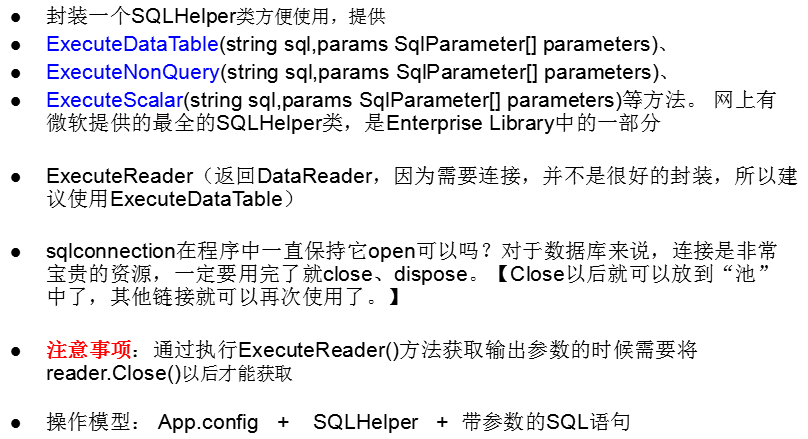
3、配置文件(关于配置这篇文章讲的挺详细的:https://www.cnblogs.com/programsky/p/4592141.html)
好处:修改方便;
维护成本降低,修改程序不需要重新编译。
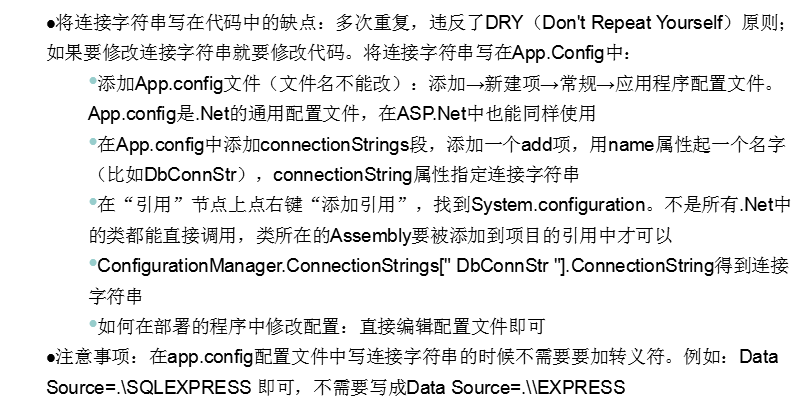
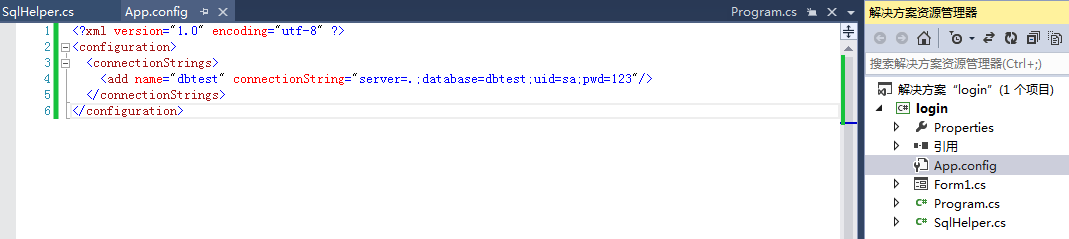
代码为:
<?xml version="1.0" encoding="utf-8" ?>

<configuration>

  <connectionStrings>

    <add name="dbtest" connectionString="server=.;database=dbtest;uid=sa;pwd=123"/>

  </connectionStrings>

</configuration>
二、开始封装
using System;

using System.Collections.Generic;

using System.Configuration;

using System.Data;

using System.Data.SqlClient;

using System.Linq;

using System.Text;

using System.Threading.Tasks;

namespace t1_UserLogin

{

    public static partial class SqlHelper

    {

        private static string connStr = ConfigurationManager.ConnectionStrings["dbtest"].ConnectionString;

        //执行查询:select返回多行多列

        public static SqlDataReader ExecuteReader (string sql, params SqlParameter[] ps)//SqlParameter[] ps=new SqlParameter[];

        {

            SqlConnection conn = new SqlConnection(connStr);

            SqlCommand cmd = new SqlCommand(sql, conn);

            if (ps.Length > )

            {

                cmd.Parameters.AddRange(ps);

            }

            conn.Open();

            //使用SqlDataReader时,连接必须是打开的;设置此参数后,关闭SqlDataReader时会自动关闭使用的连接

            return cmd.ExecuteReader(CommandBehavior.CloseConnection);

        }

        //执行查询:select返回首行首列

        public static object ExecuteScalar(string sql, params SqlParameter[] ps)

        {

            using (SqlConnection conn = new SqlConnection(connStr))

            {

                SqlCommand cmd = new SqlCommand(sql, conn);

                cmd.Parameters.AddRange(ps);

                conn.Open();

                return cmd.ExecuteScalar();

            }

        }

        //执行操作:insert,update,delete

        public static int ExecuteNonQuery(string sql, params SqlParameter[] ps)

        {

            using (SqlConnection conn = new SqlConnection(connStr))

            {

                SqlCommand cmd = new SqlCommand(sql, conn);

                cmd.Parameters.AddRange(ps);

                conn.Open();

                return cmd.ExecuteNonQuery();

            }

        }

    }

}
三、实现登录
用户连接三次登录失败,则锁定15分钟,15分钟之后才可以再使用
实现简单登录
MD5加密:
using System;

using System.Collections.Generic;

using System.Linq;

using System.Security.Cryptography;

using System.Text;

using System.Threading.Tasks;

namespace t1_UserLogin

{

    public static partial class Md5Helper

    {

        public static string Encrypt(string pwd)

        {

            MD5 md5 = MD5.Create();

            //将字符串转换成字符数据:指定编码

            byte[] pwd2 = Encoding.UTF8.GetBytes(pwd);

            byte[] pwd3 = md5.ComputeHash(pwd2);

            StringBuilder sb=new StringBuilder("");

            for (int i = ; i < pwd3.Length; i++)

            {

                sb.Append(pwd3[i].ToString("x2").ToLower());

            }

            //0-255

            //00-ff 10=>16  07

            return sb.ToString();

        }

    }

}
1、登录代码:
using System;

using System.Collections.Generic;

using System.ComponentModel;

using System.Data;

using System.Data.SqlClient;

using System.Drawing;

using System.Linq;

using System.Text;

using System.Threading.Tasks;

using System.Windows.Forms;

using t1_UserLogin;

namespace login

{

    public partial class Form1 : Form

    {

        public Form1()

        {

            InitializeComponent();

        }

        private void btnLogin_Click(object sender, EventArgs e)

        {

            string sql = "select userpwd from userinfo where username=@name";

            SqlParameter p = new SqlParameter("@name", txtName.Text);

            object pwd = SqlHelper.ExecuteScalar(sql, p);

            if(pwd==null)

            {

                MessageBox.Show("用户名错误");

            }

            else if (pwd.ToString().Equals(Md5Helper.Encrypt(txtbwd.Text)))

            {

                MessageBox.Show("登录成功");

            }

            else

            {

                MessageBox.Show("密码错误");

            }

        }

    }

}
2、登录代码:(锁定15分钟)
(1)登录逻辑(重要)

(2)数据库
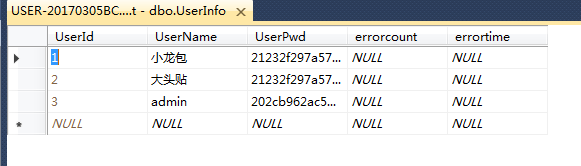
(3)初级代码
using System;

using System.Collections.Generic;

using System.ComponentModel;

using System.Data;

using System.Data.SqlClient;

using System.Drawing;

using System.Linq;

using System.Text;

using System.Threading.Tasks;

using System.Windows.Forms;

using t1_UserLogin;

namespace login

{

    public partial class Form1 : Form

    {

        public Form1()

        {

            InitializeComponent();

        }

        private void btnLogin_Click(object sender, EventArgs e)

        {

           #region 锁定15分钟

            string sql = "select count(*) from userinfo where username=@name";

            SqlParameter p = new SqlParameter("@name", txtName.Text);

            int count = Convert.ToInt32(SqlHelper.ExecuteScalar(sql, p));

            if (count > )

            {

                sql =

                    "select count(*) from userinfo where username=@name and errorcount>=3 and datediff(Minute,errortime,getdate())<=15";

                SqlParameter p11 = new SqlParameter("@name", txtName.Text);

                count = Convert.ToInt32(SqlHelper.ExecuteScalar(sql, p11));

                if (count > )

                {

                    MessageBox.Show("账户已被锁定");

                }

                else

                {

                    //当前未被锁定

                    sql = "select count(*) from userinfo where username=@name and userpwd=@pwd";

                    SqlParameter p12 = new SqlParameter("@name", txtName.Text);

                    SqlParameter p2 = new SqlParameter("@pwd", Md5Helper.Encrypt(txtbwd.Text));

                    count = Convert.ToInt32(SqlHelper.ExecuteScalar(sql, p12, p2));

                    if (count > )

                    {

                        sql = "update userinfo set errorcount=0 where username=@name";

                        SqlParameter p13 = new SqlParameter("@name", txtName.Text);

                        SqlHelper.ExecuteNonQuery(sql, p13);

                        MessageBox.Show("成功");

                    }

                    else

                    {

                        //出错,更新次数与时间

                        sql = "update userinfo set errorcount=errorcount+1,errortime=getdate() where username=@name";

                        SqlParameter p14 = new SqlParameter("@name", txtName.Text);

                        SqlHelper.ExecuteNonQuery(sql, p14);

                        MessageBox.Show("密码错误");

                    }

                }

            }

            else

            {

                MessageBox.Show("用户不存在");

            }

            #endregion

        }

    }

}
3、登录代码:(锁定15分钟)-——————优化
(1)逻辑*(重要)
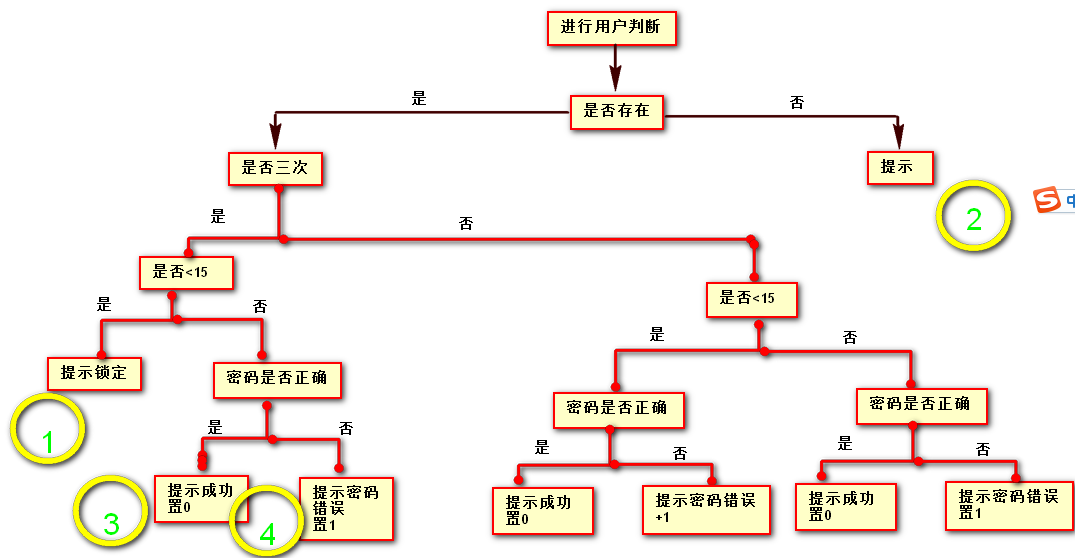
(2)代码优化
using System;

using System.Collections.Generic;

using System.ComponentModel;

using System.Data;

using System.Data.SqlClient;

using System.Drawing;

using System.Linq;

using System.Text;

using System.Threading.Tasks;

using System.Windows.Forms;

using t1_UserLogin;

namespace login

{

    public partial class Form1 : Form

    {

        public Form1()

        {

            InitializeComponent();

        }

        private void btnLogin_Click(object sender, EventArgs e)

        {

            #region 锁定15分钟-优化

            string sql = "select errorcount,errortime,userpwd from userinfo where username=@name";

            SqlParameter p = new SqlParameter("@name", txtName.Text);

            using (SqlDataReader reader = SqlHelper.ExecuteReader(sql, p))

            {

                if (reader.Read())

                {

                    //当前用户名存在

                    int errorCount = Convert.ToInt32(reader["errorCount"]);

                    double errorTime1 = ;

                    //如果单元格返回空值,使用DBNull.Value进行判断

                    if (reader["ErrorTime"] != DBNull.Value)

                    {

                        DateTime errorTime = Convert.ToDateTime(reader["errorTime"]);

                        errorTime1 = (DateTime.Now - errorTime).TotalMinutes;

                    }

                    string pwd1 = reader["userPwd"].ToString();

                    string pwd2 = Md5Helper.Encrypt(txtbwd.Text);

                    if (errorCount >= )

                    {

                        //超过3次

                        if (errorTime1 <= )

                        {

                            //过时

                            MessageBox.Show("锁定");

                        }

                        else

                        {

                            int count1 = ;

                            if (pwd1.Equals(pwd2))

                            {

                                count1 = ;

                                MessageBox.Show("成功");

                            }

                            else

                            {

                                count1 = ;

                                MessageBox.Show("密码错误");

                            }

                            //字符串拼接

                            sql = "update userinfo set errorCount=" + count1 + ",errortime=getdate() where username=@name";

                            p = new SqlParameter("@name", txtName.Text);

                            SqlHelper.ExecuteNonQuery(sql, p);

                        }

                    }

                    else

                    {

                        //不足三次

                        if (errorTime1 <= )

                        {

                            int count1 = ;

                            if (pwd1.Equals(pwd2))

                            {

                                count1 = ;

                                MessageBox.Show("成功");

                            }

                            else

                            {

                                count1 = errorCount  + ;

                                MessageBox.Show("密码错误");

                            }

                            sql = "update userinfo set errorCount=" + count1 + ",errortime=getdate() where username=@name";

                            p = new SqlParameter("@name", txtName.Text);

                            SqlHelper.ExecuteNonQuery(sql, p);

                        }

                        else

                        {

                            int count1 = ;

                            if (pwd1.Equals(pwd2))

                            {

                                count1 = ;

                                MessageBox.Show("成功");

                            }

                            else

                            {

                                count1 = ;

                                MessageBox.Show("密码错误");

                            }

                            sql = "update userinfo set errorcount=" + count1 + ",errortime=getdate() where username=@name";

                            p = new SqlParameter("@name", txtName.Text);

                            SqlHelper.ExecuteNonQuery(sql, p);

                        }

                    }

                }

                else

                {

                    MessageBox.Show("用户名不存在");

                }

            }

            #endregion

        }

    }

}
ADO.NET复习总结(5)--工具类SqlHelper 实现登录的更多相关文章
- SpringBoot + Vue + ElementUI 实现后台管理系统模板 -- 后端篇(五): 数据表设计、使用 jwt、redis、sms 工具类完善注册登录逻辑
(1) 相关博文地址: SpringBoot + Vue + ElementUI 实现后台管理系统模板 -- 前端篇(一):搭建基本环境:https://www.cnblogs.com/l-y-h/p ...
- 制作ado开发辅助工具类SqlHelper
public static class SqlHelper { //通过配置文件获取连接字符创 private static readonly string constr = Configuratio ...
- vs工具类SQLhelper参考
参考 https://www.cnblogs.com/liyangLife/p/5036636.html
- 利用JDBC工具类 模拟用户登录!
一.建库 设置 id为主键并自增! 二.定义登录接口 package com.aaa.dao; public interface IDengDao { /* 1.定义一个登陆的接口,参数是name 和 ...
- PHP文件上传,下载,Sql工具类!
PHP文件上传,下载,Sql工具类! 对文件大小,文件类型 同名覆盖 中文转码的操作,可直接使用 前台 upload.html <!DOCTYPE html> <html> & ...
- 4 多表代替密码之Hill 密码_1 矩阵工具类
在说明Hill加密之前要先复习线性代数的知识,主要是关于矩阵的一些运算和概念. 一.矩阵的逆: 定义方阵M的逆矩阵应该满足M*M^-1==I,其中I是单位矩阵,比如: 但是这个地方是对英文字母进行加密 ...
- 基于Dapper二次封装了一个易用的ORM工具类:SqlDapperUtil
基于Dapper二次封装了一个易用的ORM工具类:SqlDapperUtil,把日常能用到的各种CRUD都进行了简化封装,让普通程序员只需关注业务即可,因为非常简单,故直接贴源代码,大家若需使用可以直 ...
- 【转载】微软官方提供的Sqlserver数据库操作帮助类SQLHelper类
在.NET平台中,C#语言一般使用ADO.NET组件来操作Sqlserver数据库,通过ADO.NET组件可以实现连接数据库.查询数据集.执行SQL语句以及关闭数据库连接等操作,为此网上有很多开发者自 ...
- C#工具类:使用SharpZipLib进行压缩、解压文件
SharpZipLib是一个开源的C#压缩解压库,应用非常广泛.就像用ADO.NET操作数据库要打开连接.执行命令.关闭连接等多个步骤一样,用SharpZipLib进行压缩和解压也需要多个步骤.Sha ...
随机推荐
- 关于vs2010下水晶报表的使用入门
关于vs2010下使用水晶报表了解情况记录如下: 1.首先vs2010不再自带水晶报表控件了,需要下载安装vs2010配套的水晶报表控件:CRforVS_13_0.这个控件安装很简单,基本上都选择默认 ...
- 房上的猫:HTML5基础
一.W3C标准 1)W3C标准不是某一个标准,而是一系列的标准的集合,一个网页主要由三部分组成,即结构(Structure),表现(Presentation)和行为(Behavior) 2)不很严谨的 ...
- Vue 爬坑之路(七)—— 监听滚动事件 实现动态锚点
前几天做项目的时候,需要实现一个动态锚点的效果 如果是传统项目,这个效果就非常简单.但是放到 Vue 中,就有两大难题: 1. 在没有 jQuery 的 animate() 方法的情况下,如何实现平滑 ...
- 自学Aruba1.1-Aruba体系结构-产品线
点击返回:自学Aruba之路Aruba产品线 IP switches: 1500.2500.3500 Controllers:7200 .70x0 Series.7005 Meridian:基于ACE ...
- 数据对象转json与md5加密注意事项
项目中遇到将OC数据对象类型转化字符类型,然后进行MD5加密的技术流程,在转化字符数组到字符加密过程中遇到一些问题. 问题 转化后的字符进行md5加密,出现与服务器加密结果不匹配的情况 分析 在对代码 ...
- webgl鱼眼算法
在网页上面实现,采用的是球面映射和材质线性映射,这里注意的是用线性映射保留了球面的感觉,而不是采用sin映射,sin映射在边缘会产生很难看的效果. 最后效果如下:
- 【转载】Linux下的IO监控与分析
近期要在公司内部做个Linux IO方面的培训, 整理下手头的资料给大家分享下 各种IO监视工具在Linux IO 体系结构中的位置 源自 Linux Performance and Tuning G ...
- 运维架构服务监控Open-Falcon
一. 介绍 监控系统是整个运维环节,乃至整个产品生命周期中最重要的一环,事前及时预警发现故障,事后提供翔实的数据用于追查定位问题.监控系统作为一个成熟的运维产品,业界有很多开源的实现可供选择.当公司刚 ...
- [转]python执行bash指令,如果指令返回错误,如何优雅的结束python程序
如果是有返回值的可执行文件可以直接获取return code, 如果error code 直接退出. import os ret = os.system("COMMAND LINE" ...
- 【转载】OAuth2 流程
OAuth是一个关于授权(authorization)的开放网络标准,在全世界得到广泛应用,目前的版本是2.0版. 本文对OAuth 2.0的设计思路和运行流程,做一个简明通俗的解释,主要参考材料为R ...