
替换Spring Boot 的EnableCaching注解
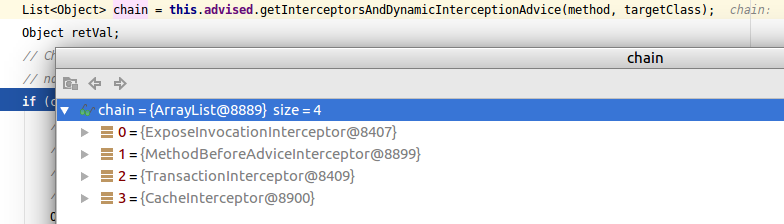
SpringBoot 中可使用@Cacheable注解来更方便的使用redis,这个注解是通过拦截器工作的,使用了@Cacheable的方法执行时,执行到CglibAopProxy.java中的 DynamicAdvisedInterceptor.intercept方法中如下图位置时,会发现CacheInterceptor:
CacheInterceptor是由EnableCaching注解引入的:
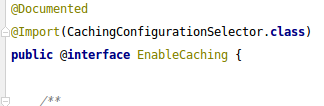
CachingConfigurationSelector:
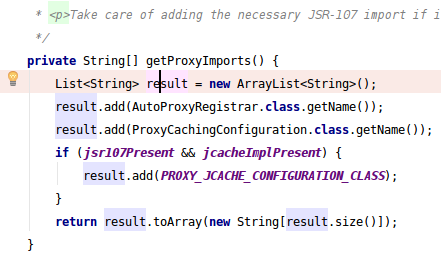
注意上图中的ProxyCachingConfiguration:
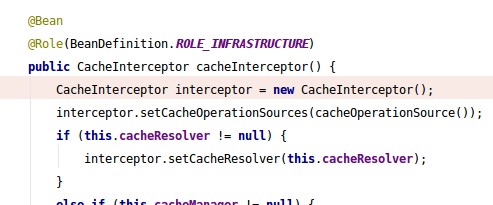
方法的返回值如果缓存中存在直接返回缓存中结果,缓存中没有才会实际执行方法这个功能的实现就是在CacheInterceptor拦截器中了,它的invoke方法:
	public Object invoke(final MethodInvocation invocation) throws Throwable {

		Method method = invocation.getMethod();

		CacheOperationInvoker aopAllianceInvoker = new CacheOperationInvoker() {

			@Override

			public Object invoke() {

				try {

					return invocation.proceed();

				}

				catch (Throwable ex) {

					throw new ThrowableWrapper(ex);

				}

			}

		};

		try {

			return execute(aopAllianceInvoker, invocation.getThis(), method, invocation.getArguments());

		}

		catch (CacheOperationInvoker.ThrowableWrapper th) {

			throw th.getOriginal();

		}

	}
具体读取数据在protected的execute方法中的private的execute中:
	protected Object execute(CacheOperationInvoker invoker, Object target, Method method, Object[] args) {

		// Check whether aspect is enabled (to cope with cases where the AJ is pulled in automatically)

		if (this.initialized) {

			Class<?> targetClass = getTargetClass(target);

			Collection<CacheOperation> operations = getCacheOperationSource().getCacheOperations(method, targetClass);

			if (!CollectionUtils.isEmpty(operations)) {

				return execute(invoker, method, new CacheOperationContexts(operations, method, args, target, targetClass));

			}

		}

		return invoker.invoke();

	}
首先下面代码第一行findCachedItem方法判断缓存中是否有数据,然后在后面的那个判断中判断,有就取缓存并直接返回结果,不再执行被拦截方法;否则else执行被拦截方法,被拦截方法中一般就是读数据库了,不过这就和这部分没啥关系了。
		Cache.ValueWrapper cacheHit = findCachedItem(contexts.get(CacheableOperation.class));

		// Collect puts from any @Cacheable miss, if no cached item is found

		List<CachePutRequest> cachePutRequests = new LinkedList<CachePutRequest>();

		if (cacheHit == null) {

			collectPutRequests(contexts.get(CacheableOperation.class),

					CacheOperationExpressionEvaluator.NO_RESULT, cachePutRequests);

		}

		Object cacheValue;

		Object returnValue;

		if (cacheHit != null && cachePutRequests.isEmpty() && !hasCachePut(contexts)) {

			// If there are no put requests, just use the cache hit

			cacheValue = cacheHit.get();

			returnValue = wrapCacheValue(method, cacheValue);

		}

		else {

			// Invoke the method if we don't have a cache hit

			returnValue = invokeOperation(invoker);

			cacheValue = unwrapReturnValue(returnValue);

		}
我这是用redis做缓存的,通过上面代码可以发现,一旦redis挂了,findCachedItem方法报异常,被拦截的方法就不能正常使用了,那么我需要redis出异常了,正常走数据库该怎么办呢。我首先考虑的是重写protected的那个execute方法,然而发现有一个private的内部类绕不过去,全都自己实现一遍,完全没必要,因为懒得细调了于是我就新建了一个拦截器,继承CacheInterceptor:
    @Override

    protected Object execute(CacheOperationInvoker invoker, Object target, Method method, Object[] args) {

        try {

            return super.execute(invoker, target, method, args);

        }catch (Exception e){

            return invokeOperation(invoker);

        }

    }
然后就是让新拦截器起作用,我讨厌SpringBoot的注解就讨厌在这部分。如果还用EnableCaching注解这问题就复杂了,于是简单粗暴新建注解代替EnableCaching,然后CachingConfigurationSelector也需要替换掉。接着是ProxyCachingConfiguration以及它的基类AbstractCachingConfiguration:
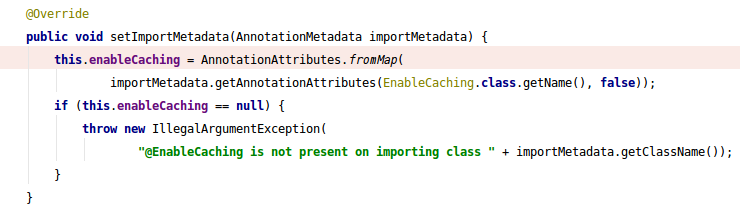
重写这个方法,用新建的注解替换掉方法中的EnableCaching就可以了,由于用的是线上代码测试的就不好往这贴了,不过亲测成功,虽然方法比较粗糙,但是SpringBoot里的代码留的扩展余地就那样,也不想太费工夫了。
==========================================================
咱最近用的github:https://github.com/saaavsaaa
微信公众号:
替换Spring Boot 的EnableCaching注解的更多相关文章
- spring boot @ConditionalOnxxx相关注解总结
Spring boot @ConditionalOnxxx相关注解总结 下面来介绍如何使用@Condition public class TestCondition implements Condit ...
- Spring boot 使用的注解有哪些?
Spring boot 使用的注解有哪些? 注解 作用 @SpringBootApplication 等价于 @Configuration + @EnableAutoConfiguration + @ ...
- (32)Spring Boot使用@SpringBootApplication注解,从零开始学Spring Boot
[来也匆匆,去也匆匆,在此留下您的脚印吧,转发点赞评论] 如果看了我之前的文章,这个节你就可以忽略了,这个是针对一些刚入门的选手存在的困惑进行写的一篇文章. 很多Spring Boot开发者总是使用 ...
- Spring Boot 二十个注解
Spring Boot 二十个注解 占据无力拥有的东西是一种悲哀. Cold on the outside passionate on the insede. 背景:Spring Boot 注解的强大 ...
- spring boot 中@Autowired注解无法自动注入的错误
版权声明:本文为博主原创文章,遵循CC 4.0 BY-SA版权协议,转载请附上原文出处链接和本声明. 本文链接:https://blog.csdn.net/huihuilovei/article/de ...
- Spring Boot中@Scheduled注解的使用方法
Spring Boot中@Scheduled注解的使用方法 一.定时任务注解为@Scheduled,使用方式举例如下 //定义一个按时间执行的定时任务,在每天16:00执行一次. @Scheduled ...
- Spring Boot 的核心注解是哪个?它主要由哪几个注解组成的?
启动类上面的注解是@SpringBootApplication,它也是 Spring Boot 的核心注解,主要组合包含了以下 3 个注解: @SpringBootConfiguration:组合了 ...
- Spring Boot Web 开发注解篇
本文提纲 1. spring-boot-starter-web 依赖概述 1.1 spring-boot-starter-web 职责 1.2 spring-boot-starter-web 依赖关系 ...
- 读懂这些spring boot的核心注解,快速配置完成项目搭建
在spring boot中,摒弃了spring以往项目中大量繁琐的配置,遵循约定大于配置的原则,通过自身默认配置,极大的降低了项目搭建的复杂度.同样在spring boot中,大量注解的使用,使得代码 ...
随机推荐
- iframe实现自适应高度
代码简单,兼容性还可以 <script>function SetWinHeight(obj) { var win=obj; if (document.getElementById) ...
- Vue 爬坑之路(二)—— 组件之间的数据传递
Vue 的组件作用域都是孤立的,不允许在子组件的模板内直接引用父组件的数据.必须使用特定的方法才能实现组件之间的数据传递. 首先用 vue-cli 创建一个项目,其中 App.vue 是父组件,com ...
- 用JMX远程监控Tomcat
要通过JMX远程监控Tomcat,首先需要进行Tomcat的JMX远程配置. 注意:此配置添加在catalina.bat文件开头的注释行(rem)后面即可. 不需鉴权的配置: 先修改Tomcat的启动 ...
- [Linux] PHP程序员玩转Linux系列-腾讯云硬盘扩容挂载
1.PHP程序员玩转Linux系列-怎么安装使用CentOS 2.PHP程序员玩转Linux系列-lnmp环境的搭建 3.PHP程序员玩转Linux系列-搭建FTP代码开发环境 4.PHP程序员玩转L ...
- ASP.NET MVC5+EF6+EasyUI 后台管理系统(84)-Quartz 作业调度用法详解一
前言 我从Quartz2.0开始使用,并对其进行了封装了界面,可以参考 http://www.cnblogs.com/ymnets/p/5065154.html 最近拿出来进行了优化,并升级到最新版, ...
- 配置lnmp
===================准备篇: 1.配置防火墙,开启80端口.3306端口vi /etc/sysconfig/iptables-A INPUT -m state –state NEW ...
- flask 扩展之 -- flask-sqlalchemy
flask-sqlalchemy.md 一. 安装 $ pip install flask-sqlalchemy 二. 配置 配置选项列表 : 选项 说明 SQLALCHEMY_DATABASE_UR ...
- select onchagnge 弹出自己的文本值
select onchagnge 弹出自己的文本值onchange='alert($("option:selected",this).text())'
- js脚本中try与cache捕获异常处理
<script type="text/javascript"> function add_reason(elm){ try{ var pp=$('.pp').val() ...
- 在线SVN仓库实现:金山快盘+TortoiseSVN(Win)+SCPlugin(Mac)
前段时间一直在研究SVN在线托管,也尝试了网上推荐的免费托管网站. 但毕竟是是免费的,还是要受到比如空间大小.私有性等这样那样的限制,感觉有些麻烦. 而且,比较心疼自己在本地开发的时候积累的更新日志, ...