
学会WCF之试错法——安全配置报错分析
服务端配置
<system.serviceModel>

     <bindings>

      <wsHttpBinding>

        <binding name ="WsHttpBinding_IService" maxReceivedMessageSize="370000" receiveTimeout="00:10:01" maxBufferPoolSize="100">

          <readerQuotas maxStringContentLength="240000"/>

          <security mode="Transport">

            <transport clientCredentialType="Windows"></transport>

          </security>

        </binding>

      </wsHttpBinding>

    </bindings>

    <services>

      <service name="WCF_Find_Error_Lib.Service" behaviorConfiguration="beh">

        <endpoint address=""

                  binding="wsHttpBinding"

                  contract="WCF_Find_Error_Lib.IService"

                  bindingConfiguration="WsHttpBinding_IService">

        </endpoint>

        <host>

          <baseAddresses>

            <add baseAddress="http://localhost/S" />

          </baseAddresses>

        </host>

      </service>

    </services>

    <behaviors>

      <serviceBehaviors>

        <behavior name="beh">

          <serviceThrottling maxConcurrentCalls="1"/>

          <serviceMetadata httpGetEnabled="True" httpsGetEnabled="True" httpGetUrl="http://localhost/S"/>

          <serviceDebug includeExceptionDetailInFaults="True" />

        </behavior>

      </serviceBehaviors>

    </behaviors>

  </system.serviceModel>
服务契约
[ServiceContract]

    public interface IService

    {

        [OperationContract]

        string GetData(int value);

        [OperationContract]

        string GetString(string value);

        [OperationContract]

        void Upload(Request request);

    }

    [MessageContract]

    public class Request

    {

        [MessageHeader(MustUnderstand = true)]

        public string FileName { get; set; }

        [MessageBodyMember(Order = )]

        public Stream Content {get;set;}

}
服务
[ServiceBehavior(InstanceContextMode = InstanceContextMode.PerSession, ConcurrencyMode = ConcurrencyMode.Reentrant)]

    public class Service : IService

    {

        public string GetData(int value)

        {

            //Thread.Sleep(120000);

            return string.Format("You entered: {0}", value);

        }

        public string GetString(string value)

        {

            //Thread.Sleep(120000);

            Thread.Sleep();

            return string.Format("You entered: {0}", value);

        }

        public void Upload(Request request)

        {

            try

            {

                StreamReader sr = new StreamReader(request.Content, Encoding.GetEncoding("GB2312"));

                StreamWriter sw = new StreamWriter("E:\\" + request.FileName + ".txt", false, Encoding.GetEncoding("GB2312"));

                while (!sr.EndOfStream)

                {

                    sw.WriteLine(sr.ReadLine());

                    Thread.Sleep();

                }

                sr.Close();

                sw.Close();

            }

            catch (Exception ex)

            { }

        }

  }
服务寄宿
  class Program

    {

        static void Main(string[] args)

        {

            try

            {

                ServiceHost host = new ServiceHost(typeof(Service));

                host.Open();

                Console.WriteLine("服务状态:"+host.State.ToString());

            }

            catch (Exception ex)

            {

                Console.WriteLine(ex.Message);

            }

            Console.WriteLine("服务启动");

            Console.WriteLine("按任意键停止服务");

            Console.ReadLine();

        }

  }
客户端配置
<system.serviceModel>

    <bindings>

      <wsHttpBinding>

        <binding name ="WsHttpBinding_IService" maxReceivedMessageSize="370000" receiveTimeout="00:10:01" maxBufferPoolSize="100">

          <readerQuotas maxStringContentLength="240000"/>

          <security mode="Transport">

            <transport clientCredentialType="Windows">

            </transport>

          </security>

        </binding>

      </wsHttpBinding>

    </bindings>

    <client>

      <endpoint address="http://localhost/S" binding="wsHttpBinding"

          bindingConfiguration="WsHttpBinding_IService" contract="IService"

          name="WHttpBinding_IService" />

    </client>

  </system.serviceModel>
客户端代理
  public class ServiceProxy

    {

        public string GetData(int value)

        {

            string ret = null;

            ServiceClient client = null;

            try

            {

                client = new ServiceClient();

                ret = client.GetData(value);

                client.Close();

            }

            catch

            {

                if (client != null)

                {

                    client.Abort();

                }

                throw;

            }

            return ret;

        }

        public string GetString(string value)

        {

            string ret = null;

            ServiceClient client = null;

            try

            {

                client = new ServiceClient();

                ret = client.GetString(value);

                client.Close();

            }

            catch

            {

                if (client != null)

                {

                    client.Abort();

                }

                throw;

            }

            return ret;

        }

        public void Upload(Request request)

        {

            ServiceClient client = null;

            try

            {

                client = new ServiceClient();

                client.Upload(request);

                client.Close();

            }

            catch

            {

                if (client != null)

                {

                    client.Abort();

                }

                throw;

            }

        }

    }

    [ServiceContractAttribute(ConfigurationName = "IService")]

    public interface IService

    {

        [System.ServiceModel.OperationContractAttribute(Action = "http://tempuri.org/IService/GetData", ReplyAction = "http://tempuri.org/IService/GetDataResponse")]

        string GetData(int value);

        [System.ServiceModel.OperationContractAttribute(Action = "http://tempuri.org/IService/GetString", ReplyAction = "http://tempuri.org/IService/GetStringResponse")]

        string GetString(string value);

        [System.ServiceModel.OperationContractAttribute(Action = "http://tempuri.org/IService/Upload", ReplyAction = "http://tempuri.org/IService/UploadResponse")]

        void Upload(Request request);

    }

    [MessageContract]

    public class Request

    {

        [MessageHeader(MustUnderstand = true)]

        public string FileName { get; set; }

        [MessageBodyMember(Order = )]

        public Stream Content { get; set; }

    }

    [ServiceBehavior(InstanceContextMode = InstanceContextMode.PerCall, ConcurrencyMode = ConcurrencyMode.Reentrant)]

    public class ServiceClient : System.ServiceModel.ClientBase<IService>, IService

    {

        public ServiceClient()

        {

        }

        public string GetData(int value)

        {

            return base.Channel.GetData(value);

        }

        public string GetString(string value)

        {

            return base.Channel.GetString(value);

        }

        public void Upload(Request request)

        {

            base.Channel.Upload(request);

        }

  }
1 Transport安全模式(本机调试)
客户端调用
using (ServiceClient client = new ServiceClient())

{

    StreamReader sr = new StreamReader("D:\\CSBMTEMP.txt", Encoding.Default);

    string str = sr.ReadToEnd();

    sr.Close();

    var s = client.GetString(str);

}
服务端和客户端配置如上。wsHttpBinding的Message安全模式,客户端凭据默认为Windows
运行客户端,抛出异常:
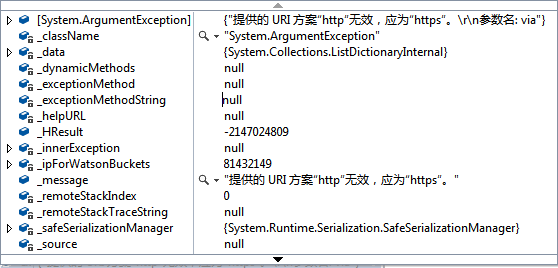
抛出异常的原因是,Transport模式支持HTTPS,TCP,ICP,MSMQ,而这里终结点地址是http://localhost/S,没有使用HTTPS协议。将终结点地址改为https://localhost/S即可。
服务端和客户端配置的安全模式不一样时
服务端安全模式修改为:
<security mode="Transport">

       <transport clientCredentialType="Basic"></transport>

</security>
客户端保持不变:
<security mode="Transport">

     <transport clientCredentialType="Windows"></transport>

</security>
运行客户端,抛出异常:
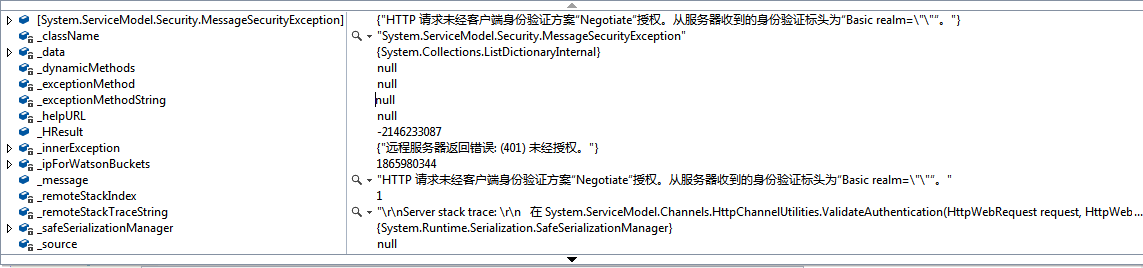
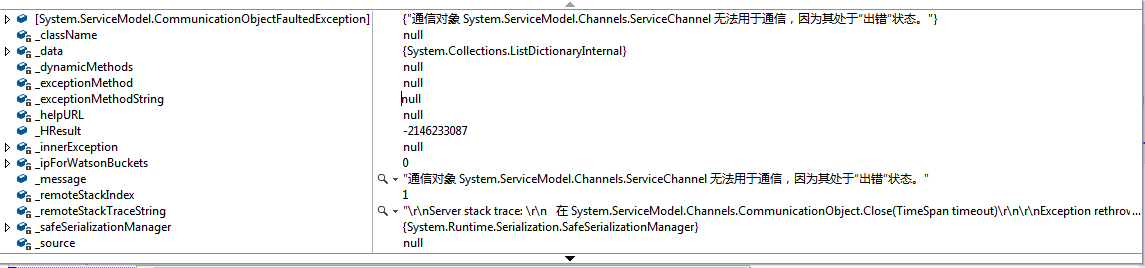
将客户端安全配置改为Basic,与服务端相同
<security mode="Transport">

            <transport clientCredentialType="Basic"></transport>

</security>
运行客户端,抛出异常,因为Transport模式不支持Basic这种客户端凭据。
2 Message安全模式(本机调试)
wsHttpBinding的Message安全模式,客户端凭据默认为Windows。
服务地址配置为https://localhost/S,服务端与客户端安全模式相同
<security mode="Message">

     <transport clientCredentialType="Windows"></transport>

</security>
运行客户端,抛出异常
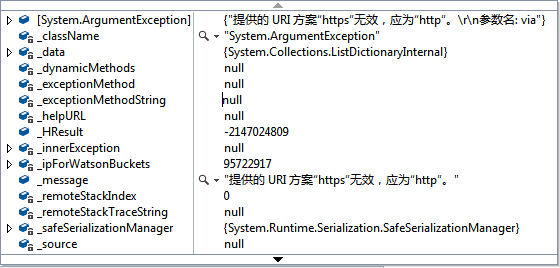
抛出异常的原因是,wsHttpBinding的Message安全模式不支持https协议,改为http协议则正常。
但是,当服务端的客户端凭据配置与客户端不一致时,也可以正常执行,并获得正常的结果。
例如,服务端配置:
<security mode="Message">

       <transport clientCredentialType="Basic"></transport>

</security>
客户端配置:
<security mode="Message">

      <transport clientCredentialType="Windows"></transport>

</security>
-----------------------------------------------------------------------------------------
转载与引用请注明出处。
时间仓促,水平有限,如有不当之处,欢迎指正。
学会WCF之试错法——安全配置报错分析的更多相关文章
- 解决eclipse spring配置报错:cvc-elt.1: Cannot find the declaration of element
解决eclipse spring配置报错:cvc-elt.1: Cannot find the declaration of element 'beans'.Referenced file conta ...
- const变量赋值报错分析
const变量赋值报错分析 const变量赋值报错 从变量到常量的赋值是合法C++的语法约定的, 如从char 到const char顺畅: 但从char **到 const char **编译器就会 ...
- mysql5.7密码修改与报错分析
1.修改密码 修改密码: vim /etc/my.cnf 的mysqld字段加入skip-grant-tables 重启MySQL,service mysqld restart 终端输入 mysql ...
- std::unique_ptr使用incomplete type的报错分析和解决
Pimpl(Pointer to implementation)很多同学都不陌生,但是从原始指针升级到C++11的独占指针std::unique_ptr时,会遇到一个incomplete type的报 ...
- rsyslog配置报错解决
配置过程中,查看/var/log/meassage 有报错信息: action '*' treated as ':omusrmsg:*' - please use ':omusrmsg:*' synt ...
- 由登录服务器时ulimit配置报错,也谈下ulimit配置
最近在登录开发机时,有报错如下: -bash: cannot modify limit: Operation not permitted 一定是哪个地方有ulimit设置,想想看,用户登录或用户su命 ...
- maven 配置报错 JAVA_HOME not found in your environment
最近比较空,想研究下spring mvc,于是编按照教程一步一步配置开发环境.配置maven完成后,运行命令mvn -v的时候,竟然报错.错误信息如下: Error: JAVA_HOME not fo ...
- 学会WCF之试错法——数据传输
数据传输 服务契约 [ServiceContract] public interface IService { [OperationContract] string GetData(int value ...
- webpack配置报错:invalid configuration object.webpack has been initialisted using a configuration objcet that does not match thie API schema
最近接收了别人的项目,webpack配置总是报错如下:最后找到了解决办法,在此分享一下: 错误情况: 解决办法: 将package.json里面的colors删除掉即可
随机推荐
- 使用MxNet新接口Gluon提供的预训练模型进行微调
1. 导入各种包 from mxnet import gluon import mxnet as mx from mxnet.gluon import nn from mxnet import nda ...
- Sqoop1.99.7将MySQL数据导入到HDFS中
准备 本示例将实现从MySQL数据库中将数据导入到HDFS中 参考文档: http://sqoop.apache.org/docs/1.99.7/user/Sqoop5MinutesDemo.html ...
- Extjs6随笔(终篇)——内容总结
上个月和Extjs说byebye了,以后大概也没机会用了.之前的博客有点乱,大家看着比较麻烦,所以趁着我还没忘,在这里总结一下♪(^∇^*) 写了个demo,传到git上了,有需要可以自取.Extjs ...
- win10 UWP MessageDialog 和 ContentDialog
我之前开发一个软件 winMarkdown,这个软件在关闭需要提示用户还没有保存东西,需要保存,如果用户选择退出,那么把数据存放. 在Metro程序中,没有传统的窗口,当我们要用需要交互的消息提示时, ...
- 如何在不同的语言/平台中获取Android ID
如何在不同的语言/平台中获取Android ID 最近开发工作中需要使用到AndroidID,在Unity和native code中也需要使用,java获取很方便,Unity中也不难,最难的是在nat ...
- 双端链表--Java实现
/*双端链表--比普通链表多了一个指向最后一个节点的引用 * 特点: 链表可以进行尾巴插入--输出顺序和输入顺序一致 * 但是不可以进行尾巴删除因为没有倒数第二节点的引用 * */ public cl ...
- MySql采用GROUP_CONCAT合并多条数据显示的方法
情况分析: 1. 表course id name 1 课程一 ================= 2.表course_teacher id course_id teacher_ ...
- MongoDB复制
1. 什么是复制 (1)MongoDB复制是将数据同步在多个服务器的过程. (2)复制提供了数据的冗余备份,并在多个服务器上存储数据副本,提高了数据的可用性, 并可以保证数据的安全性. (3)复制还允 ...
- 关于Python输出时间戳的问题
在我们的程序中,有时候想要知道程序的执行时间或者准确的停止时间,这时候就需要我们自己添加一个时间戳,以便我们做出判断和相应的处理. 下面是我亲测并收集的资料,菜鸟一枚,不全之处大神可给予补充和指正. ...
- 在Windows上搭建PhoneGAP(crodova)的开发环境
PhoneGAP是一个可以将web应用打包成移动应用的开源框架,使用它可以迅速的将HTML.CSS和JavaScript开发的web应用打包成跨平台的移动应用程序,而Apache Cordova是Ph ...