
ActiveMQ笔记——技术点汇总
Table of contents
· What's the Java Message Service?
· How are messages stored by ActiveMQ?
· Caching messages in the broker for consumers
· Embedding ActiveMQ using Spring
Introduction to ActiveMQ
1. ActiveMQ is an open source, Java Message Service (JMS) 1.1–compliant, message-oriented middleware (MOM) from the Apache Software Foundation that provides high availability, performance, scalability, reliability, and security for enterprise messaging.
2. ActiveMQ features:
a) JMS compliance.
b) Connectivity - ActiveMQ supports for protocols such as HTTP/S, IPmulticast, SSL, STOMP, TCP, UDP, XMPP, and more.
c) Pluggable persistence and security - ActiveMQ provides multiple flavors of persistence. Security can be completely customized for the type of authentication and authorization.
d) Integration with application servers - It’s common to integrate ActiveMQ with a Java application server, including Apache Tomcat, Jetty, Apache Geronimo, JBoss and etc.
e) Client APIs - ActiveMQ provides client APIs for many languages besides just Java, including C/C++, .NET, Perl, PHP, Python, Ruby, and more.
f) Broker clustering - Many ActiveMQ brokers can work together as a federated network of brokers for scalability purposes.
g) Dramatically simplified administration - ActiveMQ is designed with developers in mind.
3. When to use ActiveMQ.
a) Heterogeneous application integration - When integrating applications written in different languages on different platforms, the various client APIs make it possible to send and receive messages via ActiveMQ no matter what language is used.
b) As a replacement for RPC - Systems that rely upon synchronous requests typically have a limited ability to scale because eventually requests will begin to back up, thereby slowing the whole system. Instead of experiencing this type of a slowdown, using asynchronous messaging, additional message receivers can be easily added so that messages are consumed concurrently and therefore handled faster.
c) To loosen the coupling between applications - A loosely coupled design is considered to be asynchronous, where the calls from either application have no bearing on one another; there’s no interdependence or timing requirements. It’s often said that applications sending messages just fire-and-forget - they send the message to ActiveMQand aren’t concerned with how or when the message is delivered. In the same manner, the consuming applications have no concern with where the messages originated or how they were sent to ActiveMQ. With a tightly coupled system design, moving a application to a new location is difficult because all segments of the application must experience an outage. With an application designed using loose coupling, different segments of the system can be moved independent of one another.
d) As the backbone of an event-driven architecture - Asynchronous processes are what afford massive scalability and high availability. When a user makes a purchase on Amazon, there are quite a few separate stages through which that order must travel including order placement, invoice creation, payment processing, order fulfillment, shipping, and more. When the user places the order, there’s a synchronous call to submit the order, but the entire order process doesn’t take place behind a synchronous call via the web browser. Instead, the order is accepted and acknowledged immediately. The rest of the steps in the process are handled asynchronously. If a problem occurs that prevents the process from proceeding, the user is notified via email.
e) To improve application scalability - The ability to design an application using a service for a specific task is the backbone of service-oriented architecture (SOA). Each service fulfills a discrete function and only that function. Then applications are built through the composition of these services, and the communication among services is achieved using asynchronous messaging and eventual consistency.
Installing ActiveMQ
1. Install JDK (version >= 1.7) and set JAVA_HOME and PATH environment variable.
2. Extract the files from the zipped tarball into a directory of your choice.
tar zxvf apache-activemq-5.13.-bin.tar.gz

cd apache-activemq-5.13.
3. Run ActiveMQ as a daemon process.
bin/activemq start
4. Testing the Installation
a) Open the administrative interface.
i. URL: http://127.0.0.1:8161/admin/
ii. Login: admin
iii. Passwort: admin
b) Navigate to "Queues".
c) Add a queue name and click "Create".
d) Send test message by klicking on "Send to".
5. Shutdown ActiveMQ.
bin/activemq stop
Message-oriented middleware
1. Message-oriented middleware (MOM) is best described as a category of software for communication in an asynchronous, loosely-coupled, reliable, scalable, and secure manner among distributed applications or systems.
2. MOMs are important concept in the distributed computing world. They allow application-to-application communication using APIs provided by each vendor, and begin to deal with many issues in the distributed system space. A MOM acts as a message mediator between message senders and message receivers.
JMS specification
What's the Java Message Service?
1. The Java Message Service (JMS) aims to provide a standardized API to send and receive messages using the Java programming language in a vendor-neutral manner.
2. JMSisn’t itself a MOM. It’s an APIthat abstracts the interaction between messaging clients and MOMs in the same manner that JDBCabstracts communication with relational databases.
JMS client
JMS clients utilize the JMS APIfor interacting with the JMSprovider.
Non-JMS client
A non-JMS client uses a JMS provider’s native client APIinstead of the JMS API.
JMS producer
1. JMS clients use the JMS MessageProducer class for sending messages to a destination.
2. The default destination for a given producer is set when the producer is created using the Session.createProducer() method. But this can be overridden for individual messages by using the MessageProducer.send() method.
 public interface MessageProducer {

     void setDisableMessageID(boolean value) throws JMSException;

     boolean getDisableMessageID() throws JMSException;

     void setDisableMessageTimestamp(boolean value) throws JMSException;

     boolean getDisableMessageTimestamp() throws JMSException;

     void setDeliveryMode(int deliveryMode) throws JMSException;

     int getDeliveryMode() throws JMSException;

     void setPriority(int defaultPriority) throws JMSException;

     int getPriority() throws JMSException;

     void setTimeToLive(long timeToLive) throws JMSException;

     long getTimeToLive() throws JMSException;

     Destination getDestination() throws JMSException;

     void close() throws JMSException;

     void send(Message message) throws JMSException;

     void send(Message message, int deliveryMode, int priority,

     long timeToLive)

     throws JMSException;

     void send(Destination destination, Message message)

     throws JMSException;

     void send(

         Destination destination,

         Message message,

         int deliveryMode,

         int priority,

         long timeToLive) throws JMSException;

 }
JSM consumer
1. JMS clients use the JMS MessageConsumer class for consuming messages from a destination.
2. The MessageConsumer can consume messages either synchronously by using one of the receive() methods or asynchronously by providing a MessageListener implementation to the consumer.
 public interface MessageConsumer {

     String getMessageSelector() throws JMSException;

     MessageListener getMessageListener() throws JMSException;

     void setMessageListener(MessageListener listener) throws JMSException;

     Message receive() throws JMSException;

     Message receive(long timeout) throws JMSException;

     Message receiveNoWait() throws JMSException;

     void close() throws JMSException;

 }
JSM provider
The JMS provider is the vendor-specific MOM that implements the JMS API.
JMS message
1. A JMS message allows anything to be sent as part of the message, including text and binary data as well as information in the headers.
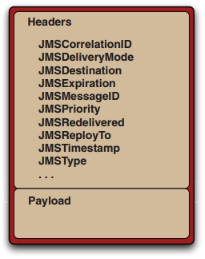
2. Headers set automatically by the client’s send() method:
a) JMSDestination.
b) JMSDeliveryMode - JMS supports two types of delivery modes for messages: persistent and nonpersistent. The default delivery mode is persistent.
i. Persistent - Advises the JMS provider to persist the message so it’s not lost if the provider fails. A JMS provider must deliver a persistent message once and only once.
ii. Nonpersistent - Instructs the JMS provider not to persist the message. A JMS provider must deliver a nonpersistent message at most once. Nonpersistent messages are typically usedfor sending notifications or real-time data.
c) JMSExpiration - The time that a message will expire. The JMSExpiration message header is calculated by adding the time-to-live to the current time in GMT. By default the time-to-live is zero, meaning that the message won’t expire.
d) JMSMessageID - A string that uniquely identifies a message that’s assigned by the JMS provider and must begin with ID.
e) JMSPriority.
f) JMSTimestamp - This header denotes the time the message was sent by the producer to the JMS provider.
3. Header set optionally by the client:
a) JMSCorrelationID - Used to associate the current message with a previous message.
b) JMSReplyTo - Used to specify a destination where a reply should be sent.
c) JMSType - Used to semantically identify the message type.
4. Headers set optionally by the JMS provider:
a) JMSRedelivered - Used to indicate the liklihood that a message was previously delivered but not acknowledged.
 public interface Message {

     ...

     boolean getBooleanProperty(String name) throws JMSException;

     byte getByteProperty(String name) throws JMSException;

     short getShortProperty(String name) throws JMSException;

     int getIntProperty(String name) throws JMSException;

     long getLongProperty(String name) throws JMSException;

     float getFloatProperty(String name) throws JMSException;

     double getDoubleProperty(String name) throws JMSException;

     String getStringProperty(String name) throws JMSException;

     Object getObjectProperty(String name) throws JMSException;

     ...

     Enumeration getPropertyNames() throws JMSException;

     boolean propertyExists(String name) throws JMSException;

     ...

     void setBooleanProperty(String name, boolean value) throws JMSException;

     void setByteProperty(String name, byte value) throws JMSException;

     void setShortProperty(String name, short value) throws JMSException;

     void setIntProperty(String name, int value) throws JMSException;

     void setLongProperty(String name, long value) throws JMSException;

     void setFloatProperty(String name, float value) throws JMSException;

     void setDoubleProperty(String name, double value) throws JMSException;

     void setStringProperty(String name, String value) throws JMSException;

     void setObjectProperty(String name, Object value) throws JMSException;

     ....

 }
5. Message selectors.
a) Message selectors allow a JMSclient to specify which messages it wants to receive from a destination based on values in message headers.
b) Selectors are conditional expressions defined using a subset of SQL92.
6. Message body - JMS defines six Java types for the message body, also known as the payload.
a) Message - The base message type. Used to send a message with no payload, only headers and properties. Typically used for simple event notification.
b) TextMessage.
c) MapMessage - Uses a set of name/value pairs as its payload. The names are of type String and the values are a Java primitive type.
d) BytesMessage.
e) StreamMessage.
f) ObjectMessage - Used to hold a serializable Java object as its payload.
JMS domains
1. The point-to-point domain.
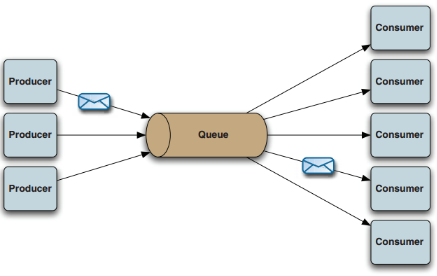
a) The point-to-point (PTP) messaging domain uses destinations known as queues.
b) Each message received on the queue is delivered once and only once to a single consumer.
c) Through the use of queues, messages are sent and received either synchronously or asynchronously.
2. The publish/subscribe domain.
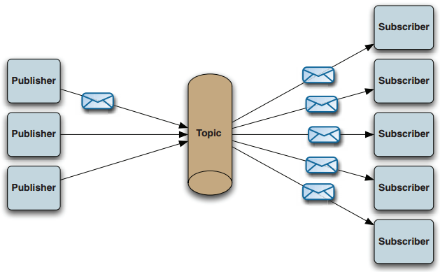
a) The publish/subscribe (pub/sub) messaging domain uses destinations known as topics. Publishers send messages to the topic and subscribers register to receive messages from the topic.
b) Any messages sent to the topic are automatically delivered to all subscribers.
c) Much the same as PTP messaging, subscribers register to receive messages from the topic either synchronously or asynchronously.
3. Request/reply messaging.
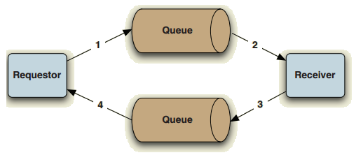
a) Although the JMS spec doesn’t define request/reply messaging as a formal messaging domain, it does provide some message headers and a couple of convenience classes for handling basic request/reply messaging.
b) Request/reply messaging is an asynchronous back-and-forth conversational pattern utilizing either the PTP domain or the pub/sub domain through a combination of the JMSReplyTo and JMSCorrelationID message headers and temporary destinations. The JMSReplyTo specifies the destination where a reply should be sent, and the JMSCorrelationID in the reply message specifies the JMSMessageID of the request message.
c) The convenience classes for handling basic request/reply are the QueueRequestor and the TopicRequestor. These classes provide a request() method that sends a request message and waits for a reply message through the creation of a temporary destination where only one reply per requestis expected.
Administered objects
1. Administered objects contain provider-specific JMSconfiguration information and are supposed to be created by a JMSadministrator.
2. The JMS spec defines two types of administered objects: ConnectionFactoryand Destination.
Connection factory
1. JMS clients use the ConnectionFactory object to create connections to a JMS provider.
2. JMS connections are used by JMS clients to create javax.jms.Session objects that represent an interaction with the JMS provider.
Destination
The Destination object encapsulates the provider-specific address to which messages are sent and from which messages are consumed.
ActiveMQ message storage
How are messages stored by ActiveMQ?
1. Messages sent to queues and topics are stored differently.
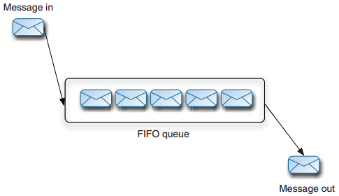
2. Queue - Storage for queues is straightforward-messages are basically stored in first in, first out order (FIFO). Only when that message has been consumed and acknowledged can it be deleted from the broker’s message store.
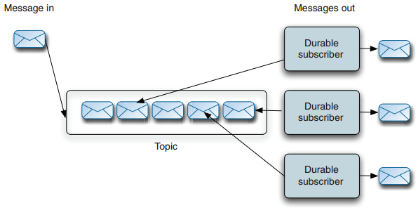
3. Topic - In order to save storage space, only one copy of a message is stored by the broker. A durable subscriber object in the store maintains a pointer to its next stored message and dispatches a copy of it to its consumer. The message store is implemented in this manner because each durable subscriber could be consuming messages at different rates or they may not all be running at the same time. Also, because every message can potentially have many consumers, a message can’t be deleted from the store until it’s been successfully delivered to every interested durable subscriber.
The KahaDB message store
1. The recommended message store for general-purpose messages since ActiveMQ version 5.3 is KahaDB.
2. This is a file-based message store that combines a transactional journal, for reliable message storage and recovery, with good performance and scalability.
3. Enable the KahaDB store for ActiveMQ.
<broker brokerName="broker" persistent="true" useShutdownHook="false">

    ...

    <persistenceAdapter>

    <kahaDB directory="activemq-data" journalMaxFileLength="16mb"/>

    </persistenceAdapter>

    ...

</broker>
The AMQ message store
1. The AMQ message store, like KahaDB, is a combination of a transactional journal for reliable persistence (to survive system crashes) and high-performance indexes, which makes this store the best option when message throughput is the main requirement for an application.
2. But because it uses two separate files for every index, and there’s an index per destination, the AMQ message store shouldn’t beused if you intend to use thousands of queues per broker. Also, recovery can be slow if the ActiveMQ broker isn’t shut down cleanly, because all the indexes need to be rebuilt.
The JDBC message store
1. The most common reason why so many organizations choose the JDBC message store is because they already have expertise administering relational databases.
2. JDBC persistence is definitely not superior in performance to the aforementioned message store implementations.
3. Databases supported by the JDBC message store:
a) Apache Derby
b) MySQL
c) PostgreSQL
d) Oracle
e) SQL Server
f) Sybase
g) Informix
h) MaxDB
The memory message store
1. The memory message store holds all persistent messages in memory.
2. No active caching is involved, so you have to be careful that both the JVM and the memory limits you set for the broker are large enough to accommodate all the messages that may exist in this message store at one time.
Caching messages in the broker for consumers
1. The ActiveMQ message broker caches messages in memory for every topic that’s used. The only types of topics that aren’t supported are temporary topics and ActiveMQ advisory topics. Caching of messages in thisway isn’t handled for queues, as the normal operation of a queue is to hold every message sent to it.
2. Messages that are cached by the broker are only dispatched to a topic consumer if the consumer is retroactive, and never to durable topic subscribers.
Code examples
Publish/subscribe messaging
1. The first use case revolves around a stock portfolio use case for demonstrating publish/subscribe messaging.
2. This example is simple and utilizes a Publisher class for sending stock price messages to a topic, as well as a Consumer class for registering a Listener class to consume messages from topics in an asynchronous manner.
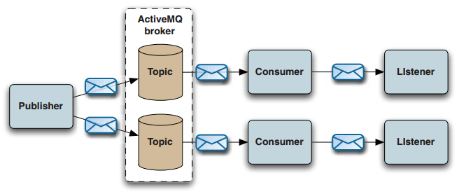
3. Publisher.java
 import java.util.Hashtable;

 import java.util.Map;

 import javax.jms.Connection;

 import javax.jms.ConnectionFactory;

 import javax.jms.Destination;

 import javax.jms.JMSException;

 import javax.jms.MapMessage;

 import javax.jms.Message;

 import javax.jms.MessageProducer;

 import javax.jms.Session;

 import org.apache.activemq.ActiveMQConnectionFactory;

 import org.apache.activemq.command.ActiveMQMapMessage;

 public class Publisher {

     protected int MAX_DELTA_PERCENT = 1;

     protected Map<String, Double> LAST_PRICES = new Hashtable<String, Double>();

     protected static int count = 10;

     protected static int total;

     protected static String brokerURL = "tcp://centos1:61616";

     protected static transient ConnectionFactory factory;

     protected transient Connection connection;

     protected transient Session session;

     protected transient MessageProducer producer;

     public Publisher() throws JMSException {

         factory = new ActiveMQConnectionFactory(brokerURL);

         connection = factory.createConnection();

         try {

         connection.start();

         } catch (JMSException jmse) {

             connection.close();

             throw jmse;

         }

         session = connection.createSession(false, Session.AUTO_ACKNOWLEDGE);

         producer = session.createProducer(null);

     }

     public void close() throws JMSException {

         if (connection != null) {

             connection.close();

         }

     }

     public static void main(String[] args) throws JMSException {

         String[] stocks = { "IONA", "JAVA" };

         Publisher publisher = new Publisher();

         while (total < 1000) {

             for (int i = 0; i < count; i++) {

                 publisher.sendMessage(stocks);

             }

             total += count;

             System.out.println("Published '" + count + "' of '" + total + "' price messages");

             try {

               Thread.sleep(1000);

             } catch (InterruptedException x) {

             }

         }

         publisher.close();

     }

     protected void sendMessage(String[] stocks) throws JMSException {

         int idx = 0;

         while (true) {

             idx = (int)Math.round(stocks.length * Math.random());

             if (idx < stocks.length) {

                 break;

             }

         }

         String stock = stocks[idx];

         Destination destination = session.createTopic("STOCKS." + stock);

         Message message = createStockMessage(stock, session);

         System.out.println("Sending: " + ((ActiveMQMapMessage)message).getContentMap() + " on destination: " + destination);

         producer.send(destination, message);

     }

     protected Message createStockMessage(String stock, Session session) throws JMSException {

         Double value = LAST_PRICES.get(stock);

         if (value == null) {

             value = new Double(Math.random() * 100);

         }

         // lets mutate the value by some percentage

         double oldPrice = value.doubleValue();

         value = new Double(mutatePrice(oldPrice));

         LAST_PRICES.put(stock, value);

         double price = value.doubleValue();

         double offer = price * 1.001;

         boolean up = (price > oldPrice);

         MapMessage message = session.createMapMessage();

         message.setString("stock", stock);

         message.setDouble("price", price);

         message.setDouble("offer", offer);

         message.setBoolean("up", up);

         return message;

     }

     protected double mutatePrice(double price) {

         double percentChange = (2 * Math.random() * MAX_DELTA_PERCENT) - MAX_DELTA_PERCENT;

         return price * (100 + percentChange) / 100;

     }

 }
4. Consumer.java
 import javax.jms.Connection;

 import javax.jms.ConnectionFactory;

 import javax.jms.Destination;

 import javax.jms.JMSException;

 import javax.jms.MessageConsumer;

 import javax.jms.Session;

 import org.apache.activemq.ActiveMQConnectionFactory;

 public class Consumer {

     private static String brokerURL = "tcp://centos1:61616";

     private static transient ConnectionFactory factory;

     private transient Connection connection;

     private transient Session session;

     public Consumer() throws JMSException {

         factory = new ActiveMQConnectionFactory(brokerURL);

         connection = factory.createConnection();

         connection.start();

         session = connection.createSession(false, Session.AUTO_ACKNOWLEDGE);

     }

     public void close() throws JMSException {

         if (connection != null) {

             connection.close();

         }

     }

     public static void main(String[] args) throws JMSException {

         String[] stocks = { "IONA", "JAVA" };

         Consumer consumer = new Consumer();

         for (String stock : stocks) {

             Destination destination = consumer.getSession().createTopic("STOCKS." + stock);

             MessageConsumer messageConsumer = consumer.getSession().createConsumer(destination);

             messageConsumer.setMessageListener(new Listener());

         }

     }

     public Session getSession() {

         return session;

     }

 }
5. Listener.java
 import java.text.DecimalFormat;

 import javax.jms.MapMessage;

 import javax.jms.Message;

 import javax.jms.MessageListener;

 public class Listener implements MessageListener {

     public void onMessage(Message message) {

         try {

             MapMessage map = (MapMessage)message;

             String stock = map.getString("stock");

             double price = map.getDouble("price");

             double offer = map.getDouble("offer");

             boolean up = map.getBoolean("up");

             DecimalFormat df = new DecimalFormat( "#,###,###,##0.00" );

             System.out.println(stock + "\t" + df.format(price) + "\t" + df.format(offer) + "\t" + (up?"up":"down"));

         } catch (Exception e) {

             e.printStackTrace();

         }

     }

 }
Point-to-point messaging
1. The second use case focuses on job queues to illustrate point-to-point messaging.
2. This example uses a Producer class to send job messages to a job queue and a Consumer class for registering a Listener class to consume messages from queues in an asynchronous manner.
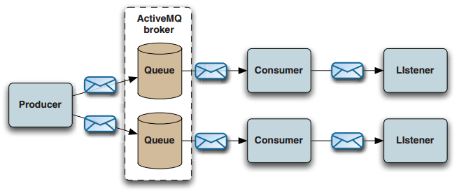
3. Publisher.java
 import javax.jms.Connection;

 import javax.jms.ConnectionFactory;

 import javax.jms.Destination;

 import javax.jms.JMSException;

 import javax.jms.Message;

 import javax.jms.MessageProducer;

 import javax.jms.ObjectMessage;

 import javax.jms.Session;

 import org.apache.activemq.ActiveMQConnectionFactory;

 public class Publisher {

     private static String brokerURL = "tcp://centos1:61616";

     private static transient ConnectionFactory factory;

     private transient Connection connection;

     private transient Session session;

     private transient MessageProducer producer;

     private static int count = 10;

     private static int total;

     private static int id = 1000000;

     private String jobs[] = new String[]{"suspend", "delete"};

     public Publisher() throws JMSException {

         factory = new ActiveMQConnectionFactory(brokerURL);

         connection = factory.createConnection();

         connection.start();

         session = connection.createSession(false, Session.AUTO_ACKNOWLEDGE);

         producer = session.createProducer(null);

     }

     public void close() throws JMSException {

         if (connection != null) {

             connection.close();

         }

     }

     public static void main(String[] args) throws JMSException {

         Publisher publisher = new Publisher();

         while (total < 1000) {

             for (int i = 0; i < count; i++) {

                 publisher.sendMessage();

             }

             total += count;

             System.out.println("Published '" + count + "' of '" + total + "' job messages");

             try {

               Thread.sleep(1000);

             } catch (InterruptedException x) {

             }

           }

         publisher.close();

     }

     public void sendMessage() throws JMSException {

         int idx = 0;

         while (true) {

             idx = (int)Math.round(jobs.length * Math.random());

             if (idx < jobs.length) {

                 break;

             }

         }

         String job = jobs[idx];

         Destination destination = session.createQueue("JOBS." + job);

         Message message = session.createObjectMessage(id++);

         System.out.println("Sending: id: " + ((ObjectMessage)message).getObject() + " on queue: " + destination);

         producer.send(destination, message);

     }

 }
4. Consumer.java
 import javax.jms.Connection;

 import javax.jms.ConnectionFactory;

 import javax.jms.Destination;

 import javax.jms.JMSException;

 import javax.jms.MessageConsumer;

 import javax.jms.Session;

 import org.apache.activemq.ActiveMQConnectionFactory;

 public class Consumer {

     private static String brokerURL = "tcp://centos1:61616";

     private static transient ConnectionFactory factory;

     private transient Connection connection;

     private transient Session session;

     private String jobs[] = new String[]{"suspend", "delete"};

     public Consumer() throws JMSException {

         factory = new ActiveMQConnectionFactory(brokerURL);

         connection = factory.createConnection();

         connection.start();

         session = connection.createSession(false, Session.AUTO_ACKNOWLEDGE);

     }

     public void close() throws JMSException {

         if (connection != null) {

             connection.close();

         }

     }

     public static void main(String[] args) throws JMSException {

         Consumer consumer = new Consumer();

         for (String job : consumer.jobs) {

             Destination destination = consumer.getSession().createQueue("JOBS." + job);

             MessageConsumer messageConsumer = consumer.getSession().createConsumer(destination);

             messageConsumer.setMessageListener(new Listener(job));

         }

     }

     public Session getSession() {

         return session;

     }

 }
5. Listener.java
 import javax.jms.Message;

 import javax.jms.MessageListener;

 import javax.jms.ObjectMessage;

 public class Listener implements MessageListener {

     private String job;

     public Listener(String job) {

         this.job = job;

     }

     public void onMessage(Message message) {

         try {

             //do something here

             System.out.println(job + " id:" + ((ObjectMessage)message).getObject());

         } catch (Exception e) {

             e.printStackTrace();

         }

     }

 }
Embedding ActiveMQ using Spring
ActiveMQ与Spring集成待补充。
作者:netoxi
出处:http://www.cnblogs.com/netoxi
本文版权归作者和博客园共有,欢迎转载,未经同意须保留此段声明,且在文章页面明显位置给出原文连接。欢迎指正与交流。
ActiveMQ笔记——技术点汇总的更多相关文章
- Hadoop笔记——技术点汇总
目录 · 概况 · Hadoop · 云计算 · 大数据 · 数据挖掘 · 手工搭建集群 · 引言 · 配置机器名 · 调整时间 · 创建用户 · 安装JDK · 配置文件 · 启动与测试 · Clo ...
- Kafka笔记——技术点汇总
Table of contents Table of contents Overview Introduction Use cases Manual setup Assumption Configur ...
- Spark SQL笔记——技术点汇总
目录 概述 原理 组成 执行流程 性能 API 应用程序模板 通用读写方法 RDD转为DataFrame Parquet文件数据源 JSON文件数据源 Hive数据源 数据库JDBC数据源 DataF ...
- JVM笔记——技术点汇总
目录 · 初步认识 · Java里程碑(关键部分) · 理解虚拟机 · Java虚拟机种类 · Java语言规范 · Java虚拟机规范 · 基本结构 · Java堆(Heap) · Java栈(St ...
- Netty笔记——技术点汇总
目录 · Linux网络IO模型 · 文件描述符 · 阻塞IO模型 · 非阻塞IO模型 · IO复用模型 · 信号驱动IO模型 · 异步IO模型 · BIO编程 · 伪异步IO编程 · NIO编程 · ...
- Java并发编程笔记——技术点汇总
目录 · 线程安全 · 线程安全的实现方法 · 互斥同步 · 非阻塞同步 · 无同步 · volatile关键字 · 线程间通信 · Object.wait()方法 · Object.notify() ...
- Storm笔记——技术点汇总
目录 概况 手工搭建集群 引言 安装Python 配置文件 启动与测试 应用部署 参数配置 Storm命令 原理 Storm架构 Storm组件 Stream Grouping 守护进程容错性(Dae ...
- Spark Streaming笔记——技术点汇总
目录 目录 概况 原理 API DStream WordCount示例 Input DStream Transformation Operation Output Operation 缓存与持久化 C ...
- Spark笔记——技术点汇总
目录 概况 手工搭建集群 引言 安装Scala 配置文件 启动与测试 应用部署 部署架构 应用程序部署 核心原理 RDD概念 RDD核心组成 RDD依赖关系 DAG图 RDD故障恢复机制 Standa ...
随机推荐
- 【原创】09. easyui-tabs 配合 iframe 使用,请求两次等问题
描述 需要把已经做好的几个设备管理页面.转为子菜单管理:直接使用 easyui-tabs 配合 iframe 是最省时省力的. 存在问题 当点击 "设备管理" 会出现子页面多次加载 ...
- nodejs01--什么是nodejs,nodejs的基本使用
nodejs使用范围 -直接在cmd命令行运行,在你的电脑上直接运行 -可以搭建一个web服务器(express,koa) -一些基本的使用 -modules是如何工作的 -npm管理modules ...
- .net Ajax使用
function CheckUsername() { var strName = $("#txtUserName").val(); $.ajax({ type: "GET ...
- Linux下栈溢出导致的core dump
1 问题产生 前两天在干活的时候,写好的一个daemon程序,一跑就core,连main函数都进不去.从来没见过这阵势的职场新人被吓尿了,幸好不是在生产环境上测试.找来同事帮忙,看了好久也没看出问题, ...
- Java 架构师之路(2)
一.技术 J2EE技术是架构师的基础.1.<Java编程思想> 初学Java时阅读这本书觉得好难,阅读第二遍时才觉得讲的很细致.这是一本不怕多读的好书. 2.<J2EE应用与BEA ...
- Mongodb启动&关闭
mac 下mongo的启动和关闭以及启动问题解决 mongo的安装在这:http://www.cnblogs.com/leinov/p/6855784.html Mac os mongodb数据安装路 ...
- [Poi2010]Monotonicity 2 线段树
这道题考试的时候先打了个dfs暴力.又打了个O(n²)的动规.然后竟然心血来潮拍了一下..明明知道过不去的...然后水了50分(20个测试点这么多啊啊啊啊). 因为它已经提前给你如果长度为i时下一位的 ...
- linux 编译安装详解
相信大家大多都听过linux 的编译安装,但它到底是怎么把源代码变为自己电脑里可以应用的软件哪?今天,小编就以httpd 为例详细讲解一下. 什么是编译安装--编译:将源代码变为机器可执行的代码文件. ...
- Hibernate(三)
1.1Hibernate的检索方式 1.1.1Hibernate的检索方式概述 Hibernate提供了以下几种检索对象的方式: 导航对象图检索方式:根据已经家就在的对象导航到其他对象. Custom ...
- window响应拖拽文件操作
window响应拖拽文件操作 1.首先调用DragAcceptFiles,让控件或者窗体支持文件拖动操作函数功能:用来为拖放文件作初始化.函数原型: void DragAcceptFiles( HWN ...