
IOS自动布局
- (void)viewDidLoad

{

    [super viewDidLoad];

    [self addNavigationBar:FEEDBACK_VIEW_CONTROLLER];

    UILabel *note = [[UILabel alloc] init];

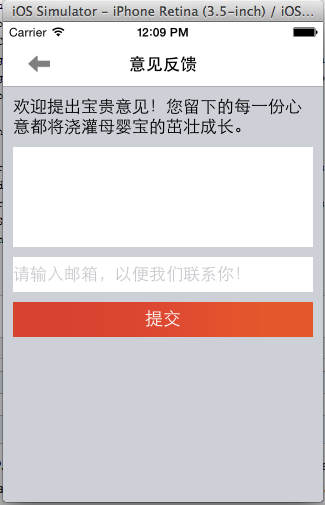
    [note setText:@"欢迎提出宝贵意见!您留下的每一份心意都将浇灌母婴宝的茁壮成长。"];

    [note setLineBreakMode:NSLineBreakByWordWrapping];

    note.numberOfLines = 0;

    [self.view addSubview:note];

    //将自适应向布局约束的转化关掉(根据情况有时需要有时不需要)

    [note setTranslatesAutoresizingMaskIntoConstraints:NO];

    [self.view addConstraint:[NSLayoutConstraint constraintWithItem:note

                                                          attribute:NSLayoutAttributeTop

                                                          relatedBy:NSLayoutRelationEqual

                                                             toItem:navBar

                                                          attribute:NSLayoutAttributeBottom

                                                         multiplier:1.0

                                                           constant:10]];

    [self.view addConstraint:[NSLayoutConstraint constraintWithItem:note

                                                          attribute:NSLayoutAttributeLeft

                                                          relatedBy:NSLayoutRelationEqual

                                                             toItem:self.view

                                                          attribute:NSLayoutAttributeLeft

                                                         multiplier:1.0

                                                           constant:10]];

    [self.view addConstraint:[NSLayoutConstraint constraintWithItem:note

                                                          attribute:NSLayoutAttributeRight

                                                          relatedBy:NSLayoutRelationEqual

                                                             toItem:self.view

                                                          attribute:NSLayoutAttributeRight

                                                         multiplier:1.0

                                                           constant:-10]];

    UITextView *tfContent = [[UITextView alloc] init];

    [tfContent setTranslatesAutoresizingMaskIntoConstraints:NO];

    [tfContent setBackgroundColor:[UIColor whiteColor]];

    [tfContent setReturnKeyType:UIReturnKeyDone];

    [self.view addSubview:tfContent];

    [self.view addConstraint:[NSLayoutConstraint constraintWithItem:tfContent

                                                          attribute:NSLayoutAttributeTop

                                                          relatedBy:NSLayoutRelationEqual

                                                             toItem:note

                                                          attribute:NSLayoutAttributeBottom

                                                         multiplier:1.0

                                                           constant:10]];

    [self.view addConstraint:[NSLayoutConstraint constraintWithItem:tfContent

                                                          attribute:NSLayoutAttributeLeft

                                                          relatedBy:NSLayoutRelationEqual

                                                             toItem:self.view

                                                          attribute:NSLayoutAttributeLeft

                                                         multiplier:1.0

                                                           constant:10]];

    [self.view addConstraint:[NSLayoutConstraint constraintWithItem:tfContent

                                                          attribute:NSLayoutAttributeRight

                                                          relatedBy:NSLayoutRelationEqual

                                                             toItem:self.view

                                                          attribute:NSLayoutAttributeRight

                                                         multiplier:1.0

                                                           constant:-10]];

    [self.view addConstraint:[NSLayoutConstraint constraintWithItem:tfContent

                                                          attribute:NSLayoutAttributeHeight

                                                          relatedBy:NSLayoutRelationEqual

                                                             toItem:nil

                                                          attribute:NSLayoutAttributeNotAnAttribute

                                                         multiplier:1.0

                                                           constant:100]];

    UITextField *tfEmail = [UITextField new];

    [tfEmail setTranslatesAutoresizingMaskIntoConstraints:NO];

    [tfEmail setBackgroundColor:[UIColor whiteColor]];

    [tfEmail setClearButtonMode:UITextFieldViewModeAlways];

    [tfEmail setReturnKeyType:UIReturnKeyDone];

    [tfEmail setPlaceholder:@"请输入邮箱,以便我们联系你!"];

    [self.view addSubview:tfEmail];

    [self.view addConstraint:[NSLayoutConstraint constraintWithItem:tfEmail

                                                          attribute:NSLayoutAttributeTop

                                                          relatedBy:NSLayoutRelationEqual

                                                             toItem:tfContent

                                                          attribute:NSLayoutAttributeBottom

                                                         multiplier:1.0

                                                           constant:10]];

    [self.view addConstraint:[NSLayoutConstraint constraintWithItem:tfEmail

                                                          attribute:NSLayoutAttributeLeft

                                                          relatedBy:NSLayoutRelationEqual

                                                             toItem:self.view

                                                          attribute:NSLayoutAttributeLeft

                                                         multiplier:1.0

                                                           constant:10]];

    [self.view addConstraint:[NSLayoutConstraint constraintWithItem:tfEmail

                                                          attribute:NSLayoutAttributeRight

                                                          relatedBy:NSLayoutRelationEqual

                                                             toItem:self.view

                                                          attribute:NSLayoutAttributeRight

                                                         multiplier:1.0

                                                           constant:-10]];

    [self.view addConstraint:[NSLayoutConstraint constraintWithItem:tfEmail

                                                          attribute:NSLayoutAttributeHeight

                                                          relatedBy:NSLayoutRelationEqual

                                                             toItem:nil

                                                          attribute:NSLayoutAttributeNotAnAttribute

                                                         multiplier:1.0

                                                           constant:35]];

    UIButton *btnSubmit = [[UIButton alloc] init];

    [btnSubmit setTranslatesAutoresizingMaskIntoConstraints:NO];

    [btnSubmit setTitle:STRING_COMMON_SUBMIT forState:UIControlStateNormal];

    [btnSubmit setBackgroundImage:[UIImage imageNamed:@"bg_red_orange"] forState:UIControlStateNormal];

    [btnSubmit setBackgroundImage:[UIImage imageNamed:@"bg_red"] forState:UIControlStateHighlighted];

    [self.view addSubview:btnSubmit];

    NSMutableArray *tmpConstraints = [NSMutableArray array];

    [tmpConstraints addObjectsFromArray:[NSLayoutConstraint constraintsWithVisualFormat:@"V:[tfEmail]-10-[btnSubmit(==35)]" options:0 metrics:nil views:NSDictionaryOfVariableBindings(tfEmail,btnSubmit)]];

    [tmpConstraints addObjectsFromArray:[NSLayoutConstraint constraintsWithVisualFormat:@"H:|-10-[btnSubmit]-10-|" options:0 metrics:nil views:NSDictionaryOfVariableBindings(btnSubmit)]];

    [self.view addConstraints:tmpConstraints];

}
IOS自动布局的更多相关文章
- iOS 自动布局详细介绍
1. 自动布局的理解 iOS自动布局很有用,可以在不同size的屏幕上运行,原先看的头痛,还是习惯用最蠢的[UIScreen mainScreen].bounds.size.width等来布局,后来实 ...
- iOS自动布局——Masonry详解
欢迎大家前往腾讯云+社区,获取更多腾讯海量技术实践干货哦~ 本文由鹅厂新鲜事儿发表于云+社区专栏 作者:oceanlong | 腾讯 移动客户端开发工程师 前言 UI布局是整个前端体系里不可或缺的一环 ...
- 掌握iOS自动布局
1,自动布局是一种基于约束的布局(constraint-based layout)引擎,它可以根据开发者在对象上的约束自动调整大小与位置. 2.在iOS 6之前使用的布局模型是“spring& ...
- iOS自动布局之autoresizingi
对于iOS的app开发者来说,不会像Android开发者一样为很多的屏幕尺寸来做界面适配,因此硬编码的坐标也能工作良好,但是从设计模式上来说这不是好的做法.而且也还有一些问题,如iPhone5的适配, ...
- 学会爱上iOS自动布局(Auto Layout) - 剑尖
本文翻译自Yari Dareglia的LEARN TO LOVE AUTO LAYOUT文章先生们,女士们,让我们以正确的心态开始本教程吧:自动布局就是简单!我花了一段时间来掌握自动布局是如何工作的, ...
- iOS 自动布局过程
自动布局将视图显示在屏幕上的步骤: 更新约束,它会从子视图传递到父视图,设置布局信息:约束更新时自动触发setNeedsUpdateConstraints:updateConstraints可以增加本 ...
- iOS 自动布局框架 – Masonry 详解
目前iOS开发中大多数页面都已经开始使用Interface Builder的方式进行UI开发了,但是在一些变化比较复杂的页面,还是需要通过代码来进行UI开发的.而且有很多比较老的项目,本身就还在采用纯 ...
- iOS自动布局框架-Masonry详解
首先,在正式使用Masonry之前,我们先来看看在xib中我们是如何使用AutoLayout 从图中我们可以看出,只要设置相应得局限,控制好父视图与子视图之间的关系就应该很ok的拖出你需要的需 ...
- IOS 自动布局-UIStackPanel和UIGridPanel(四)
为什么说scrollview的自动化布局是难点? 对scrollview做自动化布局,无非就是想对scrollview里面的subviews来做自动化布局.但是scrollview里面的subview ...
随机推荐
- leetcode:Insertion Sort List
Sort a linked list using insertion sort. 分析:此题要求在链表上实现插入排序. 思路:插入排序是一种O(n^2)复杂度的算法,基本想法就是每次循环找到一个元素在 ...
- leetcode:Number of 1 Bits
Write a function that takes an unsigned integer and returns the number of ’1' bits it has (also know ...
- C++ STL之priority_queue
STL中的priority_queue(优先队列)是一种会按照自定义的一种方式(数据的优先级)来对队列中的数据进行动态的排序的容器,不同优先级的情况下,top()上永远是最高优先级的数据,其底层采用的 ...
- STL容器的遍历删除
STL容器的遍历删除 今天在对截包程序的HashTable中加入计时机制时,碰到这个问题.对hash_map中的每个项加入时间后,用查询函数遍历hash_map,以删除掉那些在表存留时间比某个阈值长的 ...
- codeforces 510 C Fox And Names【拓扑排序】
题意:给出n串名字,表示字典序从小到大,求符合这样的字符串排列的字典序 先挨个地遍历字符串,遇到不相同的时候,加边,记录相应的入度 然后就是bfs的过程,如果某一点没有被访问过,且入度为0,则把它加入 ...
- UVa 455 Periodic Strings
题意:给出一个字符串,找出它的最小的周期,枚举从1到len的周期,看是否满足. #include<iostream> #include<cstdio> #include< ...
- BZOJ 4551 树
线段树+标记永久化. #include<iostream> #include<cstdio> #include<cstring> #include<algor ...
- linux中备份mysql数据库的一个shell脚本
#!/bin/bash #FileName:select_into_bak.sh #Desc:Use select into outfile to backup db or tables #Creat ...
- 【C#学习笔记】图片像素操作
using System; using System.Collections.Generic; using System.ComponentModel; using System.Data; usin ...
- 【转】 [C/OC的那点事儿]NSMutableArray排序的三种实现(依赖学生成绩管理系统).
原文网址:http://blog.csdn.net/ministarler/article/details/17018839 c语言实现的学生成绩管理系统是面向过程的,而OC实现的学生成绩管理系统则是 ...