
Configuring and troubleshooting a Schema Provider
原文:https://codesmith.atlassian.net/wiki/display/Generator/Configuring+and+troubleshooting+a+Schema+Provider
The sections below will help guide you through using and configuring various Schema Providers that ship with CodeSmith Generator.
Creating a new connection string
The Data Source window will check to see if a schema provider supports showing Connection String designer. If it doesn't, then you must manually enter a valid connection string into the Connection String text box. You must enter in a valid connection string for the Provider Type you are trying to use.
- If you're using the SqlSchemaProvider, connection strings follow the format used by the .NET SqlConnection.ConnectionString property.
- If you're using the ADOXSchemaProvider, connection strings follow the format used by the ADO ConnectionString property.
- If you're using the OracleSchemaProvider, please be sure to check out the link below for creating a connection string as well as the Connecting to an Oracle database section below.
- If you're using the PostgreSchemaProvider, please make sure the following statement is included in your ConnectionString: Preload Reader = true;
For all SchemaProviders, please be sure to use the proper ConnectionString for the Database Provider you are using. A great resource for building database ConnectionStrings can be found here.
Configuring a Schema Providers behavior
A schema provider may contain additional configurable logic that changes how the schema provider behaves. For example, you may only want to show the various schema objects for the current logged in user or allow CommandResultSchema information to be retrieved.
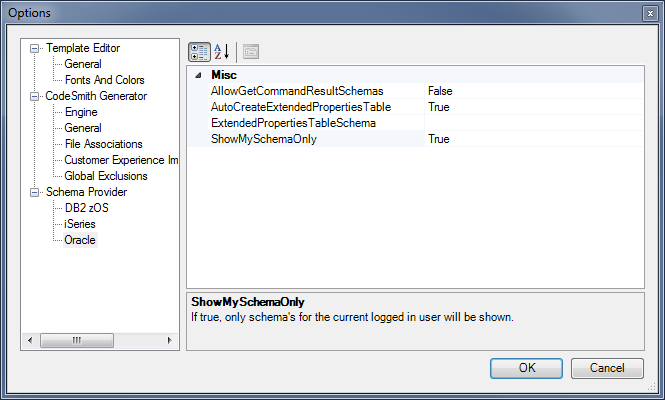
These settings can be configured in the Generator Options Schema Provider section as shown above.
Oracle Schema Provider
Connecting to an Oracle database
The first step is to add a new Data Source. Once the Data Source window is open, you will want to select the OracleSchemaProvider from the Provider Type drop down menu.
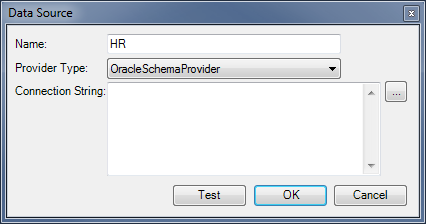
Next, you will want to click on the ellipse button (...) to build the connection string.
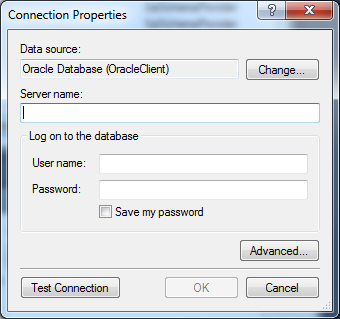
After you have filled out all of the required information, press the Test Connection Button or the OK button. If you could connect to your Oracle Server, then you are all done. If this doesn't work you may be scratching your head and thinking you are out of luck. The good news is your not. You will need to use a modified connection string that the Connection Properties UI doesn't account for.
"This is another type of Oracle connection string that doesn't rely on you to have a DSN for the connection. You create a connection string based on the format used in the tnsnames.ora file without the need to actually have one of these files on the client pc" (http://www.connectionstrings.com/oracle).
You will need to manually configure this connection string using the initial Data Source User Interface's Connection String text box (shown above). Below is an example of using an TNS-Less (Transparent Network Substrate) connection string.
Data Source=(DESCRIPTION=(ADDRESS_LIST=(ADDRESS=(PROTOCOL=TCP)(HOST=MyHost)(PORT=MyPort)))(CONNECT_DATA=(SERVER=DEDICATED)(SERVICE_NAME=MyOracleSID)));User Id=myUsername;Password=myPassword;
Please see the following website for more information on Oracle Connection Strings.
Installing Oracle Data Access Components (ODAC)
CodeSmith Generator is compiled as AnyCPU. This means that Generator will run as a 64bit process when you launch Generator outside of Visual Studio. If you are generating from within Visual Studio (32bit process), then CodeSmith Generator libraries will run as a 32bit process.
This is very important to understand as it determines which Schema Provider dependencies are resolved at run-time.
If you are trying to use the Oracle Schema Provider you may be presented with an error message that states a BadImageFormatException was thrown. This can be resolved by installing the ODAC libraries.
If you are running a 64bit version of windows, please install both the 32bit and 64bit versions.
Please visit the Oracle .NET Developer Center and download and install the latest versions of ODAC (32-bit, 64-bit). It is recommended that you restart your computer after installing the ODAC libraries.
MySQL Schema Provider
If you are trying to use the MySQL Schema Provider you may encounter the error message: 'The MySQL.Data.MySQLClient is not installed on this computer'. This error can occur because the MySQL Connector/Net ( MySql.Data.MySqlClient DbProvider) hasn't been installed on your machine.
Installing MySQL Connector/Net
Please download and install the latest MySQL .NET connector which can be found here. It is recommended that you restart your computer after installing the MySQL .NET connector.
Version 6.7.4 of the MySQL connector may not work in some circumstances. If you run into an issue where the connector isn't being resolved. It is recommended that you try installing an older version of the client.
Configuring MySQL Connector/Net
The MySQL Schema Provider doesn't require a specific version of the MySQL managed libraries. This is because it uses DbProviderFactories when interacting with MySQL. One must update all .NET Framework 4.0 machine.config's and add the MySQL provider to the DbProviderFactories element:
<system.data>

  <DbProviderFactories>

    <add name="MySQL Data Provider" invariant="MySql.Data.MySqlClient" description=".Net Framework Data Provider for MySQL" type="MySql.Data.MySqlClient.MySqlClientFactory, MySql.Data, Version=6.7.4.0, Culture=neutral, PublicKeyToken=c5687fc88969c44d" />

  </DbProviderFactories>

</system.data>
Please ensure that you update the Version number (E.G., Version=6.7.4.0) with the version of the MySQL Connector/NET that you installed.
The .NET Framework 4.0 machine.config's can be found here:
- %windir%\Microsoft.NET\Framework\v4.0.30319\Config\machine.config
- %windir%\Microsoft.NET\Framework64\v4.0.30319\Config\machine.config
SQLite Schema Provider
If you are trying to use the SQLite Schema Provider you may encounter the error message: 'The System.Data.SQLite library is not installed on this computer'. This error can occur for two reasons:
- The System.Data.SQLite hasn't been installed on your machine.
- The System.Data.SQLite hasn't been properly configured.
Installing System.Data.SQLite
CodeSmith Generator is compiled as AnyCPU. This means that Generator will run as a 64bit process when you launch Generator outside of Visual Studio. If you are generating from within Visual Studio (32bit process), then CodeSmith Generator libraries will run as a 32bit process.
This is very important to understand as it determines which Schema Provider dependencies are resolved at run-time.
The first step is to ensure that you download and install the latest .NET Framework 4.0 version of System.Data.SQLite.
Configuring System.Data.SQLite
The SQLite Schema Provider doesn't require a specific version of the SQLite managed libraries. This is because it uses DbProviderFactories when interacting with SQLite. One must update all .NET Framework 4.0 machine.config's and add the SQLite provider to the DbProviderFactories element:
<system.data>

  <DbProviderFactories>

    <add name="SQLite Data Provider" invariant="System.Data.SQLite" description=".Net Framework Data Provider for SQLite" type="System.Data.SQLite.SQLiteFactory, System.Data.SQLite" />

  </DbProviderFactories>

</system.data>
The .NET Framework 4.0 machine.config's can be found here:
- %windir%\Microsoft.NET\Framework\v4.0.30319\Config\machine.config
- %windir%\Microsoft.NET\Framework64\v4.0.30319\Config\machine.config
You should copy the 64bit SQLite assemblies if you are using 64 bit windows.
Finally, you are ready to start using the SQLite Schema Provider!
PostgreSQL Schema Provider
Connecting to an PostgreSQL database
Please follow the steps outlined in the "Creating a new connection string" section for information on creating a new data source.
Please make sure the following statement is included in your ConnectionString: Preload Reader = true; Also you can limit what schema objects are returned by adding a SearchPath to your connection string.
Installing Npgsql
If you are trying to use the PostgreSQL Schema Provider you may be presented with an error message that states a FileNotFound was thrown. This can be resolved by installing the Npgsql libraries.
System.IO.FileNotFoundException: Could not load file or assembly 'Npgsql, Version=2.0.11.0, Culture=neutral, PublicKeyToken=5d8b90d52f46fda7' or one of its dependencies. The system cannot find the file specified.
The error message is telling us that we need to install version 2.0.11.0 of Npgsql. We then navigate to the Npgsql downloadssection and look for this version. You will need to download the .NET 4.0 compiled version (E.G., ending with bin-ms.net4.0.zip). After this has been done, unblock the zipand extract the files to a folder. Next run GacUtil from an elevated Visual Studio command prompt and gac the two extracted assemblies as shown below.
gacutil -i Npgsql.dll

gacutil -i Mono.Security.dll
Configuring and troubleshooting a Schema Provider的更多相关文章
- CUBRID学习笔记 37 ADO.NET Schema Provider
通常需要添加以下引用: 1 2 3 using System.Data; using System.Data.Common; using CUBRID.Data.CUBRIDClient; 定义连 ...
- CodeSimth - .Net Framework Data Provider 可能没有安装。解决方法
今天想使用CodeSimth生成一个sqlite数据库的模板.当添加添加数据库的时候发现: .Net Framework Data Provider 可能没有安装. 下面找到官方的文档说明: SQLi ...
- Write your own Terraform provider: Part 1
转自:https://container-solutions.com/write-terraform-provider-part-1/ This is the first part of a seri ...
- CodeSimth - .Net Framework Data Provider 可能没有安装。解决方法[转载 ]
原文:http://www.cnblogs.com/chenrui7/p/3592082.html 今天想使用CodeSimth生成一个sqlite数据库的模板.当添加添加数据库的时候发现: .Net ...
- Terraform 自定义provider 开发
内容来自官方文档,主要是进行学习自定义provider 开发的流程 开发说明 我们需要开发的有provider 以及resource 对于resource 我们需要进行crud 的处理,同时还需要进行 ...
- Writing Custom Providers
转自:https://www.terraform.io/docs/extend/writing-custom-providers.html 很详细,做为一个记录 In Terraform, a Pro ...
- WebADI_Oracle ERP R12使用前WebADI设定(案例)
2014-12-25 Created By BaoXinjian
- Oracle Metalink Notes Collection
INV Note 123456.1 Latest 11i Applications Recommended Patch List Note 568012.1:FAQ: Inventory Standa ...
- Useful Articles for the Oracle E-Business Suite Technology Stack for Technical Consultant / DBA [ID
Applies to: Oracle Applications Technology Stack - Version: 11.5.10.2 to 12.1.3 - Release: 11.5.10 ...
随机推荐
- Ubuntu 13.10 中文字体设置
据我查到的资料,在默认设置下,Ubuntu 13.10 中文使用的是文泉驿正黑.我总觉得它的效果有些发虚,模糊,不满意. (貌似是Ubuntu从13.04开始取消了默认的微米黑,回退为之前的正黑.这我 ...
- Jquery中用offset().top和offsetTop的比较
今天,想测试一个div与顶部的距离,用的是.offsetTop,但是offsetTop获得的值,怎么都打印不出来.折腾了半天,打印的结果都是undefined,虽然网上很多资料都说返回的是数值.虽然这 ...
- Highcharts axja 获取json对象动态生成报表生成
最近做个项目,项目经理想做一个统计报表,在网上查看些资料就选用Highchars 这里和大家分享下使用心得. 重点说明此代码是针对一个报表显示多个项对比显示. 直接贴代码:web端 <scrip ...
- JS方法
1.方法可作为对象使用 function aa() { this.a = "aaaa"; this.b = 23; this.f = function () { alert(thi ...
- 《c程序设计语言》读书笔记-十六位进制数转十进制
#include <stdio.h> #include <stdio.h> int htoi(char s[]); main() { char s1[] = "10& ...
- 基于Linux的oracle数据库管理 part3( 存储 网络 常用命令 )
主要内容 1. 常用存储模式 2. 配置网络 3. 维护指令 常用存储模式 - 文件系统 优点:管理方便, 缺点:读写慢 - 裸设备 只没有被格式化和挂载的磁盘, 只能有程序直接访问, 不能被操作系统 ...
- serialize-and-deserialize-bst
https://leetcode.com/problems/serialize-and-deserialize-bst/ 1. 用到Java Queue接口, // LinkedList实现了Queu ...
- BZOJ 3083 - 遥远的国度
原题地址:http://www.lydsy.com/JudgeOnline/problem.php?id=3083 说话间又一个多月过去了..该来除除草了,每天都是训练.没效率,训练.没效率..省选考 ...
- Css中光标,DHTML,缩放的使用
Css中光标的使用: 属性名称 属性值 说明cursor ...
- 最小生成树之Kruskal
模板题,学习一下最小生成树的Kruskal算法 对于一个连通网(连通带权图,假定每条边上的权均为大于零的实数)来说,每棵树的权(即树中所有边的权值总和)也可能不同 具有权最小的生成树称为最小生成树 生 ...