
Activity Lifecycle
Activity Lifecycle
Activities in the system are managed as an activity stack(activity栈?). When a new activity is started, it is placed on the top of the stack and becomes the running activity(当一个activity启动时,它覆盖在栈的顶部,成为正在运行的activity) -- the previous activity always remains below it in the stack, and will not come to the foreground again until the new activity exits.
An activity has essentially four states(一个activity本质上有四种状态):
- If an activity in the foreground of the screen (at the top of the stack), it is active or running.
- If an activity has lost focus but is still visible (that is, a new non-full-sized or transparent activity has focus on top of your activity), it is paused. A paused activity is completely alive (it maintains all state and member information and remains attached to the window manager), but can be killed by the system in extreme low memory situations.
- If an activity is completely obscured by another activity, it is stopped. It still retains all state and member information, however, it is no longer visible to the user so its window is hidden and it will often be killed by the system when memory is needed elsewhere.
- If an activity is paused or stopped, the system can drop the activity from memory by either asking it to finish, or simply killing its process. When it is displayed again to the user, it must be completely restarted and restored to its previous state.
The following diagram shows the important state paths of an Activity. The square rectangles represent callback methods you can implement to perform operations when the Activity moves between states. The colored ovals are major states the Activity can be in.
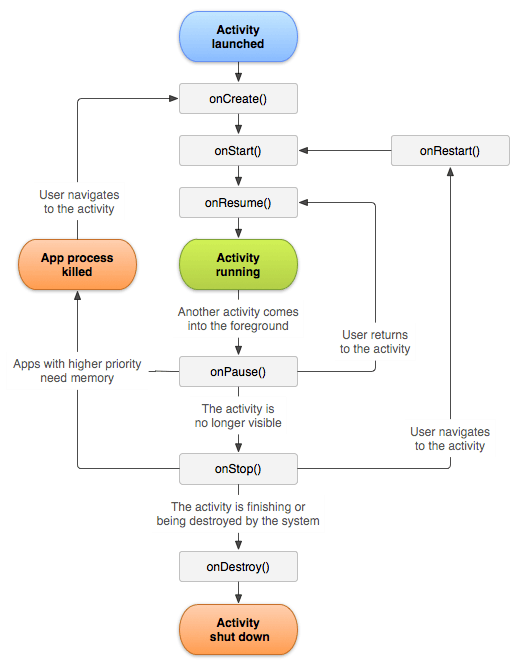
There are three key loops you may be interested in monitoring within your activity:
- The entire lifetime of an activity happens between the first call to
android.app.Activity.onCreatethrough to a single final call toandroid.app.Activity.onDestroy. An activity will do all setup of "global" state in onCreate(), and release all remaining resources in onDestroy(). For example, if it has a thread running in the background to download data from the network, it may create that thread in onCreate() and then stop the thread in onDestroy(). - The visible lifetime of an activity happens between a call to
android.app.Activity.onStartuntil a corresponding call toandroid.app.Activity.onStop. During this time the user can see the activity on-screen, though it may not be in the foreground and interacting with the user. Between these two methods you can maintain resources that are needed to show the activity to the user. For example, you can register aandroid.content.BroadcastReceiverin onStart() to monitor for changes that impact your UI, and unregister it in onStop() when the user no longer sees what you are displaying. The onStart() and onStop() methods can be called multiple times, as the activity becomes visible and hidden to the user. - The foreground lifetime of an activity happens between a call to
android.app.Activity.onResumeuntil a corresponding call toandroid.app.Activity.onPause. During this time the activity is in front of all other activities and interacting with the user. An activity can frequently go between the resumed and paused states -- for example when the device goes to sleep, when an activity result is delivered, when a new intent is delivered -- so the code in these methods should be fairly lightweight.
The entire lifecycle of an activity is defined by the following Activity methods. All of these are hooks that you can override to do appropriate work when the activity changes state. All activities will implement android.app.Activity.onCreate to do their initial setup; many will also implement android.app.Activity.onPause to commit changes to data and otherwise prepare to stop interacting with the user. You should always call up to your superclass when implementing these methods.
 public class Activity extends ApplicationContext {

     protected void onCreate(Bundle savedInstanceState);

     protected void onStart();

     protected void onRestart();

     protected void onResume();

     protected void onPause();

     protected void onStop();

     protected void onDestroy();

 }
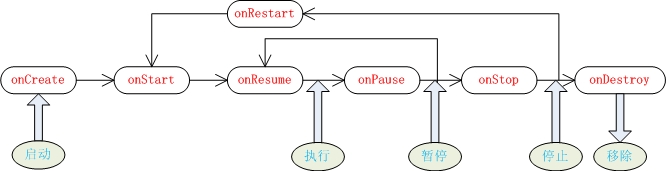
从用户的角度来说,活动的状态只有3种:可见(执行与暂停)、取得焦点(执行)、不可见(停止与移除)。
在活动整个生命周期中共有7个方法会在活动状态转换时调用:
Activity Lifecycle的更多相关文章
- Android官方文档翻译 十六 4.Managing the Activity Lifecycle
Managing the Activity Lifecycle 管理activity的生命周期 Dependencies and prerequisites 依赖关系和先决条件 How to crea ...
- Driving the Activity Lifecycle
Before Robolectric 2.2, most tests created Activities by calling constructors directly, (new MyActiv ...
- 让普通 Java 类自动感知 Activity Lifecycle
背景 在 Android 开发中,我们都很熟悉 Activity 的 Lifecycle,并且会在特定的 Lifecycle 下执行特定的操作.当然,我们清楚 Lifecycle 本身是带有 Andr ...
- android activity lifecycle
学习android的activity,之前一直没有去琢磨,今天正好了解一下activity生命周期. 参考链接: https://developer.android.com/guide/compone ...
- Android四大组件之——Activity的生命周期(图文详解)
转载请在文章开头处注明本博客网址:http://www.cnblogs.com/JohnTsai 联系方式:JohnTsai.Work@gmail.com [Andro ...
- Andoid activity 生命周期
今天介绍一下Android中最常用的组件activity的生命周期.当activity处于Android应用中运行时,它的活动状态由Android以Activity栈的形式管理.当前活动的Activi ...
- How to use Android Activity's finish(), onDestory() and System.exit(0) methods
Activity.finish() Calling this method will let the system know that the programmer wants the current ...
- 跟着Android官网学习Activity
1.Activity介绍 An Activity is an application component that provides a screen with which users can int ...
- Android学习笔记:Activity生命周期详解
进行android的开发,必须深入了解Activity的生命周期.而对这个讲述最权威.最好的莫过于google的开发文档了. 本文的讲述主要是对 http://developer.android.co ...
随机推荐
- HTML元素,属性,基础标签
元素,属性 元素 html有父元素和子元素,被包含的叫子元素,如html是head的父元素,他们是父子关系,head和body是兄弟关系 <html> <head></h ...
- socket.io遇到的问题
一.socket.io指定客户端html文件所用到的sendFile()方法中的文件路径必须是绝对路径,而且要符合一定规则: app.get('/',function(req,res){ res.se ...
- ios的 对象归档
IOS提供的数据持久化方式有:SQLite.CoreData.属性列表.NSUserDefault.对象归档. 这里来简单介绍下对象归档: 对象归档是将对象归档以文件的形式保存到磁盘中(也称为序列化, ...
- hihocoder 1138 Islands Travel dijkstra+heap 难度:2
http://hihocoder.com/problemset/problem/1138 很久不用最短路,几乎连基本性质也忘了,结果这道题就是某些最短路算法空间复杂度是o(n) 这里总结四种算法 算法 ...
- zoj2132-The Most Frequent Number
http://acm.zju.edu.cn/onlinejudge/showProblem.do?problemCode=2132 The Most Frequent Number Time Limi ...
- Mongoose 是什么?
Mongoose 参考手册 标签(空格分隔): MongoDB 一般我们不直接用MongoDB的函数来操作MongoDB数据库 Mongose就是一套操作MongoDB数据库的接口. Schema 一 ...
- How to setup SVN?
2014-01-08 11:43:50 如何简单设置SVN(前提是SVN已经安装) 1. 创建一个目录: mkdir -p ~/svn/2.1.J.1.1 2. 进入新创建的目录: cd svn/2. ...
- numpy 总结
1.array.sum() from numpy import * import operator group = array([[1.0,1.1],[1.0,1.0],[0,0],[0,0.1]]) ...
- Android 监听ContentProvider的数据改变
今天介绍一下怎么监听ContentProvider的数据改变,主要的方法是:getContext().getContentResolver().notifyChange(uri,null),这行代码是 ...
- ZooKeeper启动过程2:FastLeaderElection
前一篇文章中说到,启动ZooKeeper集群时,需要分别启动集群中的各个节点,各节点以QuorumPeer的形式启动,最后到达startLeaderElection和lookForLeader. 先说 ...