
struts2访问servlet API
搭建环境:
引入jar包,src下建立struts.xml文件
项目配置文件web.xml.
web.xml:
 <?xml version="1.0" encoding="UTF-8"?>

 <web-app xmlns:xsi="http://www.w3.org/2001/XMLSchema-instance" xmlns="http://java.sun.com/xml/ns/javaee" xsi:schemaLocation="http://java.sun.com/xml/ns/javaee http://java.sun.com/xml/ns/javaee/web-app_3_0.xsd" id="WebApp_ID" version="3.0">

   <display-name>struts2Test</display-name>

   <welcome-file-list>

     <welcome-file>index.html</welcome-file>

     <welcome-file>index.htm</welcome-file>

     <welcome-file>index.jsp</welcome-file>

     <welcome-file>default.html</welcome-file>

     <welcome-file>default.htm</welcome-file>

     <welcome-file>default.jsp</welcome-file>

   </welcome-file-list>

   <filter>

         <filter-name>struts2</filter-name>

         <filter-class>org.apache.struts2.dispatcher.ng.filter.StrutsPrepareAndExecuteFilter</filter-class>

     </filter>

     <filter-mapping>

         <filter-name>struts2</filter-name>

         <url-pattern>*.action</url-pattern>

     </filter-mapping>

 </web-app>
struts.xml:
 <?xml version="1.0" encoding="UTF-8" ?>

 <!DOCTYPE struts PUBLIC

     "-//Apache Software Foundation//DTD Struts Configuration 2.3//EN"

     "http://struts.apache.org/dtds/struts-2.3.dtd">

 <struts>

     <constant name="struts.enable.DynamicMethodInvocation" value="false" />

     <constant name="struts.devMode" value="true" />

     <package name="default" namespace="/gys" extends="struts-default">

         <action name="test" class="action.GetServletAPIAction">

             <result name="api">/servletApi.jsp</result>

         </action>

     </package>

 </struts>
Struts2的Action类并不直接与任何Servlet API耦合,这是Struts2的一个改良之处,因为Action类不在于Servlet API耦合,从而能更轻松地测试该Action.
Web中通常访问Servlet API就是HttpServletRequest,HttpSession和ServletContext,这3个类分别代表JSP内置对象中的request,session,application.
Struts2提供了一个ActionContext类来访问API,
该类提供了几个常用的方法:
Object get(Object key):该方法类似于调用HttpServletRequest的getAttribute(String name)方法.
Map getApplication():返回一个Map对象,该对象模拟了ServletContext实例.
static ActionContext getContext():静态方法,获取系统的ActionContext实例.
Map getParameters():获取所有的请求参数.类似于调用HttpServletRequest对象的getParameterMap方法.
Map getSession()返回一个Map对象,模拟了HttpSession实例.
void setApplication(Map application)直接传入一个Map实例,将该Map实例里的key-value转换成application的属性名,属性值.
void setSession(Map session)直接传入一个Map实例,将该Map实例里的key-value转换成session的属性名,属性值.
建立action类:
 package action;

 import com.opensymphony.xwork2.ActionContext;

 public class GetServletAPIAction {

     private String name;

     private String pass;

     public String getName() {

         return name;

     }

     public void setName(String name) {

         this.name = name;

     }

     public String getPass() {

         return pass;

     }

     public void setPass(String pass) {

         this.pass = pass;

     }

     public void getServletAPI1(){

         //获取ActionContext实例,通过该实例访问Servlet API

         ActionContext ctx=ActionContext.getContext();

         //获取ServletContext里的count属性

         Integer count=(Integer)ctx.getApplication().get("count");

         if(count==null){

             count=1;

         }

         else {

             count++;

         }

         //将访问人数设置成application的一个属性

         ctx.getApplication().put("count", count);

         ctx.getSession().put("username", "思思博士");

     }

     public String execute(){

         getServletAPI1();

         return "api";

     }

 }
建立页面servletApi.jsp:
 <%@ page language="java" import="java.util.*" contentType="text/html; charset=utf-8"%>

 <%

 String path = request.getContextPath();

 String basePath = request.getScheme()+"://"+request.getServerName()+":"+request.getServerPort()+path+"/";

 %>

 <!DOCTYPE HTML PUBLIC "-//W3C//DTD HTML 4.01 Transitional//EN">

 <html>

   <head>

     <base href="<%=basePath%>">

     <title>My JSP 'index.jsp' starting page</title>

     <meta http-equiv="pragma" content="no-cache">

     <meta http-equiv="cache-control" content="no-cache">

     <meta http-equiv="expires" content="0">

     <meta http-equiv="keywords" content="keyword1,keyword2,keyword3">

     <meta http-equiv="description" content="This is my page">

     <!--

     <link rel="stylesheet" type="text/css" href="styles.css">

     -->

   </head>

   <body>

     <h1>访问次数:${applicationScope.count }</h1>

     <h1>登陆人:${sessionScope.username }</h1>

   </body>

 </html>
测试一下: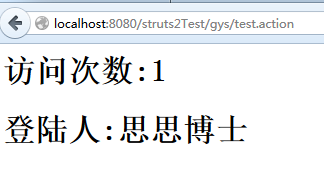
虽然Struts2提供了ActionCotext来访问Servlet API,但这种访问毕竟不能直接获得Servlet API实例,为了在Action中直接访问Servlet API,struts2还提供了如下系统接口.
ServletContextAware:实现该接口的Action可以直接访问web应用的ServletContext实例.
ServletRequestAwart:实现该接口的Action可以直接访问用户请求的HttpServletRequest实例
ServletResponseAware:实现该接口的Action可以直接访问服务器响应的HttpServletResponse实例.
下面以ServletRequestAware为例,介绍如何在Action中访问HttpServletRequest对象.
修改上面的代码:
ServletApi.jsp
 <%@ page language="java" import="java.util.*" contentType="text/html; charset=utf-8"%>

 <%

 String path = request.getContextPath();

 String basePath = request.getScheme()+"://"+request.getServerName()+":"+request.getServerPort()+path+"/";

 %>

 <!DOCTYPE HTML PUBLIC "-//W3C//DTD HTML 4.01 Transitional//EN">

 <html>

   <head>

     <base href="<%=basePath%>">

     <title>My JSP 'index.jsp' starting page</title>

     <meta http-equiv="pragma" content="no-cache">

     <meta http-equiv="cache-control" content="no-cache">

     <meta http-equiv="expires" content="0">

     <meta http-equiv="keywords" content="keyword1,keyword2,keyword3">

     <meta http-equiv="description" content="This is my page">

     <!--

     <link rel="stylesheet" type="text/css" href="styles.css">

     -->

   </head>

   <body>

    <%--  <h1>访问次数:${applicationScope.count }</h1>

     <h1>登陆人:${sessionScope.username }</h1> --%>

     <h3>${requestScope.API }</h3>

   </body>

 </html>
GetServletAPIAction.java
package action;

import javax.servlet.http.HttpServletRequest;

import javax.servlet.http.HttpServletResponse;

import org.apache.struts2.interceptor.ServletRequestAware;

import org.apache.struts2.interceptor.ServletResponseAware;

import com.opensymphony.xwork2.ActionContext;

public class GetServletAPIAction implements ServletRequestAware{

    private HttpServletRequest request;

    private String name;

    private String pass;

    public String getName() {

        return name;

    }

    public void setName(String name) {

        this.name = name;

    }

    public String getPass() {

        return pass;

    }

    public void setPass(String pass) {

        this.pass = pass;

    }

    public void getServletAPI1(){

        //获取ActionContext实例,通过该实例访问Servlet API

        ActionContext ctx=ActionContext.getContext();

        //获取ServletContext里的count属性

        Integer count=(Integer)ctx.getApplication().get("count");

        if(count==null){

            count=1;

        }

        else {

            count++;

        }

        //将访问人数设置成application的一个属性

        ctx.getApplication().put("count", count);

        ctx.getSession().put("username", "思思博士");

    }

    public void getServletAPI2(){

        request.setAttribute("API","我来自于struts2中直接访问servletAPI的request");

    }

    @Override

    public void setServletRequest(HttpServletRequest request) {

        this.request=request;

    }

    public String execute(){

        //getServletAPI1();

        getServletAPI2();

        return "api";

    }

}
测试结果:

struts2访问servlet API的更多相关文章
- 配置Struts2及Struts2访问servlet api的方式
Struts2的起源与背景 在很长的一段时间内,在所有的MVC框架中,Struts1处于绝对的统治地位,无论是从市场的普及范围,还是具体的使用者数量. 其他MVC框架都无 法与其相比,作为一一款优秀的 ...
- Struts2访问Servlet API的三种方式
有时我们需要用到Request, Response, Session,Page, ServletContext这些我们以前常用的对象,那么在Struts2中怎么样使用到这些对象呢,通常有三种方式. * ...
- Struts2访问Servlet API的几种方式
struts2提供了三种方式访问servlet API:大致分为两类 1. ActionContext: public static ActionContext getContext() :获得当前 ...
- 3.struts2访问Servlet API,并和mybaits实现全套增删改查
1.创建数据库脚本userinfo.sql prompt PL/SQL Developer import file prompt Created on 2016年5月19日 by pc set fee ...
- struts2 笔记01 登录、常用配置参数、Action访问Servlet API 和设置Action中对象的值、命名空间和乱码处理、Action中包含多个方法如何调用
Struts2登录 1. 需要注意:Struts2需要运行在JRE1.5及以上版本 2. 在web.xml配置文件中,配置StrutsPrepareAndExecuteFilter或FilterDis ...
- struts2中访问servlet API
Struts2中的Action没有与任何Servlet API耦合,,但对于WEB应用的控制器而言,不访问Servlet API几乎是不可能的,例如需要跟踪HTTP Session状态等.Struts ...
- struts2的action访问servlet API的三种方法
学IT技术,就是要学习... 今天无聊看看struts2,发现struts2的action访问servlet API的三种方法: 1.Struts2提供的ActionContext类 Object g ...
- Struts2(七) Struts2访问Servlet的API
当接受表单参数,向页面保持数据时.要用到Struts访问Servlet 的API .下面只做参考,有错误或不同意见可以发送邮箱2440867831@qq.com .建议大家看struts文档,源代码 ...
- 关于Struts2自动装配和访问Servlet API
自动装配 1.根据属性的getter和setter获取值 index.jsp <s:form action="hello" method="POST"& ...
随机推荐
- 结合Scikit-learn介绍几种常用的特征选择方法
特征选择(排序)对于数据科学家.机器学习从业者来说非常重要.好的特征选择能够提升模型的性能,更能帮助我们理解数据的特点.底层结构,这对进一步改善模型.算法都有着重要作用. 特征选择主要有两个功能: 减 ...
- RMAN备份与恢复之表空间
通过以下事例来说明表空间的恢复,删除表空间内的数据文件,删除后在针对位于该表空间的表进行插入记录以及实施检查点进程 SQL> select a.tablespace_name from dba_ ...
- Newtonsoft.Json 序列化和反序列化 时间格式 [转]
1.JSON序列化 string JsonStr= JsonConvert.SerializeObject(Entity); eg: A a=new A(); a.Name="Elain ...
- 【spring】non-compatible bean definition of same name and class
org.springframework.beans.factory.BeanDefinitionStoreException: Unexpected excep tion parsing XML do ...
- 每日学习心得:CustomValidator验证控件验证用户输入的字符长度、Linq 多字段分组统计、ASP.NET后台弹出confirm对话框,然后点击确定,执行一段代码
2013-9-15 1. CustomValidator验证控件验证用户输入的字符长度 在实际的开发中通常会遇到验证用户输入的字符长度的问题,通常的情况下,可以写一个js的脚本或者函数,在ASP ...
- 【转】调试Release发布版程序的Crash错误
http://www.cppblog.com/Walker/archive/2012/11/08/146153.html http://blog.sina.com.cn/s/blog_48f93b53 ...
- IE11如何采用其他低级版本调试网页
IE9的方法: 出于未知需求,用户在安装了较高版本IE浏览器(IE9)之后,又需要使用低版本的IE(7,8),为了返回较低版本,很多用户选择(不得不)卸载新版本IE,这样显得十分不科学.实际上IE9提 ...
- C3P0数据库连接池的相关bug解决
数据库连接池的几个常见bug: 1.警告: com.mchange.v2.async.ThreadPoolAsynchronousRunner$DeadlockDetector@76c7022e -- ...
- Ignoring HTTPS certificates
Our Development setups won't have valid or trusted certificates. When do you want test our webserver ...
- python (2)xpath与定向爬虫
内容来自:极客学院,教学视频: 写在前面: 提取Item 选择器介绍 我们有很多方法从网站中提取数据.Scrapy 使用一种叫做 XPath selectors的机制,它基于 XPath表达式. 这是 ...