
git 提交解决本地与远程冲突
首先介绍一下背景。
如果有一个工程A,开始时test.txt 的内容如下
chenfool

hello world
作者通过 git clone 的方式,将这个项目download 到本地。
此时,作者手贱,直接在web 端,将test.txt 修改成为
chenfool

hello world
过了一段时间后,作者突然想起要修改本地的test.txt文件,在本地 clone 版本中,对test.txt 文件修改如下
chenfool

hello world
然后想将本地的test.txt 提交到远程中,在push 时,会报大概如下的错
hint: Updates were rejected because the remote contains work that you do

hint: not have locally. This is usually caused by another repository pushing

hint: to the same ref. You may want to first integrate the remote changes

hint: (e.g., 'git pull ...') before pushing again.

hint: See the 'Note about fast-forwards' in 'git push --help' for details.
执行 git status 查看,它就告诉你有一个commit 还没有提交呢
On branch master

Your branch is ahead of 'origin/master' by  commit.

  (use "git push" to publish your local commits)

nothing to commit, working tree clean
此时,你可以尝试一下使用 git pull ,将远程代码和本地代码强行 merge 一下,如果能够正常merge ,则是其他问题导致了错误,如果是冲突,就可以往下看了
执行 git pull 时,会报告错误 (有一些敏感信息被作者抹除了,可能和读者真实执行有出入)
remote: Counting objects: , done.

remote: Compressing objects: % (/), done.

remote: Total  (delta ), reused  (delta )

Unpacking objects: % (/), done.

From http://192.168.1.1/chenfool/

   4c7cd0c..5b8e16f  master     -> origin/master

Auto-merging test.txt

CONFLICT (content): Merge conflict in test.txt

Automatic merge failed; fix conflicts and then commit the result.
此时再执行 git status 命令,就可以看到真正的错误了
On branch master

Your branch and 'origin/master' have diverged,

and have  and  different commits each, respectively.

  (use "git pull" to merge the remote branch into yours)

You have unmerged paths.

  (fix conflicts and run "git commit")

  (use "git merge --abort" to abort the merge)

Unmerged paths:

  (use "git add <file>..." to mark resolution)

    both modified:   test.txt
打印的信息说得很明白,就是test.txt 这个文件,被多个人修改了,并且无法实现智能合并,需要人工干预了。
我们可以怎么做呢?解决的方式简单粗暴,就是对比local 和remote 两端的差异,然后选择自己想要的内容,然后提交。
这里作者交代一下,因为作者的环境为mac,所以比对文件差异使用 Kaleidoscope 可视化工具。
Kaleidoscope 软件读者可以在这里了解更多集成的信息。
使用 git mergetool test.txt 命令,git 会自动调用 Kaleidoscope 软件,让读者自由对比其中差异,以及修改自己想要提交的内容。
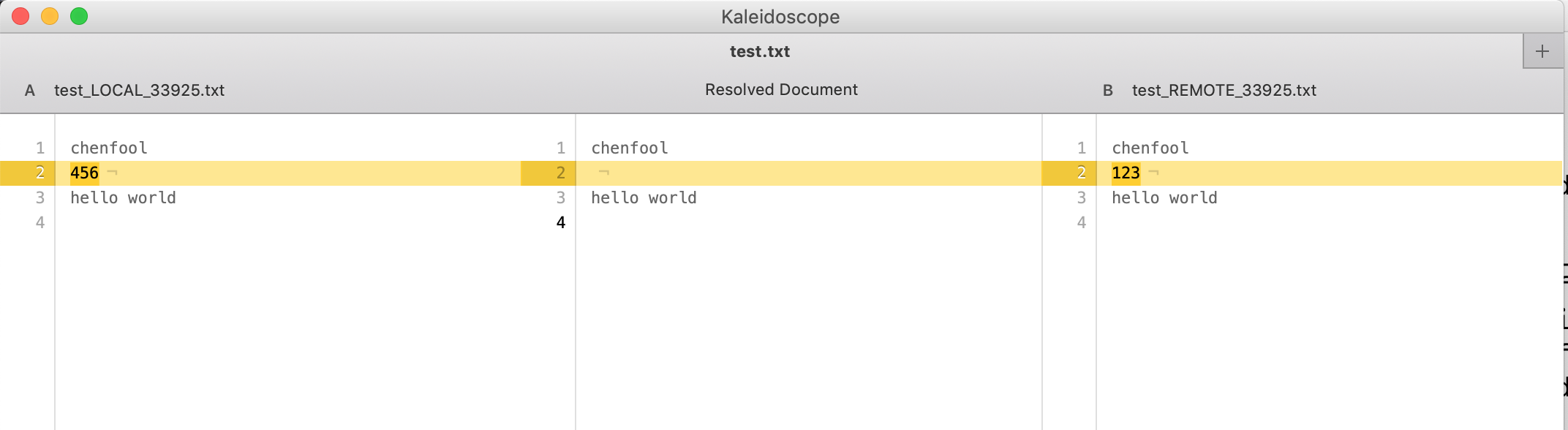
读者可以发现,左手边是local 文件的内容,右手边是remote 文件的内容,而中间则是让读者自由编辑的部分。整个界面非常的友好。
读者在中间部分正确修改好内容后,直接保存退出。
此时,在local 本地,会发现test.txt 文件变成了两个,一个名为 test.txt ,一个名为 test.txt.orig。
test.txt 是修改后的文件,也是我们即将要提交的文件。
test.txt.orig 文件则是记录了原来 local 和 remote 文件差异的文件。实际上到这个步骤,test.txt.orig 已经没有啥用处,读者们可以自行将其删除。
开始提交了,读者会发现实际上就是重新add 和commit 了一次,但是它确实能够解决提交冲突的问题。
git add test.txt

git commit -m "for test"

git push origin master
- 题外话
如果读者只是非常渴望可以将本地的文件覆盖 remote 的文件,可以通过一下方式来进行操作。
在 git push origin master 失败后,首先备份一下本地即将提交的文件,未来要用。
然后 git pull ,将remote 的内容download 本地。
此时,用户就可以通过 git status 了解是哪些文件发生了冲突。
然后再将刚才备份的文件直接覆盖本地刚刚 git pull 后的文件。
再依次执行 git add 、 git commit 和 git push origin master,就可以简单粗暴地将 local 文件覆盖 remote 文件。
git 提交解决本地与远程冲突的更多相关文章
- git 提交解决冲突(转载)
转载 git 提交解决冲突 http://www.cnblogs.com/qinbb/p/5972308.html 一:git命令在提交代码前,没有pull拉最新的代码,因此再次提交出现了冲突. ...
- Git提交到多个远程仓库(多看两个文档)
Git提交到多个远程仓库(多看两个文档) 一.总结 一句话总结: 二. Git提交到多个远程仓库(多看两个文档) 有两种做法,先看第一种 一.通过命令行进行操作 例如我有下面两个仓库: Mybatis ...
- git 强推本地分支覆盖远程分支
git 强推本地分支覆盖远程分支git push origin 分支名 --force
- git 提交解决冲突
一:git命令在提交代码前,没有pull拉最新的代码,因此再次提交出现了冲突. error: You have not concluded your merge (MERGE_HEAD exists) ...
- git上传(本地和远程有冲突时)
一. 冲突的产生:在上次git同步(上传)之后,本地和远程均有更改 二. 处理 1. 丢弃本地,采用远程: git checkout 冲突文件及其路径 如: git checkout bzrobot_ ...
- 【原】git如何删除本地和远程的仓库
今天操作git时遇到一个小问题:如何删除本地和远程的仓库,在网上巴拉一番解决了这个问题. 方法1: $rm testfile$git add -u $git commit -m "delet ...
- Git常用命令+本地连接远程仓库
一.git命令整理 git config --global user.email "邮箱名":绑定GitHub邮箱 git config --global user.name &q ...
- Git 解决本地远端版本冲突
简单粗暴.... git push -u origin master -f
- git branch --set-upstream 本地关联远程分支
最近使用git pull的时候多次碰见下面的情况: There is no tracking information for the current branch.Please specify whi ...
随机推荐
- NOIp2018集训test-10-17 (bike day3)
发现自己gradully get moodier and moodier了 负面情绪爆发地越来越频繁,根本out of control,莫名其妙地就像着了魔一样 为什么用英语大概是因为今天早上早自习因 ...
- JAVA JDBC 读取配置文件链接数据库(oracle)
----db.properties-------- dbDriver = oracle.jdbc.driver.OracleDriverurl = jdbc:oracle:thin:@192.168. ...
- ETL之Tungsten Replicator
1 概述 1.1 介绍 Tungsten Replicator是数据库集群和复制供应商Continuent推出的高性能.开源的数据复制引擎,是Continuent最先进的集群解决方案的核心组件之一,特 ...
- uboot和内核分区的修改
随着内核的更新,内核越来越大,uboot给nand的kernel分区默认是2M的 device nand0 <nandflash0>, # parts = 4 #: name ...
- mount总结
挂载分区 mount基本语法 mount [参数] /dev/sdb1(需要挂载的分区) /sdb1(挂载目录) 参数是可选的,也可以不带参数,参数的使用方法(-o ro,sync,atime). 参 ...
- 第三波精品Android源码袭来!免费下载
今天又汇总了一些源码供大家免费下载学习! 1.Android实现NewQuickAction快捷菜单NewQuickAction能根据点击事件发生的坐标来显示一个快捷菜单,比如点击位置在靠近底部,则弹 ...
- web安全之XSS和CSRF
XSS 跨站脚本攻击(cross site script),本来缩写CSS单位了和层叠样式(Cascading Style Sheet,CSS)有所区别,所以在安全领域叫做“XSS”. XSS攻击,通 ...
- struts2.Action中的method属性配置
.Action中的method属性 在struts1.x中我们知道通过继承DispatchAction可以实现把多个Action进行统一操作,在struts2中实现action的统一操作也很简单.我们 ...
- [poj1273]Drainage Ditches(最大流)
解题关键:最大流裸题 #include<cstdio> #include<cstring> #include<algorithm> #include<cstd ...
- 树莓派 Learning 002 装机后的必要操作 --- 01 解决上网问题
树莓派 装机后的必要操作 - 解决上网问题 我的树莓派型号:Raspberry Pi 2 Model B V1.1 装机系统:NOOBS v1.9.2 树莓派 装机后的必要操作 解决上网问题 解决上网 ...