
Entity Framework Code-First(11):Configure One-to-One
Configure One-to-Zero-or-One Relationship:
Here, we will configure One-to-Zero-or-One relationship between two entities, e.g. Entity1 can be associated with zero or only one instance of Entity2.
Take an example of the following Student and StudentAddress entities.
public class Student

{

    public Student() { }

    public int StudentId { get; set; }

    public string StudentName { get; set; }

    public virtual StudentAddress Address { get; set; }

}

public class StudentAddress

{

    public int StudentAddressId { get; set; }

    public string Address1 { get; set; }

    public string Address2 { get; set; }

    public string City { get; set; }

    public int Zipcode { get; set; }

    public string State { get; set; }

    public string Country { get; set; }

    public virtual Student Student { get; set; }

}
Visit Entity Relationship section to understand how EF manages one-to-one, one-to-many, and many-to-many relationships.
Now, let's configure Student and StudentAddress entities for One-to-Zero-or-One relationship where Student can have zero or maximum one StudentAddress.
As you may know, a one-to-zero-or-one relationship happens when the primary key of one table becomes PK & FK in another table in relational database such as SQL Server. So, we need to configure above entities in such a way that EF creates Students and StudentAddresses table in the DB where it will make StudentId in Student table as PK and StudentAddressId column in StudentAddress table as PK and FK both.
Configure one-to-zero-or-one relationship using DataAnnotations:
Here, we will apply DataAnnotations attributes on Student and StudentAddress entities to establish one-to-zero-or-one relationship.
The Student entity follows the default code-first convention as it includes StudentId property which will be key property. So we don't need to apply any attributes on it because EF will create Students table and make StudentId as a primary key in the DB.
For the StudentAddress entity, we need to configure StudentAddressId as PK & FK both. StudentAddressId property follows the default convention for primary key. So we don't need to apply any attribute for PK. However, we also need to make it a foreign key which points to StudentId. So, apply [ForeignKey("Student")] on StudentAddressId property which will make it foreign key for Student entity as shown below.
public class Student

{

    public Student() { }

    public int StudentId { get; set; }

    public string StudentName { get; set; }

    public virtual StudentAddress Address { get; set; }

}

public class StudentAddress

{

    [ForeignKey("Student")]

    public int StudentAddressId { get; set; }

    public string Address1 { get; set; }

    public string Address2 { get; set; }

    public string City { get; set; }

    public int Zipcode { get; set; }

    public string State { get; set; }

    public string Country { get; set; }

    public virtual Student Student { get; set; }

}
Thus, Student and StudentAddress entities has One-to-Zero-or-One relationship.
When StudentAddress entity does not follow conventions:
If, for example, StudentAddress entity does not follow the convention for PK i.e. different name for Id property then you need to configure it for PK as well. Consider the following StudentAddress entity which has property name StudentId instead of StudentAddressId.
public class Student

{

    public Student() { }

    public int StudentId { get; set; }

    public string StudentName { get; set; }

    public virtual StudentAddress Address { get; set; }

}

public class StudentAddress

{

    [Key, ForeignKey("Student")]

    public int StudentId { get; set; }

    public string Address1 { get; set; }

    public string Address2 { get; set; }

    public string City { get; set; }

    public int Zipcode { get; set; }

    public string State { get; set; }

    public string Country { get; set; }

    public virtual Student Student { get; set; }

}
In the above example, we need to configure StudentId property as Key as well as ForeignKey. This will make StudentId property in StudentAddress entity as PK and FK both.
Note: Student include StudentAddress navigation property and StudentAddress includes Student navigation property. With one-to-zero-or-one relationship, Student can be saved without StudentAddress but StudentAddress entity cannot be saved without Student entity. EF will throw an exception if you try to save StudentAddress entity without Student entity.
Configure One-to-Zero-or-One relationship using Fluent API:
Here, we will use Fluent API to configure Student and StudentAddress entities. Please note that we will not apply any DataAnnotations attributes in Student and StudentAddress entities because we will use Fluent API to configure them.
When Student and StudentAddress follow the conventions:
Student and StudentAddress entities follow the default code-first convention for PrimaryKey. So, we don't need to configure them to define their PrimaryKeys. We only need to configure StudentAddress entity where StudentAddressId should be ForeignKey.
The following example sets one-to-zero or one relationship between Student and StudentAddress using Fluent API.
protected override void OnModelCreating(DbModelBuilder modelBuilder)

{

    // Configure Student & StudentAddress entity

    modelBuilder.Entity<Student>()

                .HasOptional(s => s.Address) // Mark Address property optional in Student entity

                .WithRequired(ad => ad.Student); // mark Student property as required in StudentAddress entity. Cannot save StudentAddress without Student

}
In the above example, Student entity is configured using HasOptional() method which indicates that the StudentAddress navigation property in Student entity is an optional (not required when saving Student entity). Then, WithRequired() method configures StudentAddress entity and make Student navigation property of StudentAddress as required (required when saving StudentAddress entity. It will throw an exception when StudentAddress entity is saving without Student navigation property). This will make StudentAddressId as ForeignKey also.
Thus, you can configure One-to-Zero-or-one relationship between two entities where Student entity can be saved without attaching StudentAddress object to it but StudentAddress entity cannot be saved without attaching an object of Student entity. This makes one end required.
When StudentAddress entity do not follow conventions:
Now, let's take an example of StudentAddress entity where it does not follow primary key convention i.e. have different Id property name than <type name>Id. Consider the following Student and StudentAddress entities.
public class Student

{

    public Student() { }

    public int StudentId { get; set; }

    public string StudentName { get; set; }

    public virtual StudentAddress Address { get; set; }

}

public class StudentAddress

{

    public int StudentId { get; set; }

    public string Address1 { get; set; }

    public string Address2 { get; set; }

    public string City { get; set; }

    public int Zipcode { get; set; }

    public string State { get; set; }

    public string Country { get; set; }

    public virtual Student Student { get; set; }

}
So now, we need to configure StudentId property of StudentAddress for PrimaryKey of StudentAddress as well as ForeignKey as shown below.
protected override void OnModelCreating(DbModelBuilder modelBuilder)

{

    // Configure StudentId as PK for StudentAddress

    modelBuilder.Entity<StudentAddress>()

        .HasKey(e => e.StudentId);

    // Configure StudentId as FK for StudentAddress

    modelBuilder.Entity<Student>()

                .HasOptional(s => s.Address)

                .WithRequired(ad => ad.Student);

}
Configure One-to-One relationship using Fluent API:
We can configure One-to-One relationship between entities using Fluent API where both ends are required, meaning Student entity object must include StudentAddress entity object and StudentAddress entity must include Student entity object in order to save it.
Note:One-to-one relationship is technically not possible in MS SQL Server. It will always be one-to-zero or one. EF forms One-to-One relationships on entities not in DB.
protected override void OnModelCreating(DbModelBuilder modelBuilder)

{

    // Configure StudentId as PK for StudentAddress

    modelBuilder.Entity<StudentAddress>()

        .HasKey(e => e.StudentId);

    // Configure StudentId as FK for StudentAddress

    modelBuilder.Entity<Student>()

                .HasRequired(s => s.Address)

                .WithRequiredPrincipal(ad => ad.Student);

}
In the above example, modelBuilder.Entity<Student>().HasRequired(s => s.Address) makes Address property of StudentAddress is required. .WithRequiredPrincipal(ad => ad.Student) makes Student property of StudentAddress entity as required. Thus it configures both ends required. So now, when you try to save Student entity without address or StudentAddress entity without Student, it will throw an exception.
Note: Here, Principal entity is Student and dependent entity is StudentAddress.
DataAnnotations and Fluent API example for one-to-zero or one relationship will create the following database:
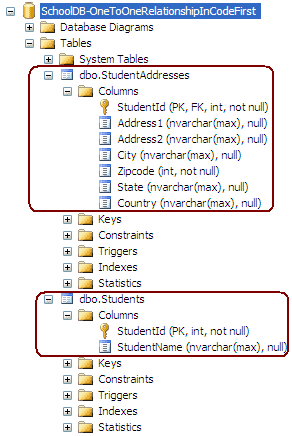
You can check the relationship between Student and StudentAddress in the database, as shown below:
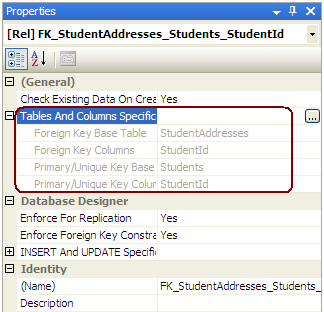
If you create an entity data model of a created database then it will appear like the diagram shown below:
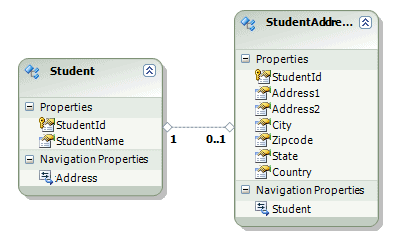
Learn how to configure a one-to-many relationship in the next section.
Entity Framework Code-First(11):Configure One-to-One的更多相关文章
- Entity Framework Tutorial Basics(11):Code First
Code First development with Entity Framework: Entity Framework supports three different development ...
- Entity Framework Code first(转载)
一.Entity Framework Code first(代码优先)使用过程 1.1Entity Framework 代码优先简介 不得不提Entity Framework Code First这个 ...
- Entity Framework Code First (三)Data Annotations
Entity Framework Code First 利用一种被称为约定(Conventions)优于配置(Configuration)的编程模式允许你使用自己的 domain classes 来表 ...
- Entity Framework Code First (二)Custom Conventions
---------------------------------------------------------------------------------------------------- ...
- Entity Framework Code First (一)Conventions
Entity Framework 简言之就是一个ORM(Object-Relational Mapper)框架. Code First 使得你能够通过C#的类来描述一个模型,模型如何被发现/检测就是通 ...
- Entity Framework Code First (七)空间数据类型 Spatial Data Types
声明:本文针对 EF5+, Visual Studio 2012+ 空间数据类型(Spatial Data Types)是在 EF5 中引入的,空间数据类型表现有两种: Geography (地理学上 ...
- Entity Framework Code First (四)Fluent API - 配置属性/类型
上篇博文说过当我们定义的类不能遵循约定(Conventions)的时候,Code First 提供了两种方式来配置你的类:DataAnnotations 和 Fluent API, 本文将关注 Flu ...
- Entity Framework Code First (八)迁移 Migrations
创建初始模型和数据库 在开始使用迁移(Migrations)之前,我们需要一个 Project 和一个 Code First Model, 对于本文将使用典型的 Blog 和 Post 模型 创建一个 ...
- Entity Framework Code First (六)存储过程
声明:本文只针对 EF6+ 默认情况下,Code First 对实体进行插入.更新.删除操作是直接在表上进行的,从 EF6 开始你可以选择使用存储过程(Stored Procedures) 简单实体映 ...
- Entity Framework Code First (五)Fluent API - 配置关系
上一篇文章我们讲解了如何用 Fluent API 来配置/映射属性和类型,本文将把重点放在其是如何配置关系的. 文中所使用代码如下 public class Student { public int ...
随机推荐
- Spring层面的事务管理
事务管理方式 1. 编程式事务管理 2. 声明式事务管理 建立于AOP之上,对指定的方法执行前后进行拦截,即在方法执行前开始或加入一个事务,执行完毕后根据结果提交或回滚事务. 方式: a. 配置文件中 ...
- 20145210姚思羽《网络对抗技术》逆向及Bof基础实践
20145210姚思羽<网络对抗技术>逆向及Bof基础实践 实践目标 1.本次实践的对象是一个名为pwn1的linux可执行文件. 2.该程序正常执行流程是:main调用foo函数,foo ...
- 如何阻止form表单中的button按钮提交
<form action="#" method="post"> <input type="text" name=" ...
- LINQ 学习路程 -- 查询操作 ElementAt, ElementAtOrDefault
Element Operators (Methods) Description ElementAt 返回指定索引的元素,如果索引超过集合长度,则抛出异常 ElementAtOrDefault 返回指定 ...
- Bootstrap(一)标题
Bootstrap标题样式进行了以下显著的优化重置: 1.重新设置了margin-top和margin-bottom的值, h1~h3重置后的值都是20px:h4~h6重置后的值都是10px.2.所 ...
- TF卡
1.我的手机 64G 2.冬冬手机 16G 3.茜茜收音机 8G(创见) 4.父 手机 8G(Kingston) 5. 6. 7.
- Linux课程---6、别名管理和网络配置(Linux命令如何记)
Linux课程---6.别名管理和网络配置(Linux命令如何记) 一.总结 一句话总结: 理解记忆:因为命令要实现那么多功能,必须有那么多参数,而不同的参数就适用不用的情况 命令基本格式:命令关键字 ...
- 第二章 python基础(一)
第一节 Python文件类型 源代码 Python源代码的文件以“py”为扩展名,由Python程序解释,不需要编译 字节代码 Python源文件经编译后生成的扩展名为“pyc”的文件 编译方法 im ...
- leetcode 204. Count Primes(线性筛素数)
Description: Count the number of prime numbers less than a non-negative number, n. 题解:就是线性筛素数的模板题. c ...
- linux命令学习笔记(18):locate 命令
locate 让使用者可以很快速的搜寻档案系统内是否有指定的档案.其方法是先建立一个包括系统内所有档案名称及 路径的数据库,之后当寻找时就只需查询这个数据库,而不必实际深入档案系统之中了.在一般的 d ...