
App Distribution Guide (二)
Configuring Your Xcode Project for Distribution
You can edit your project settings anytime, but some settings are necessary during development. Others are recommended when you distribute your app for beta testing and required when you submit your app to the App Store or Mac App Store.
你可以在任何时候编辑你的项目设置。但是有一些设置在开发阶段就是需要的。
During development, your app must be provisioned and code signed to use certain app services and run on an iOS device (iPad, iPhone, or iPod touch). If you assign a bundle ID and team to your project, Xcode can create the necessary certificates, identifiers, and profiles for you in Member Center. You can enter this information now using the project editor or as needed when you add app services and launch your app.
在开发阶段,你的app必须通过认证并且签名才可以使用一些app 设备并且在这些ios设备上运行,例如(ipad,iphone,或者ipod touch)。如果你分配一个bundle id和team到你的工程中,xcode就可以为你在member center中创建必要的certificates,identifiers和profiles。
Before you distribute your app for testing or to the store, provide all the required information about your app. For example, set app icons to pass iTunes Connect validation tests.
Before you upload your app to the store, verify your build settings and set the copyright key for Mac apps.
在上传你的app到store前,验证你的build设置并且为mac apps设置copyright。
Setting Properties When Creating Your Xcode Project
For iOS apps, a dialog similar to this appears when you create an Xcode project from a template:
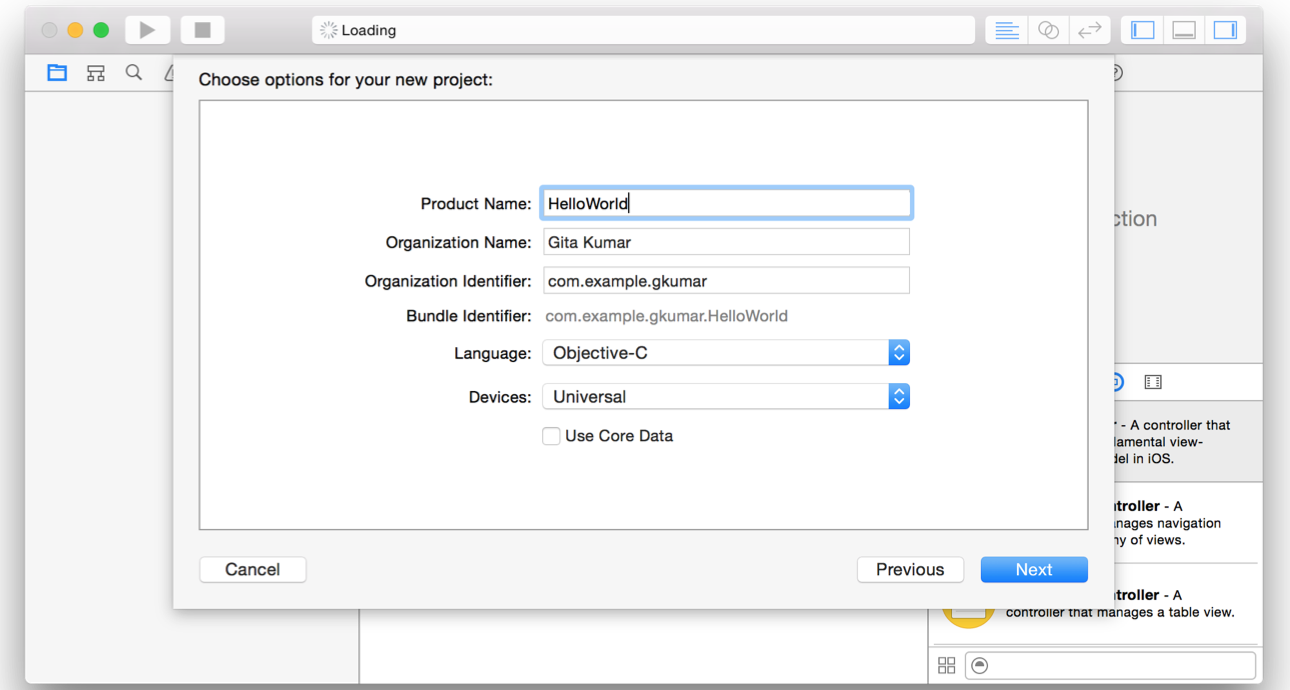
The product name is the name of your app as it will appear to customers in the store and should be similar to the app name you enter later in iTunes Connect. Most importantly, a customer should instantly associate the app name and icon in the App Store with the product name and app icon that installs on their devices. The product name is also the name that will appear in Springboard when the app is installed. The product name can’t be longer than 255 bytes and can be no fewer than 2 characters. (Read Best Practices in iTunes Connect Developer Guide for guidelines on choosing an app name.)
product name即使你的app name。会出现在store中应当同之后你在itunes connect中输入的app name类似。更重要的是,客户应当立即将在app store中的app name和icon和在设备上安装的product name和icon联系起来。product name不能超过255字节长度而且不能少于两个字符长度。
The organization name is an attribute of the Xcode project and is used in boilerplate text throughout your project folder. For example, the organization name is used in the source and header file copyright strings. The organization name in your Xcode project isn’t the same as the company name that you enter later in iTunes Connect.
organization name是xcode工程的一个属性并且用于贯穿项目folder的样本文件text。例如,organization name用于source和header文件中的copyright字符串。organization name和你之后在itunes connect中输入的company name不同。
The product name and company identifier you enter are concatenated to create the default bundle ID using reverse domain name service (reverse DNS) notation. The bundle ID needs to be unique to your app, so it’s important to set the company identifier to a unique string as well.
bundle id需要是唯一的。product name和company identifier串联起来就是默认的bundle id。所有company identifer是唯一的也很重要。例如:
orgnization identifier是com.xxx,product name是hellow world,那么默认的bundle id就是com.xxx.hellow world. 一般的orgnization identifer就是你公司的域名颠倒过来写。
For iOS apps, you can choose the types of devices you support from the Devices pop-up menu. For Mac apps, you can choose the Mac App Store categories from a pop-up menu.
The other values used by the Xcode template are sufficient for building and running your app locally, but later you’ll need to finalize properties, such as the bundle ID. Also, the assistant doesn’t set all required properties for the store. You complete the basic store configuration before you submit. Ideally, you’ll complete this configuration before you distribute your app for testing too.
After your app is released, you can’t change some of this metadata, so it’s important to choose your settings carefully. To learn which app states cause some properties to be locked in iTunes Connect, refer to iTunes Connect App Properties in iTunes Connect Developer Guide .
当你的app发布以后,你就不能更改其中的一些metadata了,所以慎重选择你的设置非常重要。
Before You Begin Configuring Your Project
Configuring Identity and Team Settings
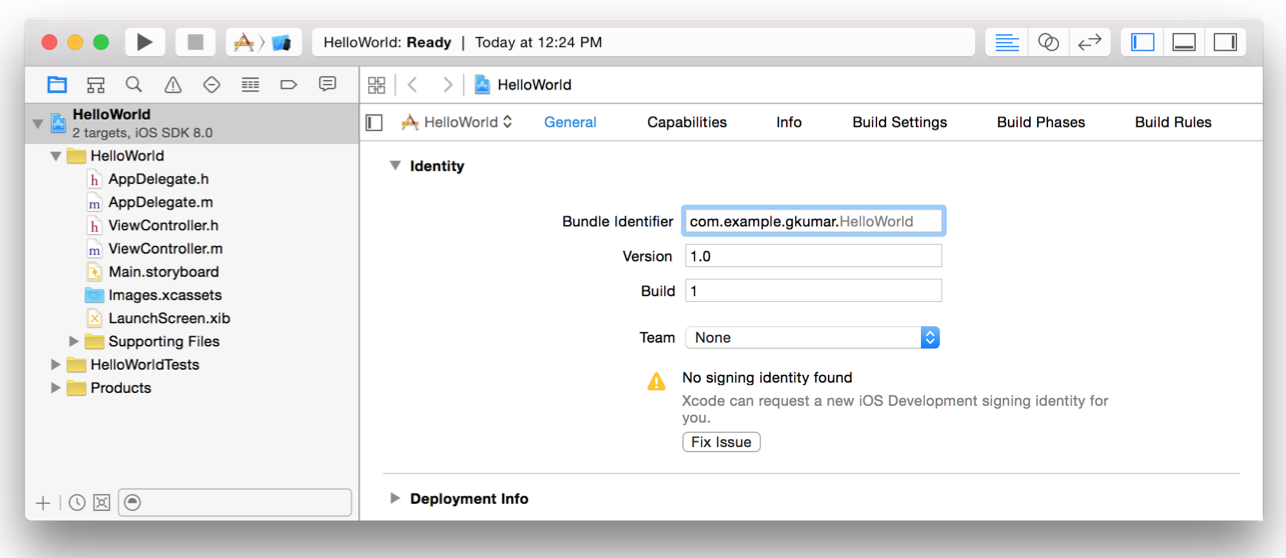
For Xcode to create the team provisioning profile, the app’s bundle ID needs to be unique and the project assigned to a team. Later, you provide other information that identifies this version of your app. The identity settings appear in the Identity section of the target’s General pane. For iOS apps, the Identity section appears as shown here:
xcode创建team provisioning profile,app的bundle id需要是唯一的并且project要分配给一个team。而后,你提供其他的信息来标示你app的版本。
About Bundle IDs
A bundle ID precisely identifies a single app. A bundle ID is used during the development process to provision devices and by the operating system when the app is distributed to customers. For example, Game Center and In-App Purchase use a bundle ID to identify your app when using these app services. The preferences system uses this string to identify the app for which a given preference applies. Similarly, Launch Services uses the bundle ID to locate an app capable of opening a particular file, using the first app it finds with the given identifier. The bundle ID is also used to validate an app’s signature.
The bundle ID string must be a uniform type identifier (UTI) that contains only alphanumeric characters (A-Z,a-z,0-9), hyphen (-), and period (.). The string should be in reverse-DNS format. For example, if your company’s domain is Acme.com and you create an app named Hello, you could assign the string com.Acme.Hello as your app’s bundle ID.
一个bundle ID精确的标示一个app。当开发中执行到provison设备或者当发布给客户时候都需要bundle id。例如,当使用game center和in-app purchase服务是使用bundle id来标示你的app。系统偏好使用这个bundle id来标示app。类似的,launch services使用bundle id来定位app打开特殊的文件。bundle id也用来验证app的签名。
bundle id字符串必须只能办好阿拉伯数字和字符(A-Z,a-z,0-9), hyphen (-), and period (.)。字符串应当是点到的dns格式。例如你的公司的域名是Acme.com并且你创建了一个app叫做hello。那么你就可以拿com.Acme来作为你的app的bundle id了。
During the development process, you use an app’s bundle ID in many different places to identify the app.
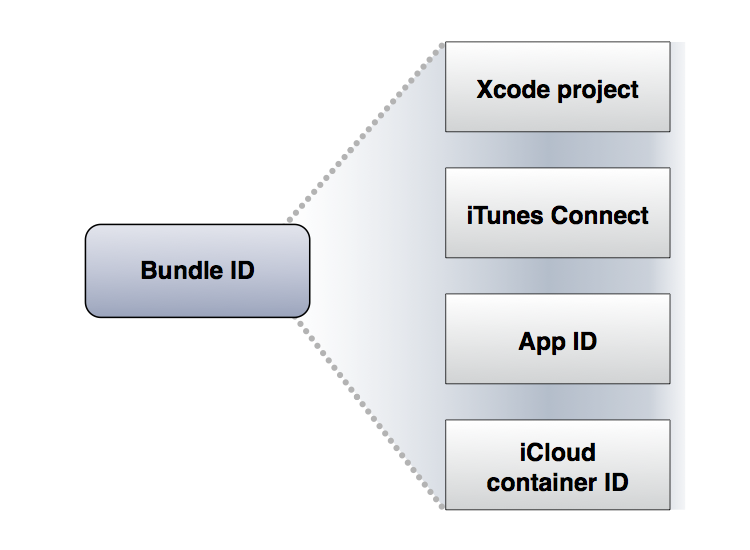
在开发过程中,你可以在许多不同的地方来使用app的bundle id来标示app。
Specifically, the bundle ID is located and used as follows:
In the Xcode project, the bundle ID is stored in the information property list file (Info.plist). This file is later copied into your app’s bundle when you build the project.
In Member Center, you create an App ID that matches the app’s bundle ID. If the App ID is an explicit App ID, it exactly matches the bundle ID. However, unlike domain names, bundle IDs are case sensitive. If the App ID is lowercase, your bundle ID needs to be lowercase, too.
In iCloud, the container IDs you specify in your Xcode project are based on the bundle IDs of one or more apps.
In iTunes Connect, you enter the bundle ID to identify your app. After your first version is available on the store, you can’t change your bundle ID or delete the associated explicit App ID.
在xcode工程中,bundle id存储在property list文件(Info.plist)中。这个文件之后当你build项目时会copy到你app的bundle中去。
在member center,你创建一个匹配你app bundle id的app id。如果app id时一个显示的app id,他会完全匹配bundle id。尽管如此但是,不想domain命名,bundle ids是大小写敏感的。如果app id是小写的,你的bundle id也需要是小写的。
在itunes connect中,你输入bundle id来标示你的app。当第一个版本在store中存在时,你就不能再更改你的bundle id或者删除和其相关联的显示的app id。
App Distribution Guide (二)的更多相关文章
- APP Distribution Guide 苹果官网
https://developer.apple.com/library/ios/documentation/IDEs/Conceptual/AppDistributionGuide/Introduct ...
- App Distribution Guide (一)
This guide contains everything you need to know to distribute an app through the App Store or Mac Ap ...
- App Distribution Guide--(三)---Configuring Your Xcode Project for Distribution
Configuring Your Xcode Project for Distribution You can edit your project settings anytime, but some ...
- Android APP压力测试(二)之Monkey信息自动收集脚本
Android APP压力测试(二) 之Monkey信息自动收集脚本 前言: 上一篇Monkey介绍基本搬抄官方介绍,主要是为了自己查阅方便.本文重点介绍我在进行Monkey时如何自动收集相关信息 ...
- 基于Html5 Plus + Vue + Mui 移动App 开发(二)
基于Html5 Plus + Vue + Mui 移动App 开发(二) 界面效果: 本页面采用Html5 Plus + Vue + Mui 开发移动界面,本页面实现: 1.下拉刷新.上拉获取更多功能 ...
- 带你从零学ReactNative开发跨平台App开发(二)
ReactNative跨平台开发系列教程: 带你从零学ReactNative开发跨平台App开发(一) 带你从零学ReactNative开发跨平台App开发(二) 带你从零学ReactNative开发 ...
- 关于APP上架制作二维码相关
1.安卓版本APP上架并生成二维码问题:安卓版本上架国内市场,这个情况比较复杂一些,比如百度,网址是以上传APP生成的一个编号来进行的,每次升级更新后都发生了变化,也就相当于每次升级后网址发生改变(比 ...
- 安卓app和苹果app共用一个二维码
应项目要求,现在安卓app和苹果app共用一个二维码,对外提供下载: <html> <head> <meta http-equiv="Content-Type& ...
- 制作IOS企业版App网页扫描二维码下载安装
有时候我们需要在XX网站的主页上去扫描二维码下载,那么ios开发中如何做到这一点呢. 我给大家解答一下,这也是在最近工作中用到的部分,在网上了解了一些. 下面给大家分解一下步骤: 1.Plist 和 ...
随机推荐
- ocrosoft Contest1316 - 信奥编程之路~~~~~第三关 问题 x: 十进制到二进制的转换
http://acm.ocrosoft.com/problem.php?cid=1316&pid=49 题目描述 把十进制到二进制的转换. 输入 234 输出 11101010 样例输入 23 ...
- Redis 与 Spring 集成
配置applicationContext.xml <!-- 连接池配置 --> <bean id="jedisPoolConfig" class="re ...
- 【bzoj1565】[NOI2009]植物大战僵尸 拓扑排序+最大权闭合图
原文地址:http://www.cnblogs.com/GXZlegend/p/6808268.html 题目描述 输入 输出 仅包含一个整数,表示可以获得的最大能源收入.注意,你也可以选择不进行任何 ...
- hdu 1172 猜数字
猜数字 Time Limit: 20000/10000 MS (Java/Others) Memory Limit: 65536/32768 K (Java/Others)Total Submi ...
- BZOJ1565 [NOI2009]植物大战僵尸 【最大权闭合子图 + tarjan缩点(或拓扑)】
题目 输入格式 输出格式 仅包含一个整数,表示可以获得的最大能源收入.注意,你也可以选择不进行任何攻击,这样能源收入为0. 输入样例 3 2 10 0 20 0 -10 0 -5 1 0 0 100 ...
- java 复习整理(五 类加载机制与对象初始化)
类加载机制与对象初始化 一 . 类加载机制 类加载机制是指.class文件加载到jvm并形成Class对象的机制.之后应用可对Class对象进行实例化并调用.类加载机制可在运行时动态加载外部的类, ...
- font-family 定义的最后为什么要加一句sans-serif
定义font-family时,最好在最后加一个sans-serif,这样如果所列出的字体都不能用,则默认的sans-serif字体能保证调用; W3C建议字体定义的时候,最后以一个类别的字体结束,例如 ...
- weblogic12c配置免密码启动
在运行startWeblogic.sh时需要输入有效的账号密码才能启动weblogic,为简化操作,可以配置boot.properties来免输账号密码,配置方法如下:1.查看在./domains/x ...
- 64位操作系统安装32位客户端和PL/SQL
PL/SQ只能使用32位的Oracle客户端.在64位系统下安装了64位的oracle 11g,使用PL/SQL需再安装32位Oracle客户端. 按以下方法试验成功: 1)安装32位的Oracle客 ...
- 货车运输(LCA+最大生成树)
神奇传送门 恩,这是一道神奇的LCA+难度的题目. 题目是这样的: A 国有n座城市,编号从1到n,城市之间有 m条双向道路.每一条道路对车辆都有重量限制,简称限重.现在有 q辆货车在运输货物,司机们 ...