
How to Fix Missing TortoiseSVN File Status Icons in Windows
For many Windows-based developers, Subversion and TortoiseSVN is a great source control solution. It’s free, is regularly updated, works on most versions of Windows and integrates well within the OS. TortoiseSVN will be one of the first systems developers install after upgrading to Windows 7.
Tortoise normally shows an overlay icon on every version-controlled file to indicate whether it has been added to the SVN repository, is new, modified, etc. While it may not be absolutely essential, the overlay offers a quick view of the current project status.
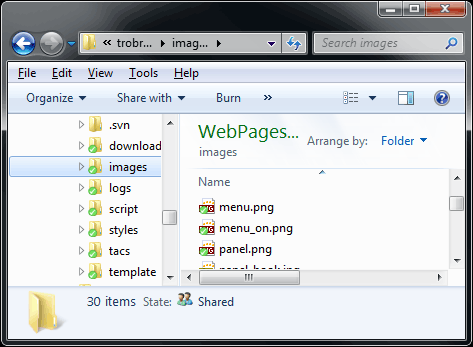
Unfortunately, Windows Tortoise users can encounter an issue where the file overlays disappear. It’s not an issue specific to Tortoise and it can affect any application which adds several icon overlays. The problem is caused by the number of overlays permitted in different versions of Windows. Vista 32-bit appears to support 15 overlay types, whereas Windows 7 64-bit supports 11. Installing a program which adds its own icon overlays can therefore disable them in another application.
Windows registers 3 icon overlays (this may differ between versions). Tortoise registers another 9. Dropbox registers 3 and will re-install them if they’re missing when the application is restarted. So Windows 7 64-bit users will only be able to view Tortoise icons if at least 4 (non-Dropbox) overlay types are removed from the system.
Here be dragons!
The fix I’m about to describe involves tampering with the Windows
registry. It’s dangerous and one false move could trash your Windows
installation!
If you’re willing to take the risk, fire up the Windows Registry
Editor (regedit.exe) and navigate to:
HKEY_LOCAL_MACHINESOFTWAREMicrosoftWindowsCurrentVersionExplorerShellIconOverlayIdentifiers
Export the branch as a .reg file — this will allow you to restore the old settings should anything go wrong.
You will see the Tortoise and other icon overlay identifiers as sub-branches. You can delete unnecessary icon overlay types by right-clicking a branch and selecting Delete:
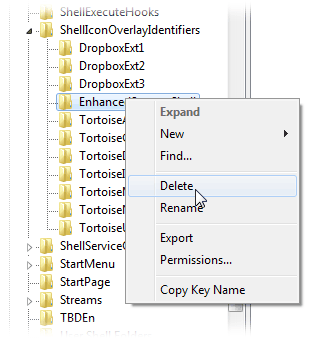
Choosing which overlays are unnecessary is your decision and will
depend on your requirements. There may be overlays for applications you
do not use or have uninstalled. I removed the TortoiseLocked and TortoiseReadOnly types because I rarely use those SVN facilities. You could also delete the lesser-used Windows Offline Files and SharingPrivate.
Once you’re done, reboot Windows and check whether the Tortoise icon overlays have reappeared.
The version of Windows you’re running will determine how many
branches you need to delete. If in doubt, remove one at a time, reboot
and check.
I hope that helps someone, somewhere. All comments welcome … let the sneering from Mac and Linux users begin!
How to Fix Missing TortoiseSVN File Status Icons in Windows的更多相关文章
- Fix "Missing Scripts"
一.Missing Scripts(脚本引用丢失) 请看下面的两张图的Warn(脚本引用丢失),在某些情况下我们会遇到这个警告. 二.解决办法 参考资料 http://unitygems.com/la ...
- wordpress无法安装这个包。: PCLZIP_ERR_MISSING_FILE (-4) : Missing archive file 'C:\WINDOWS\TEMP/wordpress-4.tmp'
朋友的wp博客好久没管理了,让ytkah帮忙打理一下,进到后台发现版本还是3.9的,那是比较早以前的版本了,早该升级了. 在升级wordpress时出现以下错误: 无法安装这个包: PCLZIP_ER ...
- How to fix “The program can’t start because MSVCR110.dll is missing from your computer.” error on Windows
原文出处 How to fix “The program can’t start because MSVCR110.dll is missing from your computer.” error ...
- java.sql.SQLException: Incorrect key file for table 'C:\Windows\TEMP\#sql578_6e2_68d.MYI'; try to repair it
java.sql.SQLException: Incorrect key file for table 'C:\Windows\TEMP\#sql578_6e2_68d.MYI'; try to re ...
- Could not load file or assembly 'System.Windows.Forms, Version=6.0.2.0, Culture=neutral, PublicKeyToken=b77a5c561934e089
项目升级后提示错误 System.IO.FileNotFoundException: Could not load file or assembly 'System.Windows.Forms, Ve ...
- 转:Intellij idea Version Control File Status Colors ( 版本控制文件状态颜色 )
https://blog.csdn.net/Bruce_Lee__/article/details/80261308 Added —— 添加 Added in not active changelis ...
- Fix missing src/main/java folder in Eclipse Maven Project – 2 build path entries are missing
新建项目没有src/main/java 和 src/main/resources 两个source文件的解决方法: Step 1 : Create a Maven Webapp project. Ri ...
- [已解决] protobuf Missing input file
如果proto描述文件在当前目录,要以"./"开始 如: protoc ./test.proto --java_out=./ 文章来源:http://www.cnblogs.com ...
- sourcetree file status checkbox gone (文件状态下的勾选文件 list 消失)
原来是这样的(sourcetree 版本 2.7.1) 不知道触发了什么条件,sourcetree 变成了以下状态(官方解释是拖动面板小于 1 px 后会导致这个问题) 中间的那一列可勾选的已修改的文 ...
随机推荐
- tachyon 集群安装
tachyon的集群安装和单机安装差别不大 http://www.cnblogs.com/admln/p/tachyon-local-install.html 不同的地方 1.修改slaves时填入所 ...
- 计算机网络中的TCP/UDP协议到底是怎么回事(一)
TCP/IP五层网络结构模型 物理层:物理层建立在物理通信介质的基础上,作为系统和通信介质的接口,用来实现数据链路实体间透明的比特 (bit) 流传输.只有该层为真实物理通信,其它各层为虚拟通信 数据 ...
- 1.6.9 UIMA Integration
1. UIMA 集成 你可以使用solr集成Apache的非结构化信息管理架构(UIMA).UIMA可以让你定义自己的分析引擎通道,逐步添加元数据到文档的标注. 关于Solr UIMA的更多信息,参考 ...
- WebStorm配置(2016/11/18更新)
目录: 1.主题设置 2.模板设置 3.代码段设置 4.快捷键设置 5.显示行号+自动换行 6.配置github 7.常用快捷键 8.软件下载(破解版及汉化包) 1.主题设置 1)ctrl+alt+s ...
- iOS - 混合开发
5.oc 与 js 混合开发 PhoneGap 专门做混合开发的,已经被另一个公司收购. WebViewJavascriptBridge 国内用的比较多 混合开发的好处:跨平台性.H5开发的时间成本, ...
- php实现二路归并排序
$arr = [9, 43, 12, 0, 87, 1]; function merge_sort(&$arr){ _merge_sort($arr, $arr, 0, count($arr) ...
- C#中的virtual & override
很奇怪的设计,需要靠着两个Keyword共同作用,才能完成多态——而不是类似Java那样的默认多态.所谓共同作用,即基类使用virtual 标示函数,子类使用override显示重写. 有点奇怪,MS ...
- ARM嵌入式整理
填空 1指令含义 列出文件列表的ls命令 切换目录的cd命令 创建目录的mkdir命令 删除目录的rmdir命令 复制文件的cp命令 删除文件或目录的rm命令 让显示画面暂停的more命令 连接文件的 ...
- 第一章 响应式设计之Media Quer
书里谈到尽量不要使用Media Queriy. 但是过多使用media query,会导致CSS变得脆弱和页面难以维护.一些方法可以减少页面使用 media query. 响应式设计: (1) 使用百 ...
- Mybatis源码解析(一)(2015年06月11日)
一.简介 先看看Mybatis的源码结构图,Mybatis3.2.7版本包含的包共计19个,其他版本可能会少. 每个基于 MyBatis 的应用都是以一个 SqlSessionFactory 的实例为 ...