
京东sdk商家上架接口调用问题总结(更新中...)
前言:
最近在做商家发布产品,调用京东sdk,发现问题很多,而且还是在我同事的帮助下完成的,摸索中,菜鸟还请高手门多多提携才好,入正题
首先是引用jd的sdk啦,京东sdk中发布商品需要调用一个
360buy.ware.get.attribute的接口和一个新增商品的接口
文档中提示接口调用如下(.net的)
360buy.ware.get.attribute调用示例(.net)
IJdClient client = new DefaultJdClient(url, appkey, appsecret);

CategoryAttributeSearchRequest req = new CategoryAttributeSearchRequest();

req.cid = "jingdong" ; req.iskeyprop = "jingdong" ; req.issaleprop = "jingdong" ; req.aid = "jingdong" ; req.fields = "jingdong" ;

CategoryAttributeSearchResponse response = client.Execute (req, token, DateTime.Now.ToLocalTime());
360buy.ware.add调用示例(.net)
 IJdClient client = new DefaultJdClient(url, appkey, appsecret);

 WareAddRequest req = new WareAddRequest();

 req.tradeno = "jingdong" ; req.warelocation = "jingdong" ; req.cid = "jingdong" ; req.shopcategory = "jingdong" ; req.title = "jingdong" ; req.upccode = "jingdong" ; req.optiontype = "jingdong" ; req.itemnum = "jingdong" ; req.stocknum = "jingdong" ; req.producter = "jingdong" ; req.wrap = "jingdong" ; req.length = "jingdong" ; req.wide = "jingdong" ; req.high = "jingdong" ; req.weight = "jingdong" ; req.costprice = "jingdong" ; req.marketprice = "jingdong" ; req.jdprice = "jingdong" ; req.notes = "jingdong" ; req.wareimage = "txt" ; req.packlisting = "jingdong" ; req.service = "jingdong" ; req.skuproperties = "jingdong" ; req.attributes = "jingdong" ; req.skuprices = "jingdong" ; req.skustocks = "jingdong" ; req.propertyalias = "jingdong" ; req.outerid = "jingdong" ; req.ispayfirst = "jingdong" ; req.iscanvat = "jingdong" ; req.isimported = "jingdong" ; req.ishealthproduct = "jingdong" ; req.isshelflife = "jingdong" ; req.shelflifedays = "jingdong" ; req.isserialno = "jingdong" ; req.isappliancescard = "jingdong" ; req.isspecialwet = "jingdong" ; req.warebigsmallmodel = "jingdong" ; req.warepacktype = "jingdong" ; req.inputpids = "jingdong" ; req.inputstrs = "jingdong" ; req.hascheckcode = "jingdong" ; req.adcontent = "jingdong" ; req.listtime = "jingdong" ;

 WareAddResponse response1 = client.Execute (req, token, DateTime.Now.ToLocalTime());
其中有req.Attributes,req.InputPids这两个的值需要调用attribute这个接口从中获得属性
url, appkey, appsecret这三个是密钥,就不说了,必填字段是req.cid,和req.fields
token, DateTime.Now.ToLocalTime()这三个可以不填
因为我要用到response1里面的skuid,而这个值只能通过response1的Attribute属性获得一个Attribute集合
List<Attribute>list=new <Attribute>();
而运行的时候会发现,即使参数都谢对了,也不会获得数据
原因就是:jdsdk面的Attribute属性和.net框架里面的Attribute重名了,
Attribute在.net里面是abstract,抽象类没有不能被创建对象
最后总结的解决办法是:用Http请求
第一步:首先要组织http请求的url地址
jd有个api测试工具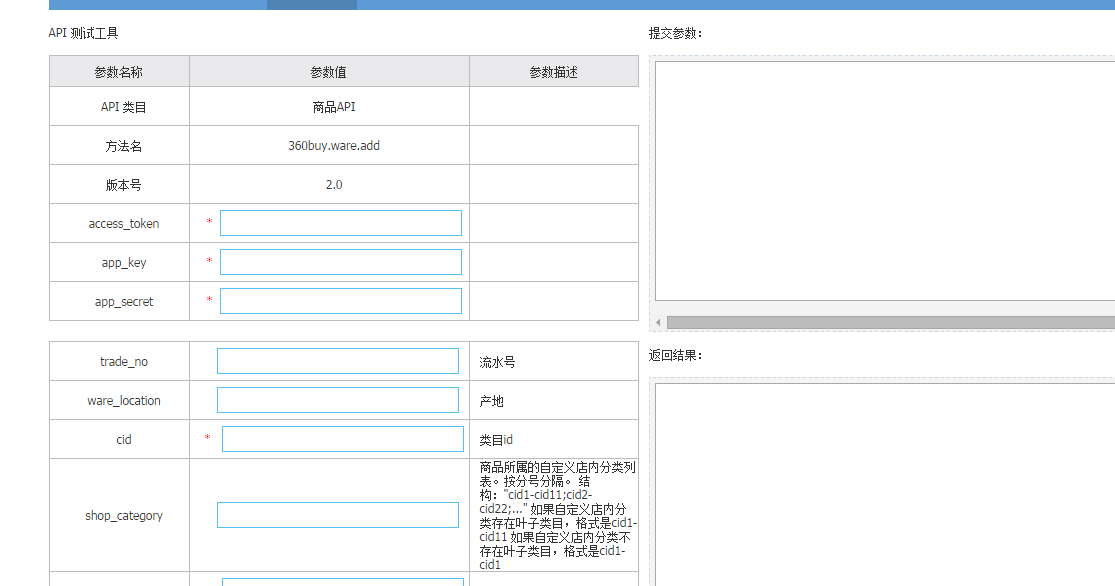
当你填完参数,点击"提交测试"的时候会在提交参数一栏显示请求的url复制出来:
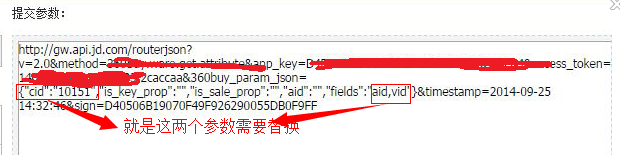
主要的搞定,下面我个方法,仅供参考
这是创建请求url的
public static string CreatUrl(string cid)
{
string url;
return url = "https://api.jd.com/routerjson?v=2.0&method=360buy.ware.get.attribute&app_key=" + appKey + "&access_token=" + accessToken + "&360buy_param_json={\"cid\":\"" + cid + "\",\"is_key_prop\":\"\",\"is_sale_prop\":\"\",\"aid\":\"\",\"fields\":\"cid,aid,name\"}×tamp=" + DateTime.Now.ToString();
}
第二部 :用组织的url去请求,获取数据
  public static Dictionary<string, string> GetAttribute(string cid)

         {

             string url = CreatUrl(cid);

             Encoding dataEncode = Encoding.UTF8;

             HttpWebRequest webReq = (HttpWebRequest)WebRequest.Create(new Uri(url));

             webReq.Method = "GET";

             webReq.ContentType = "application/x-www-form-urlencoded";

             HttpWebResponse response = (HttpWebResponse)webReq.GetResponse();

             StreamReader sr = new StreamReader(response.GetResponseStream(), Encoding.UTF8);

             string json = sr.ReadToEnd();

             int count = JObject.Parse(json)["category_attribute_search_response"]["attributes"].Count();

             Dictionary<string, string> dic = new Dictionary<string, string>();

             var list = JObject.Parse(json)["category_attribute_search_response"]["attributes"];

             for (int i = ; i < count; i++)

             {

                 if (list[i]["name"].ToString() == "ISBN")

                 {

                     dic.Add("ISBN", list[i]["aid"].ToString());

                 }

                 if (list[i]["name"].ToString() == "版次")

                 {

                     dic.Add("版次", list[i]["aid"].ToString());

                 }

                 if (list[i]["name"].ToString() == "出版社")

                 {

                     dic.Add("出版社", list[i]["aid"].ToString());

                 }

             }

             return dic;

         }
其中有一步骤比较重要,
  string json = sr.ReadToEnd();得出来的是json字符串,需要解析
大体结构是这样的
 {

     "category_attribute_search_response":

     {"code":"","total":,"attributes":

         [

         {"aid":,"name":"主题词"},

         {"aid":,"name":"读者对象"},

         {"aid":,"name":"附件"},

         {"aid":,"name":"中图法分类号"},

         {"aid":,"name":"附件数量"},

         {"aid":,"name":"朗读"},

         {"aid":,"name":"编纂"},

         {"aid":,"name":"注释"},

         {"aid":,"name":"口述"},

         {"aid":,"name":"整理"},

         {"aid":,"name":"品牌"},

         {"aid":,"name":"摄影"},

         {"aid":,"name":"书写"},

         {"aid":,"name":"出版社"},

         {"aid":,"name":"包装 "},

         {"aid":,"name":"版次"},

         {"aid":,"name":"ISBN"},

         {"aid":,"name":"印次"},

         {"aid":,"name":"印刷时间"},

         {"aid":,"name":"页数"},

         {"aid":,"name":"字数"},

         {"aid":,"name":"开本"},

         {"aid":,"name":"套装数量"},

         {"aid":,"name":"出版时间"},

         {"aid":,"name":"正文语言"},

         {"aid":,"name":"绘者"},

         {"aid":,"name":"校对"},

         {"aid":,"name":"编者"},

         {"aid":,"name":"译者"},

         {"aid":,"name":"外文名"},

         {"aid":,"name":"著者"},

         {"aid":,"name":"用纸"},

         {"aid":,"name":"丛书名"},

         {"aid":,"name":"品相"}

         ]

     }

 }
京东sdk商家上架接口调用问题总结(更新中...)的更多相关文章
- 京东sdk商家上架接口调用问题总结
前言: 最近在做商家发布产品,调用京东sdk,发现问题很多,而且还是在我同事的帮助下完成的,摸索中,菜鸟还请高手门多多提携才好,入正题 首先是引用jd的sdk啦,京东sdk中发布商品需要调用一个 36 ...
- iOS app支付宝接口调用的一点总结(补充支付宝SDK&Demo下载地址)
由于app内需要用到支付功能,选择了当前最流行的支付宝进行支付.在进行内嵌支付宝功能开发时,被它狠狠的耍了一把. 根据支付宝开发文档,参考demo代码.将相关支付功能加到了自己的代码中.一些根据文档来 ...
- 转:iOS app支付宝接口调用的一点总结(补充支付宝SDK&Demo下载地址)
iosiOSIOS文档服务器测试电话 由于app内需要用到支付功能,选择了当前最流行的支付宝进行支付.在进行内嵌支付宝功能开发时,被它狠狠的耍了一把. 根据支付宝开发文档,参考demo代码.将相关支付 ...
- asp.net mvc短信接口调用——阿里大于API开发心得
互联网上有许多公司提供短信接口服务,诸如网易云信.阿里大于等等.我在自己项目里需要使用到短信服务起到通知作用,实际开发周期三天,完成配置.开发和使用,总的说,阿里大于提供的接口易于开发,非常的方便,短 ...
- Spring框架下的 “接口调用、MVC请求” 调用参数、返回值、耗时信息输出
主要拦截前端或后天的请求,打印请求方法参数.返回值.耗时.异常的日志.方便开发调试,能很快定位到问题出现在哪个方法中. 前端请求拦截,mvc的拦截器 import java.util.Date; im ...
- OpenCV4Android开发之旅(一)----OpenCV2.4简介及 app通过Java接口调用OpenCV的示例
转自: http://blog.csdn.net/yanzi1225627/article/details/16917961 开发环境:windows+ADT Bundle+CDT+OpenCV-2 ...
- 微信公众号开发C#系列-4、获取接口调用凭证
概述 获取接口调用凭证实质就是获取access_token.在微信接口开发中,许多服务的使用都离不开Access Token,Access Token相当于打开这些服务的钥匙,正常情况下会在7200秒 ...
- RTX Server SDK跨服务器如何调用
1. 确认安装RTX Server SDK在开发的机器上必须确认已经安装了RTX Server SDK,并且与RTX Server的版本要一致.该计算机后面我们简称SDK计算机. 2. 步骤2 ...
- Unity接入多个SDK的通用接口开发与资源管理(二)
接着上篇,本篇对SDK接口进行封装.在开始之前,需要先了解下面知识. (1)unity与android之间的交互 unity通过下面方式调用android中的函数: 方法一: AndroidJavaC ...
随机推荐
- 认识C中的结构体
C中结构体是另外一种表示数据形式的方式,结构体中可以表示C中的基本数据形式,如int,double....结构体可以让我们更好的表示数据.下面来看看结构体. 说到结构体首先要了解的是它的申明形式,要申 ...
- 基于python3的手机号生成脚本
今天利用业余,自己突发想法来写个手机号码生成的脚本,其实自己用的方法很简单,想必肯定又不少人写的比我的好,我只是自己闲来无聊搞一下, #作者:雷子 #qq:952943386 #日期:2016年7月1 ...
- PathAnimation
使用Blend制作PathAnimation 1:选中Path转换为运动路径 2:选择目标对象 PathAnimation使用动态的Path PathAnimation动画在播放的时候,PahtGeo ...
- cigarettes
描述 Tom has many cigarettes. We hypothesized that he has n cigarettes and smokes them one by one keep ...
- iOS - UI - UIWebView
1.UIWebView UIWebView 是 苹果提供的用来展示网页的UI控件.它也是最占内存的控件. iOS8.0 webkit框架. WKWebView,相比UIWebView,节省了1/3~1 ...
- Oracle基础(四) 用户管理
一.用户 当创建一个数据实例时,Oracle会创建一些默认的数据库用户,如SYS,SYSTEM和SCOTT等用户.SYS和SYSTEM用户都是ORACLE的系统用户.而Scott用户是Oracle数据 ...
- VMware系统运维(七)vCenter Inventory Server安装
1.vCenter Inventory Server安装即vCenter 清单服务 2.下一步 3.接受协议,下一步 4.选择安装位置,下一步 5.设置域名,注意在安装之前一定要加域,嘻嘻. 6.设置 ...
- 查看Nodejs 占用的端口
查看 Nodejs 占用的端口 ps -ef | grep node强制关闭端口 kill
- web性能瓶颈
1.网络,网络不好,其他做得再好,性能也是问题. 其中包括自己的带宽和请求的数量,带宽是我们无法控制的.我们能做的是尽可能的减少不必要的请求. 2.服务器,一个产品,服务器是关键,所有的请求都要经过服 ...
- JAVA之执行cmd命令
感言在前:时隔好久没有更新博客园了,忙东忙西也没忙出个什么之所以然来.回首过去一两个月,只能用“疲倦”两个字来形容,而且是身心疲惫.每天11.12个小时的工作我都没觉得烦,但是总是想克服却又很难克服的 ...