
asp.net mvc上传头像加剪裁功能介绍
正好项目用到上传+剪裁功能,发上来便于以后使用。
我不能告诉你们其实是从博客园扒的前台代码,哈哈。
前端是jquery+fineuploader+jquery.Jcrop
后台是asp.net mvc 4
核心的js调用代码是crop.js和helper文件夹下的ImgHandler.cs
效果图
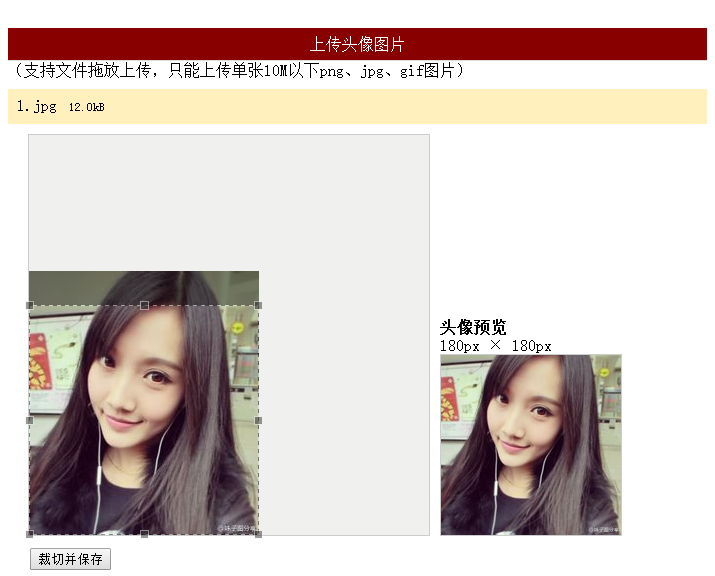
前台代码
<link href="~/Content/fineuploader.css" rel="stylesheet" />

<link href="~/Content/jquery.Jcrop.min.css" rel="stylesheet" />

<link href="~/Content/crop.min.css" rel="stylesheet" />

<script src="~/Scripts/jquery-1.8.2.min.js"></script>

<script src="~/Scripts/jquery.fineuploader-3.1.min.js"></script>

<script src="~/Scripts/jquery.Jcrop.min.js"></script>

<script src="~/Scripts/crop.js"></script>

<div id="jquery-wrapped-fine-uploader"></div>

    <div id="message"></div>

    <div id="crop_wrap">

        <div id="crop_holder">

            <div id="crop_area" class="border">

                <img id="crop_image" alt="" src="" class="preview-image" style="display: none" />

            </div>

            <div id="preview_area">

                <div id="preview_title">当前头像</div>

                <div id="preview_large_text" class="preview-text">180px × 180px</div>

                <div id="preview_large_wrap" class="border">

                    <img id="preview_large"  alt="" src="@ViewBag.Path" class="preview-image" style=""/></div>

            </div>

        </div>

        <div id="crop_operation" style="display: none;">

            <form id="form_crop" action="/home/index" method="post">

                <input type="hidden" name="x" id="x">

                <input type="hidden" name="y" id="y">

                <input type="hidden" name="w" id="w">

                <input type="hidden" name="h" id="h">

                <input type="hidden" name="imgsrc" id="imgsrc">

                <input id="crop_operation_submit" type="submit" value="裁切并保存" /><span id="crop_operation_msg" style="display: none" class="green"></span>

            </form>

        </div>

        <div id="croped_message" class="green"></div>

    </div>
后台代码
        public ActionResult Index()

        {

            return View();

        }

        /// <summary>

        /// 保存缩略图

        /// </summary>

        /// <param name="form"></param>

        /// <returns></returns>

        [HttpPost]

        public ActionResult Index(FormCollection form)

        {

            int x = Convert.ToInt32(form["x"]);

            int y = Convert.ToInt32(form["y"]);

            int w = Convert.ToInt32(form["w"]);

            int h = Convert.ToInt32(form["h"]);

            string imgsrc = form["imgsrc"].Substring(0, form["imgsrc"].LastIndexOf("?"));

            string path = ImgHandler.CutAvatar(imgsrc, x, y, w, h);

            //保存Path


            ViewBag.Path = path;

            return View();

        }

        /// <summary>

        /// 上传头像

        /// </summary>

        /// <param name="qqfile"></param>

        /// <returns></returns>

        [HttpPost]

        public ActionResult ProcessUpload(string qqfile)

        {

            try

            {

                string uploadFolder = "/Upload/original/" + DateTime.Now.ToString("yyyyMM") + "/";

                string imgName = DateTime.Now.ToString("ddHHmmssff");

                string imgType = qqfile.Substring(qqfile.LastIndexOf("."));

                string uploadPath = "";

                uploadPath = Server.MapPath(uploadFolder);

                if (!Directory.Exists(uploadPath))

                {

                    Directory.CreateDirectory(uploadPath);

                }

                using (var inputStream = Request.InputStream)

                {

                    using (var flieStream = new FileStream(uploadPath + imgName + imgType, FileMode.Create))

                    {

                        inputStream.CopyTo(flieStream);

                    }

                }

                return Json(new { success = true, message = uploadFolder + imgName + imgType });

            }

            catch (Exception e)

            {

                return Json(new { fail = true, message = e.Message });

            }

        }
asp.net mvc上传头像加剪裁功能介绍的更多相关文章
- asp.net mvc上传头像加剪裁功能
原文:asp.net mvc上传头像加剪裁功能 正好项目用到上传+剪裁功能,发上来便于以后使用. 我不能告诉你们其实是从博客园扒的前台代码,哈哈. 前端是jquery+fineuploader+jqu ...
- mvc上传头像加剪裁功能
asp.net mvc上传头像加剪裁功能 正好项目用到上传+剪裁功能,发上来便于以后使用. 我不能告诉你们其实是从博客园扒的前台代码,哈哈. 前端是jquery+fineuploader+jquery ...
- .net mvc 上传头像
我用的是mvc5 开发环境vs2017 [仅供参考] [视图代码] <div > <img src="@path" alt="@att.Count&q ...
- asp.net MVC 上传文件 System.Web.HttpException: 超过了最大请求长度
APS.NET MVC 上传文件出现 System.Web.HttpException: 超过了最大请求长度 这个问题 原因是 默认最大上传文件大小为4096,而我提交的文件太大了. 解决方案:修改 ...
- ASP.NET MVC上传文件----uploadify的使用
课程设计需要实现上传文件模块,本来ASP.NET是有内置的控件,但是ASP.NET MVC没有,所以就有两种方法:自定义和采用第三方插件.由于时间的关系,故采用第三方插件:uploadify. upl ...
- ASP.NET MVC上传文件
最近参考网络资料,学习了ASP.NET MVC如何上传文件.最基本的,没有用jQuery等技术. 1.定义Model public class TestModel { [Displ ...
- ASP.NET MVC 上传大文件时404
前一段时间会员的上传组件改用FLASH的swfupload来上传,既能很友好的显示上传进度,又能完全满足大文件的上传. 后来服务器升级到windows 2008,改为IIS7后,上传文件一旦超过30M ...
- asp.net mvc 上传文件
转至:http://www.cnblogs.com/fonour/p/ajaxFileUpload.html 0.下载 http://files.cnblogs.com/files/fonour/aj ...
- Asp.net mvc上传多张图片后台存储
前台页面通过<file name="img">标签数组上传图片,后台根据Request.Files["img"]来接收前台上传的图片. 1 Syst ...
随机推荐
- Codeforces Round #319 (Div. 1) B. Invariance of Tree 构造
B. Invariance of Tree Time Limit: 1 Sec Memory Limit: 256 MB 题目连接 http://codeforces.com/contest/576/ ...
- win8如何删除未知账户(s-1-5-21-2000478354-1390067357-725345543-1003)
今天突然发现从别处复制来的游戏压缩文件不能解压,并且以前把游戏文件都是放在该目录下的,以前局域网玩起游戏来老是不能作为主机,且不能下载局域网玩的RPG地图,以前就注意过这个未知账户(s-1-5-21- ...
- [MODx] 9. Real Example
Snippet code: <?php $path = MODX_CORE_PATH . 'components/storefinder/'; $result = $modx->addPa ...
- Android端如何获取手机当前的网络状态,比如wifi还是3G, 还是2G, 电信还是联通,还是移动
不多说了,直接看代码, NB人会懂的! package com.example.vdisktest; import android.app.Activity; import android.conte ...
- 进程环境之C程序的存储空间布局
从历史上讲,C程序一直由下面几部分组成: 正文段.这是由CPU执行的机器指令部分.通常,正文段是可共享的,所以即使是频繁执行的程序(如文本编辑器.C编译器和shell等)在存储器中也只需有一个副本,另 ...
- java_泛型方法使用实例
//提供两种使用情况,第二种情况定义前者是后者的子类-类型通配方式 package ming; import java.util.ArrayList; import java.util.Collect ...
- Android_AsyncTask_DownloadImg_progressDIalog
<LinearLayout xmlns:android="http://schemas.android.com/apk/res/android" xmlns:tools=&q ...
- axel源码学习(0)——程序逻辑
axel简介 axel是一个命令行下的轻量级http/ftp 下载加速工具,支持多线程下载和断点续传,支持从多个镜像下载同一文件. axel的用法如下: 图 0.1 axel usage axel 粗 ...
- JS常用正则(转)
作者:zxin出处:http://zxin.cnblogs.com/ 一.校验数字的表达式 1 数字:^[0-9]*$ 2 n位的数字:^\d{n}$ 3 至少n位的数字:^\d{n,}$ 4 m-n ...
- SpringAOP的注解方式
AOP(注解)[理解][应用][重点] 1.AOP注解配置流程 A.开启AOP配置支持注解@aspectj 核心配置文件中添加以下配置,功能等同于注解配置Bean的自动扫描路径 <aop:asp ...