
RecyclerView(5)官方教程带简单示例
Create Lists
The RecyclerView widget is a more advanced and flexible version of ListView. This widget is a container for displaying large data sets that can be scrolled very efficiently by maintaining a limited number of views. Use the RecyclerView widget when you have data collections whose elements change at runtime based on user action or network events.
RecyclerView比listview更高级灵活,适合显示由用户动作或网络事件而变化的大数据集合。主要是通过下面几点:
The RecyclerView class simplifies the display and handling of large data sets by providing:
- Layout managers for positioning items
- Default animations for common item operations, such as removal or addition of items
You also have the flexibility to define custom layout managers and animations for RecyclerView widgets.
RecyclerView,LayoutManager ,adapter,数据库之间的关系图

Figure 1. The RecyclerView widget.
To use the RecyclerView widget, you have to specify an adapter and a layout manager. To create an adapter, extend the RecyclerView.Adapter class. The details of the implementation depend on the specifics of your dataset and the type of views. For more information, see the examples below.
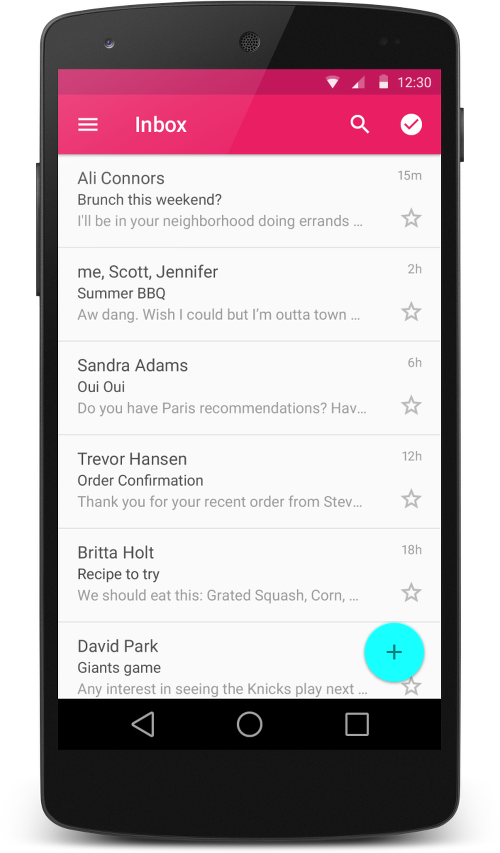
Figure 2 - Lists with RecyclerView.
A layout manager positions item views inside a RecyclerView and determines when to reuse item views that are no longer visible to the user. To reuse (or recycle) a view, a layout manager may ask the adapter to replace the contents of the view with a different element from the dataset. Recycling views in this manner improves performance by avoiding the creation of unnecessary views or performing expensivefindViewById() lookups.
RecyclerView可以使用的3个 layout manager
RecyclerView provides these built-in layout managers:
LinearLayoutManagershows items in a vertical or horizontal scrolling list.GridLayoutManagershows items in a grid.StaggeredGridLayoutManagershows items in a staggered grid.
To create a custom layout manager, extend theRecyclerView.LayoutManager class.
Animations
自定义RecyclerView 动画的方法,继承 RecyclerView.ItemAnimator 然后调用 RecyclerView.setItemAnimator() 设置下。
Animations for adding and removing items are enabled by default in RecyclerView. To customize these animations, extend the RecyclerView.ItemAnimator class and use the RecyclerView.setItemAnimator() method.
Examples
The following code example demonstrates how to add the RecyclerView to a layout:
 <!-- A RecyclerView with some commonly used attributes -->
 <android.support.v7.widget.RecyclerView
     android:id="@+id/my_recycler_view"
     android:scrollbars="vertical"
     android:layout_width="match_parent"
     android:layout_height="match_parent"/>
Once you have added a RecyclerView widget to your layout, obtain a handle to the object, connect it to a layout manager, and attach an adapter for the data to be displayed:
 public class MyActivity extends Activity {
     private RecyclerView mRecyclerView;
     private RecyclerView.Adapter mAdapter;
     private RecyclerView.LayoutManager mLayoutManager;

     @Override
     protected void onCreate(Bundle savedInstanceState) {
         super.onCreate(savedInstanceState);
         setContentView(R.layout.my_activity);
         mRecyclerView = (RecyclerView) findViewById(R.id.my_recycler_view);

         // use this setting to improve performance if you know that changes
         // in content do not change the layout size of the RecyclerView
         mRecyclerView.setHasFixedSize(true);

         // use a linear layout manager
         mLayoutManager = new LinearLayoutManager(this);
         mRecyclerView.setLayoutManager(mLayoutManager);

         // specify an adapter (see also next example)
         mAdapter = new MyAdapter(myDataset);
         mRecyclerView.setAdapter(mAdapter);
     }
     ...
 }
The adapter provides access to the items in your data set, creates views for items, and replaces the content of some of the views with new data items when the original item is no longer visible. The following code example shows a simple implementation for a data set that consists of an array of strings displayed using TextViewwidgets:
 public class MyAdapter extends RecyclerView.Adapter<MyAdapter.ViewHolder> {
     private String[] mDataset;

     // Provide a reference to the views for each data item
     // Complex data items may need more than one view per item, and
     // you provide access to all the views for a data item in a view holder
     public static class ViewHolder extends RecyclerView.ViewHolder {
         // each data item is just a string in this case
         public TextView mTextView;
         public ViewHolder(TextView v) {
             super(v);
             mTextView = v;
         }
     }

     // Provide a suitable constructor (depends on the kind of dataset)
     public MyAdapter(String[] myDataset) {
         mDataset = myDataset;
     }

     // Create new views (invoked by the layout manager)
     @Override
     public MyAdapter.ViewHolder onCreateViewHolder(ViewGroup parent,
                                                    int viewType) {
         // create a new view
         View v = LayoutInflater.from(parent.getContext())
                                .inflate(R.layout.my_text_view, parent, false);
         // set the view's size, margins, paddings and layout parameters
         ...
         ViewHolder vh = new ViewHolder(v);
         return vh;
     }

     // Replace the contents of a view (invoked by the layout manager)
     @Override
     public void onBindViewHolder(ViewHolder holder, int position) {
         // - get element from your dataset at this position
         // - replace the contents of the view with that element
         holder.mTextView.setText(mDataset[position]);

     }

     // Return the size of your dataset (invoked by the layout manager)
     @Override
     public int getItemCount() {
         return mDataset.length;
     }
 }
RecyclerView(5)官方教程带简单示例的更多相关文章
- ActiveMQ学习教程/2.简单示例
ActiveMQ学习教程(二)——简单示例 一.应用IDEA构建Maven项目 File->New->Module...->Maven->勾选->选择->Next ...
- SharpDX之Direct2D教程I——简单示例和Color(颜色)
研究Direct2D已经有一段时间了,也写了一个系列的文章 Direct2D ,是基于Windows API Code Pack 1.1.在前文 Direct2D教程VIII——几何(Geometry ...
- 比官方教程代码更简短的SignalR Server Broadcast示例
SignalR是微软ASP.NET技术体系中的新成员. 在www.asp.net网站上的SignalR专区有一篇SignalR的入门级教程<Tutorial: Server Broadcast ...
- Playmaker全面实践教程之简单的使用Playmaker示例
Playmaker全面实践教程之简单的使用Playmaker示例 简单的使用Playmaker示例 通过本章前面部分的学习,相信读者已经对Playmaker有了一个整体的认识和印象了.在本章的最后,我 ...
- 最新最最最简单的Snagit傻瓜式破解教程(带下载地址)
最新最最最简单的Snagit傻瓜式破解教程(带下载地址) 下载地址 直接滑至文章底部下载 软件介绍 一个非常著名的优秀屏幕.文本和视频捕获.编辑与转换软件.可以捕获Windows屏幕.DOS屏幕:RM ...
- 微信公开课发布微信官方教程:教你用好微信JS-SDK接口
微信公众平台开放JS-SDK(微信内网页开发工具包),说明文档已经有相关使用方法和示例了,很多同学觉得不是很直观,为此微信公开课发布微信官方教程:教你用好微信JS-SDK接口. 1.分享类接口:支持获 ...
- Ceisum官方教程2 -- 项目实例(workshop)
原文地址:https://cesiumjs.org/tutorials/Cesium-Workshop/ 概述 我们很高兴欢迎你加入Cesium社区!为了让你能基于Cesium开发自己的3d 地图项目 ...
- Unity性能优化(4)-官方教程Optimizing graphics rendering in Unity games翻译
本文是Unity官方教程,性能优化系列的第四篇<Optimizing graphics rendering in Unity games>的翻译. 相关文章: Unity性能优化(1)-官 ...
- OpenGL官方教程——着色器语言概述
OpenGL官方教程——着色器语言概述 OpenGL官方教程——着色器语言概述 可编程图形硬件管线(流水线) 可编程顶点处理器 可编程几何处理器 可编程片元处理器 语言 可编程图形硬件管线(流水线) ...
随机推荐
- Vim配置IDE开发环境
我的vim IDE界面: 1.安装Vim和Vim基本插件首先安装好Vim和Vim的基本插件.这些使用apt-get安装即可:lingd@ubuntu:~/arm$sudo apt-get instal ...
- html笔记 仅适用于个人
如何使图片与文本框上下对齐 其实就给<img>加一个属性 align="absmiddle" <form method="post" acti ...
- [搜片神器]使用C#实现DHT磁力搜索的BT种子后端管理程序+数据库设计(开源)
谢谢园子朋友的支持,已经找到个VPS进行测试,国外的服务器:http://www.sosobta.com 大家可以给提点意见... 出售商业网站代码,万元起,非诚勿扰,谢谢. 联系h31h31 a ...
- win7下Chrome有两个图标的解决方法
摘抄自:http://www.sevenforums.com/browsers-mail/238406-windows-7-taskbar-creating-double-google-chrome- ...
- Codeforces Round #347 (Div. 2) C. International Olympiad 找规律
题目链接: http://codeforces.com/contest/664/problem/C 题解: 这题最关键的规律在于一位的有1989-1998(9-8),两位的有1999-2098(99- ...
- 【HDOJ】【1512】Monkey King
数据结构/可并堆 啊……换换脑子就看了看数据结构……看了一下左偏树和斜堆,鉴于左偏树不像斜堆可能退化就写了个左偏树. 左偏树介绍:http://www.cnblogs.com/crazyac/arti ...
- json封装与解析
#include <iostream> #include <boost/property_tree/ptree.hpp> #include <boost/property ...
- 增强学习(Reinforcement Learning and Control)
增强学习(Reinforcement Learning and Control) [pdf版本]增强学习.pdf 在之前的讨论中,我们总是给定一个样本x,然后给或者不给label y.之后对样本进行 ...
- spring mvc 经典总结
概述 继 Spring 2.0 对 Spring MVC 进行重大升级后,Spring 2.5 又为 Spring MVC 引入了注解驱动功能.现在你无须让 Controller 继承任何接口,无需在 ...
- Java学习第一篇:变量,数据类型,运算符,流程控制(简介)
一.安装和配置jdk 1.jdk是什么? (1).jdk全称是Java Development Kit, Java开发工具包; (2).jdk是sun公司开发的; (3).jdk主要包括:jre(Ja ...