
cocos2d-x3.0+Eclipse配置说明
假如我们已经装了JavaJDK、Cygwin,也解压了2013-08-27之后最新的AndroidSDK,其实最新的AndroidSDK已经集成了eclipse,eclipse里面已经配置好了AndroidSDK的东西,如果我们要用到cocos2d-x3.0的话就简单很多了。
实际上在cocos2d-x3.0的cpp工程里面就已经包含了eclipse配置说明,
如:”cocos2d-x-3.0alpha0-pre\template\multi-platform-cpp\proj.android\README.md“,用计事本打开”README.md“文件,里面内容就是用eclipse生成apk的说明文档:
(这些英文都是比较常见的,不用再翻译了,按照步骤操作就行了,从”#### Setup Eclipse Environment (only once)“ 开始看。。)
## Prerequisites:
* Android NDK
* Android SDK **OR** Eclipse ADT Bundle
* Android AVD target installed
## Building project
There are two ways of building Android projects.
1. Eclipse
2. Command Line
### Import Project in Eclipse
#### Features:
1. Complete workflow from Eclipse, including:
* Build C++.
* Clean C++.
* Build and Run whole project.
* Logcat view.
* Debug Java code.
* Javascript editor.
* Project management.
2. True C++ editing, including:
* Code completion.
* Jump to definition.
* Refactoring tools etc.
* Quick open C++ files.
#### Setup Eclipse Environment (only once)
**NOTE:** This step needs to be done only once to setup the Eclipse environment for cocos2d-x projects. Skip this section if you've done this before.
1. Download Eclipse ADT bundle from [Google ADT homepage](http://developer.android.com/sdk/index.html)
**OR**
Install Eclipse with Java. Add ADT and CDT plugins.
2. Only for Windows
1. Install [Cygwin](http://www.cygwin.com/) with make (select make package from the list during the install).
2. Add `Cygwin\bin` directory to system PATH variable.
3. Add this line `none /cygdrive cygdrive binary,noacl,posix=0,user 0 0` to `Cygwin\etc\fstab` file.
3. Set up Variables:
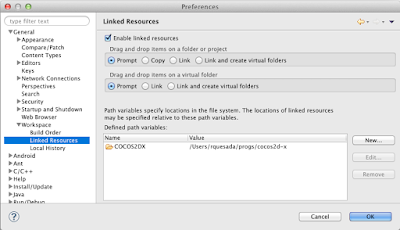
1. Path Variable `COCOS2DX`:
* Eclipse->Preferences->General->Workspace->**Linked Resources**
* Click **New** button to add a Path Variable `COCOS2DX` pointing to the root cocos2d-x directory.
2. C/C++ Environment Variable `NDK_ROOT`:
* Eclipse->Preferences->C/C++->Build->**Environment**.
* Click **Add** button and add a new variable `NDK_ROOT` pointing to the root NDK directory.
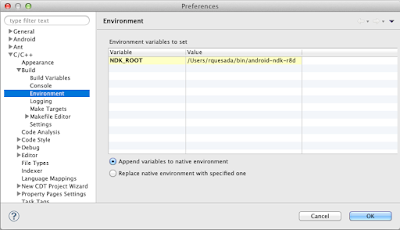
* Only for Windows: Add new variables **CYGWIN** with value `nodosfilewarning` and **SHELLOPTS** with value `igncr`
4. Import libcocos2dx library project:
1. File->New->Project->Android Project From Existing Code.
2. Click **Browse** button and open `cocos2d-x/cocos2dx/platform/android/java` directory.
3. Click **Finish** to add project.
#### Adding and running from Eclipse
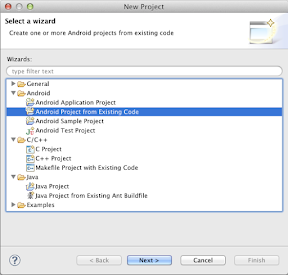
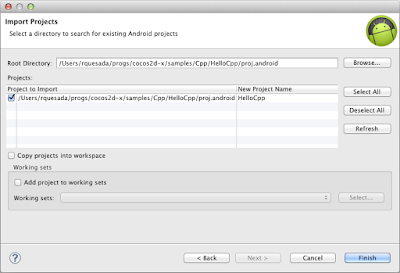
1. File->New->Project->Android Project From Existing Code
2. **Browse** to your project directory. eg: `cocos2d-x/cocos2dx/samples/Cpp/TestCpp/proj.android/`
3. Add the project
4. Click **Run** or **Debug** to compile C++ followed by Java and to run on connected device or emulator.
### Running project from Command Line
$ cd cocos2d-x/samples/Cpp/TestCpp/proj.android/
$ export NDK_ROOT=/path/to/ndk
$ ./build_native.sh
$ ant debug install
If the last command results in sdk.dir missing error then do:
$ android list target
$ android update project -p . -t (id from step 6)
$ android update project -p cocos2d-x/cocos2dx/platform/android/java/ -t (id from step 6)
cocos2d-x3.0+Eclipse配置说明的更多相关文章
- 如何在Cocos2D 1.0 中掩饰一个精灵(六)
大熊猫猪·侯佩原创或翻译作品.欢迎转载,转载请注明出处. 如果觉得写的不好请告诉我,如果觉得不错请多多支持点赞.谢谢! hopy ;) 掩饰一个精灵:实现代码 打开HelloWorldLayer.m并 ...
- 如何在Cocos2D 1.0 中掩饰一个精灵(一)
大熊猫猪·侯佩原创或翻译作品.欢迎转载,转载请注明出处. 如果觉得写的不好请告诉我,如果觉得不错请多多支持点赞.谢谢! hopy ;) 原帖来自Ray Wunderlich写的精彩的文章 How To ...
- Cocos2D v2.0至v3.x简洁转换指南(三)
Cocos2D 3.3中的注意事项 如果你在使用Cocos2D 3.3+(是SpriteBuilder 1.3+的一部分)你将不得不替分别的换所有存在的UITouch和UITouchEvent为CCT ...
- Cocos2D v2.0至v3.x简洁转换指南(二)
触摸处理 我们在稍后将完成Cocos2d 3.0中触摸处理的完整教程.而现在最重要的是知道如何去启用触摸处理在你的CCNode中: self.userInteractionEnabled = TRUE ...
- 如何将各种低版本的discuz版本升级到discuz x3.0
最近在做discuz改版的项目,遇到了很多问题,相信很多拥有discuz论坛的版主,站长和程序猿在升级或改版discuz的过程中遇到过和我一样的问题,所以我开了一个discuz专栏,为大家讲解一下di ...
- cocos2d 2.0和UIKit混合编程, Push CCDirector的时候出现黑屏的天坑
症状 使用cocos2d 2.0和UIKit混合编程, 有一块用cocos2d编写的小程序, 将CCDirector push到一个UINavigationController里面. 虽然事先在后台初 ...
- Hadoop2.2.0 eclipse插件编译及Ecliipse配置说明(图文版)
一.引言: 最近在做一个城商行项目的POC测试it版本,涉及到编译Linux64bti的源码和开发插件使用,作为笔记分享给大家. 二.插件编译 Hadoop2x版本的Eclipse插件已经单独抽取成独 ...
- cocos2d-x3.0创建第一个jsb游戏
第一步: 最新的cocos2d-x.下载地址https://github.com/cocos2d/cocos2d-x github上最新的引擎,值得注意的是官网上发布的引擎是稳定版.选择哪种就看个人喜 ...
- LDA 初见(JGibbLDA-v.1.0 eclipse使用)
参考:Eclipse下使用JGibbLDA使用总结 一.下载和初次使用JGibbLDA 1.导入JGibbLDA-v.1.0项目(参考上面链接) 2.在LDA.java右键“run”--->“r ...
随机推荐
- PAT-乙级-1012. 数字分类 (20)
1012. 数字分类 (20) 时间限制 100 ms 内存限制 65536 kB 代码长度限制 8000 B 判题程序 Standard 作者 CHEN, Yue 给定一系列正整数,请按要求对数字进 ...
- TaskTracker执行map或reduce任务的过程(二)
上次说到,当MapLauncher或ReduceLancher(用于执行任务的线程,它们扩展自TaskLauncher),从它们所维护的LinkedList也即队列中获取到TaskInProgress ...
- [itint5]摆放窗口
http://www.itint5.com/oj/#47 一种做法是:把矩形所占的方格都设为-1,就是个最大子矩阵和问题.复杂度o(w^2*h)或o(w*h^2),空间W*H猜想应用场景是:电脑屏幕上 ...
- java 串口通信 代码
下面是我自己实现的串口接收的类,串口发送比较简单,就直接发送就可以了.下面的这个类可以直接使用. package com.boomdts.weather_monitor.util; import ja ...
- 分布式搜索Elasticsearch——QueryBuilders.matchPhrasePrefixQuery
注:该文项目基础为分布式搜索Elasticsearch——项目过程(一)和分布式搜索Elasticsearch——项目过程(二),项目骨架可至这里下载. ES源代码中对matchPhrasePrefi ...
- (组合数学3.1.2.2)POJ 2084 Game of Connections(卡特兰数公示的实现)
package com.njupt.acm; import java.math.BigInteger; import java.util.Scanner; public class POJ_2084 ...
- Javascript获取最近若干个月
整理: 如果需要获取最近若干个月,牵扯到跨年的话,该怎么实现的问题,抽了点时间,代码如下: /**纪元时间获取最近12个月 * * @num 传入获取月的数目 **/ (function getMon ...
- 请用一句话概括JSONP
服务器调用客户端的函数(即回调函数),在客户端就能拿到服务端传入的参数(即返回结果)
- BZOJ2542: [Ctsc2001]终极情报网
题解: 乘积最小只需要取对数.然后反向边就变成1/c,而不是-c了. 精度问题搞得我已经我想说什么了... 贴一份网上的pascal 代码: type ss=record x,y,c,r,next:l ...
- POJ 2728 Desert King ★(01分数规划介绍 && 应用の最优比率生成树)
[题意]每条路径有一个 cost 和 dist,求图中 sigma(cost) / sigma(dist) 最小的生成树. 标准的最优比率生成树,楼教主当年开场随手1YES然后把别人带错方向的题Orz ...