
CQRS学习——集成ASP.NET Identity[其五]
【其实和Cqrs没啥关系】
缘由
其实没啥原因,只是觉得以前写了不知多少遍的用户登录复用性太差,实现的功能也不多。
依赖的Nuget包
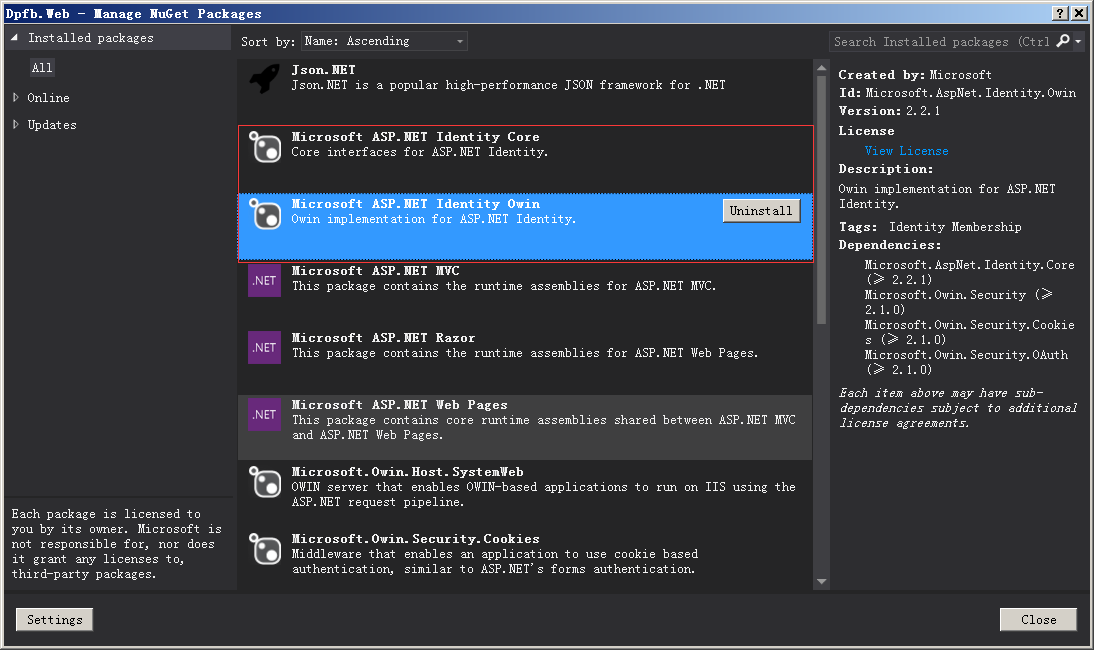
简单登陆
就简单登陆而言,只需要实现如下接口/抽象类:
Store相关:
IUserLockoutStore<DpfbUser,Guid> , IUserPasswordStore<DpfbUser,Guid>, IUserTwoFactorStore<DpfbUser,Guid>, IUserEmailStore<DpfbUser,Guid>
Manager相关:
UserManager<DpfbUser, Guid>, SignInManager<DpfbUser, Guid>
打包的代码:
    public class AppSignInManager : SignInManager<DpfbUser, Guid>

    {

        public AppSignInManager()

            : base(WebContextHelper.CurrentOwinContext.Get<AppUserManager>(),

                WebContextHelper.CurrentOwinContext.Authentication)

        {

        }

        public override async Task<ClaimsIdentity> CreateUserIdentityAsync(DpfbUser user)

        {

            var userIdentity = await UserManager.CreateIdentityAsync(user, DefaultAuthenticationTypes.ApplicationCookie);

            return userIdentity;

        }

    }

public class AppUserManager : UserManager<DpfbUser, Guid>

    {

        public AppUserManager(DpfbUserStore store)

            : base(store)

        {

        }

        public AppUserManager()

            : this(WebContextHelper.CurrentOwinContext.Get<DpfbUserStore>())

        {

        }

    }

public class DpfbUserStore :

        //IUserStore<DpfbUser, Guid>,

        IUserLockoutStore<DpfbUser, Guid>,

        IUserPasswordStore<DpfbUser,Guid>,

        IUserTwoFactorStore<DpfbUser,Guid>,

        IUserEmailStore<DpfbUser,Guid>

    {

        [Dependency]

        internal IDpfbUserQueryEntry UserQueryEntry

        {

            get { return CqrsConfigurationResolver.Config.Construct<IDpfbUserQueryEntry>(); }

        }

        internal ICommandBus CommandBus

        {

            get { return CqrsConfigurationResolver.CommandBus; }

        }

        public Task CreateAsync(DpfbUser user)

        {

            throw new NotImplementedException();

        }

        public Task DeleteAsync(DpfbUser user)

        {

            throw new NotImplementedException();

        }

        public Task<DpfbUser> FindByIdAsync(Guid userId)

        {

            return UserQueryEntry.TryFetchAsync(userId);

        }

        public Task<DpfbUser> FindByNameAsync(string userName)

        {

            return UserQueryEntry.TryFetchByNameAsync(userName);

        }

        public Task UpdateAsync(DpfbUser user)

        {

            //throw new NotImplementedException();

            return Task.FromResult();

        }

        public void Dispose()

        {

            //do nothing

        }

        public Task<DateTimeOffset> GetLockoutEndDateAsync(DpfbUser user)

        {

            //throw new NotImplementedException();

            return Task.FromResult(new DateTimeOffset(DateTime.Now));

        }

        public Task SetLockoutEndDateAsync(DpfbUser user, DateTimeOffset lockoutEnd)

        {

            //throw new NotImplementedException();

            return Task.FromResult();

        }

        public Task<int> IncrementAccessFailedCountAsync(DpfbUser user)

        {

            throw new NotImplementedException();

            return Task.FromResult();

        }

        public Task ResetAccessFailedCountAsync(DpfbUser user)

        {

            return Task.FromResult();

        }

        public Task<int> GetAccessFailedCountAsync(DpfbUser user)

        {

            return Task.FromResult();

            throw new NotImplementedException();

        }

        public Task<bool> GetLockoutEnabledAsync(DpfbUser user)

        {

            return Task.FromResult(false);

            throw new NotImplementedException();

        }

        public Task SetLockoutEnabledAsync(DpfbUser user, bool enabled)

        {

            return Task.FromResult();

            throw new NotImplementedException();

        }

        public Task SetPasswordHashAsync(DpfbUser user, string passwordHash)

        {

            CommandBus.Send(new SetPasswordHashCommand() {UserId = user.Id, PasswordHash = passwordHash});

            return Task.FromResult();

        }

        public Task<string> GetPasswordHashAsync(DpfbUser user)

        {

            return UserQueryEntry.FetchPasswordHashAsync(user.Id);

        }

        public Task<bool> HasPasswordAsync(DpfbUser user)

        {

            return UserQueryEntry.HasPasswordAsync(user.Id);

        }

        public Task SetTwoFactorEnabledAsync(DpfbUser user, bool enabled)

        {

            return Task.FromResult(false);

            throw new NotImplementedException();

        }

        public Task<bool> GetTwoFactorEnabledAsync(DpfbUser user)

        {

            return Task.FromResult(false);

            throw new NotImplementedException();

        }

        public Task SetEmailAsync(DpfbUser user, string email)

        {

            throw new NotImplementedException();

            return Task.FromResult();

        }

        public Task<string> GetEmailAsync(DpfbUser user)

        {

            throw new NotImplementedException();

        }

        public Task<bool> GetEmailConfirmedAsync(DpfbUser user)

        {

            throw new NotImplementedException();

            return Task.FromResult(true);

        }

        public Task SetEmailConfirmedAsync(DpfbUser user, bool confirmed)

        {

            throw new NotImplementedException();

            return Task.FromResult();

        }

        public Task<DpfbUser> FindByEmailAsync(string email)

        {

            throw new NotImplementedException();

        }

    }
配置
public partial class Startup

    {

        //配置Identity身份验证

        public void ConfigureAuth(IAppBuilder app)

        {

            app.CreatePerOwinContext(() => new DpfbUserStore());

            app.CreatePerOwinContext((IdentityFactoryOptions<AppUserManager> options,

                IOwinContext context) =>

            {

                var manager = new AppUserManager();

                //用户信息验证

                manager.UserValidator = new UserValidator<DpfbUser, Guid>(manager)

                {

                    AllowOnlyAlphanumericUserNames = false,

                    RequireUniqueEmail = false

                };

                //密码验证

                manager.PasswordValidator = new PasswordValidator

                {

                    RequiredLength = ,

                    RequireNonLetterOrDigit = true,

                    RequireDigit = true,

                    RequireLowercase = true,

                    RequireUppercase = true,

                };

                //配置最大出错次数

                manager.UserLockoutEnabledByDefault = true;

                manager.DefaultAccountLockoutTimeSpan = TimeSpan.FromMinutes();

                manager.MaxFailedAccessAttemptsBeforeLockout = ;

                //开启两步验证

                manager.RegisterTwoFactorProvider("PhoneCode", new PhoneNumberTokenProvider<DpfbUser, Guid>

                {

                    MessageFormat = "Your security code is: {0}"

                });

                manager.RegisterTwoFactorProvider("EmailCode", new EmailTokenProvider<DpfbUser, Guid>

                {

                    Subject = "SecurityCode",

                    BodyFormat = "Your security code is {0}"

                });

                //配置消息服务

                manager.EmailService = new EmailService();

                manager.SmsService = new SmsService();

                var dataProtectionProvider = options.DataProtectionProvider;

                if (dataProtectionProvider != null)

                {

                    manager.UserTokenProvider =

                        new DataProtectorTokenProvider<DpfbUser, Guid>(dataProtectionProvider.Create("ASP.NET Identity"));

                }

                return manager;

            });

            app.CreatePerOwinContext(()=>new AppSignInManager());

            //配置Cookie

            app.UseCookieAuthentication(new CookieAuthenticationOptions

            {

                AuthenticationType = DefaultAuthenticationTypes.ApplicationCookie,

                LoginPath = new PathString("/system/login"),

                Provider = new CookieAuthenticationProvider

                {

                    // Enables the application to validate the security stamp when the user logs in.

                    // This is a security feature which is used when you change a password or add an external login to your account.

                    OnValidateIdentity = SecurityStampValidator.OnValidateIdentity<AppUserManager, DpfbUser, Guid>(

                        TimeSpan.FromMinutes(),

                        (AppUserManager manager, DpfbUser user) =>

                            manager.CreateIdentityAsync(user, DefaultAuthenticationTypes.ApplicationCookie),

                        user => new Guid(user.GetUserId<string>()))

                }

            });

            app.UseExternalSignInCookie(DefaultAuthenticationTypes.ExternalCookie);

            // Enables the application to temporarily store user information when they are verifying the second factor in the two-factor authentication process.

            app.UseTwoFactorSignInCookie(DefaultAuthenticationTypes.TwoFactorCookie, TimeSpan.FromMinutes());

            // Enables the application to remember the second login verification factor such as phone or email.

            // Once you check this option, your second step of verification during the login process will be remembered on the device where you logged in from.

            // This is similar to the RememberMe option when you log in.

            app.UseTwoFactorRememberBrowserCookie(DefaultAuthenticationTypes.TwoFactorRememberBrowserCookie);

        }

    }
修改密码
AppUserManager的基类有个属性RequireUniqueEmail,当这个属性被置为true的时候,修改密码(以及其他敏感操作)会要求Email验证,对于内部系统而言,可以将这个属性置为false。
...
【加功能的时候再补充】
CQRS学习——集成ASP.NET Identity[其五]的更多相关文章
- 24.集成ASP.NETCore Identity
正常的情况下view页面的错误的显示应该是这么去判断的 这里我们就不加判断为了,直接用这个div 显示就可以了.当有错误会自动显示在div内 asp.net core Identity加入进来 这里用 ...
- CQRS学习——Dpfb以及其他[引]
[Dpfb的起名源自:Ddd Project For Beginer,这个Beginer自然就是博主我自己了.请大家在知晓这是一个入门项目的事实上,怀着对入门者表示理解的心情阅读本系列.不胜感激.] ...
- [ASP.NET MVC] ASP.NET Identity学习笔记 - 原始码下载、ID型别差异
[ASP.NET MVC] ASP.NET Identity学习笔记 - 原始码下载.ID型别差异 原始码下载 ASP.NET Identity是微软所贡献的开源项目,用来提供ASP.NET的验证.授 ...
- ASP.NET Identity 2集成到MVC5项目--笔记01
Identiry2是微软推出的Identity的升级版本,较之上一个版本更加易于扩展,总之更好用.如果需要具体细节.网上具体参考Identity2源代码下载 参考文章 在项目中,是不太想直接把这一堆堆 ...
- ASP.NET Identity 2集成到MVC5项目--笔记02
ASP.NET Identity 2集成到MVC5项目--笔记01 ASP.NET Identity 2集成到MVC5项目--笔记02 继上一篇,本篇主要是实现邮件.用户名登陆和登陆前邮件认证. 1. ...
- 从零搭建一个IdentityServer——集成Asp.net core Identity
前面的文章使用Asp.net core 5.0以及IdentityServer4搭建了一个基础的验证服务器,并实现了基于客户端证书的Oauth2.0授权流程,以及通过access token访问被保护 ...
- 学习asp.net Identity 心得体会(连接oracle)
asp.net Identity具体功能暂不在此细说,下面主要介绍几点连接oracle注意的事项, 1.首先下载连接oracle驱动Oracle.ManagedDataAccess.dll和Oracl ...
- ASP.NET Identity & OWIN 学习资料
有关 ASP.NET Identity 的更多细节: http://www.asp.net/identity 从一个空项目中添加 ASP.NET Identity 和 OWIN 支持: http:// ...
- asp.net identity的学习记录
# identity数据库 ## 创建空数据库 交给ef管理 ### 添加asp.net identity包 ``` Install-Package Microsoft.AspNet.Identity ...
随机推荐
- spark集成hive遭遇mysql check失败的问题
问题: spark集成hive,启动spark-shell或者spark-sql的时候,报错: INFO MetaStoreDirectSql: MySQL check failed, assumin ...
- java开发:分享一下使用urlrewrite实现网址的个性访问
很多网站都有一些比较个性的域名访问方式,如:http://www.xxx.com/u/pp 点开就可以看到pp的个人主页了,这种地址比较容易让人记住,那今天就来讲讲这种技术的实现方式. 1.使用ja ...
- Unity3d,OnMouseDown()不执行的原因总结
1.代码:看代码有没有附加上要点击的物体上: 2.碰撞:要点击的物体加了碰撞,位置大小都对:而且鼠标屏幕点击的点和它之间没有其他的碰撞遮挡(OnMouseDown()原理利用了射线): 3.相关的摄像 ...
- Android应用中-更新提示显示红点的方案
什么是红点更新提示? 红点更新提示类似微信朋友圈有新的朋友消息 时会在“发现”tab上显示红点,表示有新的消息. 目前三种显示方式: 1.显示具体数字 2.只显示红点 3.显示省略,表示数量很多 方案 ...
- JavaScript之图片轮换
<!doctype html> <title>javascript图片轮换</title> <meta charset="utf-8"/& ...
- mssql 查询效率
(1)临时表.表变量 据说:当数据量<100行数据时使用表变量,数据量较大时使用临时表(可创建索引提高查询效率). 表变量只能创建主键或唯一索引,准确讲是约束不是索引. (2)存储过程直接在查询 ...
- C#程序员整理的Unity 3D笔记(十三):Unity 3D基于组件的思想
如果你接触过<设计模式>.软件架构的编程思想,就会知道优秀的设计准则:“组合优于继承的”. 这句话很简短,但开始学习OOP的时候,真切的是—-不太好理解(以我个人当初学习为例). OOP的 ...
- WebResponse 取出全国省市区的邮编
WebResponse用法(根据省市区地址查询其邮编): class Program { static string url { get; set; } static void Main(string ...
- spring mvc 拦截器
拦截器作用:可以用于用户操作的安全检查,如:登录.权限等 package com.tool; import java.util.List; import javax.servlet.http.Http ...
- 引用类型之Function类型
Function类型 ECMAScript中最有意思的就是函数了,有意思的根源,在于函数实际上是对象.每个函数都是Function的实例,具有属性和方法.而重要的一点是,函数名,不过是指向函数的指针, ...