
[转]UiPath Build Data Table
本文转自:https://docs.uipath.com/activities/docs/build-data-table
UiPath.Core.Activities.BuildDataTable
Creates a DataTable according to a specified schema.
Activity Body
Clicking the DataTable button in the activity body opens the Build Data Table window, which enables you to customize the table to be created.
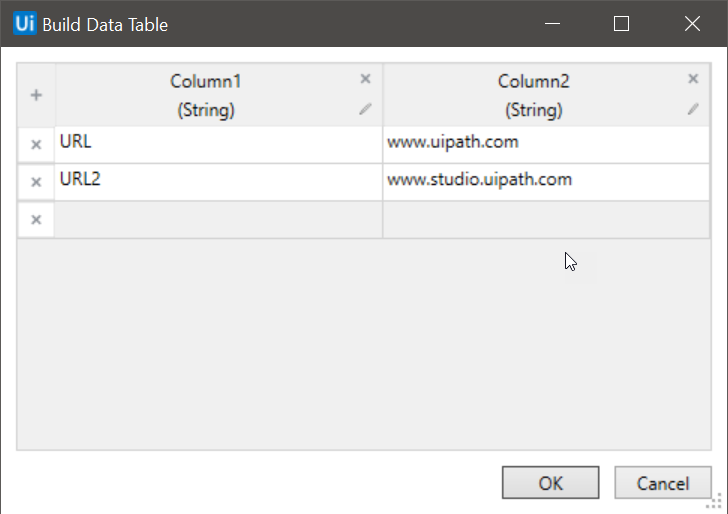
By default, two columns and two rows are displayed. The first row contains some values that can be edited. The second row cannot be removed, but it is not displayed in the output table. The default column titles and variable types cannot be edited. Instead, the columns have to be removed and then replaced by new ones.
Clicking the Add Column  button opens the New Column window. It helps you create and customize each new column you want to add to the data table. After creating a new column, you can edit its properties by clicking the Edit Column
  button.
Note:
Changing the data type of a column erases all data in that column.
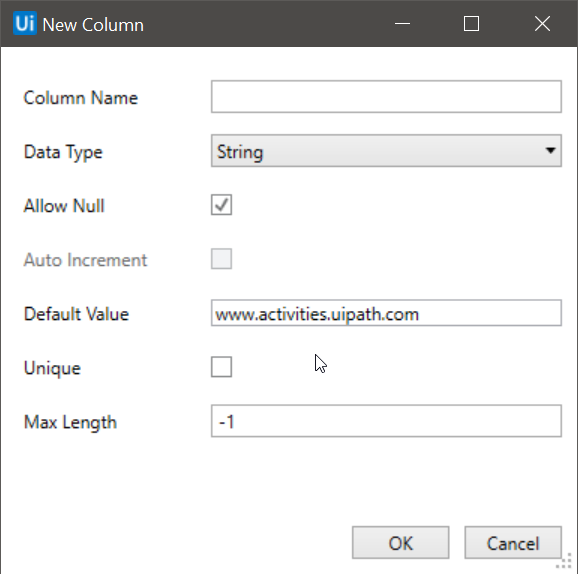
It contains the following fields:
- Column Name - The title of the column. This field supports only strings.
- Data Type - The type of values that the new column is going to accept.
- Allow Null - If this check box is selected, null values can be added to the rows of this column.
- Auto Increment - The check box is displayed only if the Data Type is set to Int32. If selected, the value of this column is automatically incremented by 1 every time a new row is added.
- Default Value - The default value of all the rows that are to be added to this column.
- Unique - If selected, all the rows in this column need to have unique values.
- MaxLength - The maximum number of characters accepted for this column. If you do not want to enforce a maximum length, the default value is -1.
Properties
Output
- DataTable - A DataTable variable that stores the information added in the Build Data Table window.
Common
- DisplayName - The display name of the activity.
Misc
- Private - If selected, the values of variables and arguments are no longer logged at Verbose level.
[转]UiPath Build Data Table的更多相关文章
- data.table包
data.table 1.生成一个data.table对象 生成一个data.table对象,记为DT. library(data.table) :],V3=round(rnorm(),),V4=:) ...
- R之data.table -melt/dcast(数据合并和拆分)
p.p1 { margin: 0.0px 0.0px 0.0px 0.0px; font: 30.0px "Helvetica Neue"; color: #323333 } p. ...
- R之data.table速查手册
R语言data.table速查手册 介绍 R中的data.table包提供了一个data.frame的高级版本,让你的程序做数据整型的运算速度大大的增加.data.table已经在金融,基因工程学等领 ...
- 两种Data Table参数化设置的区别
首先介绍Data Table的语法: 1.DataTable.value(ParameterID, SheetID) 2.DataTable(ParameterID, SheetID) 以上2种方法的 ...
- R语言数据分析利器data.table包 —— 数据框结构处理精讲
R语言data.table包是自带包data.frame的升级版,用于数据框格式数据的处理,最大的特点快.包括两个方面,一方面是写的快,代码简洁,只要一行命令就可以完成诸多任务,另一方面是处理 ...
- R语言基因组数据分析可能会用到的data.table函数整理
R语言data.table包是自带包data.frame的升级版,用于数据框格式数据的处理,最大的特点快.包括两个方面,一方面是写的快,代码简洁,只要一行命令就可以完成诸多任务,另一方面是处理快,内部 ...
- 将基因组数据分类并写出文件,python,awk,R data.table速度PK
由于基因组数据过大,想进一步用R语言处理担心系统内存不够,因此想着将文件按染色体拆分,发现python,awk,R 语言都能够非常简单快捷的实现,那么速度是否有差距呢,因此在跑几个50G的大文件之前, ...
- data.table包简介
data.table包主要特色是:设置keys.快速分组和滚得时序的快速合并.data.table主要通过二元检索法大大提高数据操作的效率,同时它也兼容适用于data.frame的向量检索法. req ...
- R︱高效数据操作——data.table包(实战心得、dplyr对比、key灵活用法、数据合并)
每每以为攀得众山小,可.每每又切实来到起点,大牛们,缓缓脚步来俺笔记葩分享一下吧,please~ --------------------------- 由于业务中接触的数据量很大,于是不得不转战开始 ...
随机推荐
- Eclipse for Tricore 的安装方法
1.安装JDK32位版 2.安装Eclipse for Tricore 32位版(应该也只有32位的) 3.OK(如果打开Tricore提示找不到JDK的话,在网上搜索如何配置JDK,修改环境变量) ...
- 制作通用framework的几点注意
一.创建framework,调成静态的framework . 二.匹配bitcode 三.增加-ObjC 在BuildSettting ->Linking->Other Linker Fl ...
- javascript类数组
一.类数组定义: 而对于一个普通的对象来说,如果它的所有property名均为正整数,同时也有相应的length属性,那么虽然该对象并不是由Array构造函数所创建的,它依然呈现出数组的行为,在这种情 ...
- BOM对象中的常用方法
先看body中的内容: <body οnlοad="demo1()"> <p> <input type="button" id=& ...
- [TimLinux] Python 再谈装饰器
参考链接:https://stackoverflow.com/questions/739654/how-to-make-a-chain-of-function-decorators 1. 函数对象 能 ...
- Spring之跨重定向请求传递数据
摘要 在开发场景中,大部分数据都是使用请求转发(forward)进行传递,而使用重定向(redirect)传递数据可能比较少. 那么问题来了:请求中的数据生命周期存活时间只在一个请求转发(reques ...
- 【转载】Dockerfile文件详解
什么是dockerfile? Dockerfile是一个包含用于组合映像的命令的文本文档.可以使用在命令行中调用任何命令. Docker通过读取Dockerfile中的指令自动生成映像. docker ...
- BZOJ1002 [FJOI2007]轮状病毒(最小生成树计数)
Time Limit: 1 Sec Memory Limit: 162 MBSubmit: 7125 Solved: 3878[Submit][Status][Discuss] Descripti ...
- CodeForces985G Team Players
G. Team Players time limit per test 2 seconds memory limit per test 256 megabytes input standard inp ...
- flex布局中flex-grow与flex-shrink的计算方式
CSS 中的 Flex(弹性布局) 可以很灵活的控制网页的布局,其中决定 Flex 布局内项目宽度/高度的是三个属性: flex-basis, flex-grow, flex-shrink. flex ...