
Redis(十五)Redis 的一些常用技术(Spring 环境下)
一、Redis 事务与锁机制

1.Redis的基础事务
在Redis中开启事务的命令是 multi 命令, 而执行事务的命令是 exec 命令。multi 到 exec 命令之间的 Redis 命令将采取进入队列的形式,直至 exec 命令的出现,才会一次性发送队列里的命令去执行,而在执行这些命令的时候其他客户端就不能再插入任何命令了。
127.0.0.1:6379> multi

OK

127.0.0.1:6379> set key1 value1

QUEUED

127.0.0.1:6379> get key1

QUEUED

127.0.0.1:6379> exec

1) OK

2) "value1"
如果回滚事务,可以使用 discard 命令取消事务中所有命令,使事务中的方法不会被执行了。
127.0.0.1:6379> multi

OK

127.0.0.1:6379> set key1 value1

QUEUED

127.0.0.1:6379> get key1

QUEUED

127.0.0.1:6379> discard

OK

127.0.0.1:6379> exec

(error) ERR EXEC without MULTI
2.在Spring中使用Redis事务
SessionCallback接口可以保证所有的命令都是通过同一个 Redis 连接进行操作的。
    public static void testTransaction() {

        ApplicationContext applicationContext = new ClassPathXmlApplicationContext("applicationContext.xml");

        RedisTemplate redisTemplate = applicationContext.getBean(RedisTemplate.class);

        SessionCallback callBack = (SessionCallback) (RedisOperations ops) -> {

            ops.multi();    // 开启事务

            ops.boundValueOps("key1").set("value1");

            // 注意由于命令只是进入队列,而没有被执行,所以此处采用get命令返回值为null

            String value = (String) ops.boundValueOps("key1").get();

            System.out.println("value = " + value);

            // list保存之前进入队列的所有命令的结果

            List list = ops.exec();// 执行事务

            // 事务结束后,取出value1

            value = (String) redisTemplate.opsForValue().get("key1");

            return value;

        };

        // 执行Redis命令

        String value = (String) redisTemplate.execute(callBack);

        System.out.println(value);

    }
返回结果:
value = null
value1
3.Redis 事务回滚的两种情况
- 命令格式正确,而数据类型错误时,仅回滚数据类型错误的那条命令
127.0.0.1:6379> multi

OK

127.0.0.1:6379> set key1 value1

QUEUED

127.0.0.1:6379> set key2 value2

QUEUED

127.0.0.1:6379> incr key1

QUEUED

127.0.0.1:6379> del key2

QUEUED

127.0.0.1:6379> exec

1) OK

2) OK

3) (error) ERR value is not an integer or out of range

4) (integer) 1 - 命令格式不正确时,直接回滚所有命令
127.0.0.1:6379> multi

OK

127.0.0.1:6379> set key1 value1

QUEUED

127.0.0.1:6379> incr

(error) ERR wrong number of arguments for 'incr' command

127.0.0.1:6379> set key2 value2

QUEUED

127.0.0.1:6379> exec

(error) EXECABORT Transaction discarded because of previous errors.

127.0.0.1:6379> get key1

(nil)

127.0.0.1:6379> get key2

(nil)
4.使用 watch 命令监控事务
在 Redis 中使用 watch 命令可以决定事务是执行还是回滚。一般而言,可以在 multi 命令之前使用 watch 命令监控某些键值对,然后使用 multi 命令开启事务。当Redis 使用 exec 命令执行事务的时候,它首先会去对比被 watch 命令所监控的键值对,如果没有发生变化,那么它会执行事务队列中的命令,提交事务;如果发生变化,那么它不会执行任何事务中的命令,而去事务回滚。无论事务是否回滚,Redis都会去取消执行事务前的watch命令:
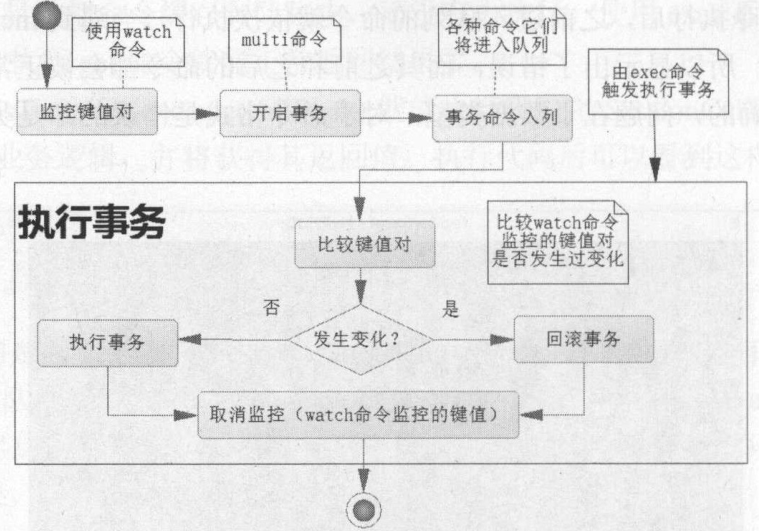
Redis 参考了多线程中使用的 CAS (比较与交换,Compare and Swap)去执行的。当一条线程去执行某些业务逻辑,但是这些业务逻辑操作的数据可能被其他线程共享了,这样会引发多线程中数据不一致的情况。为了克服这个问题,在线程开始时读取这些多线程共享的数据,并将其保存到当前线程的副本中,称为旧值(old value),watch命令就是这样的一个功能。然后,开启线程业务逻辑,由multi命令提供这个功能。在执行更新即exec命令前,比较当前线程副本保存的旧值和当前线程共享的值是否一致,如果不一致,那么该数据已经被其他线程操作过,此次更新失败,事务回滚;否则就认为它没有被其他线程操作过,就执行对应的业务逻辑。在数据高并发环境的操作中,把这样的机制称为乐观锁。
CAS 会产生 ABA 问题,而 Redis不会产生 ABA 问题。
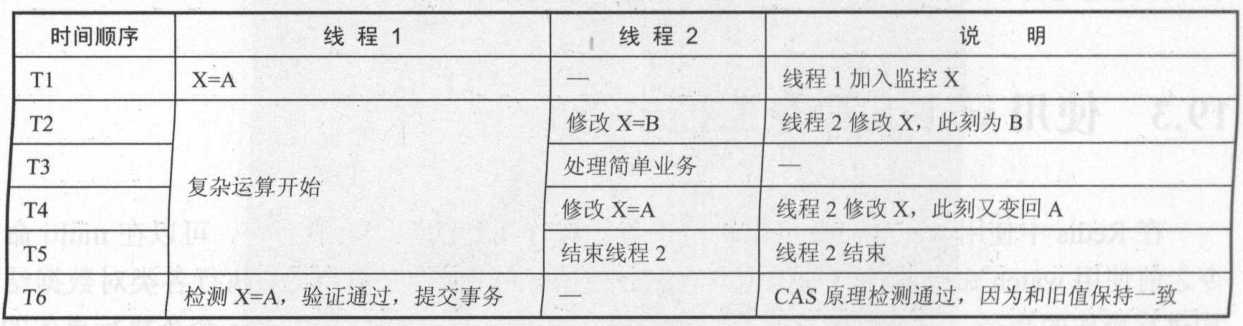
产生ABA问题的根本原因就是仅仅只记录一个旧值,解决办法例如有Hibernate中对缓存的持久对象加入字段 version 值,每操作一次持久对象,就令version++,可以解决ABA问题。
Redis多个事务完全可以在非阻塞的多线程环境下并发执行,而且Redis的机制是不会产生ABA问题的。
例如:成功提交事务的例子:
127.0.0.1:6379> flushdb

OK

127.0.0.1:6379> set key1 value1

OK

127.0.0.1:6379> watch key1

OK

127.0.0.1:6379> multi

OK

127.0.0.1:6379> set key2 value2

QUEUED

127.0.0.1:6379> get key2

QUEUED

127.0.0.1:6379> exec

1) OK

2) "value2"

127.0.0.1:6379> get key1

"value1"

127.0.0.1:6379> get key2

"value2"
二、流水线(PipeLined)
当需要使用队列批量执行一系列的命令时,Pipelined可以提高系统性能。
Redis执行读/写速度非常快,但是系统的瓶颈往往是在网络通信中的时延:
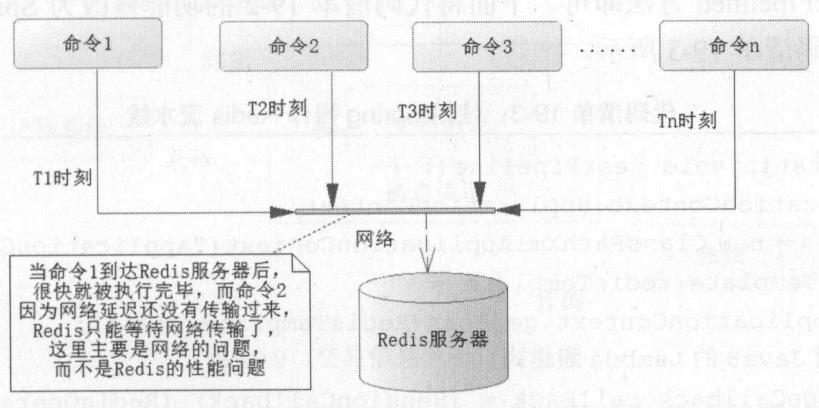
为了解决这个问题,可以使用Redis的流水线,Redis的流水线是一种通信协议:
1.使用 Java API
    public static void testJedisPipeline() {

        JedisPool pool = getPool();

        Jedis jedis = pool.getResource();

        long start = System.currentTimeMillis();

        // 开启流水线

        Pipeline pipeline = jedis.pipelined();

        // 测试十万条读/写操作

        for (int i = 0; i < 100000; i++) {

            int j = i + 1;

            pipeline.set("pipeline_key_" + j, "pipeline_value_" + j);

            pipeline.get("pipeline_key_" + j);

        }

        // pipeline.sync();// 只执行同步,不返回结果

        // pipeline.syncAndReturnAll(); 将返回执行过的命令放入List列表中

        List result = pipeline.syncAndReturnAll();

        long end = System.currentTimeMillis();

        System.err.println("耗时: " + (end - start) + "毫秒");

    }
返回:耗时: 499毫秒
2.在Spring中使用流水线
    public static void testPipeline() {

        ApplicationContext applicationContext = new ClassPathXmlApplicationContext("applicationContext.xml");

        RedisTemplate redisTemplate = applicationContext.getBean(RedisTemplate.class);

        SessionCallback callBack = (SessionCallback) (RedisOperations ops) -> {

            for (int i = 0; i < 100000; i++) {

                int j = i + 1;

                ops.boundValueOps("pipeline_key_" + j).set("pipeline_value_" + j);

                ops.boundValueOps("pipeline_key_" + j).get();

            }

            return null;

        };

        long start = System.currentTimeMillis();

        // 执行 Redis 的流水线命令

        List resultList = redisTemplate.executePipelined(callBack);

        long end = System.currentTimeMillis();

        System.out.println(end - start);

    }
返回:511
三、发布订阅
当使用银行卡消费的时候,银行往往会通过微信、短信或者邮件通知用户这笔交易的信息,这便是一种发布/订阅模式。
发布订阅模式首先需要消息源,也就是要有消息发布出来,比如银行通知。首先是银行的记账系统收到了交易的命令,交易成功后,就会把消息发送出来,订阅者就可以接收到这个消息。
发布订阅需要两点:
- 要有发送的消息渠道,让记账系统能够发送消息
- 要有订阅者订阅这个渠道的消息
1.Redis中的发布订阅
客户端1监听一个叫做chat的频道:SUBSCRIBE chat
客户端2在chat上发送消息:publish chat “hello”
此时,客户端1就收到了客户端2发送到chat上面的消息:“hello”
2.在Spring环境下使用发布订阅
(1)Spring中,接收者需要实现MessageListener接口,并实现其中的onMessage方法
package com.ssm.chapter19.redis.listener;

import org.springframework.data.redis.connection.Message;

import org.springframework.data.redis.connection.MessageListener;

import org.springframework.data.redis.core.RedisTemplate;

public class RedisMessageListener implements MessageListener {

    private RedisTemplate redisTemplate;

    public RedisTemplate getRedisTemplate() {

        return redisTemplate;

    }

    public void setRedisTemplate(RedisTemplate redisTemplate) {

        this.redisTemplate = redisTemplate;

    }

    @Override

    public void onMessage(Message message, byte[] bytes) {

        // 获取消息

        byte[] body = message.getBody();

        // 使用值反序列化其转换

        String msgBody = (String) getRedisTemplate().getValueSerializer().deserialize(body);

        System.err.println(msgBody);

        // 获取频道

        byte[] channel = message.getChannel();

        // 使用字符串序列化器转换

        String channelStr = (String) getRedisTemplate().getStringSerializer().deserialize(channel);

        System.err.println(channelStr);

        // 将频道名称的字节数组转换成字符串

        String bytesStr = new String(bytes);

        System.err.println(bytesStr);

    }

}
(2)在Spring 配置文件中配置这个类
    <bean id="redisMsgListener"

        class="com.ssm.chapter19.redis.listener.RedisMessageListener">

        <property name="redisTemplate" ref="redisTemplate" />

    </bean>
(3)还需要配置监听容器RedisMessageListenerContainer可以用于监听Redis的发布订阅消息,指定频道名称为chat
当消息通过chat发送时,就会使用redisMsgListener进行处理。
    <bean id="topicContainer" class="org.springframework.data.redis.listener.RedisMessageListenerContainer"

        destroy-method="destroy">

        <!--Redis连接工厂 -->

        <property name="connectionFactory" ref="connectionFactory" />

        <!--连接池,这里只要线程池生存,才能继续监听 -->

        <property name="taskExecutor">

            <bean

                class="org.springframework.scheduling.concurrent.ThreadPoolTaskScheduler">

                <property name="poolSize" value="2" />

            </bean>

        </property>

        <!--消息监听Map -->

        <property name="messageListeners">

            <map>

                <!--配置监听者,key-ref和bean id定义一致 -->

                <entry key-ref="redisMsgListener">

                    <!--监听类 -->

                    <bean class="org.springframework.data.redis.listener.ChannelTopic">

                        <constructor-arg value="chat" />

                    </bean>

                </entry>

            </map>

        </property>

    </bean>
(4)测试:执行下面的方法后,控制台输出结果为:
    public static void testPubSub() {

        ApplicationContext applicationContext = new ClassPathXmlApplicationContext("applicationContext.xml");

        RedisTemplate redisTemplate = applicationContext.getBean(RedisTemplate.class);

        String channel = "chat";

        redisTemplate.convertAndSend(channel, "I am lazy!!");

    }
控制台输出结果为:
I am lazy!!

chat

chat
四、超时命令
对于Redis而言,del命令可以删除一些键值对,所以Redis比Java虚拟机更加灵活,与此同时,当内存运行空间满了之后,还可以按照回收机制自动回收一些键值对。
但是,当垃圾进行回收的时候,又有可能执行回收而引发系统停顿,因此选择适当的回收机制和时间将有利于系统性能的提高。
Redis可以给对应的键值设置超时:
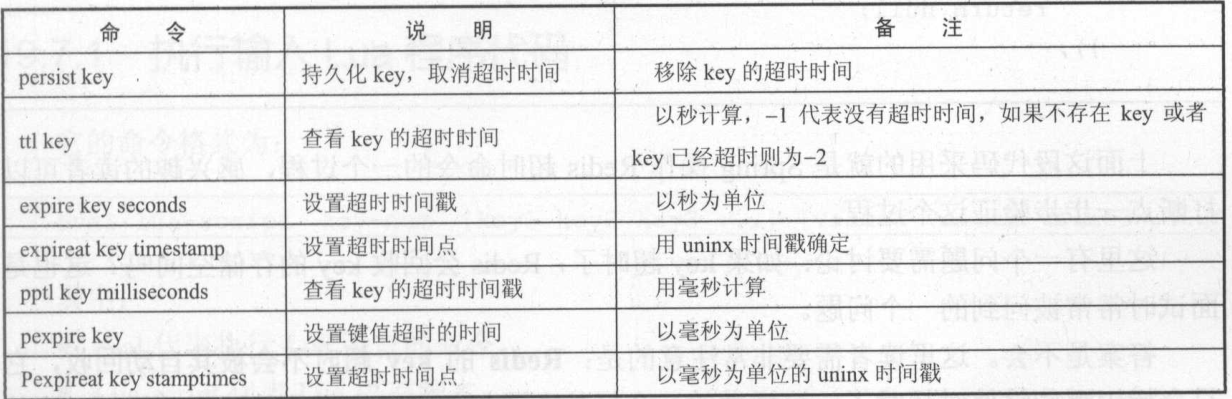
1.在Redis中测试超时命令
127.0.0.1:6379> set key1 value1

OK

127.0.0.1:6379> get key1

"value1"

127.0.0.1:6379> ttl key1

(integer) -1

127.0.0.1:6379> expire key1 120

(integer) 1

127.0.0.1:6379> ttl key1

(integer) 112

127.0.0.1:6379> ttl key1

(integer) 110

127.0.0.1:6379> ttl key1

(integer) 110

127.0.0.1:6379> ttl key1

(integer) 108

127.0.0.1:6379> ttl key1

(integer) 65

127.0.0.1:6379> persist key1

(integer) 1

127.0.0.1:6379> persist key1

(integer) 0

127.0.0.1:6379> ttl key1

(integer) -1
2.在Spring中使用超时命令
    public static void testExpire() {

        ApplicationContext applicationContext = new ClassPathXmlApplicationContext("applicationContext.xml");

        RedisTemplate redisTemplate = applicationContext.getBean(RedisTemplate.class);

        redisTemplate.execute((RedisOperations ops) -> {

            ops.boundValueOps("key1").set("value1");

            String keyValue = (String) ops.boundValueOps("key1").get();

            Long expSecond = ops.getExpire("key1");

            System.err.println(expSecond);

            boolean b = false;

            b = ops.expire("key1", 120L, TimeUnit.SECONDS);

            b = ops.persist("key1");

            Long l = 0L;

            l = ops.getExpire("key1");

            Long now = System.currentTimeMillis();

            Date date = new Date();

            date.setTime(now + 120000);

            ops.expireAt("key", date);

            return null;

        });

    }
3.问题:如果key超时了,Redis 会回收key的存储空间吗?
不会。Redis的key超时不会被其自动回收,它只会标识哪些键值对超时了。
这样做的好处是,如果一个很大的键值对超时,必须一个列表或者哈希结构,存在数以百万个元素,要对其回收需要很长时间。如果采用超时回收,则可能产生系统停顿。坏处也很明显,就是超时的键值对会浪费比较多的空间。
Redis 提供两种方式回收超时键值对:
- 定时回收:在确定的某个时间触发一段代码,回收超时的键值对。定时回收可以完全回收那些超时的键值对,但是缺点也很明显,如果这些键值对比较多,则Redis需要运行较长的时间,从而导致停顿。一般会选择在没有业务发生的时刻触发Redis的定时回收,以便清理超时的键值对。
- 惰性回收:当一个超时的键,被再次用get命令访问时,将触发Redis将其从内存中情况。优势是可以指定回收超时的键值对,缺点是要执行一个get操作,或者在某些时候,难以判断哪些键值对已经超时。
五、使用Lua语言
Redis 命令的计算能力不算很强大,而使用Lua语言则在很大程度上弥补了 Redis 这个不足。只是在 Redis中,执行 Lua 语言是原子性的,也就是Redis执行Lua的时候是不会被中断的。
Redis支持阆中方式运行Lua,一种是直接输入;另外一种是将 Lua 语言编写成文件。
1.执行输入Lua程序代码
eval lua-script key-num [key1 key2 key3 ...] [value1 value2 value3 ...]

eval:执行Lua语言的命令

Lua-script:代表Lua语言脚本

key-num:代表参数中有多少个key,没有为0

[key1 key2 key3 ...]:以key为参数

[value1 value2 value3 ...]:将这些参数传递给Lua
例如:
127.0.0.1:6379> eval "return 'hello java'" 0

"hello java"

127.0.0.1:6379> eval "redis.call('set',KEYS[1],ARGV[1])" 1 lua-key lua-value

(nil)

127.0.0.1:6379> get lua-key

"lua-value"
有时可能需要多次执行同一段脚本,在Redis中脚本会通过SHA-1签名算法加密脚本,返回一个标识字符串,可以通过这个字符串执行加密后的脚本。这样的好处是,如果脚本很长,从客户端传输可能需要很长的时间,那么使用标识字符串,则只需要传递32位字符串即可,这样可以提高传输的效率,从而提高性能。
127.0.0.1:6379> script load "redis.call('set',KEYS[1],ARGV[1])"

"7cfb4342127e7ab3d63ac05e0d3615fd50b45b06"

127.0.0.1:6379> evalsha 7cfb4342127e7ab3d63ac05e0d3615fd50b45b06 1 sha-key sha-value

(nil)

127.0.0.1:6379> get sha-key

"sha-value"
2.在Spring 中使用 Lua 脚本存储简单字符串
    public static void testLuaScript() {

        ApplicationContext applicationContext = new ClassPathXmlApplicationContext("applicationContext.xml");

        RedisTemplate redisTemplate = applicationContext.getBean(RedisTemplate.class);

        Jedis jedis = (Jedis) redisTemplate.getConnectionFactory().getConnection().getNativeConnection();

        // 执行简单的脚本

        String helloJava = (String) jedis.eval("return 'hello java'");

        System.out.println(helloJava);

        // 执行带参数的脚本

        jedis.eval("redis.call('set',KEYS[1], ARGV[1])", 1, "lua-key", "lua-value");

        String luaKey = (String) jedis.get("lua-key");

        System.out.println(luaKey);

        // 缓存脚本,返回SHA1签名标识字符串

        String sha1 = jedis.scriptLoad("redis.call('set',KEYS[1], ARGV[1])");

        // 执行脚本

        jedis.evalsha(sha1, 1, new String[] { "sha-key", "sha-val" });

        // 获取执行脚本后的数据

        String shaVal = jedis.get("sha-key");

        System.out.println(shaVal);

        // �关闭连接

        jedis.close();

    }
3.在Spring中使用Lua脚本存储对象
Spring 提供了 RedisScript 接口和一个实现类 DefaultRedisScript ,通过这个对象就可以通过Lua脚本操作对象。
    public static void testRedisScript() {

        ApplicationContext applicationContext = new ClassPathXmlApplicationContext("applicationContext.xml");

        RedisTemplate redisTemplate = applicationContext.getBean(RedisTemplate.class);

        // 定义默认脚本封装类

        DefaultRedisScript<Role> redisScript = new DefaultRedisScript<Role>();

        // 设置脚本

        redisScript.setScriptText("redis.call('set', KEYS[1], ARGV[1])  return redis.call('get', KEYS[1])");

        // 定义操作的key列表

        List<String> keyList = new ArrayList<String>();

        keyList.add("role1");

        // 需要序列化保存和读取的对象

        Role role = new Role();

        role.setId(1L);

        role.setRoleName("role_name_1");

        role.setNote("note_1");

        // 获得标识字符串

        String sha1 = redisScript.getSha1();

        System.out.println(sha1);

        // 设置返回结果类型为Role类型

        redisScript.setResultType(Role.class);

        // 使用JdkSerializationRedisSerializer进行序列化

        JdkSerializationRedisSerializer serializer = new JdkSerializationRedisSerializer();

        // 执行脚本

        // DefaultRedisScript接口对象,参数序列化器,结果序列化器,key列表,参数列表

        Role obj = (Role) redisTemplate.execute(redisScript, serializer, serializer, keyList, role);

        // 打印返回结果

        System.out.println(obj.getId());

    }
返回:
731429de653665577edb661a6741c4083e103b77

1
4.执行Lua文件
新建Lua文件test.lua
redis.call('set', KEYS[1], ARGV[1])

redis.call('set', KEYS[2], ARGV[2])

local n1 = tonumber(redis.call('get', KEYS[1]))

local n2 = tonumber(redis.call('get', KEYS[2]))

if n1 > n2 then

    return 1

end

if n1 == n2 then

    return 0

end

if n1 < n2 then

    return 2

end
在命令行输入 redis-cli --eval test.lua key1 key2 , 2 4 会返回:2
在 Spring 中,只能通过evalsha的方式执行Lua文件,例如:
    public static void testLuaFile() {

        ApplicationContext applicationContext = new ClassPathXmlApplicationContext("applicationContext.xml");

        RedisTemplate redisTemplate = applicationContext.getBean(RedisTemplate.class);

        // 读入文件流

        File file = new File("D:\\BaiduNetdiskDownload\\ssm\\Chapter19\\src\\test.lua");

        byte[] bytes = getFileToByte(file);

        Jedis jedis = (Jedis) redisTemplate.getConnectionFactory().getConnection().getNativeConnection();

        // 发送二进制文件给Redis服务器,得到标识数组

        byte[] sha1 = jedis.scriptLoad(bytes);

        // 传递参数,执行Lua文件

        Object obj = jedis.evalsha(sha1, 2, "key1".getBytes(), "key2".getBytes(), "2".getBytes(), "4".getBytes());

        System.out.println(obj);

    }

    /**

     * 把文件转化为二进制数组

     *

     * @param file

     *

     * @return 二进制数组

     */

    public static byte[] getFileToByte(File file) {

        byte[] by = new byte[(int) file.length()];

        try {

            InputStream is = new FileInputStream(file);

            ByteArrayOutputStream bytestream = new ByteArrayOutputStream();

            byte[] bb = new byte[2048];

            int ch;

            ch = is.read(bb);

            while (ch != -1) {

                bytestream.write(bb, 0, ch);

                ch = is.read(bb);

            }

            by = bytestream.toByteArray();

        } catch (Exception ex) {

            ex.printStackTrace();

        }

        return by;

    }
六、在Spring中使用 Redis 哨兵模式
1.配置文件
主服务器192.168.11.128,两个从服务器192.168.11.129、192.168.11.130。
然后在三台机器上分别启动哨兵服务。
<?xml version='1.0' encoding='UTF-8' ?>

<beans xmlns="http://www.springframework.org/schema/beans"

    xmlns:xsi="http://www.w3.org/2001/XMLSchema-instance"

    xsi:schemaLocation="http://www.springframework.org/schema/beans

    http://www.springframework.org/schema/beans/spring-beans-4.0.xsd">

    <!--配置Redis连接池 -->

    <bean id="poolConfig" class="redis.clients.jedis.JedisPoolConfig">

        <property name="maxIdle" value="50" />  <!--最大空闲数 -->

        <property name="maxTotal" value="100" />  <!--最大连接数 -->

        <property name="maxWaitMillis" value="3000" />  <!--最大等待时间3s -->

    </bean>

    <!--jdk序列化器,可保存对象 -->

    <bean id="jdkSerializationRedisSerializer"

        class="org.springframework.data.redis.serializer.JdkSerializationRedisSerializer" />

    <!--String序列化器 -->

    <bean id="stringRedisSerializer"

        class="org.springframework.data.redis.serializer.StringRedisSerializer" />

    <!--哨兵配置 -->

    <bean id="sentinelConfig"

        class="org.springframework.data.redis.connection.RedisSentinelConfiguration">

        <!--服务名称 -->

        <property name="master">

            <bean class="org.springframework.data.redis.connection.RedisNode">

                <property name="name" value="mymaster" />

            </bean>

        </property>

        <!--哨兵服务IP和端口 -->

        <property name="sentinels">

            <set>

                <bean class="org.springframework.data.redis.connection.RedisNode">

                    <constructor-arg name="host" value="192.168.11.128" />

                    <constructor-arg name="port" value="26379" />

                </bean>

                <bean class="org.springframework.data.redis.connection.RedisNode">

                    <constructor-arg name="host" value="192.168.11.129" />

                    <constructor-arg name="port" value="26379" />

                </bean>

                <bean class="org.springframework.data.redis.connection.RedisNode">

                    <constructor-arg name="host" value="192.168.11.130" />

                    <constructor-arg name="port" value="26379" />

                </bean>

            </set>

        </property>

    </bean>

    <!--连接池设置 -->

    <bean id="connectionFactory"

        class="org.springframework.data.redis.connection.jedis.JedisConnectionFactory">

        <constructor-arg name="sentinelConfig" ref="sentinelConfig" />

        <constructor-arg name="poolConfig" ref="poolConfig" />

        <property name="password" value="abcdefg" />

    </bean>

    <!--配置RedisTemplate -->

    <bean id="redisTemplate" class="org.springframework.data.redis.core.RedisTemplate">

        <property name="connectionFactory" ref="connectionFactory" />

        <property name="keySerializer" ref="stringRedisSerializer" />

        <property name="defaultSerializer" ref="stringRedisSerializer" />

        <property name="valueSerializer" ref="jdkSerializationRedisSerializer" />

    </bean>

</beans>
2.验证哨兵模式
关闭192.168.11.128主服务其上的Redis服务,然后3分钟后,哨兵会进行投票切换新的主机,然后执行下面的方法。
    public static void testSpringSentinel() {

        ApplicationContext ctx = new ClassPathXmlApplicationContext("com/ssm/chapter20/config/spring-cfg.xml");

        RedisTemplate redisTemplate = ctx.getBean(RedisTemplate.class);

        String retVal = (String) redisTemplate.execute((RedisOperations ops) -> {

            ops.boundValueOps("mykey").set("myvalue");

            String value = (String) ops.boundValueOps("mykey").get();

            return value;

        });

        System.out.println(retVal);

    }
七、Spring 缓存机制和Redis的结合
Redis(十五)Redis 的一些常用技术(Spring 环境下)的更多相关文章
- 第四百一十五节,python常用排序算法学习
第四百一十五节,python常用排序算法学习 常用排序 名称 复杂度 说明 备注 冒泡排序Bubble Sort O(N*N) 将待排序的元素看作是竖着排列的“气泡”,较小的元素比较轻,从而要往上浮 ...
- Redis(十五):哨兵Sentinel
Redis哨兵 Redis 的 Sentinel 系统用于管理多个 Redis 服务器(instance), 该系统执行以下三个任务: 监控(Monitoring): Sentinel 会不断地检查你 ...
- 高可用Redis(十):Redis原生命令搭建集群
1.搭建Redis Cluster主要步骤 1.配置开启节点 2.meet 3.指派槽 4.主从关系分配 2.环境说明 两台虚拟机,IP地址分别为:192.168.81.100和192.168.81. ...
- Redis(十二):redis两种持久化方法对比分析
前言 最近在项目中使用到Redis做缓存,方便多个业务进程之间共享数据.由于Redis的数据都存放在内存中,如果没有配置持久化,redis重启后数据就全丢失了,于是需要开启redis的持久化功能,将数 ...
- Redis系列五 Redis持久化
Redis持久化 一.RDB(Redis DataBase) 1.介绍 在指定的时间间隔内将内存中的数据集快照写入磁盘,也就是行话讲的Snapshot快照,它恢复时是将快照文件直接读到内存里. Red ...
- 《闲扯Redis十》Redis 跳跃表的结构实现
一.前言 Redis 提供了5种数据类型:String(字符串).Hash(哈希).List(列表).Set(集合).Zset(有序集合),理解每种数据类型的特点对于redis的开发和运维非常重要. ...
- 十五、Hadoop学习笔记————Zookeeper的环境搭建
linux中/opt一般用来存放应用/var目录一般用来存放日志 sample为样例文件,复制一份zoo.cfg文件 配置zoo文件,id为服务器id(整数),host为服务器的ip地址,第一个por ...
- Spring Boot教程(十五)使用Intellij中的Spring Initializr来快速构建Spring Boot/Cloud工程
在之前的所有Spring Boot和Spring Cloud相关博文中,都会涉及Spring Boot工程的创建.而创建的方式多种多样,我们可以通过Maven来手工构建或是通过脚手架等方式快速搭建,也 ...
- Java进阶专题(十五) 从电商系统角度研究多线程(下)
前言 本章节继上章节继续梳理:线程相关的基础理论和工具.多线程程序下的性能调优和电商场景下多线程的使用. 多线程J·U·C ThreadLocal 概念 ThreadLocal类并不是用来解决 ...
随机推荐
- 接口测试返回数据为JSONP格式时如何处理
#需要被处理的jsonp数据 JSONP = "jsonpreturn({'c': 1, 'd': 2});" #处理方法 def jsonp_to_json(JSONP): JS ...
- Python 之父的解析器系列之七:PEG 解析器的元语法
原题 | A Meta-Grammar for PEG Parsers 作者 | Guido van Rossum(Python之父) 译者 | 豌豆花下猫("Python猫"公众 ...
- 格子游戏Grid game CodeForce#1104C 模拟
题目链接:Grid game 题目原文 You are given a 4x4 grid. You play a game — there is a sequence of tiles, each o ...
- (七十六)c#Winform自定义控件-表单验证组件
前提 入行已经7,8年了,一直想做一套漂亮点的自定义控件,于是就有了本系列文章. GitHub:https://github.com/kwwwvagaa/NetWinformControl 码云:ht ...
- 远程桌面连接mstsc 超扎心
搞了一天问了几千个人.最后终于有一位大佬解决了.扎心啊. http://jingyan.baidu.com/article/39810a23edc48bb637fda672.html 就是服务没打开.
- Oozie、Flume、Mahout配置与应用
-------------------------Oozie-------------------- [一.部署] 1)部署Oozie服务端 [root@cMaster~]#sudo yum inst ...
- c3p0配置记录
官方文档 : http://www.mchange.com/projects/c3p0/index.html <!--当连接池中的连接耗尽的时候c3p0一次同时获取的连接数.Default: 3 ...
- [Vjudge][POJ][Tony100K]搜索基础练习 - 全题解
目录 POJ 1426 POJ 1321 POJ 2718 POJ 3414 POJ 1416 POJ 2362 POJ 3126 POJ 3009 个人整了一些搜索的简单题目,大家可以clone来练 ...
- vimrc配置文件
目录 vimrc配置文件 参考 主要功能 使用方法 配置文件 文件下载 vimrc配置文件
- IDEA 学习笔记之 Java项目开发深入学习(2)
Java项目开发深入学习(2): 查找变量被用到的地方 编译当前文件 增加变量watch 注意:我使用了keymap (eclipse模板),所以很多快捷键和eclipse一样. F5单步调试进入函数 ...