
Thymeleaf语法
Thymeleaf 官网:https://www.thymeleaf.org/
1.入门示例
(1)在controller编写一个请求,放进去一些数据;
@RequestMapping("/success")

public String success(Model model){

    //存入数据

    model.addAttribute("msg","Hello,Thymeleaf");

    //classpath:/templates/success.html

    return "success";

}
(2)我们要使用thymeleaf,需要在html文件中导入命名空间的约束,方便提示。我们可以去官方文档的#3中看一下命名空间拿来过来
xmlns:th="http://www.thymeleaf.org"
(3)我们去编写下前端页面 success,html
<!DOCTYPE html>

<html lang="en" xmlns:th="http://www.thymeleaf.org">

<head>

    <meta charset="UTF-8">

    <title>BAO</title>

</head>

<body>

<div th:text="${msg}">hello</div>

</body>

</html>
注意: $ 表达式只能写在th标签内部,不然不会生效
(4)访问localhost:8080/success

(5)表达式的使用选择
Variable Expressions: ${...}:获取变量值;OGNL;

Selection Variable Expressions: *{...}:选择表达式:和${}在功能上是一样

Message Expressions: #{...}:获取国际化内容

Link URL Expressions: @{...}:定义URL;

Fragment Expressions: ~{...}:片段引用表达式
(6)关闭缓存,实现页面刷新加载
spring:

  thymeleaf:

    cache: false # 开发时关闭缓存,不然没法看到实时页面

    mode: HTML # 用非严格的 HTML

    encoding: UTF-8

    servlet:

      content-type: text/html
2.测试练习
(1)我们编写一个Controller,放一些数据
@RequestMapping("/success2")

public String success2(Map<String,Object> map){

    //存入数据

    map.put("msg","<h1>Hello</h1>");

    map.put("users", Arrays.asList("bsq","qin"));

    //classpath:/templates/success.html

    return "success";

}
(2)前端页面
<!DOCTYPE html>

<html lang="en" xmlns:th="http://www.thymeleaf.org">

<head>

    <meta charset="UTF-8">

    <title>BAO说</title>

</head>

<body>

<h1>Success</h1>

<div th:text="${msg}"></div>

<!--不转义-->

<div th:utext="${msg}"></div>

<!--遍历数据-->

<!--th:each每次遍历都会生成当前这个标签:-->

<h4 th:each="us :${users}" th:text="${us}"></h4>

<h4>

    <!--行内写法:官网#12-->

    <span th:each="user:${users}">[[${user}]]</span>

</h4>

</body>

</html>
(4).使用工具类
${#工具类.方法}
(5)引入资源
@{/资源地址}
3.常用语法
(1)th:text :获取变量值
<p th:text="'Hello!, ' + ${name} + '!'" >name</p>
可以看出获取变量值用 $ 符号,对于javaBean的话使用 变量名.属性名 方式获取,这点和 EL 表达式一样.
另外 $ 表达式只能写在th标签内部,不然不会生效,上面例子就是使用 th:text 标签的值替换 p 标签里面的值,至于 p 里面的原有的值只是为了给前端开发时做展示用的.这样的话很好的做到了前后端分离.
(2)Thymeleaf 对于 URL 的处理是通过语法 @{…} 来处理的
<a th:href="@{http://www.baidu.com}">绝对路径</a>

<a th:href="@{/}">相对路径</a>

<a th:href="@{css/bootstrap.min.css}">Content路径,默认访问static下的css文件夹</a>
(3)字符串替换
很多时候可能我们只需要对一大段文字中的某一处地方进行替换,可以通过字符串拼接操作完成:
<span th:text="'Welcome to our application, ' + ${user.name} + '!'">
一种更简洁的方式是:
<span th:text="|Welcome to our application, ${user.name}!|">
当然这种形式限制比较多,|…|中只能包含变量表达式${…},不能包含其他常量、条件表达式等。
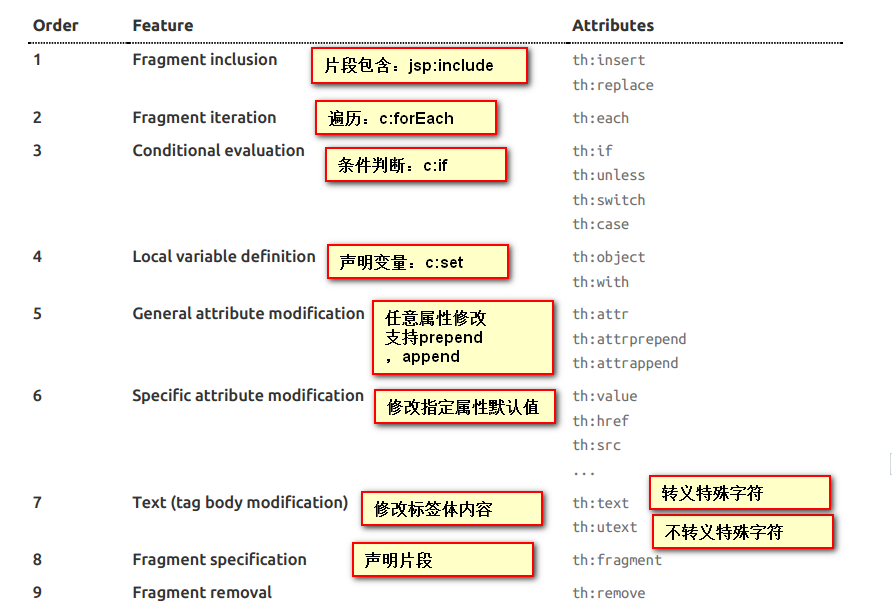
(4)th:each :循环
渲染列表数据是一种非常常见的场景,例如现在有 n 条记录需要渲染成一个表格,该数据集合必须是可以遍历的,使用 th:each 标签:
(5)运算符
在表达式中可以使用各类算术运算符,例如+, -, *, /, %
th:with="isEven=(${prodStat.count} % 2 == 0)"
逻辑运算符>, <, <=,>=,==,!=都可以使用,唯一需要注意的是使用<,>时需要用它的HTML转义符:
th:if="${prodStat.count} > 1" th:text="'Execution mode is ' + ( (${execMode} == 'dev')? 'Development' : 'Production')"
(6)条件
if/unless
Thymeleaf 中使用 th:if 和 th:unless 属性进行条件判断,下面的例子中,标签只有在 th:if 中条件成立时才显示:
<a th:href="@{/login}" th:unless=${session.user != null}>Login</a>
th:unless 于 th:if 恰好相反,只有表达式中的条件不成立,才会显示其内容。
switch
Thymeleaf 同样支持多路选择 Switch 结构:
<div th:switch="${user.role}">

  <p th:case="'admin'">User is an administrator</p>

  <p th:case="#{roles.manager}">User is a manager</p>

</div>
默认属性 default 可以用 * 表示:
<div th:switch="${user.role}">

  <p th:case="'admin'">User is an administrator</p>

  <p th:case="#{roles.manager}">User is a manager</p>

  <p th:case="*">User is some other thing</p>

</div>
Thymeleaf语法的更多相关文章
- thymeleaf模板、thymeleaf语法相关中文文档教程
thymeleaf模板在SpringBoot中是默认的模范引擎技术,SpringBoot不推荐使用比较老旧的jsp.但如果您想使用jsp的话,当然也可以.我这里为您讲述thymeleaf模板的基本th ...
- Thymeleaf语法总结
Thymeleaf是Spring boot推荐使用的模板引擎. 一.th属性 html有的属性,Thymeleaf基本都有,而常用的属性大概有七八个.其中th属性执行的优先级从1~8,数字越低优先级越 ...
- Thymeleaf语法总结 | 笔记分享
Thymeleaf语法总结 一.Thymeleaf介绍 Thymeleaf是Spring boot推荐使用的模版引擎,直接以html显示,前后端可以很好的分离. 二.Thymeleaf语法(Thy ...
- thymeleaf 语法
一.语法: 1. 简单表达式 (simple expressions) ${...} 变量表达式 *{...} 选择变量表达式 #{...} 消息表达式 @{...} 链接url表达式 2.字 ...
- Springboot学习:Thymeleaf 语法基础
详细内容见:Thymeleaf Tutorial 中文翻译,中文文档 参考: thymeleaf官方指南 新一代Java模板引擎Thymeleaf Thymeleaf基本知识 thymeleaf总结文 ...
- Thymeleaf的基本语法总结
最近用Spring boot开发一些测试平台和工具,用到页面展示的部分, 选择的是thymeleaf模版引擎. 页面开发的7788快结束了,下面来总结下此过程中对thymeleaf的使用总结. 什么是 ...
- JAVA入门[22]—thymeleaf
一.thymeleaf官网 官网:https://www.thymeleaf.org/index.html doc:https://www.thymeleaf.org/documentation.ht ...
- (二)springboot整合thymeleaf模板
在我们平时的开发中,用了很久的jsp作view显示层,但是标签库和JSP缺乏良好格式的一个副作用就是它很少能够与其产生的HTML类似.所以,在Web浏览器或HTML编辑器中查看未经渲染的JSP模板是非 ...
- Thymeleaf引擎支持Multi Prefix
最近团队的一个项目在重构,希望引入Thymeleaf减少页面端的代码复杂性.在重构过程中,发现html文件需要保存在多个不同的目录中,但Thymeleaf缺省的实现不支持这种方式. 1 ...
随机推荐
- ElasticSearch(四):基本搜索
ElasticSearch(四):基本搜索 学习课程链接<Elasticsearch核心技术与实战> URI Search 使用HTTP的GET方法,在URL中使用查询参数进行查询. GE ...
- 编程工具 | VScode 使用快捷键
按 Press 功能 Function Ctrl + Shift + P,F1 显示命令面板 Show Command Palette Ctrl + P 快速打开 Quick Open Ctrl + ...
- freeradius简单配置
1.安装freeradius sudo apt-get update sudo apt-get install freeradius 2.配置client.conf vim /etc/freeradi ...
- javascript canvas 生成图片的方法
javascript canvas 生成图片的方法 先生成base64格式的图片 然后ajax传到后台 写入服务器文件夹即可<pre><!DOCTYPE HTML><ht ...
- SpringMVC错误:nested exception is java.lang.IncompatibleClassChangeError: class org.springframework.core.type.clas
这是jar包冲突引起的 spring-core.jar已经有asm 所以不用再单独导入asm包了
- mysql查询不重复的行内容,不重复的记录数.count,distinct
有这么一个表 记录了id, p_id, p_name , p_content , p_time 1 343 aaa aaaaaa 2012-09-01 2 ...
- 斐波那契数列的实现(C语言)
int fibonacci(int positon){ if(position==1||position==2){ return 1; } return fibonacci(position-1)+f ...
- PHP 面试踩过的坑
1.get,post 的区别 **显示有区别 ** get方法是将字符串拼接在地址栏后面可以看见 而post方法看不见 **传递的大小有区别 ** 具体大小和浏览器有关系,ie浏览器是2k其他浏览器的 ...
- 领扣(LeetCode)删除链表中的节点 个人题解
请编写一个函数,使其可以删除某个链表中给定的(非末尾)节点,你将只被给定要求被删除的节点. 现有一个链表 -- head = [4,5,1,9],它可以表示为: 4 -> 5 -> 1 - ...
- gcc在x64体系中如何传递参数,linux,mac,iOS适用
上一篇介绍了vc(windows)平台在x64体系当中,c函数的传参方式.本篇将要介绍gcc(类linux,mac)平台在x64中,c函数是如何传参的.为节约时间和篇幅,首先来定义一个有十个参数的函数 ...