
Kettle Rest大文件上传(RestUploadFile.ktr) Rest文件下载(FileDownload.ktr)
1. Rest大文件上传(RestUploadFile.ktr)
需求描述
- 上传文件大于10M小于500M
- 上传文件进行分片(5M一片要比1M分片整体时间快)
- 先使用java类进行功能模拟在迁移Ktr
- 使用Kettle+Java片段代码开发
- 启动步骤时可以自定义必须参数
- 增加UserId(如:testXiaoYu目录)
- 上传地址:http://**:8089/api/dlapiservice/v1/file/userdata
- 下载地址:http://**:8089/api/dlapiservice/v1/file/userdata/
- HDFS地址:http://**:50070/explorer.html#/testXiaoYu(需要查看需要92服务器远程到153服务器查看)
截图步骤说明
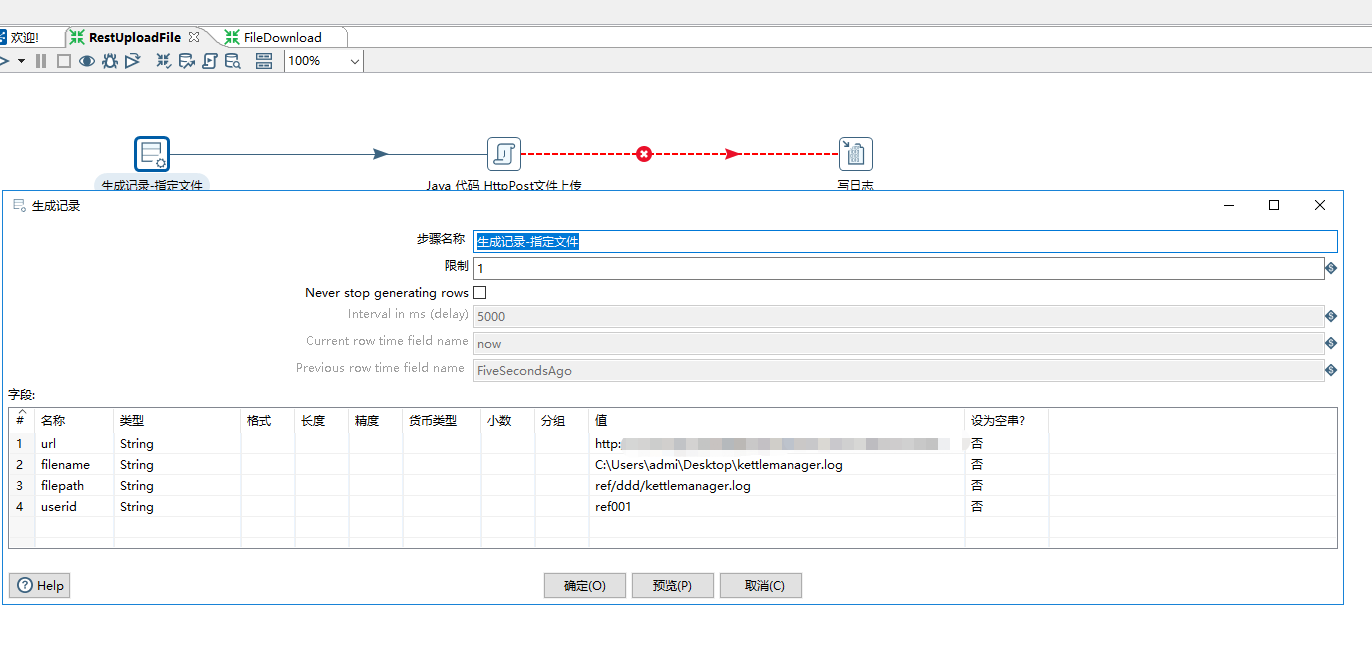
指定大文件上传
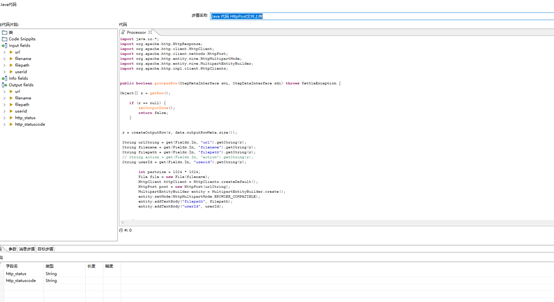
片段代码
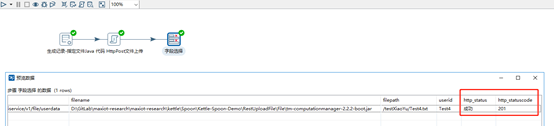
运行成功结果
上传片段代码
 import java.io.*;

 import org.apache.http.HttpResponse;

 import org.apache.http.client.HttpClient;

 import org.apache.http.client.methods.HttpPost;

 import org.apache.http.entity.mime.HttpMultipartMode;

 import org.apache.http.entity.mime.MultipartEntityBuilder;

 import org.apache.http.impl.client.HttpClients;

 public boolean processRow(StepMetaInterface smi, StepDataInterface sdi) throws KettleException {

 Object[] r = getRow();

     if (r == null) {

         setOutputDone();

         return false;

     }

  r = createOutputRow(r, data.outputRowMeta.size());

  String urlString = get(Fields.In, "url").getString(r);

  String filename = get(Fields.In, "filename").getString(r);

  String filepath = get(Fields.In, "filepath").getString(r);

  // String action = get(Fields.In, "action").getString(r);

  String userId = get(Fields.In, "userid").getString(r);

         int partsize = 1024 * 1024 * 5;

         File file = new File(filename);

           HttpClient httpClient = HttpClients.createDefault();

          HttpPost post = new HttpPost(urlString);

          MultipartEntityBuilder entity = MultipartEntityBuilder.create();

         entity.setMode(HttpMultipartMode.BROWSER_COMPATIBLE);

         entity.addTextBody("filepath", filepath);

         entity.addTextBody("userId", userId);

  try {

             //Make HTTP Call

             if (file == null || file.getAbsolutePath() == null) {

                 get(Fields.Out, "http_status").setValue(r,"失败");

             } else {

                 long filelenght = file.length();

                 if (filelenght <= partsize) {

                     entity.addBinaryBody("file", file);

                     entity.addTextBody("action", "create");

                     post = new HttpPost(urlString);

                     post.setEntity(entity.build());

                     HttpResponse response = httpClient.execute(post);

                      //设置返回值

                     String httpStatusCode = String.valueOf(response.getStatusLine().getStatusCode());

                     // System.out.println("****上传完成*************:" + httpStatusCode + "------result:" + result);

                     if(httpStatusCode.equals("200")||httpStatusCode.equals("201"))

                     {

                         get(Fields.Out, "http_status").setValue(r,"成功");

                     }

                     else

                     {

                         get(Fields.Out, "http_status").setValue(r,"失败");

                     }

                 }else {

                     int endPosition = 0;//子文件结束位置

                     int count = (filelenght % partsize != 0) ? (int) (filelenght / partsize + 1) : (int) (filelenght / partsize);

                      try {

                           FileInputStream fileInputStream = new FileInputStream(file);

                          int byteslength = 0;

                         byte[] tempbytes = new byte[partsize];

                         byte[] array = null;

                         int i = 1;

                          while ((byteslength = fileInputStream.read(tempbytes)) != -1) {

                             endPosition += partsize;

                             endPosition = (endPosition > filelenght) ? (int) filelenght : endPosition;

                             array = new byte[byteslength];

                              //System.arraycopy(tempbytes, 0, array, 0, byteslength);

                              entity = MultipartEntityBuilder.create();

                             if (endPosition == partsize) {

                                 entity.addTextBody("action", "create");

                             } else {

                                 entity.addTextBody("action", "append");

                             }

                             entity.setMode(HttpMultipartMode.BROWSER_COMPATIBLE);

                             entity.addTextBody("filepath", filepath);

                             entity.addTextBody("userId", userId);

                             File tempfile = new File(String.valueOf(0));

                              FileOutputStream temfileStream = new FileOutputStream(tempfile);

                             temfileStream.write(array);

                             entity.addBinaryBody("file", tempfile);

                             post = new HttpPost(urlString);

                             post.setEntity(entity.build());

                              temfileStream.close();

                              httpClient = HttpClients.createDefault();

                             HttpResponse response = httpClient.execute(post);

                             //设置返回值

                             String httpStatusCode = String.valueOf(response.getStatusLine().getStatusCode());

                             get(Fields.Out, "http_statuscode").setValue(r, httpStatusCode);

                              if (httpStatusCode.equals("200") || httpStatusCode.equals("201")) {

                                 get(Fields.Out, "http_status").setValue(r,"成功");

                             } else {

                                 get(Fields.Out, "http_status").setValue(r,"失败");

                                 break;

                             }

                              i++;

                         }

                     }catch (Exception e) {

                          get(Fields.Out, "http_statuscode").setValue(r, -1);

                         get(Fields.Out, "http_status").setValue(r, "失败:"+e.getMessage());

                     }

                 }

             }

         } catch (Exception e) {

             //System.out.println("==================" + e.getMessage());

             // Set value of HTTP Status to -1 since HTTP Post caused exception

             get(Fields.Out, "http_statuscode").setValue(r, -1);

             get(Fields.Out, "http_status").setValue(r, "失败:"+e.getMessage());

         } finally {

         }

             // get(Fields.Out, "http_statuscode").setValue(r, -1);

             // get(Fields.Out, "http_status").setValue(r, "失败");

      // Send the row on to the next step.

     putRow(data.outputRowMeta, r);

       return true;

 }
2. Rest文件下载(FileDownload.ktr)
需求描述
- 下载上传的文件
- (5M一片要比1M分片整体时间快)
- 下载地址:http://**:8089/api/dlapiservice/v1/file/userdata/
- HDFS地址:http:// **:50070/explorer.html#/testXiaoYu(需要查看需要92服务器远程到153服务器查看)

下载片段代码
 import org.apache.http.*;

 import org.apache.http.client.ClientProtocolException;

 import org.apache.http.client.HttpClient;

 import org.apache.http.client.methods.HttpGet;

 import org.apache.http.client.utils.URIBuilder;

 import org.apache.http.impl.client.HttpClients;

 import java.io.File;

 import java.io.FileOutputStream;

 import java.io.IOException;

 import java.io.InputStream;

 import java.net.URISyntaxException;

 public boolean processRow(StepMetaInterface smi, StepDataInterface sdi) throws KettleException {

 Object[] r = getRow();

     if (r == null) {

         setOutputDone();

         return false;

     }

  r = createOutputRow(r, data.outputRowMeta.size());

  String urlString = get(Fields.In, "url").getString(r);

  String filepath = get(Fields.In, "filepath").getString(r);

  String folder = get(Fields.In, "folder").getString(r);

  String filename ="";

  String userId = get(Fields.In, "userid").getString(r);

  HttpClient httpClient = HttpClients.createDefault();

         try {

             URIBuilder builder = new URIBuilder(urlString+"/" + userId);

             builder.addParameter("filepath", filepath);

             HttpGet httpGet = new HttpGet(builder.build());

             HttpResponse response = httpClient.execute(httpGet);

             HttpEntity entity = response.getEntity();

             InputStream is = entity.getContent();

             filename = getFileName(response);

             //System.out.println("-----filename--------:" + filename);

             File file = new File(folder + filename);

             file.getParentFile().mkdirs();

             FileOutputStream fileout = new FileOutputStream(file);

             byte[] buffer = new byte[1024 * 1024];

             int ch = 0;

             while ((ch = is.read(buffer)) != -1) {

                 fileout.write(buffer, 0, ch);

             }

             is.close();

             fileout.flush();

             fileout.close();

             get(Fields.Out, "filename").setValue(r,filename);

             get(Fields.Out, "http_status").setValue(r, "成功");

         } catch (URISyntaxException e) {

             //e.printStackTrace();

             get(Fields.Out, "exception").setValue(r, "失败:"+e.getMessage());

         } catch (ClientProtocolException e) {

             //e.printStackTrace();

             get(Fields.Out, "exception").setValue(r, "失败:"+e.getMessage());

         } catch (IOException e) {

             //e.printStackTrace();

             get(Fields.Out, "exception").setValue(r, "失败:"+e.getMessage());

         }

      // Send the row on to the next step.

     putRow(data.outputRowMeta, r);

       return true;

 }

 public static String getFileName(HttpResponse response) {

         Header contentHeader = response.getFirstHeader("Content-Disposition");

         String filename = null;

         if (contentHeader != null) {

             HeaderElement[] values = contentHeader.getElements();

             if (values.length == 1) {

                 NameValuePair param = values[0].getParameterByName("filename");

                 if (param != null) {

                     try {

                         filename = param.getValue();

                     } catch (Exception e) {

                         e.printStackTrace();

                     }

                 }

             }

         }

         return filename;

     }
- KettleDemo整体原型前提条件,Java片段代码需要引用Jar包下载路径: http://hc.apache.org/downloads.cgi

- Jar包拷贝

Kettle Rest大文件上传(RestUploadFile.ktr) Rest文件下载(FileDownload.ktr)的更多相关文章
- 解决PHP大文件上传问题
PHP大文件上传问题 今天负责创业计划大赛的老师问我作品上报系统上传不了大文件,我当时纳闷了,做的时候没限制上传文件的大小阿,怎么会传不了呢,自己亲自体验了番,果然不 行,想了好一会儿才有点眉目 ...
- 使用commons-fileupload包进行大文件上传注意事项
项目中使用 commons-fileupload-1.2.1.jar 进行大文件上传. 测试了一把,效果很不错. 总结如下: 必须设置好上传文件的最大阀值 final long MAX_SIZE = ...
- 因用了NeatUpload大文件上传控件而导致Nonfile portion > 4194304 bytes错误的解决方法
今天遇到一个问题,就是“NeatUpload大文件上传控件而导致Nonfile portion > 4194304 bytes错误”,百度后发现了一个解决方法,跟大家分享下: NeatUploa ...
- ASP.NET 大文件上传的简单处理
在 ASP.NET 开发的过程中,文件上传往往使用自带的 FileUpload 控件,可是用过的人都知道,这个控件的局限性十分大,最大的问题就在于上传大文件时让开发者尤为的头疼,而且,上传时无法方便的 ...
- 【原创】用JAVA实现大文件上传及显示进度信息
用JAVA实现大文件上传及显示进度信息 ---解析HTTP MultiPart协议 (本文提供全部源码下载,请访问 https://github.com/grayprince/UploadBigFil ...
- BootStrap Progressbar 实现大文件上传的进度条
1.首先实现大文件上传,如果是几兆或者几十兆的文件就用基本的上传方式就可以了,但是如果是大文件上传的话最好是用分片上传的方式.我这里主要是使用在客户端进行分片读取到服务器段,然后保存,到了服务器段读取 ...
- 使用NeatUpload控件实现ASP.NET大文件上传
使用NeatUpload控件实现ASP.NET大文件上传 一般10M以下的文件上传通过设置Web.Config,再用VS自带的FileUpload控件就可以了,但是如果要上传100M甚至1G的文件就不 ...
- Asp.net mvc 大文件上传 断点续传
Asp.net mvc 大文件上传 断点续传 进度条 概述 项目中需要一个上传200M-500M的文件大小的功能,需要断点续传.上传性能稳定.突破asp.net上传限制.一开始看到51CTO上的这 ...
- 百万行mysql数据库优化和10G大文件上传方案
百万行mysql数据库优化和10G大文件上传方案 最近这几天正在忙这个优化的方案,一直没时间耍,忙碌了一段时间终于还是拿下了这个项目?项目中不要每次都把程序上的问题,让mysql数据库来承担,它只是个 ...
随机推荐
- codeforces 664A A. Complicated GCD(水题)
题目链接: A. Complicated GCD time limit per test 1 second memory limit per test 256 megabytes input stan ...
- Swift类型转换
关于「类型转换」(Type Casting),<The Swift Programming Language>描述如下: Type casting is a way to check th ...
- Java笔记(十)
正则表达式: 符合一定规则的表达式,用于专门操作字符串. 对QQ号码进行校验,要求:5-11位,0不能开头,只能是数字. public class Demo{ public static void m ...
- float和Float的区别
float是基本数据类型,Float是包装类(封装类).封装类可将接本数据类型封装后当作对象进行操作,并为各种基本数据类型提供各种转换功能.例如Float f = new Float(3.4f);,即 ...
- 必须知道的八大种排序算法【java实现】
一.冒泡排序 冒泡排序是一种简单的排序算法.它重复地走访过要排序的数列,一次比较两个元素,如果他们的顺序错误就把他们交换过来.走访数列的工作是重复地进行直到没有再需要交换,也就是说该数列已经排序完成. ...
- Spring boot实例
代码下载http://pan.baidu.com/s/1c2aXLkc 密码:2joh 1.代码包规划 Application主类 package com.smart; import org.spri ...
- dockerfile创建镜像(二)
ENTRYPOINT 两种格式: ENTRYPOINT [“executable”, “param1”, “param2”] ENTRYPOINT command param1 param2 (she ...
- c++中stl----vector
1 vector是啥玩意 (1)可以使用下标访问个别的元素 (2)迭代器可以按照不同的方式遍历 (3)可以在容器的末尾增加或者删除元素 2 容器大小和容器的容量区别 (1)大小是元素的个数,容量是分配 ...
- awk用法总结
简介 awk的命名来自于他的三位创始人Alfred Aho .Peter Weinberger 和 Brian Kernighan 的姓氏的首字母. 有多种版本:New awk(nawk),GNU a ...
- Android 4.2开发环境搭建
一.工具 jdk1.7; eclipse 4.3(for java ee); Android SDK; 二.安装JDK并配置 安装略,配置如下: 右击 “我的电脑”->属性->高级系统设置 ...