
ASP.NET Web Application中使用链接文件
最近重构一个内部的平台系统,作为一个平台,其下有几个子系统,每个子系统有自己的网站系统。而每个网站使用的是统一的风格,统一的验证机制,反馈系统,等等。所以,为了避免几个子系统中重复出现相同的资源或文件,我打算将以前的ASP.NET Web Site全部转换为ASP.NET Web Application,然后通过链接外部公共文件的方式解决这个问题。同时:
1. Web Application是Web Site的升级产品。
2. Web Application允许添加链接方式,把其他目录的文件作为链接加入工程,更具备灵活性。
3. Web Application编译,构建,部署更加简单,快速,便捷。
当然,Web Application和Web Site还有很多不同的地方,比如:
1. Web Application有designer.cs文件,Web Site没有。
2. Web Application有命名空间,Web Site默认没有。
3. Web Application默认没有App_Code目录,需手工添加,且添加的cs文件默认属性为Content,需手工修改为Compile才加入编译。
...
等等。本文主要讲述,在ASP.NET Web Application中使用链接文件时,遇到的一些问题,以及解决办法。
首先,介绍一下将Web Site页面转换为Web Application页面的方法。如果了解了两者的区别,将会非常容易。主要分为几步:
1. 新建一个Web Application工程,将原Web Site页面添加到该工程中。
2. 在aspx.cs文件中,给类加上命名空间。同时,aspx文件头部的Inherits属性也加上命名空间。
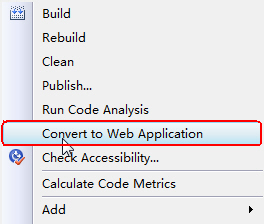
3. 右键aspx文件或工程名,点击"Convert to Web Application"。这时,自动生成的designer.cs文件了。(aspx页面中的控件的定义。)
好了,添加外部的链接文件:
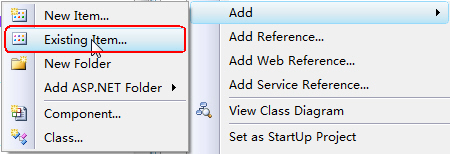
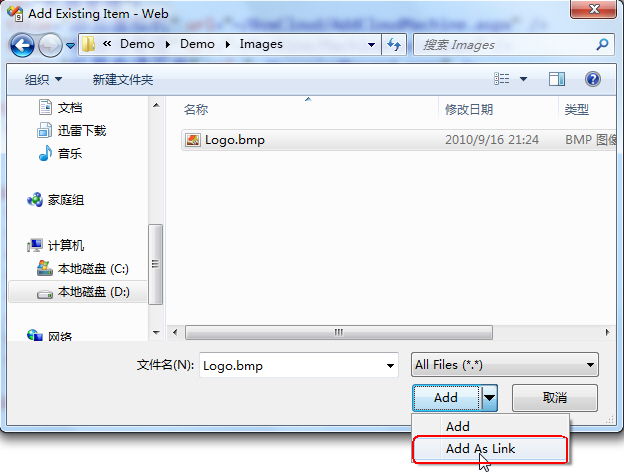
添加链接的文件很简单,也很方便。但是调试过程中,会遇到很大的麻烦。因为调试时,默认使用VS内置的Web Server,网站的根目录是源代码目录,调试时,遇到链接文件时,会因为找不到文件而出错。
而如果使用”publish“菜单发布网站时,会将链接的资源文件拷贝过去,这才是我们想要的。每次调试都需要进行发布,然后在本机的iis里设置虚拟目录,太麻烦了。
同时,我们希望通过MSBuild自动构建和发布网站,构建时也希望能自动的将链接的文件拷贝一份过去。MSBuild中编译ASP.NET Web Application工程的命令是:
但是,上面的命令不会把链接的文件拷贝过去。这个问题困扰了我,难道要我写一个Copy的Task,自己将需要的文件拷贝过去?后来google了一下,发现也有人遇到我一样的问题,并且提供了一个绝佳的解决方案,同时解决了调试和发布的问题,真是太完美了!
方法是,修改csproj文件,重新定义默认的_CopyWebApplication Target,同时,增加拷贝链接文件的Target。将下面这段代码加入到csproj文件中:

============================================================
_CopyWebApplication
MODIFIED: Ignores linked files as part of normal deployment logic.
This target will copy the build outputs along with the
content files into a _PublishedWebsites folder.
This Task is only necessary when $(OutDir) has been redirected
to a folder other than ~\bin such as is the case with Team Build.
============================================================
-->
<Target Name="_CopyWebApplication" Condition="'$(OutDir)' != '$(OutputPath)'">
<!-- Log tasks -->
<Message Text="Copying Web Application Project Files for $(MSBuildProjectName)" />
<!-- Create the _PublishedWebsites\app\bin folder -->
<MakeDir Directories="$(WebProjectOutputDir)\bin" />
<!-- Copy build outputs to _PublishedWebsites\app\bin folder -->
<Copy SourceFiles="@(IntermediateAssembly)" DestinationFolder="$(WebProjectOutputDir)\bin" SkipUnchangedFiles="true" />
<Copy SourceFiles="@(AddModules)" DestinationFolder="$(WebProjectOutputDir)\bin" SkipUnchangedFiles="true" />
<Copy SourceFiles="$(IntermediateOutputPath)$(_SGenDllName)" DestinationFolder="$(WebProjectOutputDir)\%(Content.SubFolder)%(Content.RecursiveDir)" SkipUnchangedFiles="true" Condition="'$(_SGenDllCreated)'=='true'" />
<Copy SourceFiles="$(IntermediateOutputPath)$(TargetName).pdb" DestinationFolder="$(WebProjectOutputDir)\bin" SkipUnchangedFiles="true" Condition="'$(_DebugSymbolsProduced)'=='true'" />
<Copy SourceFiles="@(DocFileItem)" DestinationFolder="$(WebProjectOutputDir)\bin" SkipUnchangedFiles="true" Condition="'$(_DocumentationFileProduced)'=='true'" />
<Copy SourceFiles="@(IntermediateSatelliteAssembliesWithTargetPath)" DestinationFiles="@(IntermediateSatelliteAssembliesWithTargetPath->'$(WebProjectOutputDir)\bin\%(Culture)\$(TargetName).resources.dll')" SkipUnchangedFiles="true" />
<Copy SourceFiles="@(ReferenceComWrappersToCopyLocal); @(ResolvedIsolatedComModules); @(_DeploymentLooseManifestFile); @(NativeReferenceFile)" DestinationFolder="$(WebProjectOutputDir)\bin" SkipUnchangedFiles="true" />
<!-- copy any referenced assemblies to _PublishedWebsites\app\bin folder -->
<Copy SourceFiles="@(ReferenceCopyLocalPaths)" DestinationFolder="$(WebProjectOutputDir)\bin" SkipUnchangedFiles="true" />
<!-- MODIFICATION HERE: Copy local content files (i.e. non-linked files) recursively to _PublishedWebsites\app\ folder -->
<Copy Condition=" '%(Content.Link)' == '' " SourceFiles="%(Content.Identity)" DestinationFolder="$(WebProjectOutputDir)\%(Content.RelativeDir)" />
</Target>
<!--
============================================================
CopyLinkedContentFiles
A new target to copy any linked content files into the
web application output folder.
NOTE: This is necessary even when '$(OutDir)' has not been redirected.
============================================================
-->
<Target Name="CopyLinkedContentFiles">
<!-- Remove any old copies of the files -->
<Delete Condition=" '%(Content.Link)' != '' AND Exists('$(WebProjectOutputDir)\%(Content.Link)') " Files="$(WebProjectOutputDir)\%(Content.Link)" />
<!-- Copy linked content files recursively to the project folder -->
<Copy Condition=" '%(Content.Link)' != '' " SourceFiles="%(Content.Identity)" DestinationFiles="$(WebProjectOutputDir)\%(Content.Link)" />
</Target>
<!-- Override the default target dependencies to -->
<!-- include the new _CopyLinkedContentFiles target. -->
<PropertyGroup>
<PrepareForRunDependsOn>
$(PrepareForRunDependsOn);
_CopyWebApplication;
CopyLinkedContentFiles;
_BuiltWebOutputGroupOutput
</PrepareForRunDependsOn>
</PropertyGroup>
</Project>
其实就是写了一些通用的Copy,而不必手工指定哪些需要拷贝。然后,在MSBuild脚本中,增加CopyLinkedContentFiles Target:
搞定!这时MSBuild编译出来的文件将会包括所有我们需要的文件了。同时,在VS里点击”Build“编译,会将链接的文件也复制一份过来源码目录,这样就能非常方便的使用内置的Web Server进行调试了!
ASP.NET Web Application中使用链接文件的更多相关文章
- 在ASP.NET Web Application中通过SOAP协议调用Bing搜索服务
本文介绍了如何在ASP.NET Web Application中将Bing搜索作为Web Service来使用,并通过HTTP的SOAP协议在ASP.NET Web Application中调用Bin ...
- ASP.NET web application中的redirect
在开发ASP.NET MVC web application过程中,开发上线了新系统后,需要把老系统的url redirect新系统下 其中在项目系统目录下有一个文件 301RedirectsPage ...
- ASP.NET Web网站中App_Code文件夹的作用及使用场景
原文地址:Web Site项目和ASP.NET Web Application中App_Code文件夹的作用作者:宾的宾 我现在要建一个ASP.NET的网站了,不难吧,开始动手.如下图: 这种方法建立 ...
- 如何在ASP.NET Web站点中统一页面布局[Creating a Consistent Layout in ASP.NET Web Pages(Razor) Sites]
如何在ASP.NET Web站点中统一页面布局[Creating a Consistent Layout in ASP.NET Web Pages(Razor) Sites] 一.布局页面介绍[Abo ...
- Asp.Net Web API 2第十三课——ASP.NET Web API中的JSON和XML序列化
前言 阅读本文之前,您也可以到Asp.Net Web API 2 系列导航进行查看 http://www.cnblogs.com/aehyok/p/3446289.html 本文描述ASP.NET W ...
- 【ASP.NET Web API教程】4.3 ASP.NET Web API中的异常处理
原文:[ASP.NET Web API教程]4.3 ASP.NET Web API中的异常处理 注:本文是[ASP.NET Web API系列教程]的一部分,如果您是第一次看本系列教程,请先看前面的内 ...
- ASP.NET Web API中的JSON和XML序列化
ASP.NET Web API中的JSON和XML序列化 前言 阅读本文之前,您也可以到Asp.Net Web API 2 系列导航进行查看 http://www.cnblogs.com/aehyok ...
- 如何在 ASP.Net Web Forms 中使用依赖注入
依赖注入技术就是将一个对象注入到一个需要它的对象中,同时它也是控制反转的一种实现,显而易见,这样可以实现对象之间的解耦并且更方便测试和维护,依赖注入的原则早已经指出了,应用程序的高层模块不依赖于低层模 ...
- 在ASP.NET Web API中使用OData
http://www.alixixi.com/program/a/2015063094986.shtml 一.什么是ODataOData是一个开放的数据协议(Open Data Protocol)在A ...
随机推荐
- oracle GROUP BY rollup
1.ROW_NUMBER() OVER函数的基本用法用法 http://www.cnblogs.com/fxgachiever/archive/2010/09/15/1826792.html 2.De ...
- Linux 增加虚拟内存
1. 用 df -h 命令找一个比较大的磁盘空间 2.建立swap文件 大小为2G count= 3.启用虚拟内存 1. 将swap文件设置为swap分区文件 mkswap swapfile #(由于 ...
- MVC 下载相关
前台: location.href = "/Flow/SB1SP?clxxid=8099b23c-aa5a-44a3-97ef-85eed78145ba"; 后台: publci ...
- PostgresSQL 数组包含@>
原文链接:http://www.postgresql.org/docs/9.5/static/functions-array.html 9.18. Array Functions and Operat ...
- vue从入门到开发--3-基础语法
一:v-text指令 指令v-text:可通过该指令绑定动态数据(动态数据我觉得可以是从服务器请求下来的数据,保存在data里边,然后动态显示在文档中,因为是一个一个的组件,数据应该不会很多吧,就只有 ...
- 关于搭建系统直播和Thinkphp的杂谈(持续更新)
Q:Access denied for user 'root'@'localhost' 错误 A:第一种:配置文件中把数据库的用户名密码再改一遍,把runtime里的文件删除 第二种:修改syste ...
- uvm_subscriber——告诉她我们来过
Subscribers are basically listeners of an analysis port. They subscribe to a broadcaster and receive ...
- java httpclient 跳过证书验证
import java.io.IOException;import java.net.InetAddress;import java.net.Socket;import java.net.Unknow ...
- HDU 1398 Square Coins 平方硬币 (普通母函数,水)
题意: 有17种硬币,每种的面值为编号的平方,比如 1,4,9,16.....给出一个数字,求组成这个面值有多少种组法? 思路: 用普通母函数解,主要做的就是模拟乘法,因为硬币是无限的,所以每个构造式 ...
- UVA1665 Islands (并查集)
补题,逆序考虑每个询问的时间,这样每次就变成出现新岛屿,然后用并查集合并统计.fa = -1表示没出现. 以前写过,但是几乎忘了,而且以前写得好丑的,虽然常数比较小,现在重新写练练手.每个单词后面都要 ...