
ASP.NET Web Application中使用链接文件
最近重构一个内部的平台系统,作为一个平台,其下有几个子系统,每个子系统有自己的网站系统。而每个网站使用的是统一的风格,统一的验证机制,反馈系统,等等。所以,为了避免几个子系统中重复出现相同的资源或文件,我打算将以前的ASP.NET Web Site全部转换为ASP.NET Web Application,然后通过链接外部公共文件的方式解决这个问题。同时:
1. Web Application是Web Site的升级产品。
2. Web Application允许添加链接方式,把其他目录的文件作为链接加入工程,更具备灵活性。
3. Web Application编译,构建,部署更加简单,快速,便捷。
当然,Web Application和Web Site还有很多不同的地方,比如:
1. Web Application有designer.cs文件,Web Site没有。
2. Web Application有命名空间,Web Site默认没有。
3. Web Application默认没有App_Code目录,需手工添加,且添加的cs文件默认属性为Content,需手工修改为Compile才加入编译。
...
等等。本文主要讲述,在ASP.NET Web Application中使用链接文件时,遇到的一些问题,以及解决办法。
首先,介绍一下将Web Site页面转换为Web Application页面的方法。如果了解了两者的区别,将会非常容易。主要分为几步:
1. 新建一个Web Application工程,将原Web Site页面添加到该工程中。
2. 在aspx.cs文件中,给类加上命名空间。同时,aspx文件头部的Inherits属性也加上命名空间。
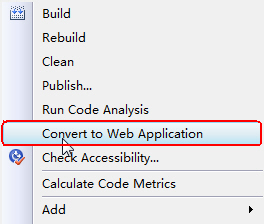
3. 右键aspx文件或工程名,点击"Convert to Web Application"。这时,自动生成的designer.cs文件了。(aspx页面中的控件的定义。)
好了,添加外部的链接文件:
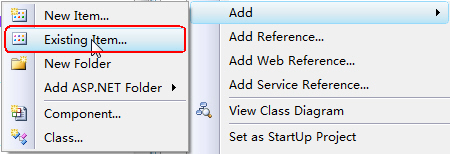
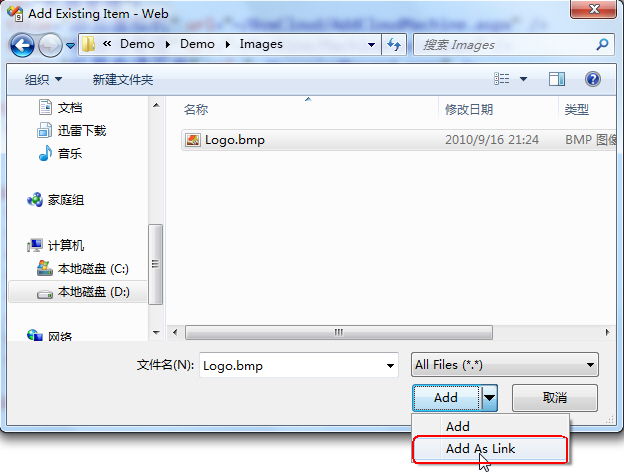
添加链接的文件很简单,也很方便。但是调试过程中,会遇到很大的麻烦。因为调试时,默认使用VS内置的Web Server,网站的根目录是源代码目录,调试时,遇到链接文件时,会因为找不到文件而出错。
而如果使用”publish“菜单发布网站时,会将链接的资源文件拷贝过去,这才是我们想要的。每次调试都需要进行发布,然后在本机的iis里设置虚拟目录,太麻烦了。
同时,我们希望通过MSBuild自动构建和发布网站,构建时也希望能自动的将链接的文件拷贝一份过去。MSBuild中编译ASP.NET Web Application工程的命令是:
但是,上面的命令不会把链接的文件拷贝过去。这个问题困扰了我,难道要我写一个Copy的Task,自己将需要的文件拷贝过去?后来google了一下,发现也有人遇到我一样的问题,并且提供了一个绝佳的解决方案,同时解决了调试和发布的问题,真是太完美了!
方法是,修改csproj文件,重新定义默认的_CopyWebApplication Target,同时,增加拷贝链接文件的Target。将下面这段代码加入到csproj文件中:

============================================================
_CopyWebApplication
MODIFIED: Ignores linked files as part of normal deployment logic.
This target will copy the build outputs along with the
content files into a _PublishedWebsites folder.
This Task is only necessary when $(OutDir) has been redirected
to a folder other than ~\bin such as is the case with Team Build.
============================================================
-->
<Target Name="_CopyWebApplication" Condition="'$(OutDir)' != '$(OutputPath)'">
<!-- Log tasks -->
<Message Text="Copying Web Application Project Files for $(MSBuildProjectName)" />
<!-- Create the _PublishedWebsites\app\bin folder -->
<MakeDir Directories="$(WebProjectOutputDir)\bin" />
<!-- Copy build outputs to _PublishedWebsites\app\bin folder -->
<Copy SourceFiles="@(IntermediateAssembly)" DestinationFolder="$(WebProjectOutputDir)\bin" SkipUnchangedFiles="true" />
<Copy SourceFiles="@(AddModules)" DestinationFolder="$(WebProjectOutputDir)\bin" SkipUnchangedFiles="true" />
<Copy SourceFiles="$(IntermediateOutputPath)$(_SGenDllName)" DestinationFolder="$(WebProjectOutputDir)\%(Content.SubFolder)%(Content.RecursiveDir)" SkipUnchangedFiles="true" Condition="'$(_SGenDllCreated)'=='true'" />
<Copy SourceFiles="$(IntermediateOutputPath)$(TargetName).pdb" DestinationFolder="$(WebProjectOutputDir)\bin" SkipUnchangedFiles="true" Condition="'$(_DebugSymbolsProduced)'=='true'" />
<Copy SourceFiles="@(DocFileItem)" DestinationFolder="$(WebProjectOutputDir)\bin" SkipUnchangedFiles="true" Condition="'$(_DocumentationFileProduced)'=='true'" />
<Copy SourceFiles="@(IntermediateSatelliteAssembliesWithTargetPath)" DestinationFiles="@(IntermediateSatelliteAssembliesWithTargetPath->'$(WebProjectOutputDir)\bin\%(Culture)\$(TargetName).resources.dll')" SkipUnchangedFiles="true" />
<Copy SourceFiles="@(ReferenceComWrappersToCopyLocal); @(ResolvedIsolatedComModules); @(_DeploymentLooseManifestFile); @(NativeReferenceFile)" DestinationFolder="$(WebProjectOutputDir)\bin" SkipUnchangedFiles="true" />
<!-- copy any referenced assemblies to _PublishedWebsites\app\bin folder -->
<Copy SourceFiles="@(ReferenceCopyLocalPaths)" DestinationFolder="$(WebProjectOutputDir)\bin" SkipUnchangedFiles="true" />
<!-- MODIFICATION HERE: Copy local content files (i.e. non-linked files) recursively to _PublishedWebsites\app\ folder -->
<Copy Condition=" '%(Content.Link)' == '' " SourceFiles="%(Content.Identity)" DestinationFolder="$(WebProjectOutputDir)\%(Content.RelativeDir)" />
</Target>
<!--
============================================================
CopyLinkedContentFiles
A new target to copy any linked content files into the
web application output folder.
NOTE: This is necessary even when '$(OutDir)' has not been redirected.
============================================================
-->
<Target Name="CopyLinkedContentFiles">
<!-- Remove any old copies of the files -->
<Delete Condition=" '%(Content.Link)' != '' AND Exists('$(WebProjectOutputDir)\%(Content.Link)') " Files="$(WebProjectOutputDir)\%(Content.Link)" />
<!-- Copy linked content files recursively to the project folder -->
<Copy Condition=" '%(Content.Link)' != '' " SourceFiles="%(Content.Identity)" DestinationFiles="$(WebProjectOutputDir)\%(Content.Link)" />
</Target>
<!-- Override the default target dependencies to -->
<!-- include the new _CopyLinkedContentFiles target. -->
<PropertyGroup>
<PrepareForRunDependsOn>
$(PrepareForRunDependsOn);
_CopyWebApplication;
CopyLinkedContentFiles;
_BuiltWebOutputGroupOutput
</PrepareForRunDependsOn>
</PropertyGroup>
</Project>
其实就是写了一些通用的Copy,而不必手工指定哪些需要拷贝。然后,在MSBuild脚本中,增加CopyLinkedContentFiles Target:
搞定!这时MSBuild编译出来的文件将会包括所有我们需要的文件了。同时,在VS里点击”Build“编译,会将链接的文件也复制一份过来源码目录,这样就能非常方便的使用内置的Web Server进行调试了!
ASP.NET Web Application中使用链接文件的更多相关文章
- 在ASP.NET Web Application中通过SOAP协议调用Bing搜索服务
本文介绍了如何在ASP.NET Web Application中将Bing搜索作为Web Service来使用,并通过HTTP的SOAP协议在ASP.NET Web Application中调用Bin ...
- ASP.NET web application中的redirect
在开发ASP.NET MVC web application过程中,开发上线了新系统后,需要把老系统的url redirect新系统下 其中在项目系统目录下有一个文件 301RedirectsPage ...
- ASP.NET Web网站中App_Code文件夹的作用及使用场景
原文地址:Web Site项目和ASP.NET Web Application中App_Code文件夹的作用作者:宾的宾 我现在要建一个ASP.NET的网站了,不难吧,开始动手.如下图: 这种方法建立 ...
- 如何在ASP.NET Web站点中统一页面布局[Creating a Consistent Layout in ASP.NET Web Pages(Razor) Sites]
如何在ASP.NET Web站点中统一页面布局[Creating a Consistent Layout in ASP.NET Web Pages(Razor) Sites] 一.布局页面介绍[Abo ...
- Asp.Net Web API 2第十三课——ASP.NET Web API中的JSON和XML序列化
前言 阅读本文之前,您也可以到Asp.Net Web API 2 系列导航进行查看 http://www.cnblogs.com/aehyok/p/3446289.html 本文描述ASP.NET W ...
- 【ASP.NET Web API教程】4.3 ASP.NET Web API中的异常处理
原文:[ASP.NET Web API教程]4.3 ASP.NET Web API中的异常处理 注:本文是[ASP.NET Web API系列教程]的一部分,如果您是第一次看本系列教程,请先看前面的内 ...
- ASP.NET Web API中的JSON和XML序列化
ASP.NET Web API中的JSON和XML序列化 前言 阅读本文之前,您也可以到Asp.Net Web API 2 系列导航进行查看 http://www.cnblogs.com/aehyok ...
- 如何在 ASP.Net Web Forms 中使用依赖注入
依赖注入技术就是将一个对象注入到一个需要它的对象中,同时它也是控制反转的一种实现,显而易见,这样可以实现对象之间的解耦并且更方便测试和维护,依赖注入的原则早已经指出了,应用程序的高层模块不依赖于低层模 ...
- 在ASP.NET Web API中使用OData
http://www.alixixi.com/program/a/2015063094986.shtml 一.什么是ODataOData是一个开放的数据协议(Open Data Protocol)在A ...
随机推荐
- mysql合服 更新相同的用户名前追加服务器编号
表结构: CREATE TABLE IF NOT EXISTS `user` ( `) NOT NULL COMMENT '主键', `user_level` ) COMMENT '等级', `) C ...
- Codeforces 371BB. Fox Dividing Cheese
Two little greedy bears have found two pieces of cheese in the forest of weight a and b grams, corre ...
- SpringBoot 2.x (10):整合Redis
Redis部署到阿里云: 下载redis源码,编译,允许远程访问的配置 阿里云安全组设置: SSH连过去: wget http://download.redis.io/releases/redis-4 ...
- 重新安装Magento CE 2.1.0
删除 var/cache 文件夹 删除 var/generation文件夹 删除 app/etc/config.php 删除 app/etc/env.php 如果您觉得阅读本文对您有帮助,欢迎转载本文 ...
- 2013上半年中国CRM市场分析报告
经过了十多年的风风雨雨,CRM度过了漫长的市场培育期,即将迎来成熟期.目前这一阶段也是CRM惨烈搏杀的一个阶段,据不完全统计,国内大大小小的CRM厂商已经超过600家,各厂商几度火拼,努力扩大自己在C ...
- 2018百度之星初赛(A)2 度度熊学队列
思路: 记录一下c++ stl中的双向链表list的各种用法. https://blog.csdn.net/fanyun_01/article/details/56881515 实现: #includ ...
- JavaScript之执行环境及作用域
执行环境定义了变量或函数有权访问的其他数据,决定了它们各自的行为.每个执行环境都有一个与之关联的变量对象,环境中定义的所有变量和函数都保存在这个对象中.我们编写的代码是无法访问这个对象的,但解 ...
- C++拾遗(三)——函数
函数的定义 C++是一种静态强类型语言,对于每一次的函数调用,编译时都会检查其实参,必须与形参类型相同,或可被转换为该类型. 参数传递 普通的非引用类型的参数通过复制对应的实参实现初始化.引用形参直接 ...
- codevs 2618 核电站问题
时间限制: 1 s 空间限制: 32000 KB 题目等级 : 黄金 Gold 题目描述 Description 一个核电站有N个放核物质的坑,坑排列在一条直线上.如果连续M个坑中放入核物质,则会 ...
- 怎样将英文版的Eclipse转为中文版的?
=====>1.打开eclipse储存文件夹 =====>2.在eclipse文件中找到dropins文件 =====>3.把已经下载好的eclipse汉化包复制到dropins中 ...