
Angularjs学习---官方phonecat实例学习angularjs step0 step1
接下来一系列的文章都是学习https://docs.angularjs.org/tutorial的笔记,主要学习的angular-phonecat项目的实现,来介绍angularjs的使用.
1.下载angular-phonecat
使用git clone phonecat:
git clone --depth= https://github.com/angular/angular-phonecat.git
可以把--depth=14去掉,这里是拉最新的14个commit.
The --depth=14 option just tells Git to pull down only the last 14 commits. This makes the download much smaller and faster.
2.安装所需工具
Bower - client-side code package manager

Http-Server - simple local static web server

Karma - unit test runner

Protractor - end  end test runner
nodejs,npm,karma的安装可以参考前面的文章:Angularjs学习---ubuntu12.04中karma安装配置中常见的问题总结
1).ubuntu中安装bower命令为:
sudo npm install -g bower
2).安装驱动:
npm run update-webdriver
这里好像安装的是selenium驱动.
3).启动项目:npm start
amosli@amosli-pc:~/develop/angular-phonecat$ npm start

> angular-phonecat@0.0. prestart /home/amosli/develop/angular-phonecat

> npm install

> angular-phonecat@0.0. postinstall /home/amosli/develop/angular-phonecat

> bower install

> angular-phonecat@0.0. start /home/amosli/develop/angular-phonecat

> http-server -p

Starting up http-server, serving ./ on port:

Hit CTRL-C to stop the server
4).端到端的测试:
npm run protractor
- open up a Chrome browser and connect it to the application
- execute all the End to End tests in this browser
- report the results of these tests in the terminal/command line window
- close down the browser and exit
自动化测试步骤是打开chrome浏览器,连接到应用程序这里是angular-phonecat---->执行所有的端到端的测试---->在命令行中报告测试结果---->关闭浏览器并退出.
3.phonecat项目教程概述
教程分为13步,每一步可以切换到相应的分支上直接运行其步骤,比如要学习第0步的内容,那么执行如下命令:
amosli@amosli-pc:~/develop/angular-phonecat$ git checkout step-

Previous HEAD position was b1e657a... step- phone ordering

HEAD is now at c5495a2... step- bootstrap angular app
同样,可以看到的切换的步骤有step-0到12.
4.phonecat项目step-0
1).切换到第0步,启动项目:
amosli@amosli-pc:~/develop/angular-phonecat$ git checkout step-

Previous HEAD position was b1e657a... step- phone ordering

HEAD is now at c5495a2... step- bootstrap angular app

amosli@amosli-pc:~/develop/angular-phonecat$ npm start
2).在浏览器输入http://localhost:8000/app/index.html
效果:
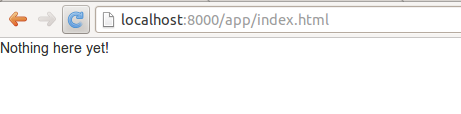
index.html的源码
<!doctype html>

<html lang="en" ng-app>

<head>

  <meta charset="utf-8">

  <title>My HTML File</title>

  <link rel="stylesheet" href="../bower_components/bootstrap/dist/css/bootstrap.css">

  <link rel="stylesheet" href="css/app.css">

  <script src="../bower_components/angular/angular.js"></script>

</head>

<body>

  <p>Nothing here {{'yet' + '!'}}</p>

</body>

</html>
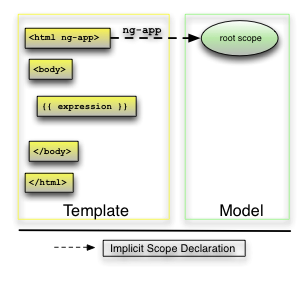
其数据渲染顺序:
injector that will be used for dependency injection is created.
The injector will then create the root scope that will become the context for the model of our application.
Angular will then "compile" the DOM starting at the
ngApproot element, processing any directives and bindings found along the way.
5.phonecat项目step-1
请编辑app/index.html文件,将下面的代码添加到index.html文件中,然后运行该应用查看效果。
<ul>

    <li>

        <span>Nexus S</span>

        <p>

        Fast just got faster with Nexus S.

        </p>

    </li>

    <li>

        <span>Motorola XOOM™ with Wi-Fi</span>

        <p>

        The Next, Next Generation tablet.

        </p>

    li>

</ul>
效果:

Angularjs学习---官方phonecat实例学习angularjs step0 step1的更多相关文章
- AngularJs学习笔记-慕课网AngularJS实战
第1章 快速上手 放弃了IE8以及以下,不支持. 4大核心特性: 1.MVC Model: 数据模型 View:视图 Controller:业务逻辑和控制逻辑 好处:职责清晰,模块化. 2.模块化 3 ...
- AngularJs学习笔记--I18n/L10n
原版地址:http://code.angularjs.org/1.0.2/docs/guide/i18n 一.I18n and L10n in AngularJS 1. 什么是I18n和L10n? 国 ...
- AngularJs学习笔记--Forms
原版地址:http://code.angularjs.org/1.0.2/docs/guide/forms 控件(input.select.textarea)是用户输入数据的一种方式.Form(表单) ...
- AngularJs学习笔记--expression
原版地址:http://code.angularjs.org/1.0.2/docs/guide/expression 表达式(Expressions)是类Javascript的代码片段,通常放置在绑定 ...
- AngularJs学习笔记--directive
原版地址:http://code.angularjs.org/1.0.2/docs/guide/directive Directive是教HTML玩一些新把戏的途径.在DOM编译期间,directiv ...
- AngularJs学习笔记--Guide教程系列文章索引
在很久很久以前,一位前辈向我推荐AngularJs.但当时我没有好好学习,仅仅是讲文档浏览了一次.后来觉醒了……于是下定决心好好理解这系列的文档,并意译出来(英文水平不足……不能说是翻译,有些实在是看 ...
- AngularJs学习笔记--bootstrap
AngularJs学习笔记系列第一篇,希望我可以坚持写下去.本文内容主要来自 http://docs.angularjs.org/guide/ 文档的内容,但也加入些许自己的理解与尝试结果. 一.总括 ...
- AngularJs学习笔记--html compiler
原文再续,书接上回...依旧参考http://code.angularjs.org/1.0.2/docs/guide/compiler 一.总括 Angular的HTML compiler允许开发者自 ...
- AngularJs学习笔记--concepts(概念)
原版地址:http://code.angularjs.org/1.0.2/docs/guide/concepts 继续.. 一.总括 本文主要是angular组件(components)的概览,并说明 ...
随机推荐
- mac版Camtasia 2.10破解
Camtasia是非常好用的一款录屏.视频编辑.制作的软件.但是这么一款优秀的软件只有30天的试用期,试用期过后便不能使用. 目前网上的破解办法几乎都属于同一种办法: http://www.orsoo ...
- Mybatis拦截器
Mybatis拦截器
- BZOJ 3144 [Hnoi2013]切糕 ——网络流
[题目分析] 网络流好题! 从割的方面来考虑问题往往会得到简化. 当割掉i,j,k时,必定附近的要割在k-D到k+D上. 所以只需要建两条inf的边来强制,如果割不掉强制范围内的时候,原来的边一定会换 ...
- Spark 资源池简介
在一个application内部,不同线程提交的Job默认按照FIFO顺序来执行,假设线程1先提交了一个job1,线程2后提交了一个job2,那么默认情况下,job2必须等待job1执行完毕后才能执行 ...
- Js的typeof和Js的基本数据类型
本文将从以下几个方面介绍Js的typeof和Js的基本数据类型: ** Js的typeof的用法 ** Js的基本数据类型 ** 使用基本类型使用typeof的返回结果 ** Js的typeof的用法 ...
- JS二维数组排序组合
需求是这样的:http://q.cnblogs.com/q/29093/ 这里简述一下: 现在有一个不确定长度的数组.比如:var temp=[["Fu","Hai&qu ...
- 第一次IT技术面试经历
一.技术总监面试问题: 1.Hibernate的应用项目例举 2.jsp标签库例举 3.oracle的增删改查 4.关系型数据库的关联关系 5.数据库分页操作 二.技术总监面试问题: 1.for循环中 ...
- 原生js移动端touch事件实现上拉加载更多
大家都知道jQuery里没有touch事件,所以在移动端使用原生js实现上拉加载效果还是很不错的,闲话不多说,代码如下: //获取要操作的元素 var objSection = document.ge ...
- Webform Session、Cookies传值,跳转页面方式
Session:每个独立的浏览器都会创建一个独立的Session,不是一台电脑一个Session 存放位置:服务器上 作用:只要里面有内容,那么这个网站中所有的C#端都能访问到这个变量 优点:安全,速 ...
- C#时间戳转换
,,)).ToUniversalTime ().Ticks ) / ;//先取得当前的UTC时间,然后转换成计算用的周期数(简称计时周期数),每个周期为100纳钞(ns)=0.1微秒(us)=0.00 ...