
win10中使用win7/win8.1"个性化"
直接下载使用:
设置
Windows Registry Editor Version 5.00
;
; Created by http://winaero.com, reedited by http://ithome.com
;
[HKEY_CLASSES_ROOT\DesktopBackground\Shell\Appearance]
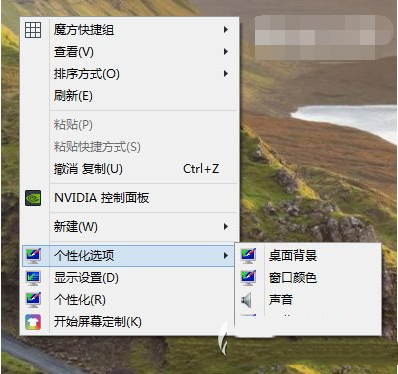
"MUIVerb"="个性化设置"
"SubCommands"="Wallpaper;Colors;Sounds;Screensaver;Icons"
"icon"="desk.cpl"
"Position"="Bottom"
[HKEY_LOCAL_MACHINE\SOFTWARE\Microsoft\Windows\CurrentVersion\Explorer\CommandStore\shell\Screensaver]
@="屏幕保护程序"
"Position"="Bottom"
"Icon"="desk.cpl"
[HKEY_LOCAL_MACHINE\SOFTWARE\Microsoft\Windows\CurrentVersion\Explorer\CommandStore\shell\Screensaver\Command]
@="rundll32.exe shell32.dll,Control_RunDLL desk.cpl,screensaver,@screensaver"
[HKEY_LOCAL_MACHINE\SOFTWARE\Microsoft\Windows\CurrentVersion\Explorer\CommandStore\shell\Sounds]
@="声音"
"Position"="Bottom"
"Icon"="mmsys.cpl"
[HKEY_LOCAL_MACHINE\SOFTWARE\Microsoft\Windows\CurrentVersion\Explorer\CommandStore\shell\Sounds\Command]
@="rundll32.exe shell32.dll,Control_RunDLL mmsys.cpl ,2"
[HKEY_LOCAL_MACHINE\SOFTWARE\Microsoft\Windows\CurrentVersion\Explorer\CommandStore\shell\Wallpaper]
@="桌面背景"
"Icon"="%SystemRoot%\\System32\\desk.cpl"
"Position"="Bottom"
[HKEY_LOCAL_MACHINE\SOFTWARE\Microsoft\Windows\CurrentVersion\Explorer\CommandStore\shell\Wallpaper\Command]
@="control.exe /NAME Microsoft.Personalization /PAGE pageWallpaper"
[HKEY_LOCAL_MACHINE\SOFTWARE\Microsoft\Windows\CurrentVersion\Explorer\CommandStore\shell\Icons]
@="桌面图标"
"Icon"="%SystemRoot%\\System32\\desk.cpl"
"Position"="Bottom"
[HKEY_LOCAL_MACHINE\SOFTWARE\Microsoft\Windows\CurrentVersion\Explorer\CommandStore\shell\Icons\Command]
@="rundll32 shell32.dll,Control_RunDLL desk.cpl,,0"
[HKEY_LOCAL_MACHINE\SOFTWARE\Microsoft\Windows\CurrentVersion\Explorer\CommandStore\shell\Colors]
@="窗口颜色"
"Icon"="%SystemRoot%\\System32\\desk.cpl"
"Position"="Bottom"
[HKEY_LOCAL_MACHINE\SOFTWARE\Microsoft\Windows\CurrentVersion\Explorer\CommandStore\shell\Colors\command]
@="control.exe /NAME Microsoft.Personalization /PAGE pageColorization"
将以上代码粘贴到记事本中,保存为“所有文件”,文件名随意,但后缀名务必为“.reg”。
恢复
Windows Registry Editor Version 5.00
[-HKEY_CLASSES_ROOT\DesktopBackground\Shell\Appearance]
[-HKEY_LOCAL_MACHINE\SOFTWARE\Microsoft\Windows\CurrentVersion\Explorer\CommandStore\shell\Screensaver]
[-HKEY_LOCAL_MACHINE\SOFTWARE\Microsoft\Windows\CurrentVersion\Explorer\CommandStore\shell\Sounds]
[-HKEY_LOCAL_MACHINE\SOFTWARE\Microsoft\Windows\CurrentVersion\Explorer\CommandStore\shell\Wallpaper]
[-HKEY_LOCAL_MACHINE\SOFTWARE\Microsoft\Windows\CurrentVersion\Explorer\CommandStore\shell\Icons]
[-HKEY_LOCAL_MACHINE\SOFTWARE\Microsoft\Windows\CurrentVersion\Explorer\CommandStore\shell\Colors]
将以上代码粘贴到记事本中,保存为“所有文件”,文件名随意,但后缀名务必为“.reg”。
效果
win10中使用win7/win8.1"个性化"的更多相关文章
- 【转】微软教学:三种方法屏蔽Win7/Win8.1升级Win10推送
原文地址:http://www.ithome.com/html/win10/199961.htm 微软在2015年6月就开启了Win10升级推送工作,主要是靠<获取Windows10>工具 ...
- Win7/Win8/Win8.1/Win10下的DragEnter DragDrop事件不触发
Win7/Win8/Win8.1/Win10下的DragDrop事件不触发 2011-02-02 来自:博客园 字体大小:[大 中 小] 摘要:你的应用程序需要从windows资源管理器拖动文件到 ...
- Win7/Win8.1预订升级Win10失败临时解决方案
很多Win7/Win8.1用户在今天凌晨通过微软官方推送的方式升级Win10,但这一过程中遇到了“安装失败”等问题,导致升级无法进行.鉴于这种情况,很多用户选择进入Windows10预下载安装文件夹打 ...
- atitit。win7 win8 win9 win10 win11 新特性总结与战略规划
atitit.win7 win8 win9 win10 win11 新特性总结与战略规划 1. win7 1 1.1. 发布时间 2009年10月22日 1 1.2. 稳定性大幅提升,很少蓝屏死机 ...
- Win7/Win8.1升级Win10后屏幕一直闪烁怎么办?
有些用户在把Win7/Win8.1升级到Win10正式版后,发现屏幕一直不停闪烁,以至于无法正常使用.出现这种情况的原因可能有很多,微软社区的论坛审阅人Alex_Shen给出了一种解决方案:进入安全模 ...
- win7/win8/win10 系统
WIN7/WIN8/WIN10 系统安装 http://www.windows7en.com/Win7/18572.html
- 如何在Win10中启用和关闭管理员账户?
和Win7/Win8.1一样,Win10的管理员账户Administrator是默认隐藏和关闭的,因为该账户权限极高,被不法分子利用后存在极大风险.但如果你想在某些特殊情况下使用该账户,就需要手动将其 ...
- win10中使用sqlserver2008r2 SQL Server 配置管理器
原文:win10中使用sqlserver2008r2 SQL Server 配置管理器 使用 Windows10 访问 SQL Server 配置管理器 因为 SQL Server 配置管理器是 Mi ...
- 找回MSI安装包Win7/Win8管理员身份功能
找回MSI安装包Win7/Win8管理员身份功能 从Vista开始,系统引入了UAC用户控制功能,即普通用户运行exe软件安装程序,支持使用普通账户/管理员身份分别进行安装,但是msi安装包只支持默认 ...
随机推荐
- 初步使用redis
1.导入jar包 2.新建类: public class JedisAdapter { private static final Logger logger = LoggerFactory.getLo ...
- js函数定义参数个数和实际传入参数的对比
因为js是一种弱类型的编程语言,对数据类型的要求没有其他编程语言的要求严格,所以在定义函数的时候不需要像java和C#一样对其传入参数的类型进行定义.那么传入参数的个数有没有影响呢?今天小猪就做了个实 ...
- VC OnCtlColor函数来修改控件背景颜色
CWnd::OnCtlColor afx_msg HBRUSH OnCtlColor( CDC* pDC, CWnd* pWnd, UINT nCtlColor ); 返回值:OnCtlColor必须 ...
- Jinkins定时任务设置
设置的地方在构建触发器中 Build after other projects are built:在其他项目构建完成后再进行构建. Build periodically:周期进行构建 Build w ...
- Python实现二叉树的前序、中序、后序、层次遍历
有关树的理论部分描述:<数据结构与算法>-4-树与二叉树: 下面代码均基于python实现,包含: 二叉树的前序.中序.后序遍历的递归算法和非递归算法: 层次遍历: 由前序序列.中 ...
- vue、React Nactive的区别(转载)
Vue与React的对比 Vue.js与React.js从某些反面来说很相似,通过两个框架的学习,有时候对一些用法会有一点思考,为加深学习的思索,特翻阅了两个文档,从以下各方面进行了对比,加深了对这两 ...
- jquery 插件的实现和优化
1.menus 实现: $.fn.menu=function(options){ var $this=$(this); var cross='<div class="zhiniu_cr ...
- 关于Django查询知识点总结
========关于Django查询知识点总结======= models.Book.objects.filter(**kwargs): querySet [obj1,obj2] models.Boo ...
- 题解 BZOJ 1037 & Luogu P2592 [ZJOI2008]生日聚会
BZOJ & Luogu 老师说是背包?并没看出来QAQ 设f[i][j][o][p]表示已经选了i个人,j个男生,男生比女生最多多o个,女生比男生最多多p个时的方案数 两种转移: <= ...
- 不可见类有抽象父类,spring配置子类bean,注入父类,aop就可以切父类的方法
public class TestBeanChild { int b = 1; public TestBean createDefault() { return new TestBeanDefault ...