
iOS 之 UIStackView
UIStackView是iOS9新推出的布局控件,它的出现,可以说颠覆了以往的布局方式。
问题时,如果我使用UIStackView,它能用在iOS7、8系统中吗?
我要测试一下。测试程序我放到github上面,点击这里进入github地址。
1. 使用UIStackView
代码实现:
/**

 *  创建stackView布局视图

 */

-(void)makeUIofStackView{

    CGRect rect = CGRectMake(0, 0, m_frameInfo.width, m_frameInfo.height);

    m_mainStackView = [[UIStackView alloc] initWithFrame:rect];

    /**

     *  因为继承于UIView,所以有backgroundColor属性。

     *  布局控件,设置背景色也是没有用的

     */

    m_mainStackView.backgroundColor = [UIColor redColor];

    [self.view addSubview:m_mainStackView];

}
现在创建了一个布局控件,它占据了整个视图的大小,所以,它负责整个页面的布局。
2. 添加子视图
/**

 *  在stackview中添加视图,并设置布局属性

 */

-(void)makeUIStackViewAddViewsWithDistribution:(UIStackViewDistribution)distribution{

    m_mainStackView.distribution = distribution;

    UIView *blueView = [[UIView alloc] init];

    UIView *greenView = [[UIView alloc] init];

    blueView.backgroundColor = [UIColor blueColor];

    greenView.backgroundColor = [UIColor greenColor];

    [m_mainStackView addArrangedSubview:blueView];

    [m_mainStackView addArrangedSubview:greenView];

}
distribution就是“布局”的意思。那么,distribution的属性共有哪些呢?
2.1. UIStackViewDistributionFill
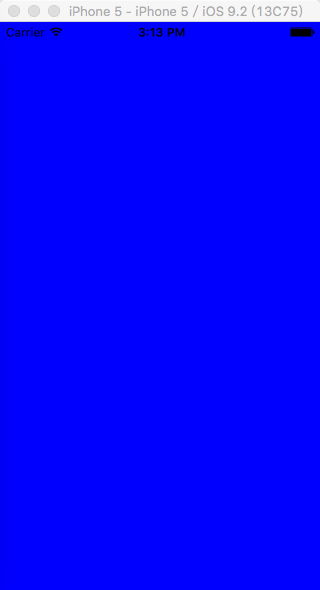
默认的distribution是 “UIStackViewDistributionFill” ,它代表每一个子视图都填满整个UIStackView的全部范围。这样,就会只显示第一个视图,其它的视图都显示到整个屏幕之外,或者没有显示,内部的设置我就不清楚了。
2.2. UIStackViewDistributionFillEqually
里面的各个元素的空间是相等的,并且各个元素都填满所在空间。

2.2. UIStackViewDistributionFillProportionally
2.2.1. 添加三个视图,并设置视图大小
/**

 *  在stackview中添加视图,并设置布局属性

 */

-(void)makeUIStackViewAddViewsWithDistribution:(UIStackViewDistribution)distribution{

    m_mainStackView.distribution = distribution;

    CGRect rectBlue  = CGRectMake(0, 0, m_frameInfo.width/6 * 3, m_frameInfo.height);

    CGRect rectGreen = CGRectMake(0, 0, m_frameInfo.width/6 * 2, m_frameInfo.height);

    CGRect rectRed   = CGRectMake(0, 0, m_frameInfo.width/6 * 1, m_frameInfo.height);

    UIView *blueView  = [[UIView alloc] initWithFrame:rectBlue];

    UIView *greenView = [[UIView alloc] initWithFrame:rectGreen];

    UIView *redView   = [[UIView alloc] initWithFrame:rectRed];

    blueView.backgroundColor  = [UIColor blueColor];

    greenView.backgroundColor = [UIColor greenColor];

    redView.backgroundColor   = [UIColor redColor];

    [m_mainStackView addArrangedSubview:blueView];

    [m_mainStackView addArrangedSubview:greenView];

    [m_mainStackView addArrangedSubview:redView];

}
代码如上时,并且属性为UIStackViewDistributionFillProportionally时,只显示第三个页面。
2.2.2. 只添加两个视图,并设置视图大小
并没有根据宽度来分配,当不加入第三个页面时,也就是最后一行代码被注释掉,显示前两个View,并且是平均分布的。这是为什么呢?
2.2.3. 视图UIView换成UILalbe
感觉像是,View并不作为元素来处理吗?如果换成UILable会如何呢?
/**

 *  在stackview中添加视图,并设置布局属性

 */

-(void)makeUIStackViewAddViewsWithDistribution:(UIStackViewDistribution)distribution{

    m_mainStackView.distribution = distribution;

    CGRect rectBlue  = CGRectMake(0, 0, m_frameInfo.width/6 * 3, m_frameInfo.height);

    CGRect rectGreen = CGRectMake(0, 0, m_frameInfo.width/6 * 2, m_frameInfo.height);

    CGRect rectRed   = CGRectMake(0, 0, m_frameInfo.width/6 * 1, m_frameInfo.height);

    UILabel *blueView  = [[UILabel alloc] initWithFrame:rectBlue];

    UILabel *greenView = [[UILabel alloc] initWithFrame:rectGreen];

    UILabel *redView   = [[UILabel alloc] initWithFrame:rectRed];

    blueView.backgroundColor  = [UIColor blueColor];

    greenView.backgroundColor = [UIColor greenColor];

    redView.backgroundColor   = [UIColor redColor];

    [m_mainStackView addArrangedSubview:blueView];

    [m_mainStackView addArrangedSubview:greenView];

    [m_mainStackView addArrangedSubview:redView];

}
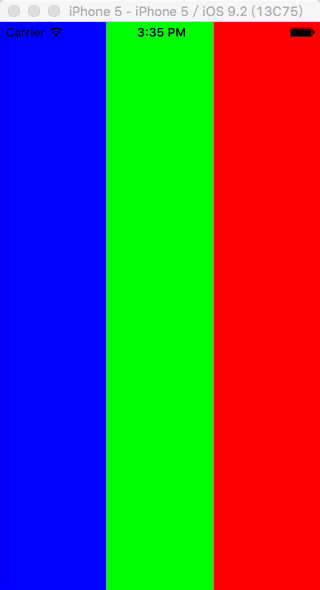
这时,它们是平均分布的
2.2.4. 视图UIView换成UILalbe,并设置不同长度的文本
感觉很诡异吗?我猜是因为UILabel的text都为空的缘故。试试填入不同的文本。
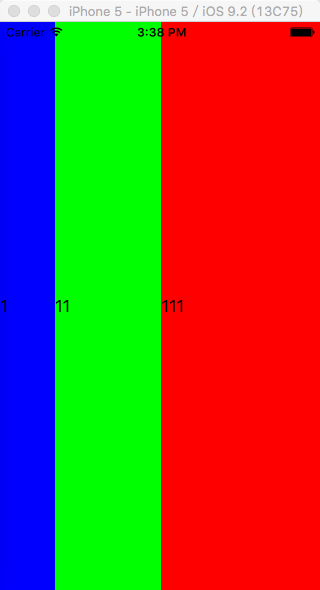
也就是说根据内容的大小,而不是根据Frame的大小。
2.2.5. 创建UIView,UILalbe,并用UIView装载UILable,同时设置它们的大小
但是,上述理论也不完全正确,我们把UIView的大小设置一下,然后再装入UILabel:
/**

 *  在stackview中添加视图,并设置布局属性

 */

-(void)makeUIStackViewAddViewsWithDistribution:(UIStackViewDistribution)distribution{

    m_mainStackView.distribution = distribution;

    CGRect rectBlue  = CGRectMake(0, 0, m_frameInfo.width/6 * 3, m_frameInfo.height);

    CGRect rectGreen = CGRectMake(0, 0, m_frameInfo.width/6 * 2, m_frameInfo.height);

    CGRect rectRed   = CGRectMake(0, 0, m_frameInfo.width/6 * 1, m_frameInfo.height);

    UILabel *blueLable  = [[UILabel alloc] initWithFrame:rectBlue];

    UILabel *greenLable = [[UILabel alloc] initWithFrame:rectGreen];

    UILabel *redLable   = [[UILabel alloc] initWithFrame:rectRed];

    blueLable.backgroundColor  = [UIColor blueColor];

    greenLable.backgroundColor = [UIColor greenColor];

    redLable.backgroundColor   = [UIColor redColor];

    blueLable.text  = @"1";

    greenLable.text = @"11";

    redLable.text   = @"111";

    UIView *blueView  = [[UIView alloc] initWithFrame:rectBlue];

    UIView *greenView = [[UIView alloc] initWithFrame:rectGreen];

    UIView *redView   = [[UIView alloc] initWithFrame:rectRed];

    [blueView addSubview:blueLable];

    [greenView addSubview:greenLable];

    [redView addSubview:redLable];

    [m_mainStackView addArrangedSubview:blueView];

    [m_mainStackView addArrangedSubview:greenView];

    [m_mainStackView addArrangedSubview:redView];

}
会出现如下状况:
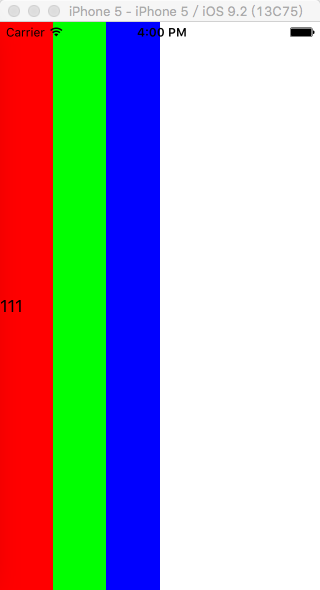
这是什么状况呢? 乍看之下,还会有点梦。这时,起始设置UIView的Frame就有效果了。实际上,蓝色的UIView占了1/2;绿色的UIView占了 1/3;红色的UIView占了 1/6;而蓝色的UIView和绿色的UIView的UILable都被挡住了,因为这三个视图都是从(0,0)点开始的。
2.2.6. 创建UIView,UILalbe,并用UIView装载UILable, 都不设置大小
/**

 *  在stackview中添加视图,并设置布局属性

 */

-(void)makeUIStackViewAddViewsWithDistribution:(UIStackViewDistribution)distribution{

    m_mainStackView.distribution = distribution;

    CGRect rectBlue  = CGRectMake(0, 0, m_frameInfo.width/6 * 3, m_frameInfo.height);

    CGRect rectGreen = CGRectMake(0, 0, m_frameInfo.width/6 * 2, m_frameInfo.height);

    CGRect rectRed   = CGRectMake(0, 0, m_frameInfo.width/6 * 1, m_frameInfo.height);

    UILabel *blueLable  = [[UILabel alloc] init];

    UILabel *greenLable = [[UILabel alloc] init];

    UILabel *redLable   = [[UILabel alloc] init];

    blueLable.backgroundColor  = [UIColor blueColor];

    greenLable.backgroundColor = [UIColor greenColor];

    redLable.backgroundColor   = [UIColor redColor];

    blueLable.text  = @"1";

    greenLable.text = @"11";

    redLable.text   = @"111";

    UIView *blueView  = [[UIView alloc] init];

    UIView *greenView = [[UIView alloc] init];

    UIView *redView   = [[UIView alloc] init];

    [blueView addSubview:blueLable];

    [greenView addSubview:greenLable];

    [redView addSubview:redLable];

    [m_mainStackView addArrangedSubview:blueView];

    [m_mainStackView addArrangedSubview:greenView];

    [m_mainStackView addArrangedSubview:redView];

}
效果如下;
什么都没有显示,这倒可以理解,因为内容都为空。
2.2.7. 创建UIView,UILalbe,并用UIView装载UILable, 只设置UILable的大小
/**

 *  在stackview中添加视图,并设置布局属性

 */

-(void)makeUIStackViewAddViewsWithDistribution:(UIStackViewDistribution)distribution{

    m_mainStackView.distribution = distribution;

    CGRect rectBlue  = CGRectMake(0, 0, m_frameInfo.width/6 * 3, m_frameInfo.height);

    CGRect rectGreen = CGRectMake(0, 0, m_frameInfo.width/6 * 2, m_frameInfo.height);

    CGRect rectRed   = CGRectMake(0, 0, m_frameInfo.width/6 * 1, m_frameInfo.height);

    UILabel *blueLable  = [[UILabel alloc] initWithFrame:rectBlue];

    UILabel *greenLable = [[UILabel alloc] initWithFrame:rectGreen];

    UILabel *redLable   = [[UILabel alloc] initWithFrame:rectRed];

    blueLable.backgroundColor  = [UIColor blueColor];

    greenLable.backgroundColor = [UIColor greenColor];

    redLable.backgroundColor   = [UIColor redColor];

    blueLable.text  = @"1";

    greenLable.text = @"11";

    redLable.text   = @"111";

    UIView *blueView  = [[UIView alloc] init];

    UIView *greenView = [[UIView alloc] init];

    UIView *redView   = [[UIView alloc] init];

    [blueView addSubview:blueLable];

    [greenView addSubview:greenLable];

    [redView addSubview:redLable];

    [m_mainStackView addArrangedSubview:blueView];

    [m_mainStackView addArrangedSubview:greenView];

    [m_mainStackView addArrangedSubview:redView];

}
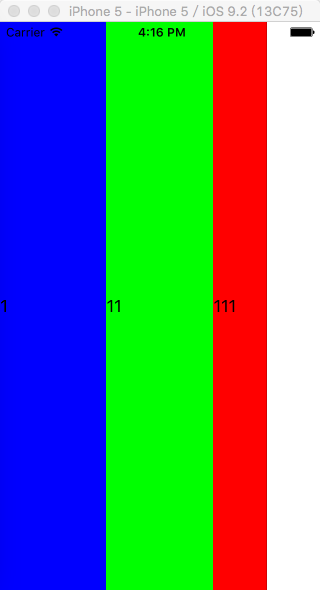
这就已经很诡异了,还能再诡异一点吗?
2.2.8. 创建UIView,UILalbe,并用UIView装载UILable, 只设置UIView的大小
/**

 *  在stackview中添加视图,并设置布局属性

 */

-(void)makeUIStackViewAddViewsWithDistribution:(UIStackViewDistribution)distribution{

    m_mainStackView.distribution = distribution;

    CGRect rectBlue  = CGRectMake(0, 0, m_frameInfo.width/6 * 3, m_frameInfo.height);

    CGRect rectGreen = CGRectMake(0, 0, m_frameInfo.width/6 * 2, m_frameInfo.height);

    CGRect rectRed   = CGRectMake(0, 0, m_frameInfo.width/6 * 1, m_frameInfo.height);

    UILabel *blueLable  = [[UILabel alloc] init];

    UILabel *greenLable = [[UILabel alloc] init];

    UILabel *redLable   = [[UILabel alloc] init];

    blueLable.backgroundColor  = [UIColor blueColor];

    greenLable.backgroundColor = [UIColor greenColor];

    redLable.backgroundColor   = [UIColor redColor];

    blueLable.text  = @"1";

    greenLable.text = @"11";

    redLable.text   = @"111";

    UIView *blueView  = [[UIView alloc] initWithFrame:rectBlue];

    UIView *greenView = [[UIView alloc] initWithFrame:rectGreen];

    UIView *redView   = [[UIView alloc] initWithFrame:rectRed];

    [blueView addSubview:blueLable];

    [greenView addSubview:greenLable];

    [redView addSubview:redLable];

    [m_mainStackView addArrangedSubview:blueView];

    [m_mainStackView addArrangedSubview:greenView];

    [m_mainStackView addArrangedSubview:redView];

}
这时你能猜到什么情况吗?
2.2.9. 只添加Lable 字体居中
/**

 *  在stackview中添加视图,并设置布局属性

 */

-(void)makeUIStackViewAddViewsWithDistribution:(UIStackViewDistribution)distribution{

    m_mainStackView.distribution = distribution;

    CGRect rectBlue  = CGRectMake(0, 0, m_frameInfo.width/6 * 3, m_frameInfo.height);

    CGRect rectGreen = CGRectMake(0, 0, m_frameInfo.width/6 * 2, m_frameInfo.height);

    CGRect rectRed   = CGRectMake(0, 0, m_frameInfo.width/6 * 1, m_frameInfo.height);

    UILabel *blueLable  = [[UILabel alloc] initWithFrame:rectBlue];

    UILabel *greenLable = [[UILabel alloc] initWithFrame:rectGreen];

    UILabel *redLable   = [[UILabel alloc] initWithFrame:rectRed];

    blueLable.backgroundColor  = [UIColor blueColor];

    greenLable.backgroundColor = [UIColor greenColor];

    redLable.backgroundColor   = [UIColor redColor];

    blueLable.text = @"1";

    greenLable.text = @"11";

    redLable.text = @"111";

    blueLable.textAlignment  = NSTextAlignmentCenter;

    greenLable.textAlignment = NSTextAlignmentCenter;

    redLable.textAlignment   = NSTextAlignmentCenter;

    [m_mainStackView addArrangedSubview:blueLable];

    [m_mainStackView addArrangedSubview:greenLable];

    [m_mainStackView addArrangedSubview:redLable];

}
效果如下
2.2.x. 总结
我觉得在UIStackView中,还是不要用UIView吧,直接用UILable这类控件就好了。并且,我能把握住的属性还是平均分布 UIStackViewDistributionFillEqually。如果要用此属性,还得总结。
2.3. UIStackViewDistributionEqualSpacing
从名字看,是各个元素直接的间隙相等。另外,还有一个隐含的意思,就是有间隙;那么,还有另外一个意思,就是UILable的长度是有限的,那么,怎么个有限法呢?就是根据内容的长度来设定的,内容多大,长度就多大。
2.3.1. UILable + 文字长度不同 + 不设置大小
/**

 *  在stackview中添加视图,并设置布局属性

 */

-(void)makeUIStackViewAddViewsWithDistribution:(UIStackViewDistribution)distribution{

    m_mainStackView.distribution = distribution;

    UILabel *blueLable  = [[UILabel alloc] init];

    UILabel *greenLable = [[UILabel alloc] init];

    UILabel *redLable   = [[UILabel alloc] init];

    UILabel *blackLable = [[UILabel alloc] init];

    UILabel *yellowLable = [[UILabel alloc] init];

    UILabel *pinkLable   = [[UILabel alloc] init];

    blueLable.backgroundColor  = [UIColor blueColor];

    greenLable.backgroundColor = [UIColor greenColor];

    redLable.backgroundColor   = [UIColor redColor];

    blackLable.backgroundColor  = [UIColor blackColor];

    yellowLable.backgroundColor = [UIColor yellowColor];

    pinkLable.backgroundColor   = [UIColor purpleColor];

    blueLable.text = @"1";

    greenLable.text = @"11";

    redLable.text = @"111";

    blackLable.text = @"1";

    yellowLable.text = @"11";

    pinkLable.text = @"111";

    blueLable.textAlignment  = NSTextAlignmentCenter;

    greenLable.textAlignment = NSTextAlignmentCenter;

    redLable.textAlignment   = NSTextAlignmentCenter;

    blackLable.textAlignment  = NSTextAlignmentCenter;

    yellowLable.textAlignment = NSTextAlignmentCenter;

    pinkLable.textAlignment   = NSTextAlignmentCenter;

    [m_mainStackView addArrangedSubview:blueLable];

    [m_mainStackView addArrangedSubview:greenLable];

    [m_mainStackView addArrangedSubview:redLable];

    [m_mainStackView addArrangedSubview:blackLable];

    [m_mainStackView addArrangedSubview:yellowLable];

    [m_mainStackView addArrangedSubview:pinkLable];

}
效果如下:
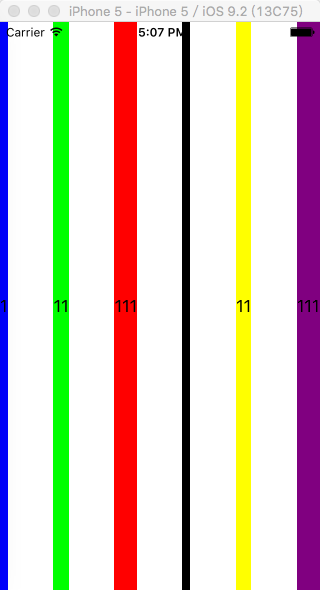
可以看出,UIStackViewDistributionEqualSpacing属性的潜台词是,各个UILable是根据内容来设置大小的,内容多大,在这里,宽度就多大。剩余的空间是平均分配的。
2.3.2. UILable + 文字长度不同 + 设置UILable大小
/**

 *  在stackview中添加视图,并设置布局属性

 */

-(void)makeUIStackViewAddViewsWithDistribution:(UIStackViewDistribution)distribution{

    m_mainStackView.distribution = distribution;

    CGRect rectBlue  = CGRectMake(0, 0, m_frameInfo.width/6 * 3, m_frameInfo.height);

    CGRect rectGreen = CGRectMake(0, 0, m_frameInfo.width/6 * 2, m_frameInfo.height);

    CGRect rectRed   = CGRectMake(0, 0, m_frameInfo.width/6 * 1, m_frameInfo.height);

    CGRect rectBlack  = CGRectMake(0, 0, m_frameInfo.width/6 * 3, m_frameInfo.height);

    CGRect rectYellow = CGRectMake(0, 0, m_frameInfo.width/6 * 2, m_frameInfo.height);

    CGRect rectPurple   = CGRectMake(0, 0, m_frameInfo.width/6 * 1, m_frameInfo.height);

    UILabel *blueLable  = [[UILabel alloc] initWithFrame:rectBlue];

    UILabel *greenLable = [[UILabel alloc] initWithFrame:rectGreen];

    UILabel *redLable   = [[UILabel alloc] initWithFrame:rectRed];

    UILabel *blackLable = [[UILabel alloc] initWithFrame:rectBlack];

    UILabel *yellowLable = [[UILabel alloc] initWithFrame:rectYellow];

    UILabel *purpleLable   = [[UILabel alloc] initWithFrame:rectPurple];

    blueLable.backgroundColor  = [UIColor blueColor];

    greenLable.backgroundColor = [UIColor greenColor];

    redLable.backgroundColor   = [UIColor redColor];

    blackLable.backgroundColor  = [UIColor blackColor];

    yellowLable.backgroundColor = [UIColor yellowColor];

    purpleLable.backgroundColor   = [UIColor purpleColor];

    blueLable.text = @"1";

    greenLable.text = @"11";

    redLable.text = @"111";

    blackLable.text = @"1";

    yellowLable.text = @"11";

    purpleLable.text = @"111";

    blueLable.textAlignment  = NSTextAlignmentCenter;

    greenLable.textAlignment = NSTextAlignmentCenter;

    redLable.textAlignment   = NSTextAlignmentCenter;

    blackLable.textAlignment  = NSTextAlignmentCenter;

    yellowLable.textAlignment = NSTextAlignmentCenter;

    purpleLable.textAlignment   = NSTextAlignmentCenter;

    [m_mainStackView addArrangedSubview:blueLable];

    [m_mainStackView addArrangedSubview:greenLable];

    [m_mainStackView addArrangedSubview:redLable];

    [m_mainStackView addArrangedSubview:blackLable];

    [m_mainStackView addArrangedSubview:yellowLable];

    [m_mainStackView addArrangedSubview:purpleLable];

}
效果一样,说明设置Frame大小无用
2.4. UIStackViewDistributionEqualCentering
同样,该属性标明:实例中的元素UILable的长度是根据内容的大小来设置的,内容多大,宽度就多大。
2.3.1. UILable + 文字长度不同 + 不设置大小
只是更改了一个
UIStackViewDistributionEqualCentering属性
不再上代码
效果如下:

可以看出,各个UILable之间的间隙是不同的,但是每个UILabel中心店之间的距离是相同的。
2.3.2. UILable + 文字长度不同 + 设置大小
跟上面的效果一样。
3. UIStackView嵌套
其实,我们会经常用到UIStackView的嵌套,通常,在大的布局上,分成几个等大的部分,然后,每个部分可能会有些不同的设置。
iOS 之 UIStackView的更多相关文章
- iOS 9: UIStackView入门
本文转自http://www.cocoachina.com/ios/20150623/12233.html 本文由CocoaChina译者candeladiao翻译,欢迎参加我们的翻译活动.原文:iO ...
- ios项目里扒出来的json文件
p.p1 { margin: 0.0px 0.0px 0.0px 0.0px; font: 13.0px Menlo; color: #000000 } p.p2 { margin: 0.0px 0. ...
- iOS 专题 之 界面开发 之 控件
iOS 之 UIViewController iOS 之 Navagation Button iOS 之 UIButton iOS 之 UITextField iOS 之 UIStackView iO ...
- iOS下的界面布局利器-MyLayout布局框架
Swift:TangramKit: https://github.com/youngsoft/TangramKit OC:MyLayout: https://github.com/youngsof ...
- iOS - FlexBox 布局之 YogaKit
由于刚开始的项目主要用的H5.javaScript技术为主原生开发为辅的手段开发的项目,UI主要是还是H5,如今翻原生.为了方便同时维护两端.才找到这个很不错的库. FlexBox?听起来像是一门H5 ...
- fir.im Weekly - 除了写代码,还需要了解什么
雾霾天,宜撸代码.吹牛,不宜出门约会(¬_¬)ノ 本期 fir.im Weekly 亦如往期,收集了优秀的 iOS/Android 开发资源,GitHub 源码.前端方面的热点分享.除了代码,也许你 ...
- iOS UIStackView的理解
iOS9 提供的UIStackview简化了布局操作,它有些像Android中的liner layout.以前不用UIStackview也是可以做出类似的效果的,不过要添加许多的约束,看得头都大了,使 ...
- iOS开发——UI篇OC篇&UIStackView详解
UIStackView详解 一.继承关系.遵守协议.隶属框架及可用平台 UIStackView 类提供了一个高效的接口用于平铺一行或一列的视图组合.Stack视图使你依靠自动布局的能力,创建用户接口使 ...
- iOS 开发之UIStackView的应用
————————————————UIStackView的应用———————————————— 一:先讲下优势: 对于排布列表式控件的布局需求,用UIStackView控件,开发中为我们省去了繁琐的代码 ...
随机推荐
- Android ---paint类
引自:http://www.cnblogs.com/-OYK/archive/2011/10/25/2223624.html Android Paint和Color类 要绘图,首先得调整画笔,待画 ...
- jquery奇怪的问题
Jquery中 $("#data_table4 tr:eq(0)").after("<tr><td>" +result+data.row ...
- Java关键字transient和volatile小结(转)
Java关键字transient和volatile小结(转) transient和volatile两个关键字一个用于对象序列化,一个用于线程同步,都是Java中比较高阶的话题,简单总结一下. tran ...
- DWR整合之JSF
DWR 与 JSF DWR 包括两个 JSF 的扩展点,一个创造器和一个 ServletFilter. 1.JSF Creator DWR1.1 中有一个体验版的 JsfCreator.你可以在 dw ...
- higncharts 编辑Highcharts.com链接
credits: { text: 'Example.com', href: 'http://www.example.com' }, 只 ...
- Linux 最简单的驱动程序hello world
图片驱动位置:kernel3-10/driver/misc/mediatek/imgsensor/src/mt8127/kd_sensorlist.c 例子:kernel-3.10/driver/mi ...
- php 访问对象的属性(当属性的键名称为数字时)的方法 {}
这篇文章下面写了一个 将 数组转化成对象的方法, 这个数组的键为数字(即数组为索引数组), 访问对象的时候, $obj->1 显然错位,那到底该怎么样访问对象的数字属性呢? $obj->{ ...
- (五)Jquery Mobile列表
Jquery Mobile列表 一.JM列表 1.普通列表 效果: 带序号的列表 将ul换成ol 效果: 2.data-inset=& ...
- 仿苹果短信(微信 ,qq)左划弹出菜单
难点: 1.功能的实现,左划.ListView的复用 2.单行显示,多行显示 3.ListView分割线.点击阴影,上下滑动左右滑动无阴影.多点触控改为单点触控 4.融球动画 http://blog. ...
- iOS开发——NSArray中的字符串排序
NSArray *arr = @[@"fjhsf",@"wert",@"fdg",@"asd",@"fs g ...