
Intent的概念及应用(二)
------siwuxie095
1、Intent过滤器 intent-filter 相关选项
如果多个Activity拥有同样的action,在启动时这个action时的情况:
首先在LearnIntent下new一个 Empty Activity:MyAty1,
在其对应的布局中添加一个TextView,起标识作用
在AndroidManifest.xml中,先去掉MyAty的activity中的 android:exported="false",
为 MyAty 和 MyAty1 的 activity 添加 label 属性,这样在后续显示时就采用label中的名字,
在MyAty1 的activity下添加 intent-filter,再在Intent-filter下添加 category 和 action,
category设置为默认,action则设置成和MyAty的action一样,如下:
|
<?xml <manifest xmlns:android="http://schemas.android.com/apk/res/android" package="com.siwuxie095.learnintent"> <application android:allowBackup="true" android:icon="@mipmap/ic_launcher" android:label="@string/app_name" android:supportsRtl="true" android:theme="@style/AppTheme"> <activity android:name=".MainActivity"> <intent-filter> <action android:name="android.intent.action.MAIN" <category android:name="android.intent.category.LAUNCHER" </intent-filter> </activity> <activity android:name=".MyAty" android:label="MyAty"> <intent-filter> <category android:name="android.intent.category.DEFAULT" <action android:name="com.siwuxie095.learnintent.intent.action.MyAty" </intent-filter> </activity> <activity android:name=".MyAty1" android:label="MyAty1"> <intent-filter> <category android:name="android.intent.category.DEFAULT" <action android:name="com.siwuxie095.learnintent.intent.action.MyAty" </intent-filter> </activity> </application> </manifest> |
运行App1,一览:

若选择某个后点击"始终",以后打开App1,就不会再弹出这个选择界面,
可以进入LearnIntent的设置里,清除默认操作即可


对于隐式Intent,在启动时除了 action 单独匹配的方式之外,还可以加上其他的匹配方式
在intent-filter下,添加data标签,

各种可匹配的属性,这里选择属性scheme为:app(即协议是app)
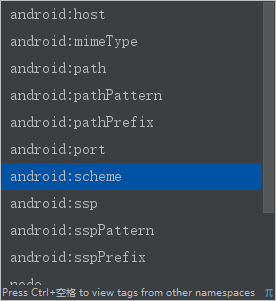
最后:
|
<activity android:name=".MyAty1" android:label="MyAty1"> <intent-filter> <category android:name="android.intent.category.DEFAULT" <action android:name="com.siwuxie095.learnintent.intent.action.MyAty" <data android:scheme="app" </intent-filter> </activity> |
那么在启动App1时,如果指明要启动的是MyAty1,只需对App1的MainActivity.java
中的startActivity()略作修改
|
findViewById(R.id.btnStartMyAty).setOnClickListener(new View.OnClickListener() { @Override public try{ // app:和scheme协议中的保持一致 startActivity(new Intent("com.siwuxie095.learnintent.intent.action.MyAty", Uri.parse("app://hello"))); }catch (Exception e){ //提示信息 LENGTH_SHORT 短时呈现 Toast.makeText(MainActivity.this,"无法启动指定的Activity",Toast.LENGTH_SHORT).show(); } } }); |
运行,不会再出现选择对话框,直接启动指明协议的Activity:MyAty1
2、通过浏览器链接启动本地Activity
创建一个新项目:LaunchLocalActivity,选择API:21 Android 5.0,选择Empty Activity
再new一个Empty Activity:LocalAppAty
(整个过程用不上MainActivity,所以不用理会MainActivity.java和activity_main.xml)
工程结构目录一览:

AndroidManifest.xml中LocalAppAty的配置:
|
<?xml <manifest xmlns:android="http://schemas.android.com/apk/res/android" package="com.siwuxie095.launchlocalapp"> <application android:allowBackup="true" android:icon="@mipmap/ic_launcher" android:label="@string/app_name" android:supportsRtl="true" android:theme="@style/AppTheme"> <activity android:name=".MainActivity"> <intent-filter> <action android:name="android.intent.action.MAIN" <category android:name="android.intent.category.LAUNCHER" </intent-filter> </activity> <activity android:name=".LocalAppAty"> <intent-filter> <!-- 可被浏览器启动的 <category android:name="android.intent.category.BROWSABLE" <!-- 因为是Activity 需要一个DEFAULT --> <category android:name="android.intent.category.DEFAULT" <!-- 浏览器链接被点击后,会发送一个action:VIEW --> <action android:name="android.intent.action.VIEW" <!-- 配置data属性 <data android:scheme="app" </intent-filter> </activity> </application> </manifest> |
在LocalAppAty.java中获取传入参数:
|
package com.siwuxie095.launchlocalapp; import android.net.Uri; import android.support.v7.app.AppCompatActivity; import android.os.Bundle; public class LocalAppAty extends AppCompatActivity { @Override protected super.onCreate(savedInstanceState); setContentView(R.layout.activity_local_app_aty); //接受传入参数:getIntent()获取启动这个Activity的Intent对象, // 再通过getData() 获取到与这个Intent相关的数据对象,是Uri类型的对象 //注意是android.net类型的Uri,不是java.net类型的URI Uri uri=getIntent().getData(); //输出为 app://hello System.out.println(uri); } } |
在布局文件layout中的activity_local_app_aty.xml中添加一个TextView,
并修改text:
|
<?xml <RelativeLayout xmlns:android="http://schemas.android.com/apk/res/android" xmlns:tools="http://schemas.android.com/tools" android:id="@+id/activity_local_app_aty" android:layout_width="match_parent" android:layout_height="match_parent" android:paddingBottom="@dimen/activity_vertical_margin" android:paddingLeft="@dimen/activity_horizontal_margin" android:paddingRight="@dimen/activity_horizontal_margin" android:paddingTop="@dimen/activity_vertical_margin" tools:context="com.siwuxie095.launchlocalapp.LocalAppAty"> <TextView android:text="这是用于被浏览器链接启动的一个本地Activity" android:layout_width="wrap_content" android:layout_height="wrap_content" android:layout_alignParentTop="true" android:layout_alignParentStart="true" android:layout_marginStart="103dp" android:layout_marginTop="100dp" android:id="@+id/textView" </RelativeLayout> |
下面是如何从浏览器启动Activity:LocalAppAty
首先打开Eclipse EE(Eclipse for Java EE Developers),创建一个
Dynamic Web Project,再new一个JSP文件:index.jsp,如下:
|
<%@ page language="java" contentType="text/html; charset=UTF-8" pageEncoding="UTF-8"%> <!DOCTYPE html PUBLIC "-//W3C//DTD HTML 4.01 Transitional//EN" <html> <head> <meta http-equiv="Content-Type" content="text/html; charset=UTF-8"> <title>链接启动Activity</title> <style type="text/css"> a{ font-size: 50pt; } </style> </head> <body> <!-- 跳转地址是app, //后是参数,随便写一个 --> <p align="center"> <a href="app://hello">Launch My App</a> </p> </body> </html> |
实际上主要就是下面sublime中的代码,因为此过程需要利用Tomcat,才用的Eclipse

先将上面的JSP文件:index.jsp,运行在Tomcat服务器,再将电脑和手机连入同一个WiFi,
电脑打开命令行,输入ipconfig,查看路由器分配给电脑的IP地址,这里是:192.168.2.104,
替换掉localhost,即可在手机浏览器访问。
电脑:localhost:8080/Demo/index.jsp,手机:192.168.2.104:8080/Demo/index.jsp
手机UC浏览器打开一览:
(1)点击链接前

(2)点击链接后

(3)启动LocalAppAty后

【made by siwuxie095】
Intent的概念及应用(二)的更多相关文章
- 在Android中Intent的概念及应用(二)——Intent过滤器相关选项
一.如果多个Activity拥有同一个Intent Action,启动时用同一个Action启动会是什么情况? 如何指定某一个Activity启动? 在多个Activity拥有同一个Intent Ac ...
- 在 Android 中 Intent 的概念及应用
一.显式Intent: startActivity(new Intent(MainActivity.this, 类名.class)); 二.隐式Intent: 1.在AndroidManiFest ...
- 【Android】12.1 Intent基本概念
分类:C#.Android.VS2015: 创建日期:2016-02-23 一.简介 Intent:意图,含义就是你想利用它调用哪个组件实现相关的功能,比如调用相机组件实现拍照.调用Contact组件 ...
- 在Android中Intent的概念及应用(一)——显示Intent和隐式Intent
Intent寻找目标组件的两种方式: 显式Intent:通过指定Intent组件名称来实现的,它一般用在知道目标组件名称的前提下,一般是在相同的应用程序内部实现的. 隐式Intent:通过Intent ...
- C功底挑战Java菜鸟入门概念干货(二)
(接上篇博文:C功底挑战Java菜鸟入门概念干货(一)) 一.Java面向对象程序设计-类的基本形式 1.“类”是把事物的数据与相关的功能封装在一起,形成的一种特殊结构,用以表达对真实世界的一种抽象概 ...
- 面向对象【day07】:面向对象概念介绍(二)
本节内容 1.概念 2.特性 3.面向对象介绍 一丶概念 1.面向对象编程 OOP(Object-Oriented Programming)编程是利用“类”和“对象”来创建各种模型来实现对真实世界的描 ...
- 【C#小知识】C#中一些易混淆概念总结(二)--------构造函数,this关键字,部分类,枚举 分类: C# 2014-02-03 01:24 1576人阅读 评论(0) 收藏
目录: [C#小知识]C#中一些易混淆概念总结--------数据类型存储位置,方法调用,out和ref参数的使用 继上篇对一些C#概念问题进行细节的剖析以后,收获颇多.以前,读书的时候,一句话一掠而 ...
- Istio的流量管理(概念)(istio 系列二)
Istio的流量管理(概念) 目录 Istio的流量管理(概念) 概述 Virtual services 为什么使用virtual service Virtual services举例 hosts字段 ...
- Intent的概念及应用(一)
------siwuxie095 1.显式Intent (1)先创建一个项目:LearnIntent,选择API:21 Android 5.0, 选择Empty Activity,完成 (2)创建一个 ...
随机推荐
- int *p[4]与int (*q)[4]的区别
以上定义涉及两个运算符:“*”(间接引用).“[]”(下标),“[]”的优先级别大于“*”的优先级别. 首先看int *p[4],“[]”的优先级别高,所以它首先是个大小为4的数组,即p[4]:剩下的 ...
- 测试redis+keepalived实现简单的主备切换【转载】
转自: 测试redis+keepalived实现简单的主备切换 - Try My Best 尽力而为 - ITeye技术网站http://raising.iteye.com/blog/2311757 ...
- mysql建库
CREATE DATABASE db_name DEFAULT CHARACTER SET utf8 COLLATE utf8_general_ci; CREATE DATABASE 的语法: CRE ...
- i2c的时钟延展问题(转)
源:http://blog.csdn.net/zyboy2000/article/details/7636769 结论: (即在模拟i2c主:在主设置SCL为高后,要超时判断SCL是否为高,再发后面的 ...
- zf-关于查询机把index.jsp换成index_new.jsp页面之后把功能链接都改成新页面的简单方法
一开始我都是找action 然后一个一个的改 把onmousedown="goURL('index.jsp')" 改成 onmousedown="goURL('index ...
- 【贪心】时空定位I
[贪心]时空定位I 题目描述 张 琪曼已经确定了李旭琳在一个长为20千米,宽为2千米的空间,她要在横中心线上放置半径为Ri的定位装置,每个定位装置的效果都会让以它为中心的半径为实 数Ri(0<R ...
- 创建OpenStack外部网络并分配浮动IP
source openrcneutron net-create ext-net --provider:network_type local --router:external Trueneutron ...
- USACO Section 1.2 Transformations 解题报告
题目 题目描述 一块 N x N正方形的黑白瓦片的图案要被转换成新的正方形图案. 写一个程序来找出将原始图案按照以下列转换方法转换成新图案的最小方式: 转 90 度:图案按顺时针转 90 度. 转 1 ...
- mark一篇文章--用nodejs搭建一个本地反向代理环境
调试线上代码的时候,我们经常遇到的一个问题就是 本地一套环境,线上一套环境,本地没有的文件用线上的这种需求.我简单来说下使用nodejs如何做到. 先说下不用nodejs我们怎么做,工具比如fiddl ...
- uvc摄像头代码解析1
一.FAQ 1.判断自己的摄像头是否支持uvc标准 输入lsusb //列出usb设备 [cpp] Bus 001 Device 001: ID 1d6b:0002 Linux Foundatio ...