
python实现基于CGI的Web应用
python实现基于CGI的Web应用
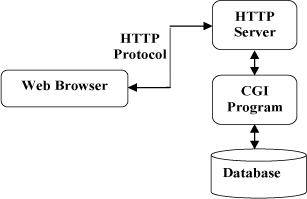

from http.server import HTTPServer, CGIHTTPRequestHandler

port = 8081

httpd = HTTPServer(('', port), CGIHTTPRequestHandler)

print("Starting simple_httpd on port: " + str(httpd.server_port))

httpd.serve_forever()
2、index.html
首页;URL: “http://localhost:8081/cgi-bin/book_list_view.py” 将调用 cgi-bin文件夹下的book_list_view.py
<html>

<head>

<title>BookStore</title>

</head>

<body>

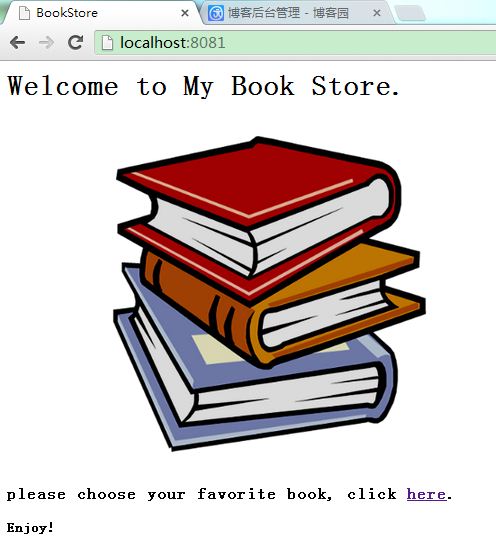
<h1>Welcome to My Book Store.</h1>

<img src="resource/books.png">

<h3>

please choose your favorite book, click <a href="cgi-bin/book_list_view.py">here</a>.

</h3>

<p>

<strong> Enjoy!</strong>

</p>

</body>

</html>
3、book_list_view.py
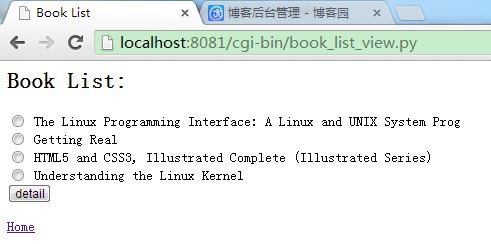
图书清单页面。用户选择要查看的图书,提交表单,然后调动图书详细界面。
#Python标准库中定义的CGI跟踪模块:cgibt

import cgitb

cgitb.enable()

#启用这个模块时,会在web浏览器上显示详细的错误信息。enable()函数打开CGI跟踪

#CGI脚本产生一个异常时,Python会将消息显示在stderr(标准输出)上。CGI机制会忽略这个输出,因为它想要的只是CGI的标准输出(stdout)

import template.yate as yate

import service.book_service as book_service

#CGI标准指出,服务器端程序(CGI脚本)生成的任何输出都将会由Web服务器捕获,并发送到等待的web浏览器。具体来说,会捕获发送到Stdout(标准输出)的所有内容


#一个CGI脚本由2部分组成, 第一部分输出 Response Headers, 第二部分输出常规的html.
print("Content-type:text/html\n")#Response Headers

#网页内容:有html标签组成的文本

print('<html>')

print('<head>')

print('<title>Book List</title>')

print('</head>')

print('<body>')

print('<h2>Book List:</h2>')

print(yate.start_form('book_detail_view.py'))

book_dict=book_service.get_book_dict()

for book_name in book_dict:

    print(yate.radio_button('bookname',book_dict[book_name].name))

print(yate.end_form('detail'))

print(yate.link("/index.html",'Home'))

print('</body>')

print('</html>')
4、yate.py
自定义的简单模板,用于快捷生成html
def start_form(the_url, form_type="POST"):

    return('<form action="' + the_url + '" method="' + form_type + '">')

def end_form(submit_msg="Submit"):

    return('<input type=submit value="' + submit_msg + '"></form>')

def radio_button(rb_name, rb_value):

    return('<input type="radio" name="' + rb_name +

                             '" value="' + rb_value + '"> ' + rb_value + '<br />')

def u_list(items):

    u_string = '<ul>'

    for item in items:

        u_string += '<li>' + item + '</li>'

    u_string += '</ul>'

    return(u_string)

def header(header_text, header_level=2):

    return('<h' + str(header_level) + '>' + header_text +

           '</h' + str(header_level) + '>')

def para(para_text):

    return('<p>' + para_text + '</p>')

def link(the_link,value):

    link_string = '<a href="' + the_link + '">' + value + '</a>'

    return(link_string)
5、book_detail_view.py
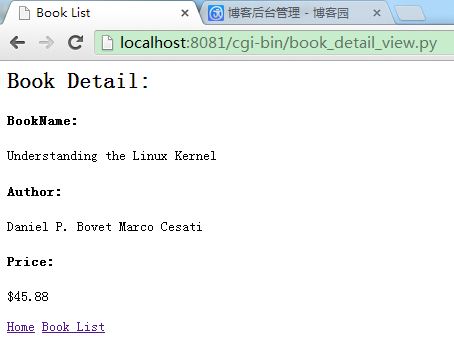
图书详细页面
import cgitb

cgitb.enable()

import cgi

import template.yate as yate

import service.book_service as book_service

import template.yate as yate

#使用cig.FieldStorage() 访问web请求发送给web服务器的数据,这些数据为一个Python字典

form_data = cgi.FieldStorage()

print("Content-type:text/html\n")

print('<html>')

print('<head>')

print('<title>Book List</title>')

print('</head>')

print('<body>')

print(yate.header('Book Detail:'))

try:

   book_name = form_data['bookname'].value

   book_dict=book_service.get_book_dict()

   book=book_dict[book_name]

   print(book.get_html)

except KeyError as kerr:

   print(yate.para('please choose a book...'))

print(yate.link("/index.html",'Home'))

print(yate.link("/cgi-bin/book_list_view.py",'Book List'))

print('</body>')

print('</html>')
6、Book.py
图书类
from template import yate

class Book:

    def __init__(self,name,author,price):

        self.name=name

        self.author=author

        self.price=price

    @property

    def get_html(self):

        html_str=''

        html_str+=yate.header('BookName:',4)+yate.para(self.name)

        html_str+=yate.header('Author:',4)+yate.para(self.author)

        html_str+=yate.header('Price:',4)+yate.para(self.price)

        return(html_str)
7、book_service.py
图书业务逻辑类
from model.Book import Book

def get_book_dict():

    book_dict={}

    try:

        with open('book.txt','r') as book_file:

            for each_line in book_file:

                book=parse(each_line)

                book_dict[book.name]=book

    except IOError as ioerr:

        print("IOErr:",ioerr)

    return(book_dict)

def parse(book_info):

    (name,author,price)=book_info.split(';')

    book=Book(name,author,price)

    return(book)
8、book.txt
待显示的图书信息(书名;作者;价格)
The Linux Programming Interface: A Linux and UNIX System Prog;Michael Kerrisk;$123.01
HTML5 and CSS3, Illustrated Complete (Illustrated Series);Jonathan Meersman Sasha Vodnik;$32.23
Understanding the Linux Kernel;Daniel P. Bovet Marco Cesati;$45.88
Getting Real;Jason Fried, Heinemeier David Hansson, Matthew Linderman;$87.99

python实现基于CGI的Web应用的更多相关文章
- Python flask 基于 Flask 提供 RESTful Web 服务
转载自 http://python.jobbole.com/87118/ 什么是 REST REST 全称是 Representational State Transfer,翻译成中文是『表现层状态转 ...
- python web编程-CGI帮助web服务器处理客户端编程
这几篇博客均来自python核心编程 如果你有任何疑问,欢迎联系我或者仔细查看这本书的地20章 另外推荐下这本书,希望对学习python的同学有所帮助 概念预热 eb客户端通过url请求web服务器里 ...
- [ Python ] Flask 基于 Web开发 大型程序的结构实例解析
作为一个编程入门新手,Flask是我接触到的第一个Web框架.想要深入学习,就从<FlaskWeb开发:基于Python的Web应用开发实战>这本书入手,本书由于是翻译过来的中文版,理解起 ...
- 什么是 WSGI -- Python 中的 “CGI” 接口简介
今天在 git.oschina 的首页上看到他们推出演示平台,其中,Python 的演示平台支持 WSGI 接口的应用.虽然,这个演示平台连它自己提供的示例都跑不起来,但是,它还是成功的勾起了我对 W ...
- Python全栈开发:web框架们
Python的WEB框架 Bottle Bottle是一个快速.简洁.轻量级的基于WSIG的微型Web框架,此框架只由一个 .py 文件,除了Python的标准库外,其不依赖任何其他模块. 1 2 3 ...
- 【python之路42】web框架们的具体用法
Python的WEB框架 (一).Bottle Bottle是一个快速.简洁.轻量级的基于WSIG的微型Web框架,此框架只由一个 .py 文件,除了Python的标准库外,其不依赖任何其他模块. p ...
- Python(九)Tornado web 框架
一.简介 Tornado 是 FriendFeed 使用的可扩展的非阻塞式 web 服务器及其相关工具的开源版本.这个 Web 框架看起来有些像web.py 或者 Google 的 webapp,不过 ...
- 用Python写一个简单的Web框架
一.概述 二.从demo_app开始 三.WSGI中的application 四.区分URL 五.重构 1.正则匹配URL 2.DRY 3.抽象出框架 六.参考 一.概述 在Python中,WSGI( ...
- Flask —— 使用Python和OpenShift进行即时Web开发
最近Packtpub找到了我,让我给他们新出版的关于Flask的书写书评.Flask是一个很流行的Python框架.那本书是Ron DuPlain写的<Flask 即时Web开发>.我决定 ...
随机推荐
- JS中Array数组的三大属性用法
原文:JS中Array数组的三大属性用法 Array数组主要有3大属性,它们分别是length属性.prototype属性和constructor属性. JS操作Array数组的方法及属性 本文总结了 ...
- 基于protobuf的RPC实现
可以比较使用google protobuf RPC实现echo service可见.述. google protobuf仅仅负责消息的打包和解包.并不包括RPC的实现.但其包括了RPC的定义.如果有以 ...
- 使用OpenCV玩家营造出一个视频控制(没有声音)
说明:OpenCV计算机视觉库,所以使用的图像或视频处理,因此,没有任何声音在播放视频的临时 软件:使用OpenCV制播放器(无声音) 功能说明:新建播放窗体.加入进度条能够拖动视频播放. 流程图: ...
- linux 定时关机命令
一. 关机流程 Linux 运作时, 不能够直接将电源关闭, 否则, 可能会损毁档案系统. 因此, 必须依照正常的程序关机: 观察系统使用情形(或许当时, 正有使用者做着重要的工作呢!) 通知线上使用 ...
- 快速构建Windows 8风格应用33-构建锁屏提醒
原文:快速构建Windows 8风格应用33-构建锁屏提醒 引言 Windows Phone(8&7.5)和Windows 8引入了锁屏概念,其实做过Windows Phone 7.5应用开发 ...
- WebApi 插件式构建方案
WebApi 插件式构建方案 WebApi 插件式构建方案 公司要推行服务化,不可能都整合在一个解决方案内,因而想到了插件式的构建方案.最终定型选择基于 WebApi 构建服务化,之所以不使用 WCF ...
- 【通过操作指针,与指针做函数參数'实现字串在主串中出现的次数,然后将出现的部分依照要求进行替换
】
#include<stdio.h> #include<stdlib.h> int strTime(const char *str1, const char *str2, int ...
- 修改servu数据库密码 servu加密方式
项目要求可以有用户自行修改servu密码.servu可以通过odbc访问access\mysql\sqlserver数据库.我们直接通过创建web来修改就可以了. 不过问题来了,密码是加密的...通过 ...
- 输出,变量的使用,子查询,逻辑语句,循环,case..when..then..end多分支语句,Exists(判断存在)
--------------输出----------------print 'hello world'--以文本形式输出select 'hello world'--以网格形式输出,也可以设置成以文本形 ...
- 对Extjs中store的多种操作
Store.getCount()返回的是store中的所有数据记录,然后使用for循环遍历整个store,从而得到每条记录. 除了使用getCount()的方法外,还可以使用each()函数,如下面的 ...