
windows下用c++调用caffe做前向
参考博客:
https://blog.csdn.net/muyouhang/article/details/54773265
https://blog.csdn.net/hhh0209/article/details/79830988
新建caffe的属性表,caffe_gpu_x64_release.props
将NugetPackages,caffe,CUDA中的头文件加进去
属性-C/C++-附加包含目录:
D:\caffe20190311\NugetPackages\OpenCV.2.4.10\build\native\include

D:\caffe20190311\NugetPackages\OpenBLAS.0.2.14.1\lib\native\include

D:\caffe20190311\NugetPackages\protobuf-v120.2.6.1\build\native\include

D:\caffe20190311\NugetPackages\glog.0.3.3.0\build\native\include

D:\caffe20190311\NugetPackages\gflags.2.1.2.1\build\native\include

D:\caffe20190311\NugetPackages\boost.1.59.0.0\lib\native\include

D:\caffe20190311\caffe-master\include

D:\caffe20190311\caffe-master\include\caffe

C:\Program Files\NVIDIA GPU Computing Toolkit\CUDA\v8.0\include
将NugetPackages,caffe生成的,CUDA中静态库加入进去
属性-链接器-常规-附加库目录:
D:\caffe20190311\NugetPackages\OpenCV.2.4.10\build\native\lib\x64\v120\Release

D:\caffe20190311\NugetPackages\hdf5-v120-complete.1.8.15.2\lib\native\lib\x64

D:\caffe20190311\NugetPackages\OpenBLAS.0.2.14.1\lib\native\lib\x64

D:\caffe20190311\NugetPackages\gflags.2.1.2.1\build\native\x64\v120\dynamic\Lib

D:\caffe20190311\NugetPackages\glog.0.3.3.0\build\native\lib\x64\v120\Release\dynamic

D:\caffe20190311\NugetPackages\protobuf-v120.2.6.1\build\native\lib\x64\v120\Release

D:\caffe20190311\NugetPackages\boost_chrono-vc120.1.59.0.0\lib\native\address-model-64\lib

D:\caffe20190311\NugetPackages\boost_system-vc120.1.59.0.0\lib\native\address-model-64\lib

D:\caffe20190311\NugetPackages\boost_thread-vc120.1.59.0.0\lib\native\address-model-64\lib

D:\caffe20190311\NugetPackages\boost_filesystem-vc120.1.59.0.0\lib\native\address-model-64\lib

D:\caffe20190311\NugetPackages\boost_date_time-vc120.1.59.0.0\lib\native\address-model-64\lib

D:\caffe20190311\caffe-master\Build\x64\Release

C:\Program Files\NVIDIA GPU Computing Toolkit\CUDA\v8.0\lib\x64
将一些动态库加入进去
属性-链接器-输入-附加依赖项:
libcaffe.lib

libprotobuf.lib

libglog.lib

gflags.lib

libopenblas.dll.a

hdf5.lib

hdf5_hl.lib

cublas.lib

cublas_device.lib

cuda.lib

cudadevrt.lib

cudnn.lib

cudart.lib

cufft.lib

cudart_static.lib

cufftw.lib

cusparse.lib

cusolver.lib

curand.lib

nppc.lib

opencv_highgui2410.lib

opencv_core2410.lib

opencv_imgproc2410.lib

kernel32.lib

user32.lib

gdi32.lib

winspool.lib

comdlg32.lib

advapi32.lib

shell32.lib

ole32.lib

oleaut32.lib

uuid.lib

odbc32.lib

odbccp32.lib
若在没有GPU的电脑,用cpu调用caffe
将头文件,静态库目录,动态库,去掉和cuda相关的就行
caffe_cpu_x64_release.props
附加包含目录,去掉最后一排与CUDA相关的头文件目录
附加库目录,去掉最后一排与CUDA相关的静态库目录
附加依赖项:
libcaffe.lib

libprotobuf.lib

libglog.lib

gflags.lib

libopenblas.dll.a

hdf5.lib

hdf5_hl.lib

opencv_highgui2410.lib

opencv_core2410.lib

opencv_imgproc2410.lib

kernel32.lib

user32.lib

gdi32.lib

winspool.lib

comdlg32.lib

advapi32.lib

shell32.lib

ole32.lib

oleaut32.lib

uuid.lib

odbc32.lib

odbccp32.lib
即可配置好caffe_x64_release.props的属性表
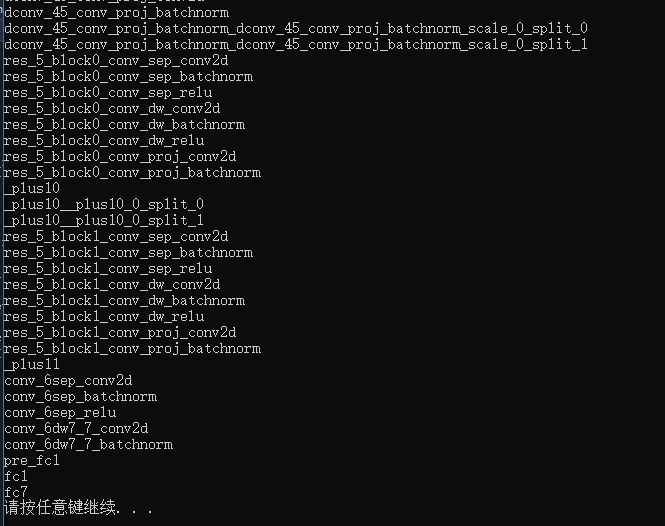
调用caffe,输入prototxt和caffemodel文件,输出每个层的名字:
caffe_layer.h
#include<caffe/common.hpp>

#include<caffe/proto/caffe.pb.h>

#include<caffe/layers/batch_norm_layer.hpp>

#include<caffe/layers/bias_layer.hpp>

#include <caffe/layers/concat_layer.hpp>

#include <caffe/layers/conv_layer.hpp>

#include <caffe/layers/dropout_layer.hpp>

#include<caffe/layers/input_layer.hpp>

#include <caffe/layers/inner_product_layer.hpp>

#include "caffe/layers/lrn_layer.hpp"

#include <caffe/layers/pooling_layer.hpp>

#include <caffe/layers/relu_layer.hpp>

#include "caffe/layers/softmax_layer.hpp"

#include<caffe/layers/scale_layer.hpp>

#include<caffe/layers/prelu_layer.hpp>

namespace caffe

{

	extern INSTANTIATE_CLASS(BatchNormLayer);

	extern INSTANTIATE_CLASS(BiasLayer);

	extern INSTANTIATE_CLASS(InputLayer);

	extern INSTANTIATE_CLASS(InnerProductLayer);

	extern INSTANTIATE_CLASS(DropoutLayer);

	extern INSTANTIATE_CLASS(ConvolutionLayer);

	REGISTER_LAYER_CLASS(Convolution);

	extern INSTANTIATE_CLASS(ReLULayer);

	REGISTER_LAYER_CLASS(ReLU);

	extern INSTANTIATE_CLASS(PoolingLayer);

	REGISTER_LAYER_CLASS(Pooling);

	extern INSTANTIATE_CLASS(LRNLayer);

	REGISTER_LAYER_CLASS(LRN);

	extern INSTANTIATE_CLASS(SoftmaxLayer);

	REGISTER_LAYER_CLASS(Softmax);

	extern INSTANTIATE_CLASS(ScaleLayer);

	extern INSTANTIATE_CLASS(ConcatLayer);

	extern INSTANTIATE_CLASS(PReLULayer);

}
main.cpp
#include<caffe.hpp>

#include <string>

#include <vector>

#include "caffe_layer.h"

using namespace caffe;

using namespace std;

int main() {

	string net_file = "./infrared_mbfnet/antispoof-infrared.prototxt";		//prototxt文件

	string weight_file = "./infrared_mbfnet/antispoof-infrared.caffemodel";		//caffemodel文件

	Caffe::set_mode(Caffe::CPU);

	//Caffe::SetDevice(0);

	Phase phase = TEST;

	boost::shared_ptr<Net<float>> net(new caffe::Net<float>(net_file, phase));

	net->CopyTrainedLayersFrom(weight_file);

	vector<string> blob_names = net->blob_names();

	for (int i = 0; i < blob_names.size(); i++){

		cout << blob_names.at(i) << endl;

	}

	system("pause");

	return 0;

}
注意:若模型中用到了,prelu层,需要在caffe_layer.h中加入prelu_layer.hpp的头文件,并在代码中声明一下,extern INSTANTIATE_CLASS(PReLULayer),否则,会报错,找不到该层。
运行结果:
用c++调用caffe做前向:
在caffe目录中,./caffe-master/examples/cpp_classification/classification.cpp 将该文件添加到vs2013工程中,配置caffe_x64_release属性表
在原始的classification.cpp文件中,main函数的输入项有4个,model_file,trained_file,label_file,mean_file,其中mean_file是均值文件,存放了img.channels x height x width个float型的数,每个float数,是所有训练样本该位置的均值。在有些情况下,均值已经确定,imgdata=(src-127.5)*0.0078125,故可以将均值直接赋值给Classifier类的成员变量mean_。
void Classifier::SetMean1()

{

	mean_ = cv::Mat(input_geometry_, CV_32FC3, cv::Scalar(127.5, 127.5, 127.5));

}
此时,main函数只需要输入3个参数,prototxt,caffemodel,label.txt文件。
该工程中包含两个文件,caffe_layer.h,classification.cpp
classification.cpp
#define USE_OPENCV 1

#include <caffe/caffe.hpp>

#ifdef USE_OPENCV

#include <opencv2/core/core.hpp>

#include <opencv2/highgui/highgui.hpp>

#include <opencv2/imgproc/imgproc.hpp>

#endif  // USE_OPENCV

#include <algorithm>

#include <iosfwd>

#include <memory>

#include <string>

#include <utility>

#include <vector>

#include <fstream>

#include <time.h>

#include "caffe_layer.h"

#ifdef USE_OPENCV

using namespace caffe;  // NOLINT(build/namespaces)

using std::string;

using namespace cv;

/* Pair (label, confidence) representing a prediction. */

typedef std::pair<string, float> Prediction;

class Classifier {

 public:

  Classifier(const string& model_file,

             const string& trained_file,

             const string& label_file);

  std::vector<Prediction> Classify(const cv::Mat& img, int N = 5);

  int Classify1(const cv::Mat& img);

 private:

  void SetMean(const string& mean_file);

  void SetMean1();

  std::vector<float> Predict(const cv::Mat& img);

  void WrapInputLayer(std::vector<cv::Mat>* input_channels);

  void Preprocess(const cv::Mat& img,

                  std::vector<cv::Mat>* input_channels);

 private:

  shared_ptr<Net<float> > net_;

  cv::Size input_geometry_;

  int num_channels_;

  cv::Mat mean_;

  std::vector<string> labels_;

};

Classifier::Classifier(const string& model_file,

                       const string& trained_file,

                       const string& label_file) {

#ifdef CPU_ONLY

  Caffe::set_mode(Caffe::CPU);

#else

  Caffe::set_mode(Caffe::GPU);

#endif

  /* Load the network. */

  net_.reset(new Net<float>(model_file, TEST));

  net_->CopyTrainedLayersFrom(trained_file);

  CHECK_EQ(net_->num_inputs(), 1) << "Network should have exactly one input.";

  CHECK_EQ(net_->num_outputs(), 1) << "Network should have exactly one output.";

  Blob<float>* input_layer = net_->input_blobs()[0];

  num_channels_ = input_layer->channels();

  //std::cout << num_channels_ << std::endl;

  CHECK(num_channels_ == 3 || num_channels_ == 1)

    << "Input layer should have 1 or 3 channels.";

  input_geometry_ = cv::Size(input_layer->width(), input_layer->height());

  /* Load the binaryproto mean file. */

  //SetMean(mean_file);

  SetMean1();

  /* Load labels. */

  std::ifstream labels(label_file.c_str());

  CHECK(labels) << "Unable to open labels file " << label_file;

  string line;

  while (std::getline(labels, line))

    labels_.push_back(string(line));

  Blob<float>* output_layer = net_->output_blobs()[0];

  CHECK_EQ(labels_.size(), output_layer->channels())

    << "Number of labels is different from the output layer dimension.";

}

static bool PairCompare(const std::pair<float, int>& lhs,

                        const std::pair<float, int>& rhs) {

  return lhs.first > rhs.first;

}

/* Return the indices of the top N values of vector v. */

static std::vector<int> Argmax(const std::vector<float>& v, int N) {

  std::vector<std::pair<float, int> > pairs;

  for (size_t i = 0; i < v.size(); ++i)

    pairs.push_back(std::make_pair(v[i], static_cast<int>(i)));

  std::partial_sort(pairs.begin(), pairs.begin() + N, pairs.end(), PairCompare);

  std::vector<int> result;

  for (int i = 0; i < N; ++i)

    result.push_back(pairs[i].second);

  return result;

}

/* Return the top N predictions. */

std::vector<Prediction> Classifier::Classify(const cv::Mat& img, int N) {

  std::vector<float> output = Predict(img);

  N = std::min<int>(labels_.size(), N);

  std::vector<int> maxN = Argmax(output, N);

  std::vector<Prediction> predictions;

  for (int i = 0; i < N; ++i) {

    int idx = maxN[i];

    predictions.push_back(std::make_pair(labels_[idx], output[idx]));

  }

  return predictions;

}

int Classifier::Classify1(const cv::Mat& img) {

	std::vector<float> output = Predict(img);

	float max = output[0];

	int max_id = 0;

	for (int i = 1; i < output.size(); i++)

	{

		if (output[i]>max)

			max_id = i;

	}

	return max_id;

}

/* Load the mean file in binaryproto format. */

void Classifier::SetMean(const string& mean_file) {

  BlobProto blob_proto;

  ReadProtoFromBinaryFileOrDie(mean_file.c_str(), &blob_proto);

  /* Convert from BlobProto to Blob<float> */

  Blob<float> mean_blob;

  mean_blob.FromProto(blob_proto);

  CHECK_EQ(mean_blob.channels(), num_channels_)

    << "Number of channels of mean file doesn't match input layer.";

  /* The format of the mean file is planar 32-bit float BGR or grayscale. */

  std::vector<cv::Mat> channels;

  float* data = mean_blob.mutable_cpu_data();

  for (int i = 0; i < num_channels_; ++i) {

    /* Extract an individual channel. */

    cv::Mat channel(mean_blob.height(), mean_blob.width(), CV_32FC1, data);

    channels.push_back(channel);

    data += mean_blob.height() * mean_blob.width();

  }

  /* Merge the separate channels into a single image. */

  cv::Mat mean;

  cv::merge(channels, mean);

  /* Compute the global mean pixel value and create a mean image

   * filled with this value. */

  cv::Scalar channel_mean = cv::mean(mean);

  mean_ = cv::Mat(input_geometry_, mean.type(), channel_mean);

}

void Classifier::SetMean1()

{

	mean_ = cv::Mat(input_geometry_, CV_32FC3, cv::Scalar(127.5, 127.5, 127.5));

}

std::vector<float> Classifier::Predict(const cv::Mat& img) {

  Blob<float>* input_layer = net_->input_blobs()[0];

  input_layer->Reshape(1, num_channels_,

                       input_geometry_.height, input_geometry_.width);

  /* Forward dimension change to all layers. */

  net_->Reshape();

  std::vector<cv::Mat> input_channels;

  WrapInputLayer(&input_channels);

  Preprocess(img, &input_channels);

  net_->Forward();

  /* Copy the output layer to a std::vector */

  Blob<float>* output_layer = net_->output_blobs()[0];

  const float* begin = output_layer->cpu_data();

  const float* end = begin + output_layer->channels();

  return std::vector<float>(begin, end);

}

/* Wrap the input layer of the network in separate cv::Mat objects

 * (one per channel). This way we save one memcpy operation and we

 * don't need to rely on cudaMemcpy2D. The last preprocessing

 * operation will write the separate channels directly to the input

 * layer. */

void Classifier::WrapInputLayer(std::vector<cv::Mat>* input_channels) {

  Blob<float>* input_layer = net_->input_blobs()[0];

  int width = input_layer->width();

  int height = input_layer->height();

  float* input_data = input_layer->mutable_cpu_data();

  for (int i = 0; i < input_layer->channels(); ++i) {

    cv::Mat channel(height, width, CV_32FC1, input_data);

    input_channels->push_back(channel);

    input_data += width * height;

  }

}

void Classifier::Preprocess(const cv::Mat& img,

                            std::vector<cv::Mat>* input_channels) {

  /* Convert the input image to the input image format of the network. */

  cv::Mat sample;

  if (img.channels() == 3 && num_channels_ == 1)

    cv::cvtColor(img, sample, cv::COLOR_BGR2GRAY);

  else if (img.channels() == 4 && num_channels_ == 1)

    cv::cvtColor(img, sample, cv::COLOR_BGRA2GRAY);

  else if (img.channels() == 4 && num_channels_ == 3)

    cv::cvtColor(img, sample, cv::COLOR_BGRA2BGR);

  else if (img.channels() == 1 && num_channels_ == 3)

    cv::cvtColor(img, sample, cv::COLOR_GRAY2BGR);

  else

    sample = img;

  cv::Mat sample_resized;

  if (sample.size() != input_geometry_)

    cv::resize(sample, sample_resized, input_geometry_);

  else

    sample_resized = sample;

  cv::Mat sample_float;

  if (num_channels_ == 3)

    sample_resized.convertTo(sample_float, CV_32FC3);

  else

    sample_resized.convertTo(sample_float, CV_32FC1);

  cv::Mat sample_normalized;

  cv::subtract(sample_float, mean_, sample_normalized);

  cv::Mat img_scale(cv::Size(img.cols, img.rows), CV_32FC3, cv::Scalar(0, 0, 0));

  for (int i = 0; i < img_scale.rows; i++)

	  for (int j = 0; j < img_scale.cols; j++)

	  {

		  //cv::Vec3f *p = img_scale.ptr<Vec3f>(i, j);

		  if (sample_normalized.channels() == 3)

		  {

			  img_scale.at<Vec3f>(i, j)[0] = sample_normalized.at<Vec3f>(i, j)[0] * 0.0078125;

			  img_scale.at<Vec3f>(i, j)[1] = sample_normalized.at<Vec3f>(i, j)[1] * 0.0078125;

			  img_scale.at<Vec3f>(i, j)[2] = sample_normalized.at<Vec3f>(i, j)[2] * 0.0078125;

		  }

	  }

  /* This operation will write the separate BGR planes directly to the

   * input layer of the network because it is wrapped by the cv::Mat

   * objects in input_channels. */

  cv::split(img_scale, *input_channels);

  CHECK(reinterpret_cast<float*>(input_channels->at(0).data)

        == net_->input_blobs()[0]->cpu_data())

    << "Input channels are not wrapping the input layer of the network.";

}

int main(int argc, char** argv)

{

	::google::InitGoogleLogging(argv[0]);

	string model_file = "./infrared_mbfnet/antispoof-infrared.prototxt";

	string trained_file = "./infrared_mbfnet/antispoof-infrared.caffemodel";

	string label_file = "infrared_mbfnet/infrared_label.txt";

	Classifier classifier(model_file, trained_file, label_file);

	string file = "img/0/outdoor_6_964.jpg";

	std::cout << file << " : ";

	cv::Mat img = cv::imread(file, 1);

	CHECK(!img.empty()) << "Unable to decode image " << file;

	int predict_id = classifier.Classify1(img);

	std::cout << predict_id << std::endl;

	system("pause");

	return 1;

}

/*

int main(int argc, char** argv)

{

	::google::InitGoogleLogging(argv[0]);

	string model_file = "./infrared_mbfnet/antispoof-infrared.prototxt";

	string trained_file = "./infrared_mbfnet/antispoof-infrared.caffemodel";

	string label_file = "infrared_mbfnet/infrared_label.txt";

	Classifier classifier(model_file, trained_file, label_file);

	//string file = "img/0/outdoor_6_964.jpg";

	string txtpath = "infrared_test.txt";

	fstream fin;

	fin.open(txtpath, ios::in);

	if (!fin.is_open())

	{

		return -1;

	}

	string line;

	int total_num = 0;

	int pos_num = 0;

	while (!fin.eof())

	{

		total_num += 1;

		fin >> line;

		size_t pos1 = line.rfind('/');

		size_t pos2 = line.rfind('/', pos1-1);

		string true_label = line.substr(pos2 + 1, pos1 - pos2 - 1);

		cv::Mat img = cv::imread(line, 1);

		CHECK(!img.empty()) << "Unable to decode image " << line;

		int predict_id = classifier.Classify1(img);

		std::cout <<line<<" : "<< predict_id << std::endl;

		//std::cout << true_label << " " << predict_id << std::endl;

		if (atoi(true_label.c_str()) == predict_id)

			pos_num += 1;

	}

	float accuracy = pos_num*1.0 / total_num;

	std::cout << "accuracy:" << accuracy << std::endl;

	system("pause");

	return 1;

}

*/

#else

int main(int argc, char** argv) {

  LOG(FATAL) << "This example requires OpenCV; compile with USE_OPENCV.";

}

#endif  // USE_OPENCV
若想将该inference的功能,集成在其他项目中,可将类的声明和类的实现,以及main函数分离:
caffe_layer.h(如上文所示)
classification.h
//#define USE_OPENCV 1

#include <caffe/caffe.hpp>

//#ifdef USE_OPENCV

#include <opencv2/core/core.hpp>

#include <opencv2/highgui/highgui.hpp>

#include <opencv2/imgproc/imgproc.hpp>

//#endif  // USE_OPENCV

#include <algorithm>

#include <iosfwd>

#include <memory>

#include <string>

#include <utility>

#include <vector>

#include <fstream>

#include <time.h>

//#ifdef USE_OPENCV

using namespace caffe;  // NOLINT(build/namespaces)

using std::string;

using namespace cv;

/* Pair (label, confidence) representing a prediction. */

typedef std::pair<string, float> Prediction;

class Classifier {

public:

	Classifier(const string& model_file,

		const string& trained_file,

		const string& label_file);

	std::vector<Prediction> Classify(const cv::Mat& img, int N = 5);

	int Classify1(const cv::Mat& img);

private:

	void SetMean(const string& mean_file);

	void SetMean1();

	std::vector<float> Predict(const cv::Mat& img);

	void WrapInputLayer(std::vector<cv::Mat>* input_channels);

	void Preprocess(const cv::Mat& img,

		std::vector<cv::Mat>* input_channels);

private:

	shared_ptr<Net<float> > net_;

	cv::Size input_geometry_;

	int num_channels_;

	cv::Mat mean_;

	std::vector<string> labels_;

};
classficaion.cpp
#include "classification.h"

Classifier::Classifier(const string& model_file,

                       const string& trained_file,

                       const string& label_file) {

#ifdef CPU_ONLY

  Caffe::set_mode(Caffe::CPU);

#else

  Caffe::set_mode(Caffe::GPU);

#endif

  /* Load the network. */

  net_.reset(new Net<float>(model_file, TEST));

  net_->CopyTrainedLayersFrom(trained_file);

  CHECK_EQ(net_->num_inputs(), 1) << "Network should have exactly one input.";

  CHECK_EQ(net_->num_outputs(), 1) << "Network should have exactly one output.";

  Blob<float>* input_layer = net_->input_blobs()[0];

  num_channels_ = input_layer->channels();

  //std::cout << num_channels_ << std::endl;

  CHECK(num_channels_ == 3 || num_channels_ == 1)

    << "Input layer should have 1 or 3 channels.";

  input_geometry_ = cv::Size(input_layer->width(), input_layer->height());

  /* Load the binaryproto mean file. */

  //SetMean(mean_file);

  SetMean1();

  /* Load labels. */

  std::ifstream labels(label_file.c_str());

  CHECK(labels) << "Unable to open labels file " << label_file;

  string line;

  while (std::getline(labels, line))

    labels_.push_back(string(line));

  Blob<float>* output_layer = net_->output_blobs()[0];

  CHECK_EQ(labels_.size(), output_layer->channels())

    << "Number of labels is different from the output layer dimension.";

}

static bool PairCompare(const std::pair<float, int>& lhs,

                        const std::pair<float, int>& rhs) {

  return lhs.first > rhs.first;

}

/* Return the indices of the top N values of vector v. */

static std::vector<int> Argmax(const std::vector<float>& v, int N) {

  std::vector<std::pair<float, int> > pairs;

  for (size_t i = 0; i < v.size(); ++i)

    pairs.push_back(std::make_pair(v[i], static_cast<int>(i)));

  std::partial_sort(pairs.begin(), pairs.begin() + N, pairs.end(), PairCompare);

  std::vector<int> result;

  for (int i = 0; i < N; ++i)

    result.push_back(pairs[i].second);

  return result;

}

/* Return the top N predictions. */

std::vector<Prediction> Classifier::Classify(const cv::Mat& img, int N) {

  std::vector<float> output = Predict(img);

  N = std::min<int>(labels_.size(), N);

  std::vector<int> maxN = Argmax(output, N);

  std::vector<Prediction> predictions;

  for (int i = 0; i < N; ++i) {

    int idx = maxN[i];

    predictions.push_back(std::make_pair(labels_[idx], output[idx]));

  }

  return predictions;

}

int Classifier::Classify1(const cv::Mat& img) {

	std::vector<float> output = Predict(img);

	float max = output[0];

	int max_id = 0;

	for (int i = 1; i < output.size(); i++)

	{

		if (output[i]>max)

			max_id = i;

	}

	return max_id;

}

/* Load the mean file in binaryproto format. */

void Classifier::SetMean(const string& mean_file) {

  BlobProto blob_proto;

  ReadProtoFromBinaryFileOrDie(mean_file.c_str(), &blob_proto);

  /* Convert from BlobProto to Blob<float> */

  Blob<float> mean_blob;

  mean_blob.FromProto(blob_proto);

  CHECK_EQ(mean_blob.channels(), num_channels_)

    << "Number of channels of mean file doesn't match input layer.";

  /* The format of the mean file is planar 32-bit float BGR or grayscale. */

  std::vector<cv::Mat> channels;

  float* data = mean_blob.mutable_cpu_data();

  for (int i = 0; i < num_channels_; ++i) {

    /* Extract an individual channel. */

    cv::Mat channel(mean_blob.height(), mean_blob.width(), CV_32FC1, data);

    channels.push_back(channel);

    data += mean_blob.height() * mean_blob.width();

  }

  /* Merge the separate channels into a single image. */

  cv::Mat mean;

  cv::merge(channels, mean);

  /* Compute the global mean pixel value and create a mean image

   * filled with this value. */

  cv::Scalar channel_mean = cv::mean(mean);

  mean_ = cv::Mat(input_geometry_, mean.type(), channel_mean);

}

void Classifier::SetMean1()

{

	mean_ = cv::Mat(input_geometry_, CV_32FC3, cv::Scalar(127.5, 127.5, 127.5));

}

std::vector<float> Classifier::Predict(const cv::Mat& img) {

  Blob<float>* input_layer = net_->input_blobs()[0];

  input_layer->Reshape(1, num_channels_,

                       input_geometry_.height, input_geometry_.width);

  /* Forward dimension change to all layers. */

  net_->Reshape();

  std::vector<cv::Mat> input_channels;

  WrapInputLayer(&input_channels);

  Preprocess(img, &input_channels);

  net_->Forward();

  /* Copy the output layer to a std::vector */

  Blob<float>* output_layer = net_->output_blobs()[0];

  const float* begin = output_layer->cpu_data();

  const float* end = begin + output_layer->channels();

  return std::vector<float>(begin, end);

}

/* Wrap the input layer of the network in separate cv::Mat objects

 * (one per channel). This way we save one memcpy operation and we

 * don't need to rely on cudaMemcpy2D. The last preprocessing

 * operation will write the separate channels directly to the input

 * layer. */

void Classifier::WrapInputLayer(std::vector<cv::Mat>* input_channels) {

  Blob<float>* input_layer = net_->input_blobs()[0];

  int width = input_layer->width();

  int height = input_layer->height();

  float* input_data = input_layer->mutable_cpu_data();

  for (int i = 0; i < input_layer->channels(); ++i) {

    cv::Mat channel(height, width, CV_32FC1, input_data);

    input_channels->push_back(channel);

    input_data += width * height;

  }

}

void Classifier::Preprocess(const cv::Mat& img,

                            std::vector<cv::Mat>* input_channels) {

  /* Convert the input image to the input image format of the network. */

  cv::Mat sample;

  if (img.channels() == 3 && num_channels_ == 1)

    cv::cvtColor(img, sample, cv::COLOR_BGR2GRAY);

  else if (img.channels() == 4 && num_channels_ == 1)

    cv::cvtColor(img, sample, cv::COLOR_BGRA2GRAY);

  else if (img.channels() == 4 && num_channels_ == 3)

    cv::cvtColor(img, sample, cv::COLOR_BGRA2BGR);

  else if (img.channels() == 1 && num_channels_ == 3)

    cv::cvtColor(img, sample, cv::COLOR_GRAY2BGR);

  else

    sample = img;

  cv::Mat sample_resized;

  if (sample.size() != input_geometry_)

    cv::resize(sample, sample_resized, input_geometry_);

  else

    sample_resized = sample;

  cv::Mat sample_float;

  if (num_channels_ == 3)

    sample_resized.convertTo(sample_float, CV_32FC3);

  else

    sample_resized.convertTo(sample_float, CV_32FC1);

  cv::Mat sample_normalized;

  cv::subtract(sample_float, mean_, sample_normalized);

  cv::Mat img_scale(cv::Size(img.cols, img.rows), CV_32FC3, cv::Scalar(0, 0, 0));

  for (int i = 0; i < img_scale.rows; i++)

	  for (int j = 0; j < img_scale.cols; j++)

	  {

		  //cv::Vec3f *p = img_scale.ptr<Vec3f>(i, j);

		  if (sample_normalized.channels() == 3)

		  {

			  img_scale.at<Vec3f>(i, j)[0] = sample_normalized.at<Vec3f>(i, j)[0] * 0.0078125;

			  img_scale.at<Vec3f>(i, j)[1] = sample_normalized.at<Vec3f>(i, j)[1] * 0.0078125;

			  img_scale.at<Vec3f>(i, j)[2] = sample_normalized.at<Vec3f>(i, j)[2] * 0.0078125;

		  }

	  }

  /* This operation will write the separate BGR planes directly to the

   * input layer of the network because it is wrapped by the cv::Mat

   * objects in input_channels. */

  cv::split(img_scale, *input_channels);

  CHECK(reinterpret_cast<float*>(input_channels->at(0).data)

        == net_->input_blobs()[0]->cpu_data())

    << "Input channels are not wrapping the input layer of the network.";

}

//#else

//int main(int argc, char** argv) {

//  LOG(FATAL) << "This example requires OpenCV; compile with USE_OPENCV.";

//}

//#endif  // USE_OPENCV
main.cpp
#include "classification.h"

#include "caffe_layer.h"

int main(int argc, char** argv)

{

	::google::InitGoogleLogging(argv[0]);

	string model_file = "./infrared_mbfnet/antispoof-infrared.prototxt";

	string trained_file = "./infrared_mbfnet/antispoof-infrared.caffemodel";

	string label_file = "infrared_mbfnet/infrared_label.txt";

	Classifier classifier(model_file, trained_file, label_file);

	string file = "img/0/outdoor_6_964.jpg";

	std::cout << file << " : ";

	cv::Mat img = cv::imread(file, 1);

	CHECK(!img.empty()) << "Unable to decode image " << file;

	int predict_id = classifier.Classify1(img);

	std::cout << predict_id << std::endl;

	system("pause");

	return 1;

}

/*

int main(int argc, char** argv)

{

::google::InitGoogleLogging(argv[0]);

string model_file = "./infrared_mbfnet/antispoof-infrared.prototxt";

string trained_file = "./infrared_mbfnet/antispoof-infrared.caffemodel";

string label_file = "infrared_mbfnet/infrared_label.txt";

Classifier classifier(model_file, trained_file, label_file);

//string file = "img/0/outdoor_6_964.jpg";

string txtpath = "infrared_test.txt";

fstream fin;

fin.open(txtpath, ios::in);

if (!fin.is_open())

{

return -1;

}

string line;

int total_num = 0;

int pos_num = 0;

while (!fin.eof())

{

total_num += 1;

fin >> line;

size_t pos1 = line.rfind('/');

size_t pos2 = line.rfind('/', pos1-1);

string true_label = line.substr(pos2 + 1, pos1 - pos2 - 1);

cv::Mat img = cv::imread(line, 1);

CHECK(!img.empty()) << "Unable to decode image " << line;

int predict_id = classifier.Classify1(img);

std::cout <<line<<" : "<< predict_id << std::endl;

//std::cout << true_label << " " << predict_id << std::endl;

if (atoi(true_label.c_str()) == predict_id)

pos_num += 1;

}

float accuracy = pos_num*1.0 / total_num;

std::cout << "accuracy:" << accuracy << std::endl;

system("pause");

return 1;

}

*/
注意:该工程是在vs2013下的release模式下调用,用vs2013的原因,是因为NugetPackages中仅有vs2013的lib和dll库,release的原因,因为caffe是在release模式下编译的,debug模式下没有试过。
windows下用c++调用caffe做前向的更多相关文章
- windows,用c++调用mxnet做前向
参考博客: https://blog.csdn.net/qq_34062105/article/details/82590553 https://blog.csdn.net/u012234115/ar ...
- 如何在程序中调用Caffe做图像分类
Caffe是目前深度学习比较优秀好用的一个开源库,采样c++和CUDA实现,具有速度快,模型定义方便等优点.学习了几天过后,发现也有一个不方便的地方,就是在我的程序中调用Caffe做图像分类没有直接的 ...
- windows下C语言调用系统文件选择对话框
代码片段,在windows下用C语言调用文件选择对话框,以备忘 #define DEFAULT_DIR "" char extraction_path[MAX_PATH] = DE ...
- Windows下C语言调用dll动态链接库
dll是windows下的动态链接库文件,下面记录一下在windows下如何调用C语言开发的dll动态链接库. 1.dll动态链接库的源代码 hello_dll.c #include "st ...
- windows下使用c++调用redis
不废话,unix下c++调用 redis可以看这个: http://blog.csdn.net/youngqj/article/details/8266177 ==================== ...
- windows下openresty中使用lua做接口转发、二次封装等
需求:根据客户需求,可以在ngx下 通过lua做接口二次封装再次转发给用户或第三方 场景:对返回值有要求的.接口屏蔽字段.或做一些业务上的验证等 1.windows直接下载openresty 解压即可 ...
- 【数据库开发】windows下使用c++调用redis
不废话,unix下c++调用 redis可以看这个: http://blog.csdn.net/youngqj/article/details/8266177 ==================== ...
- Windows下C++/Fortran调用.exe可执行文件
目录 软件环境 Windows下CMake编译配置 设置项目的generator Command Line CMake GUI PreLoad.cmake 设置make 示例程序 CMake 设置Fo ...
- 【转】windows下安装和调用curl的方法
本文转自:http://1316478764.iteye.com/blog/2100778 curl是利用URL语法在命令行方式下工作的开源文件传输工具.它支持很多协议:FTP, FTPS, HTTP ...
随机推荐
- MYSQL.版本查看-LINUX
MYSQL.版本查看-LINUX 方式1: 不需登录mysql,登录Linux服务后,执行如下指令: # mysql -V 注意: 那个是大写的V,如果使用小写的v,在root没有设置密码的情况下,就 ...
- 在嵌入式开发中应该这样理解嵌入式C编程
一.新手常常问的一个问题:C语言和嵌入式C编程有什么区别?而嵌入式工程师一般都会告诉你,其区别在于嵌入式的C语言是跑在嵌入式的开发板上的,CPU和电脑不一样,所以编译器也是不一样的,生成的可执行程序也 ...
- windows下redis 配置文件参数说明
1.先看redis.windows.conf 文件 # Redis configuration file example # Note on units: when memory size is ne ...
- JavaFX-Application
JavaFX—Application 1.Application是JavaFX程序的入口,任何javafx应用程序程序都要继承该类并重写start()方法 public class TsetStage ...
- C++笔记整理(参考整理自各大博客)
为什么构造函数不能是虚函数,析构函数往往是虚函数? 静态存储区.无论在那里构建,其过程都是两步:首先,分配一块内存:其次,调用构造函数.好,问题来了,如果构造函数是虚函数,那么就需要通过vtable ...
- redis注册为window服务
打开redis安装路径并执行:redis-server --service-install redis.windows.conf 安装服务命令 执行完命令后打开电脑服务 此时服务还未启动,执行命令:r ...
- EDK II代码实例之Variable
EFI_STATUS Status = EFI_SUCCESS; EFI_GUID OemOSTypeGuid = {0xd06a0bc7, 0x9feb, 0x4cbb, 0xbd, 0x78, 0 ...
- linux文件查找-find和locate
一.find 使用语法:find [查找目录] [查找规则] [查找完后执行的action] find是根据具体目录进行搜索 1.查找目录 如果不指定查找目录,默认在当前目录下进行查找 如果需要 ...
- 【题解】Luogu CF817F MEX Queries
原题传送门 817,我突然想到了某8位质数 这题珂以说是珂朵莉树的模板 三个操作都肥肠简单,前两个区间赋值,第三个区间0变1,1变0 每次输出从头开始扫描就行(我忘了珂朵莉树的性质,竟然还动态维护最左 ...
- centos7救援模式--误删/usr/bin/恢复
模拟场景 centos7 误删/usr/bin/等系统内置文件夹, 导致几百个内置命令丢失. 修复 rescue模式 vm模拟一遍(如果在物理机, 可通过U盘方式直接开机U盘进入选择救援模式, 方式通 ...